
Digital Signage for Healthcare Facilities That Never Goes Dark
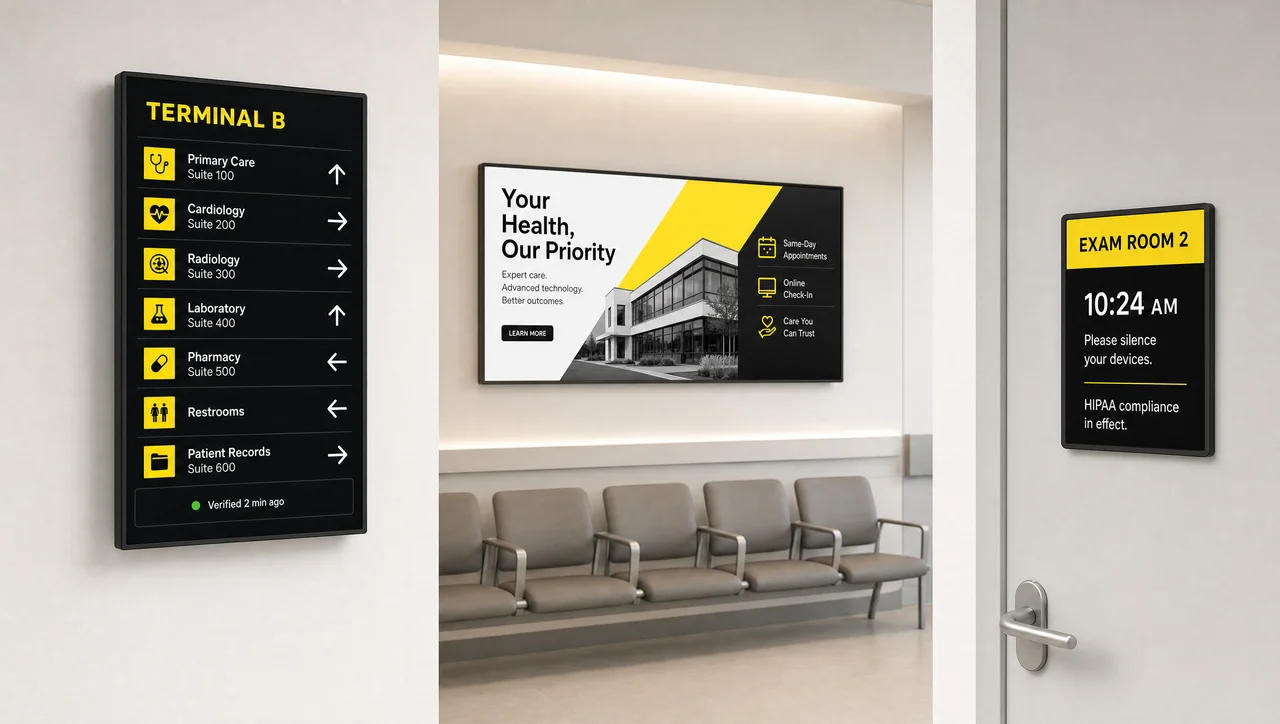
Digital signage for healthcare facilities puts wayfinding, waiting-room content, staff updates, and emergency alerts on one platform across every building — with built-in verification that catches a blank screen before a patient or nurse does.
-
Verified Uptime
Know before staff or patients do Decker Verifier checks every screen and player around the clock and can restart or reconnect them remotely, without a technician walking the floor.
-
One Control Point
Update every building, one place Schedule wayfinding, alerts, and waiting-room content across every location from a single dashboard, no on-site visits to change a display.
-
Built to Flex
Wayfinding, alerts, updates in one Run patient-facing directories, staff communications, and emergency takeovers on the same platform instead of stitching together separate tools.
What digital signage for healthcare actually looks like
A hospital, clinic, or medical office runs more screen types than almost any other building on the block:
- A directory at the entrance
- A queue board in the waiting room
- A rota in the break room
- A compliance notice by the nurses’ station
Digital signage for healthcare replaces that mix of printed signs, a TV with a DVD on loop, and a whiteboard someone has to update by hand — it’s one of the digital signage solutions Decker builds for facilities running more than a handful of screens, all managed from a single platform so a change made once reaches every screen it’s assigned to.
Benefits of digital signage in healthcare and hospitals
Facilities that move from printed signs to digital signage report the same handful of wins, and Decker’s own numbers add two more.
-
Shorter Perceived Wait Time
A queue board or waiting-room feed gives patients something to look at besides the clock, instead of a silent room and a static sign.
-
Consistent Messaging Everywhere
The same visiting-hours policy or safety notice looks identical in every waiting room and hallway across every building, not just the one someone remembered to update.
-
Reinforced Staff & Provider Messaging
Policy updates and provider notices reach every break room and nurses’ station without depending on a memo or a group email that gets buried.
-
Up to 80% Less Time Spent Updating Content
Decker customers cut the time spent pushing content changes across a healthcare facility’s screen network by up to 80% compared to manual updates.
-
Up to 60% Less Screen Downtime
Automatic verification and remote restarts cut screen downtime by up to 60% across a healthcare facility’s screen network, so fewer blank screens go unnoticed.


Where it's used in a hospital, clinic, or medical office
Digital signage content for healthcare falls into a few clear categories, and most facilities end up running several of them on the same network.
-
Wayfinding & Directories
Help patients and visitors find departments, exam rooms, and specialists without a stop at the front desk. A directory updates the moment a department moves floors.
-
Waiting Room & Lobby Screens
Turn dead time into something useful: service information, hours, and ambient content, music or nature scenes between messages, instead of a static TV feed nobody controls.
-
Patient Education at the Point of Care
Exam room and clinic screens can show condition, medication, or procedure information a physician references during a visit, instead of a paper handout.
-
Infection Prevention & Compliance Messaging
Hand hygiene reminders, PPE requirements, and isolation precaution notices update by unit or department without printing a new poster every time a policy changes.
-
Staff & Break Room Communications
Shift updates, policy changes, and department notices reach every break room without relying on a group email that gets buried.
-
Emergency Alerts & Facility Notices
Push a facility-wide takeover message the moment visiting hours change, a wing closes, or an evacuation route needs to be shown.
-
Cafeteria & Food Service Menus
A hospital cafeteria or coffee cart can run the same point-of-sale-connected digital menu board technology built for restaurants, with items and prices pulled straight from the register.


Built for every type of care setting
Hospitals, clinics, and medical offices all need the same reliability, but not the same rollout.
-
Hospitals
Multi-department, multi-building networks where a directory, a wing-closure notice, and a break-room screen all update from one dashboard without IT walking a floor.
-
Clinics
Smaller footprints, often several locations across a city, where consistent wayfinding and visiting-hours messaging matter more than a large screen count.
-
Medical Offices
A single-practice or small multi-provider office running a handful of screens for waiting-room content, exam-room education, and front-desk directories.

How content stays current across every building
Getting a new notice onto every screen in every building shouldn’t take a service visit. Decker starts from a template library instead of a blank screen, then splits publishing into three steps.
-
Step 1.
Connect every screen
A Decker Player attaches to each display and pulls its schedule and content from one dashboard, no separate setup per building.
-
Step 2.
Publish once, push everywhere
Build a wayfinding update or an alert centrally, then send it to one room, one building, or the entire network in the same action.
-
Step 3.
Verify automatically
Decker Verifier confirms the screen is actually showing what was sent, not just that a file left the server.
Reliability built into the hardware
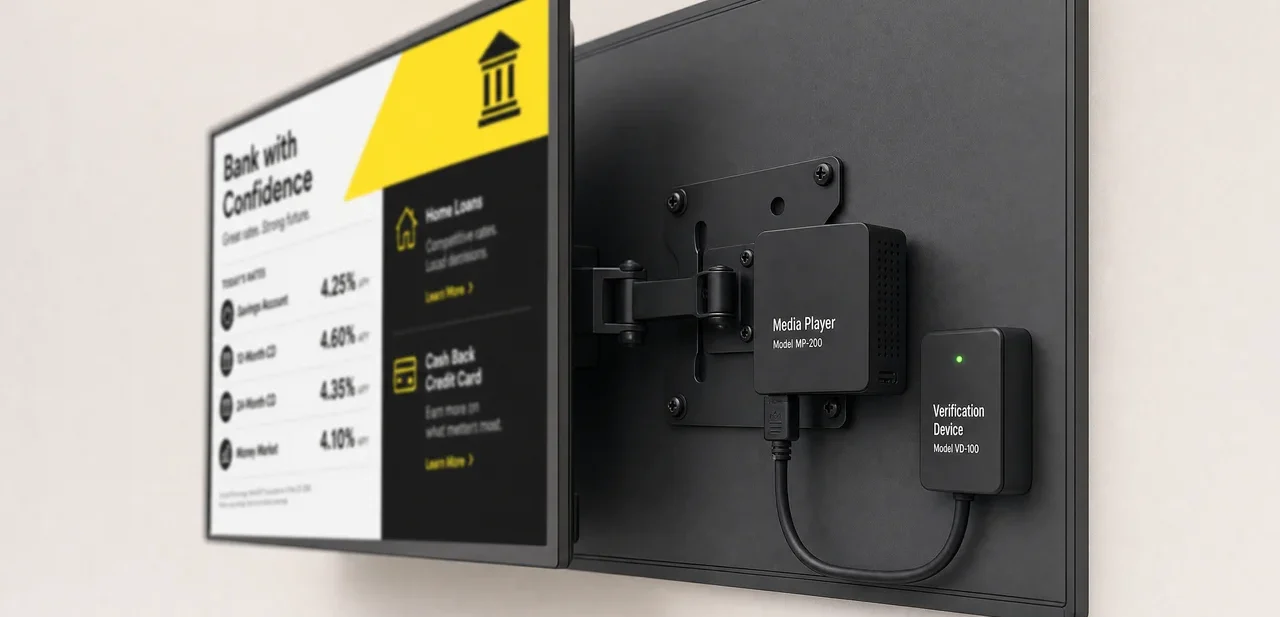
Most signage platforms confirm a file reached a screen and stop there. Decker Player and Decker Verifier work as a pair behind every display: the Player shows the content, and the Verifier watches the player and the screen independently.
It checks power state, HDMI input, and whether an image is actually present, and can restart either device or switch the input remotely if something drops. That pairing also keeps a running record of how many hours each screen actually displayed content, not just how many hours it was scheduled to.
Not “message sent” — “message showing.” A file leaving the server proves nothing about what’s actually on the wall.
Where it’s not the right fit
Digital signage for healthcare isn’t the right call in every situation:
- You need to display protected health information pulled from your EHR — bedside vitals, chart data — Decker manages facility content, not clinical data feeds, and doesn’t integrate with medical devices.
- You’re covering one screen at one front desk with content that rarely changes — a full network platform is more infrastructure than the job needs.
- Your building has no existing displays or network drops near where you want screens — budget for that install work separately from digital signage software.
Trusted at Scale
- 13,700+
- screens run on the Decker platform
- 490+
- locations connected across every deployment
- 90+ cities
- in 2 countries and counting
- 7+ years
- building signage that verifies itself
Healthcare digital signage FAQ
How much does it cost to buy digital signage for hospitals or clinics?
Cost depends on the number of screens, whether you’re reusing existing displays, and which content and monitoring tier you need. Decker prices per screen rather than bundling hardware you may already have — current rates are on the pricing page.
Is this a managed, turnkey system or do we assemble our own stack?
Turnkey. Decker bundles the media player, the verification device, the software, and screen monitoring into one digital signage solution instead of assembling them from different vendors.
Can it help with infection-control or compliance messaging?
Yes — hand hygiene reminders, PPE requirements, and policy notices can be scheduled by unit or department and updated instantly when a policy changes.
Can digital signage show patient data from our EHR?
No. Decker handles facility communications for hospitals and clinics — wayfinding, waiting-room content, staff updates, alerts — and doesn’t connect to clinical systems or display protected health information.
What hardware does it work with?
Decker runs on its own media player and pairs it with a separate verification device behind each screen. Most facilities can reuse their existing commercial displays.
How do you manage screens across multiple buildings?
Every screen, in every building, is scheduled from one dashboard. Content assigned to a group of screens updates on all of them at once, without a visit to each location.
What happens if a screen or player goes down?
Decker Verifier checks power, connection, and HDMI input independently of the player, and can restart or reconnect either device remotely.
See It on your own floor plan
Book a live walkthrough and we’ll map wayfinding, alerts, and staff screens to your actual buildings.


