
Digital signage for restaurants
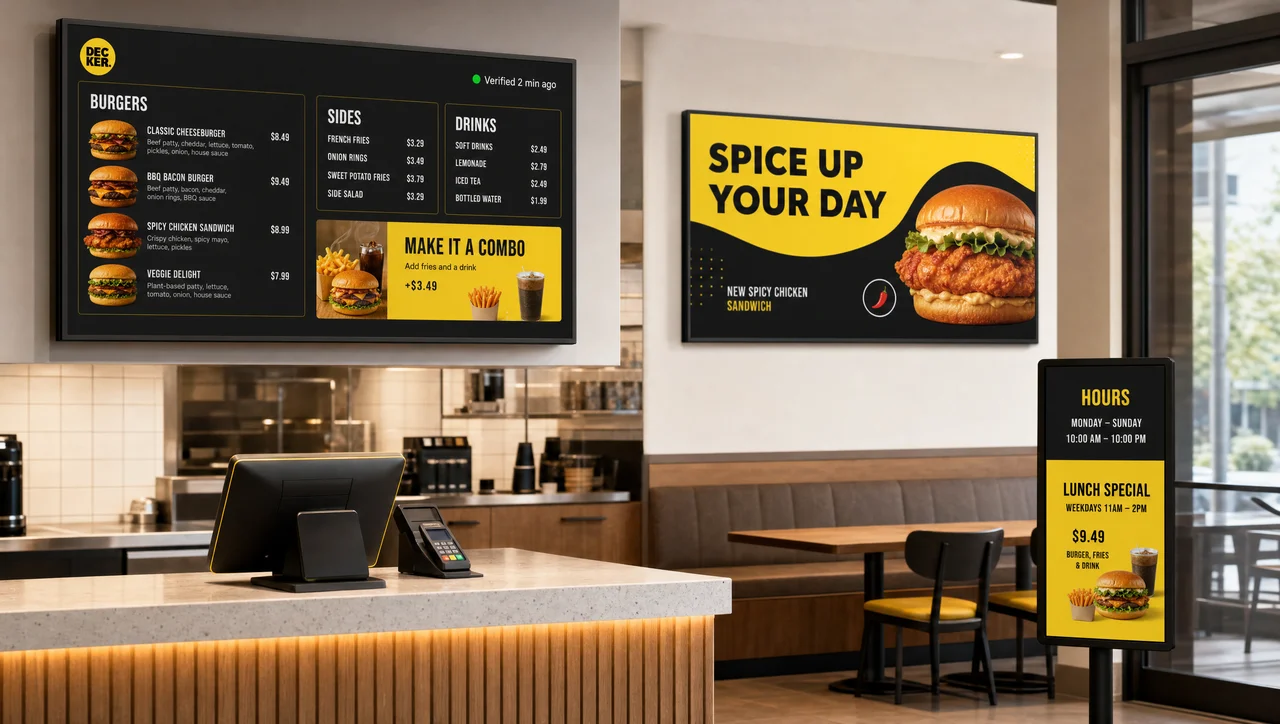
Decker’s digital signage for restaurants runs the menu board, the promo loop, and the hours sign from one dashboard, switches content by store and daypart automatically, and confirms independently what’s actually on screen — not just that it was published.


-
One Dashboard Menu, promo, and hours together
The same dashboard builds the menu board, runs the promo loop above the bar, and posts hours and specials at the door — no separate tool per screen.
-
Built by Daypart Store- and daypart-aware content
Switch breakfast to lunch to happy hour automatically, and target a promo to one store or a whole region without touching a dashboard at 6 a.m.
-
Verified, Not Sent Decker Verifier confirms display
Independent hardware checks the menu board and player after every publish, and can reboot or switch inputs remotely — no truck roll needed.
A restaurant digital signage, not just a menu screen
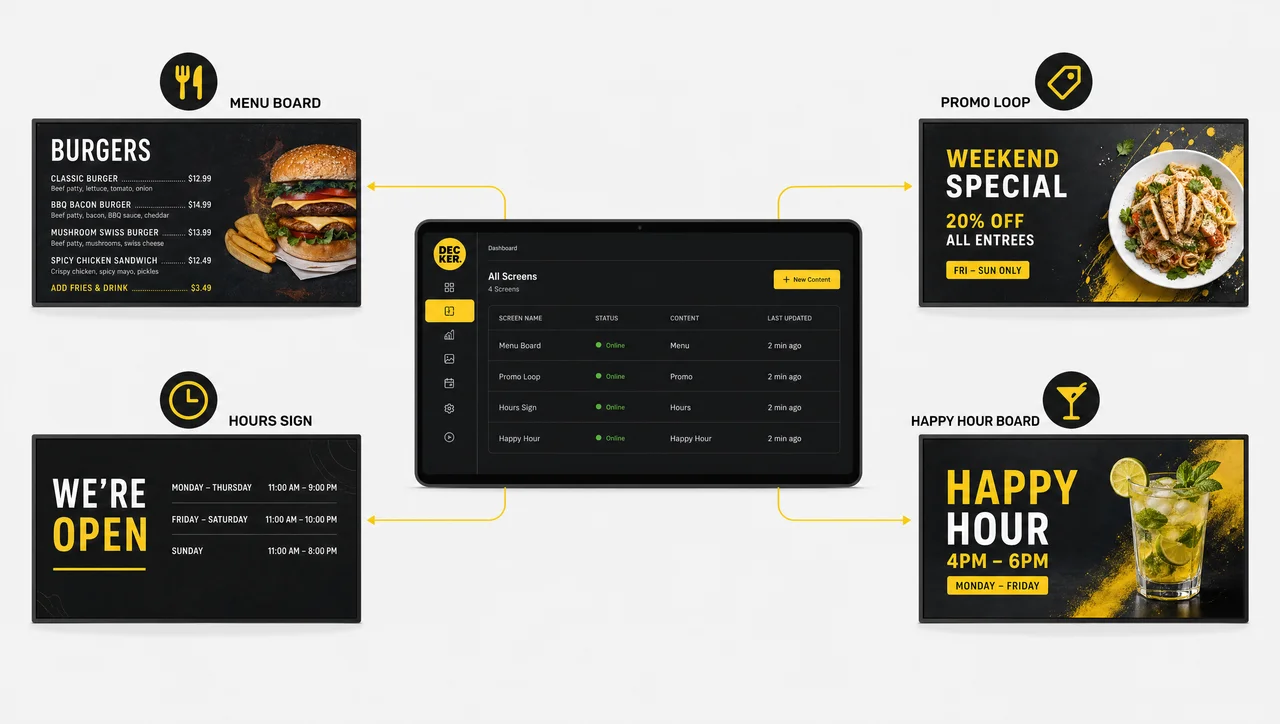
Most “digital signage solutions for restaurants” stop at the menu board. Decker is a complete digital signage solution that runs the whole front of house from one login: the menu, the promo loop above the bar, the hours sign at the door, and the happy-hour board — all scheduled, published, and monitored from the same dashboard, on the same screens.
-
Verified execution, not a guess.
Decker Verifier runs independently of the Decker Player, confirming a screen is actually displaying content — not just that a publish request went out.
-
One dashboard, every screen type.
The same content editor that builds a menu board also runs promotional loops, ambient brand content, and an hours-and-specials sign, in every major media format plus web pages and YouTube videos.
-
Store- and daypart-aware by design.
Switch breakfast to lunch to happy hour automatically, target a promo to one location or a whole region, and let weather-based rules swap the content without anyone touching a dashboard at 6 a.m.
-
Built to scale past one location.
Whether you’re running indoor digital signage for restaurants at a single flagship or a multi-location group, the same Decker platform for restaurants already runs 13,700+ connected screens across hundreds of locations, without swapping systems as you grow.


Benefits of digital signage for restaurants
The benefits of digital signage in restaurants aren’t abstract — they show up in three places: what customers see, what staff have to manage by hand, and what corporate can actually verify happened.
-
Menus that change themselves.
A price change or an 86’d item in your POS regenerates the on-screen menu automatically through Decker’s POS integration — fonts, layout, and spacing adjust in seconds, so nobody is exporting a JPEG at 10 p.m.
-
Fewer staff interruptions.
When the board matches the POS by default, servers and counter staff spend less time explaining “actually, that’s not available anymore” and more time running the floor.
-
Proof it worked, not just that it sent.
Decker Verifier logs real uptime per screen, and deployments using it report roughly 60% less screen downtime — not just whether a publish request was fired, but how many hours a screen actually displayed content.
-
One brand, every location.
A cost-effective digital signage for restaurants rollout doesn’t mean a patchwork of screens; role-based access lets corporate lock the brand while individual stores still run local promotions.


How restaurants can use digital signage
How restaurants can use digital signage in practice usually breaks down by service point, not by feature list. A few of the most common ones:
-
Step 1.
Menu and pricing boards.
The core use case: full-service menus that stay accurate because they’re wired to the POS, not to a design queue.
-
Step 2.
Promotions and ambient branding.
Loop specials, chef features, and brand content on screens that aren’t menu boards at all — a lobby wall, a bar-back display, a host-stand screen.
-
Step 3.
Hours, specials, and daypart switching.
One rule set moves the board from breakfast to lunch to happy hour, and swaps content by weather or day of week without a manual flip.
-
Step 4.
Fast-casual counter and self-order screens.
Digital signage in fast casual restaurants tends to sit between full-service ambience and QSR speed — if your format leans closer to quick counter service, Decker’s platform for QSR is built specifically around that throughput.
-
Step 5.
Bar and drink menu screens.
A drinks board with its own rotation and pricing logic runs on the same platform — see “digital signage for restaurants and bars” for the setup built around bar service specifically.
-
Step 6.
Outdoor and patio screens.
Outdoor digital signage for restaurants and cafes needs different brightness and weatherproofing than an indoor board — “outdoor digital signage” runs on the same Decker account as everything else, so the patio isn’t a separate platform to manage.
The future of digital signage in restaurants
The future of digital signage in restaurants is less about bigger screens and more about screens that need less manual attention: content tied directly to POS and inventory data instead of a design calendar, dayparts and weather-based rules that run themselves, and — increasingly — hardware-level confirmation that a network of hundreds of screens is actually doing what corporate thinks it’s doing. Digital signage trends for restaurants in 2026 point toward verification and automation catching up to the content-creation side of the category, which has been the easy part for years.
When digital signage might not be the right fit for your restaurant
We’d rather say this upfront than have you find out after signing a contract.
- One screen, a menu that barely changes. If your restaurant updates its menu less than once a month, a paid automation platform is more than you need — the free Starter plan covers a single screen.
- No POS feeding your menu prices. Automatic price sync depends on a connected POS or spreadsheet. Without one, your restaurant is still editing the menu board by hand, regardless of platform.
- Unreliable Wi-Fi in the dining room. The screen keeps showing its last published menu offline, but remote monitoring, reboot, and uptime logging for that screen need a network path back to the platform.
- Weekly full menu redesigns. Automation handles price, item, and availability changes inside an existing layout — if your restaurant rebuilds the whole menu design from scratch every week, you still need a designer for that part.
How Decker compares to other restaurant signage platforms
| Capability | Software-only signage | Restaurant-ops platforms | Decker |
| Delivers content to screens | ✅ Yes | ⚠️ Partial | ✅ Yes |
| Confirms content is actually displaying | ❌ No | ❌ No | ✅ Yes |
| Independent monitoring of screen and player | ❌ No | ❌ No | ✅ Yes |
| Remote reboot without a truck roll | ❌ No | ❌ No | ✅ Yes |
| Verified uptime data per screen | ❌ No | ❌ No | ✅ Yes |
| Store- and daypart-based targeting | ⚠️ Limited | ❌ No | ✅ Yes |
Confirmed execution, independent monitoring, remote reboot, and uptime data run through the Decker Verifier add-on on top of any paid plan.
Digital signage for restaurants FAQ
What is the best digital signage for restaurants?
It depends on what you’re solving for. If accuracy and proof-of-display matter — knowing a menu is actually live, not just that it was sent — Decker’s Player-plus-Verifier setup is built specifically for that. For a full side-by-side across vendors, see our “best digital signage software for restaurants” comparison guide.
Is there free digital signage software for restaurants?
Yes. If you’re comparing free digital signage for restaurants, Decker’s Starter plan covers one screen free forever, with no credit card required. Paid plans add multi-screen management and POS automation, with a free trial included; current rates and everything included at each tier are on the “Decker pricing page.”
Does this work for multi-location restaurant groups and franchises?
Yes. Role-based access lets corporate lock brand-critical content while individual stores still publish local promotions, and every screen across every location reports into the same dashboard.
Does Decker connect to my existing POS system?
In most cases, yes — Decker links directly to the point-of-sale system your team already uses, so a price change or an item marked unavailable updates your digital menu board for restaurants automatically, without a separate editing tool.
What are the digital signage trends for restaurants in 2026?
The main shift is toward automation and verification: menus wired directly to POS and inventory data instead of a design calendar, and hardware-level confirmation that screens are actually displaying what was published — not just that a request was sent.
How fast do price changes actually reach the screen?
On Professional plans and above, a change in your POS reaches the screen in 1–5 seconds, with no full-screen reload or flicker.
See digital signage on your restaurant's menu
Send us your screen count and current setup, and we’ll show you exactly what a verified, POS-linked digital signage platform looks like for your restaurant.


