QSR Digital Menu Boards Driven by Prices, Dayparts, and Stock

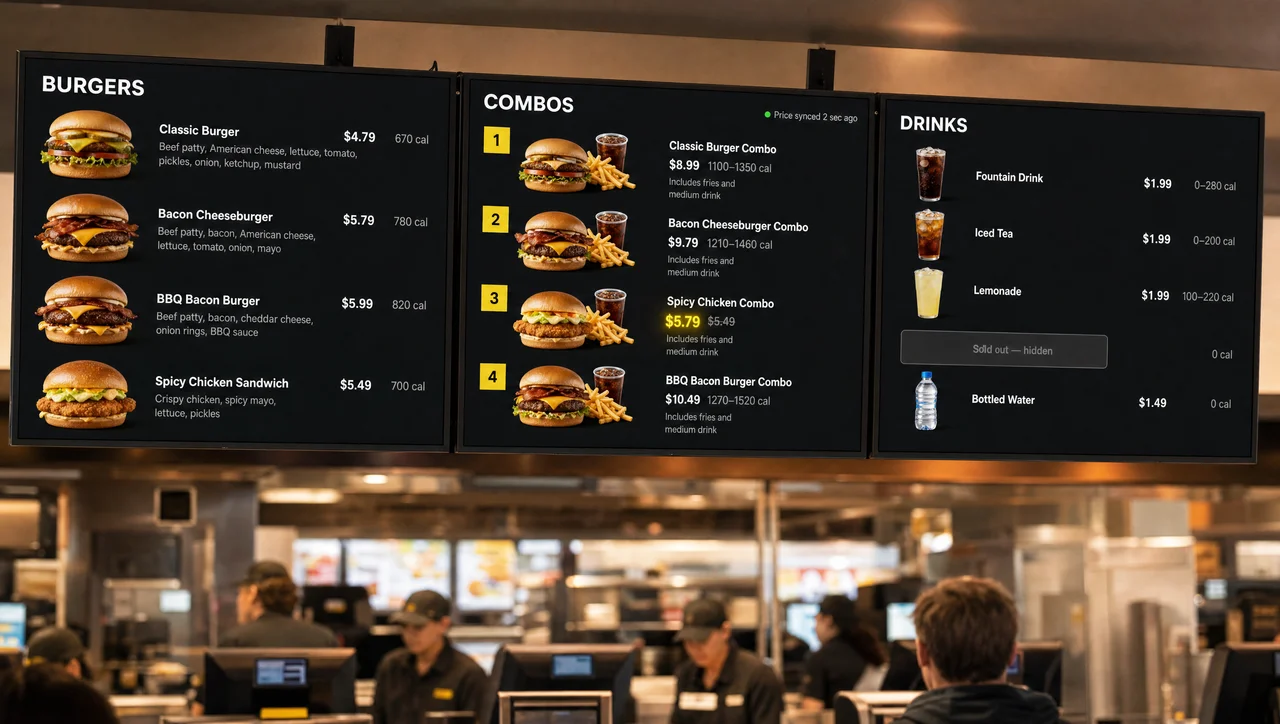
QSR digital menu boards above a counter showing a price that just synced from the POS.

QSR digital menu boards from Decker take prices, combos, and sold-out items straight from your POS and redraw the menu on every screen in 1–5 seconds. In addition, breakfast switches to lunch on schedule, a limited-time deal starts and ends by date, and an 86’d item leaves the board before a guest in line can order it.

Verified on-screen playback
  • Burger Shop logo, a Los Angeles client running QSR menu boards synced to its POS
  • Patty Boys logo, a client whose quick service restaurant menu boards run on Decker
  • 1–5 seconds Prices synced from the POS

    A price change in Toast, Square, or Clover redraws every QSR menu board in the chain within seconds, with no designer involved.

  • 86'd = hidden Stock rules the board

    When the POS marks an item sold out, it leaves that store’s board by itself and returns once the kitchen restocks.

  • Rules, not files Time, date, store, and weather

    As a result, dayparts, LTO dates, seasons, regional prices, and weather switch the menu in every store.

What Are QSR Digital Menu Boards?

QSR digital menu boards are screens above the counter that show a quick service restaurant’s items, prices, combos, and calories straight from menu data, so the board changes when the data changes, not when someone reprints it. Like other digital menu boards, a QSR digital menu board runs on three parts: a screen (usually a commercial LCD panel), a small player behind it, and a system that publishes the menu.

The quick service format differs in where guests read the menu: standing in line. They decide in a few seconds and order by combo number, so the board works as the order script for the whole counter. A clear board means fewer questions at the register and a shorter line. Compared with a printed panel, a digital board handles four things on its own:

  • A price changes in the POS, not at the print shop.
  • Breakfast items leave the board at the cutoff hour.
  • An item that sold out hides itself until it returns to stock.
  • One edit reaches every store that runs the same menu.

A menu board carries the menu itself: items, prices, combos, modifiers, and calories, while promo loops and order-status screens belong to QSR digital signage solutions. Next, here is why chains drop printed panels.

QSR Chains and Digital Menu Boards: 6 Reasons Printed Menus Fall Behind

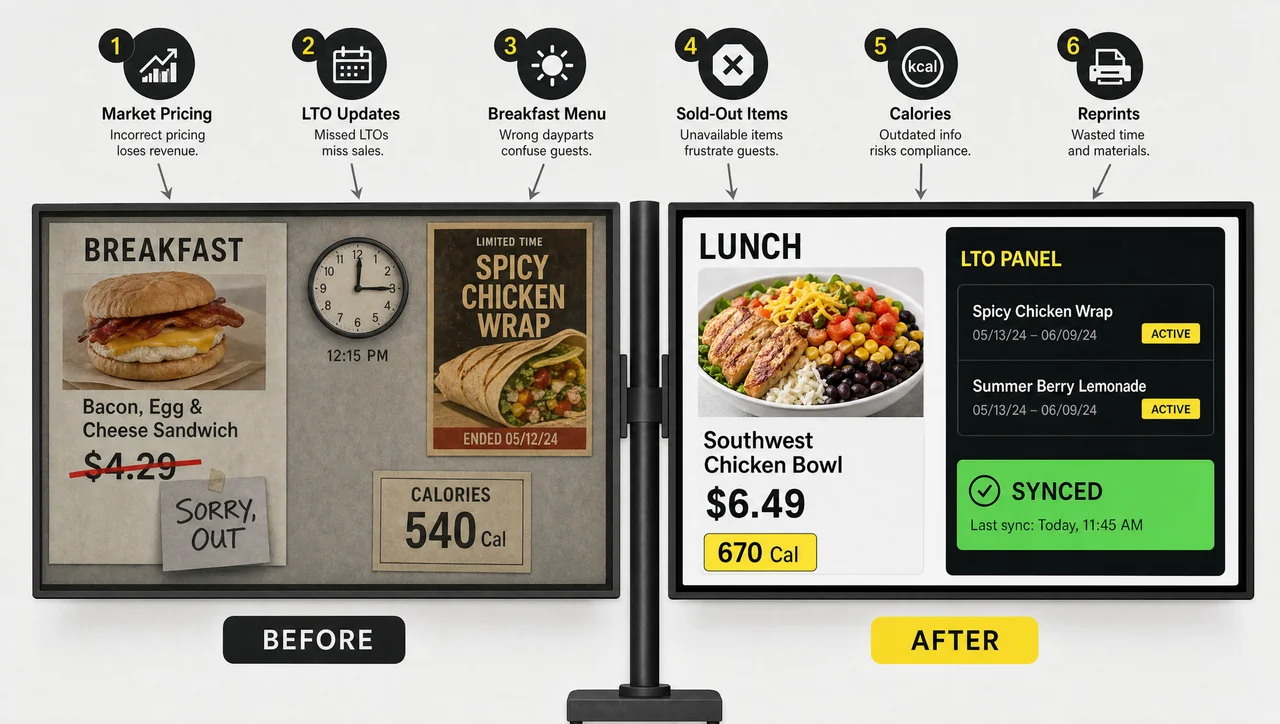
QSR chains move to digital menu boards because their menus change faster than any printed board can follow, and the six reasons below show where that speed matters. Prices move by market, LTOs run on dates, and the kitchen runs out of items mid-shift. Each change below means a reprint on a static board and a data update on a digital one.

Printed menu next to QSR chains digital menu boards with six reasons shown at one counter.
  • Prices differ from market to market

    A chain rarely charges one price everywhere. Franchisees set local prices, and labor costs move them by state: since April 1, 2024, California’s AB 1228 has required a $20 minimum wage at quick service chains with more than 60 locations nationwide. A printed menu board needs one version per price zone.

  • LTOs run on fixed dates

    An LTO starts the same morning in every store and ends on a set date. With printed panels, the poster often goes up late in some stores and stays up after the LTO ends, so guests ask for an item the register no longer rings up.

  • Breakfast ends at a set hour

    Most quick service menus switch from breakfast to lunch at a fixed time, often between 10:30 and 11 a.m. A static menu board either shows both menus at once or needs a staff member to swap panels in the middle of the rush.

  • Items sell out during the rush

    When the kitchen runs out, the item gets 86’d in the POS but stays on the menu board. Every guest who orders it hears “sorry, we’re out” at the register, orders again, and slows the line behind them.

  • Chains must post calories

    Under the FDA menu labeling rule, chains with 20 or more locations must show calories on their menu boards. A new portion size or recipe means a new calorie count on every board in every store.

  • Every reprint repeats the cost

    Design, printing, shipping, and hanging new panels start over with each change, and a chain pays for them store by store. As a result, many chains update printed menus only a few times a year, even when prices move more often. Digital menu boards for QSR chains help them skip that cycle, because the data changes and the board follows.

How QSR Digital Menu Boards Update Themselves in Decker

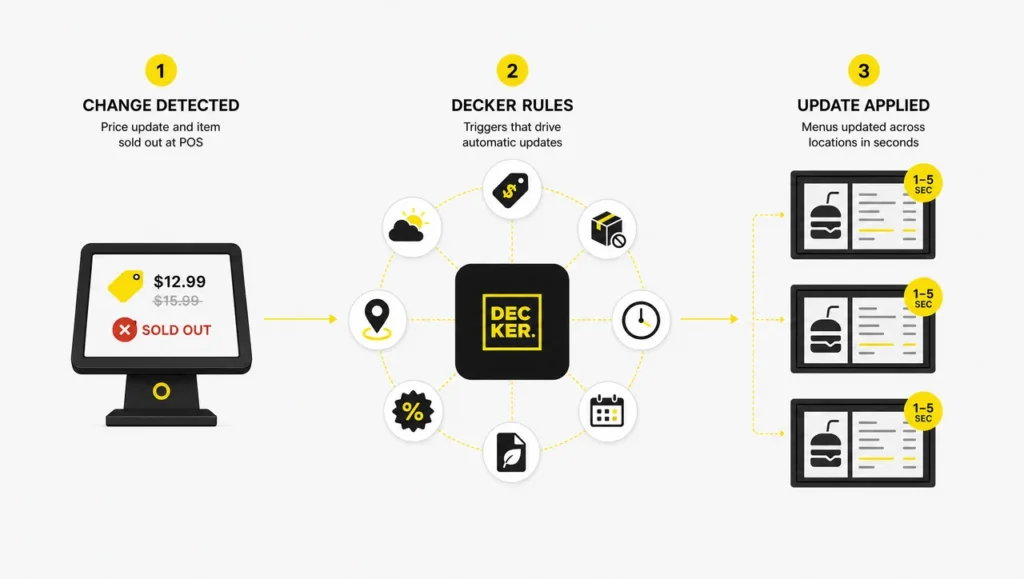
In Decker, QSR digital menu boards follow rules that replace files: a price change in the POS reaches every board in 1–5 seconds, while schedules, dates, and stock decide what else the board shows. When a manager edits a price or marks an item unavailable in a POS such as Toast, Square, or Clover, Decker regenerates the menu image by itself, adjusting fonts, layout, and spacing without a designer.

How QSR digital menu boards update from POS prices, stock, time, season, promos, store, and weather.
Trigger What changes on the board Example in a quick service restaurant
Price change in the POS The new price appears in 1–5 seconds; only that element redraws, with no flicker A burger goes up $0.30 in one market
Item marked unavailable The item hides on every screen in that store Milkshakes run out at 2 p.m.
Time of day The daypart menu swaps Breakfast gives way to lunch at 10:30 a.m.
Day of the week Day-specific combos appear A weekday value bundle
Store group or region Local prices appear in the same layout An airport store and a suburban store
Date range An LTO starts and ends by itself A six-week limited-time sandwich
Season A seasonal menu swaps in and out on set dates Summer shakes replace hot cocoa in June
Promotion rule A promo price replaces the regular one for the promo window A $5 lunch combo from 11 a.m. to 2 p.m.
Weather Hot or cold items move to the top Hot drinks lead on a cold morning

Decker runs these rules in the cloud for every store at once. In addition, only the changed parts travel to each screen, and the player keeps the last menu in its offline cache if the store’s internet drops. Across Decker customers, the price-change cycle went from one to two days of designer, email, and USB stick to seconds, because the change now happens in the POS as part of normal work.

Combos, Upsells, and LTOs on QSR Menu Boards

QSR menu boards sell through their layout: which items come first, which combo gets the photo, and what a guest sees next to the item they came for. Decker treats item order, highlights, and combo panels as rules, so the board puts the right items forward at the right hour.

  • Combo prices that match the register

    Meal deals come from the POS like every other item, so the combo price on the board always matches what the register charges. The panel can also carry a food photo or a short looping video of the meal, while its price still comes from the POS.

  • Upsize and add-ons next to the item

    “Make it a meal,” a larger drink, or an extra patty sits right beside the item a guest already wants, instead of on a slide that rotates away before the guest reaches the counter.

  • An LTO panel with start and end dates

    Reserve one panel or one zone of a menu board for LTOs. Set the start and end dates once, for the whole chain or a group of stores, and the panel switches on and off by itself.

  • High-margin items first, by daypart

    Item order and highlights change with the time of day: coffee and breakfast sandwiches lead in the morning, combos at lunch, snacks and desserts in the afternoon. In addition, store-level A/B tests show which order sells more before it goes chain-wide.

Calorie Labeling Rules for QSR Menu Boards

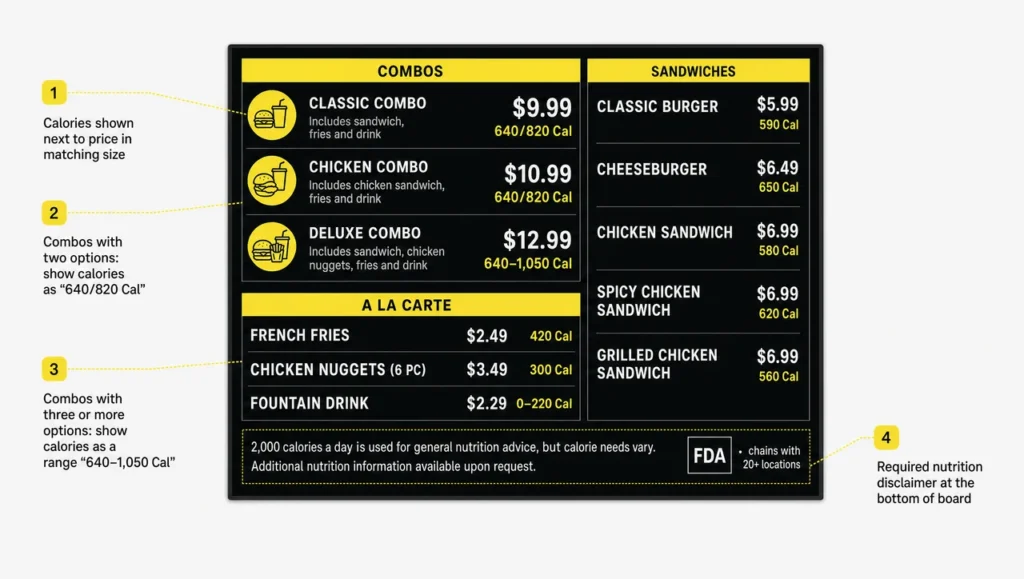
Chains with 20 or more locations that operate under the same name and sell substantially the same menu must post calories on their QSR menu boards under the FDA menu labeling rule (21 CFR 101.11), in force since May 7, 2018. The rule comes from Section 4205 of the Affordable Care Act and sets where and how the numbers appear:

  • Calories sit next to the name or price of each standard menu item, in type no smaller than the name or the price, whichever is smaller.
  • The board carries the statement “2,000 calories a day is used for general nutrition advice, but calorie needs vary.”
  • The board also tells guests that written nutrition information is available on request.
  • Combos show calories for every option: a slash for two choices and a range for three or more.
QSR menu boards calorie labeling with calorie counts, combo ranges, and the 2,000 calorie statement.
Combo options on the board Calorie format Example
Two choices Slash 640/820 Cal
Three or more choices Range 640–1,050 Cal

Some cities add their own rules on top. New York City, for example, requires a sodium warning icon next to items with 2,300 mg of sodium or more at chains with 15 or more locations nationwide. As a result of one menu for the whole chain, a corrected calorie count goes out to every digital menu board for QSR stores that the chain runs, and it takes one publish, and nobody hunts for the old number on a printed panel.

One Layout, Local Prices: Quick Service Restaurant Menu Boards Across a Chain

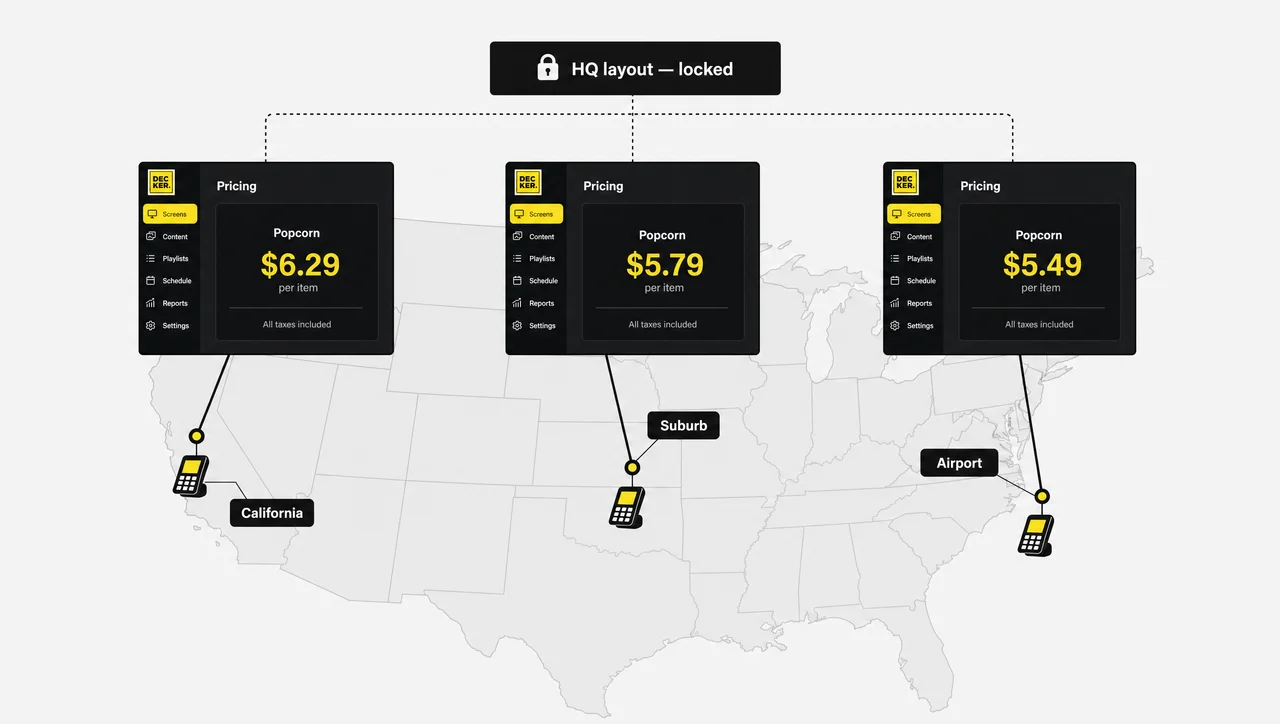
A quick service chain runs one menu design with many prices, so quick service restaurant menu boards need a layout that headquarters locks and prices that each store sets. Decker splits the two: the brand team owns the look, and each store’s POS owns the numbers.

Quick service restaurant menu boards with one layout and local prices in three stores of a chain.
  • A layout locked by headquarters

    Headquarters sets fonts, photos, and the order of categories once. Custom roles and permissions decide who can change the layout and who can only publish, so a franchisee cannot move the logo or restyle a panel.

  • Local prices from each store's POS

    Every store keeps its own prices in its own POS, and its boards read them. An airport location and a suburban location share one layout and show different numbers.

  • Store groups by region and format

    Publish to one store, a region, a format such as airport or campus, or the whole chain. A regional LTO reaches only its stores, while a chain-wide menu change reaches every board at once.

  • A new store copies the chain menu

    Opening a location means copying a ready menu to its screens, not building a new one. The new store’s POS fills in local prices, and its digital menu boards for QSR counters start working with the rest of the chain.

  • Menu results by store

    Decker records which menu ran in which store and when, and matches it with POS sales. As a result, marketing sees which combo placement or item order sold more, store by store.

When QSR Menu Boards Go Dark Mid-Rush

A blank menu board at noon leaves a whole line unable to order, so Decker pairs each player with Decker Verifier, a separate device that checks what the screen actually shows and fixes it remotely. The Decker Player plays the menu over HDMI and keeps the last version in its offline cache when the network drops. 

Decker Verifier works independently of the player. It detects a black screen, a lost connection, a frozen player, or wrong content, including outdated prices and items that should be hidden. Then it restarts the player or the display, switches the HDMI input back, and alerts the team without a technician visit. Verifier also logs uptime for every screen, so the operations team sees how many hours the chain’s digital menu boards for QSR counters actually showed the menu.

“If the screen is on, guests can see the menu.” Not true: a TV can be on and stuck on another input, a home screen, or a frozen frame from the morning. Therefore, only a check of the screen itself shows what the line actually sees.

Project: Burger Shop Menu Boards Tied to the POS

Burger Shop Logo
Challenge
A burger shop in Downtown Los Angeles updated its menu screens by hand, and each change took days or even weeks to reach the boards.
Solution
Decker connected four menu screens at the counter to the shop's POS, so prices and item availability now come straight from the register.
Results
As a result, menu updates went from days or weeks to minutes, and the menu boards show what the register charges without a designer in the loop.

How to Launch QSR Digital Menu Boards With Decker

QSR digital menu boards go live in five steps that start from the POS your stores already use.

  1. Step 1.

    Connect your POS

    Link Toast, Square, Clover, or a spreadsheet. Decker matches POS items to menu elements automatically, even when names differ slightly between the POS and the layout.

  2. Step 2.

    Build the chain layout

    Start from a ready layout, bring your brand’s own, or let the AI generator build a first version from the POS menu. Then place categories, combo panels, and calorie counts once.

  3. Step 3.

    Connect a player to each screen

    Plug a Decker Player into each QSR digital menu board over HDMI and connect it to Wi-Fi or Ethernet. TVs that already hang above the counter can stay.

  4. Step 4.

    Set the rules once

    Add dayparts, LTO dates, weather rules, and store groups. From then on, every QSR digital menu board switches without a manager touching it.

  5. Step 5.

    Pilot one store, then roll out

    Run one store for a week, change a price in the POS, and watch the QSR digital menu board follow. Next, copy the menu to the rest of the chain, with Verifier confirming every screen.

Request a demo

QSR Digital Menu Boards: FAQ

How does a QSR menu board connect to the POS?

Decker reads items, prices, and availability from POS systems such as Toast, Square, and Clover, or from a spreadsheet, and matches them to the menu layout. POS price and stock sync comes with the Professional plan and above.

How fast does a price change reach QSR menu boards?

A new price appears on screen in 1–5 seconds. Only the changed element redraws, so the rest of the board stays in place and the screen does not flicker.

What happens to the menu board if the store's internet goes down?

A QSR digital menu board keeps showing the last menu from the player’s offline cache. New prices and items arrive once the connection returns, and Verifier alerts the team if a screen goes dark in the meantime.

Do QSR menu boards have to show calories?

Chains with 20 or more locations under the same name must post calories on menu boards under the FDA menu labeling rule. Smaller chains fall outside the federal rule, but some cities and states set their own requirements.

Can a quick service restaurant use the TVs it already has?

Yes. A Decker Player turns most TVs into a QSR digital menu board over HDMI. Consumer TVs, however, target about 4–6 hours of viewing a day at 250–400 nits, and many consumer warranties exclude business use. Commercial displays run 16/7 or 24/7, reach 450–1,000 nits, use active cooling, and usually carry a 3-year business warranty, so they fit menu boards that run through every daypart. Near the line, keep screen vents clear and avoid mounting a board directly above fryers or grills, where hot, greasy air rises.

What support does a QSR chain get with Decker?

The Enterprise plan adds onboarding and staff training, a one-hour response SLA with phone help, a dedicated customer success manager, and design services for the chain’s menu layouts. Decker Verifier handles screen issues remotely, so a store does not wait for a site visit to get its board back.

When does a quick service restaurant not need automated menu boards?

When its menu data rarely changes. One store that changes prices less than twice a year and has no dayparts can run a single QSR digital menu board on the free plan with a fixed layout. A menu of a dozen items that never sell out gives stock-based hiding nothing to hide. Without a POS that holds item-level data, prices can come from a spreadsheet, but nothing syncs automatically. Screens with no network keep the last menu from the offline cache, however, new prices only arrive once a connection returns.

What does Decker cost per screen?

Decker bills per screen. One screen stays free forever, and paid plans start with a 30-day trial without a card. The Decker pricing page lists current rates.

See Your Menu Follow the POS

Connect one store, change a price in your POS, and watch the board update in seconds. In addition, the 30-day trial covers up to five screens with no card required.