How Do I Implement QSR POS in My Business? A 10-Step Rollout Plan for 2026



To implement a QSR POS in your business, audit your channels, set a go-live date, wire the network, migrate the menu, connect the kitchen display, drive-thru and delivery apps, train each station, then launch off-peak in one store. A self-installed system can run in days; Toast's vendor-led onboarding typically takes 4–6 weeks.
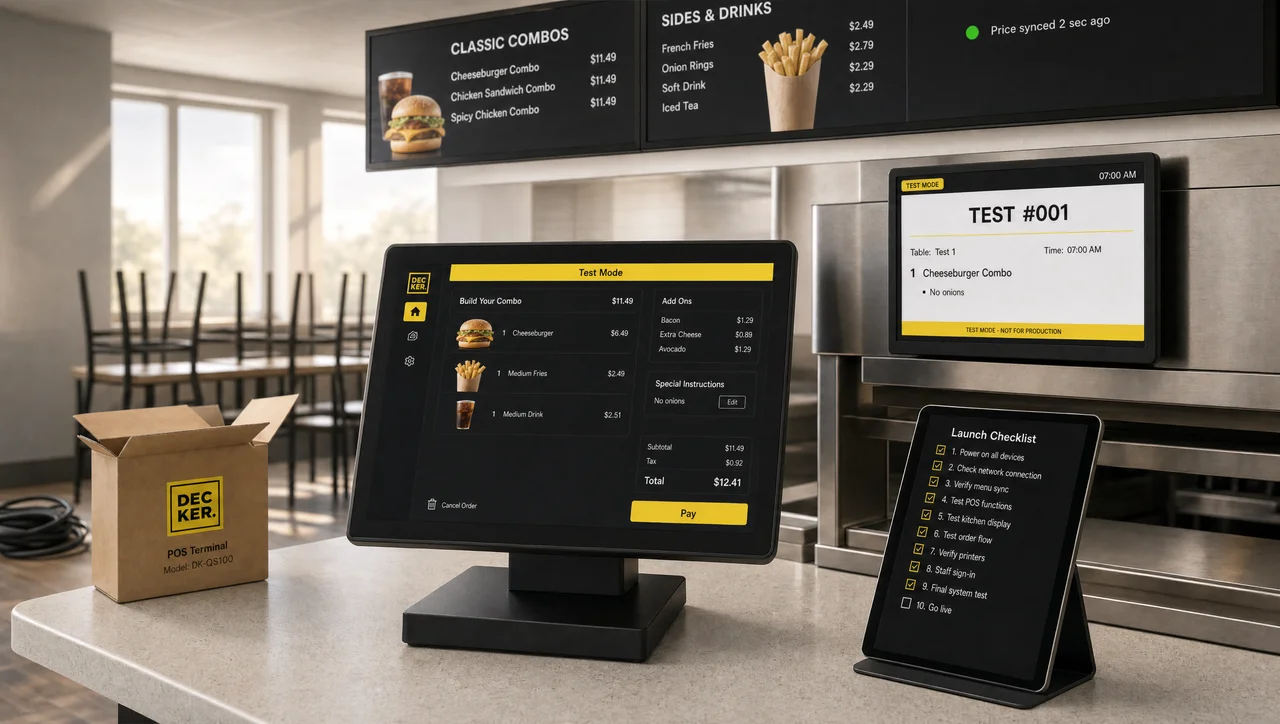
A new point of sale in a quick service restaurant is not a software install. It touches the payment terminals, the kitchen screens, the drive-thru lane, three or four delivery apps and every crew member on the schedule, and it has to work during the lunch rush on day one.
If you are asking how do I implement QSR POS in my business, the answer is a sequence, not a single install: this POS implementation guide walks through the ten steps in the order operators actually do them. Each step comes with official requirements from Toast, Square and Clover, real timelines from chains that have done it, and the mistakes that make a launch fail. If you are still choosing the system itself, start with our QSR POS comparison of nine platforms and come back here once you have a shortlist.
How Do I Implement QSR POS in My Business? The 10 Steps and Timeline
To implement QSR POS in your business, plan ten steps that take a few days self-installed or 4–6 weeks with vendor onboarding. The work falls into four phases: planning, hardware and network, menu and integrations, then training and launch. Most of the calendar is spent waiting on hardware, data imports and menu builds, not on the installation day itself.
| Phase | Step | Who does it | Typical time |
|---|---|---|---|
| Planning | 1. Audit channels, devices and contracts | Owner or operations manager | 1–2 days |
| Planning | 2. Write the implementation plan and budget | Owner | 1 day |
| Planning | 3. Pick the implementation partner | Owner with vendor | About 1 week |
| Hardware and network | 4. Prepare the network and install hardware | IT or electrician, then vendor | Toast hardware ships in 7–14 business days |
| Hardware and network | 5. Migrate menu, gift cards and loyalty | Owner with vendor | Toast loyalty import: 10–15 business days |
| Menu and integrations | 6. Build the menu for speed | Vendor and store manager | 3–7 days for 150+ items with modifiers |
| Menu and integrations | 7. Connect KDS, drive-thru, kiosks and delivery | Vendor and integration partners | Days to weeks, by channel count |
| Training and launch | 8. Train the crew by station | Store manager | One shift per crew member |
| Training and launch | 9. Test and go live in one store | Everyone | 1 day, then 7 days of close support |
| Training and launch | 10. Roll out to other locations | Brand or franchise team | Weeks to months |
How long the whole project takes depends mostly on scale:
| Scale | Example | Implementation time |
|---|---|---|
| One store, self-installed | Square: no setup fee, plug-in devices | A few days; GoTab puts a simple store at 3–7 days |
| One store, vendor-led | Toast remote or on-site onboarding | 4–6 weeks, as published by Toast in August 2026 |
| Small multi-unit group | Several stores on one menu | 2–3 months, per GoTab’s 2026 guide |
| Large chain | Jack in the Box on Qu | 2,100+ restaurants in 15 months, about 140 a month |
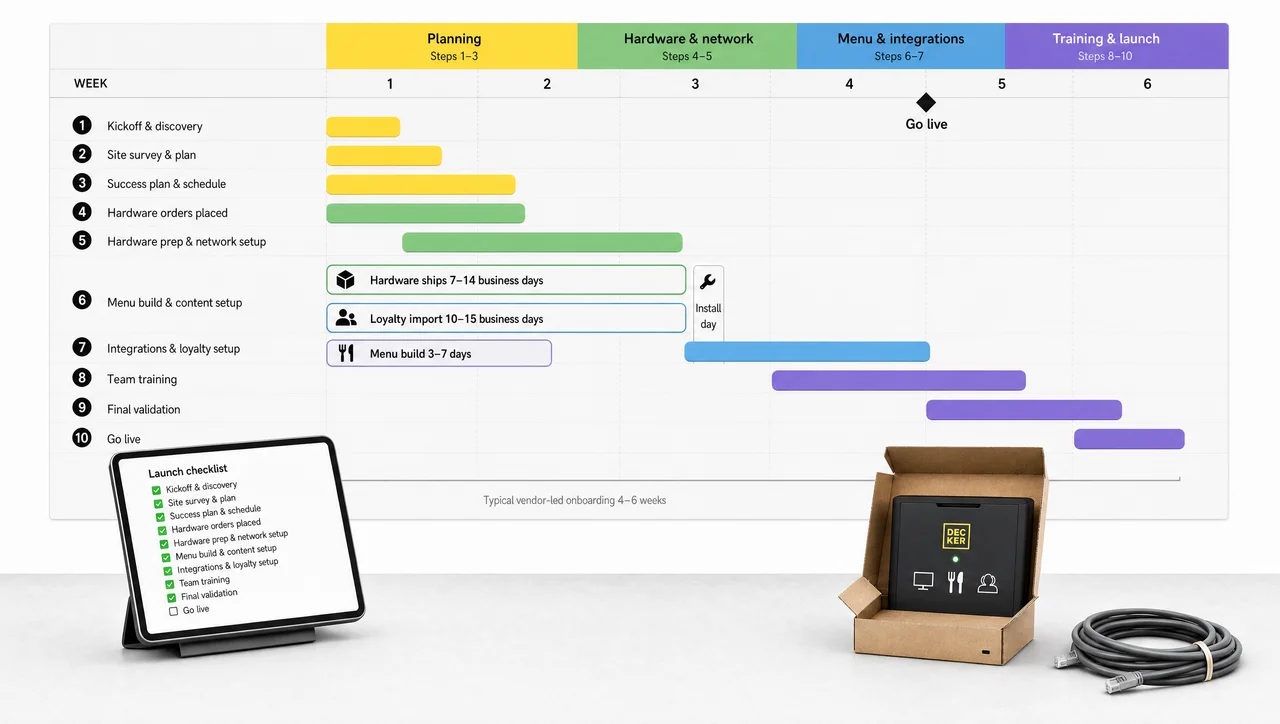
These QSR infrastructure POS implementation times have three common bottlenecks:
- Hardware delivery. Toast ships devices 7 to 14 business days after the order, and someone has to sign for them on site.
- Data imports. Toast needs 10 to 15 business days to import loyalty balances.
- Menu build. A menu of 150 or more items with modifiers takes 3 to 7 days to build and check, according to GoTab. GoTab also reports that merchant account approval can take up to 14 days.
Start all three on day one, because the installation itself takes a single day.
Step 1. Audit Your Setup Before You Switch POS Systems
Before you switch POS systems, list every order channel, device and contract the new system has to replace or connect. An audit done on paper in one afternoon prevents most of the surprises that show up in week three.
Write down:
- Every order channel: front counter, drive-thru, self-order kiosks, your own online ordering, DoorDash, Uber Eats, Grubhub and catering.
- Peak volume: orders per hour at lunch and orders per day. These numbers size the network and the number of kitchen screens. Toast plans for about 250 orders a day on two terminals and one KDS, and about 1,000 a day on ten terminals and two KDS screens.
- Every device in the store: terminals, card readers, receipt and kitchen printers, kitchen display screens, delivery tablets, menu boards and drive-thru timers. Mark what will be replaced and what stays.
- What the new system must do: fast order entry, modifier handling, an offline mode, delivery orders without separate tablets, and connections to the kitchen display, kiosks and menu screens.
- The exit cost of the old contract. Toast’s merchant agreement renews automatically for one-year periods unless you cancel in writing 30 days ahead. The early termination fee equals the remaining subscription fees for the term, or $150 for each remaining month on Pay-as-you-go. Clover accounts opened through banks and resellers often carry separate equipment leases.
Signs it is time to switch restaurant POS rather than fix the current one:
- A separate tablet for every delivery app, with orders re-keyed by hand.
- A kitchen display with no offline mode. One Square operator described “2 hours in the middle of our biggest rush of the week. Friday night” without the KDS.
- Menu changes that have to be made in three or four places.
- Hardware or payment processing locked to one vendor at a rate you can no longer accept.
- No integration with your menu boards, drive-thru timers or loyalty program.
You would not be alone in switching POS. According to Toast, 44% of operators plan to replace or significantly upgrade their POS in 2026.
A new POS does not fix slow service on its own. In the 2025 Intouch Insight drive-thru study, order accuracy was 26 percentage points higher when the order confirmation board showed the order correctly, and fell to 64% when it showed the order wrong. The screen, the speaker and the process decide speed and accuracy; the POS only feeds them.
Step 2. Write a POS System Implementation Plan and Checklist
A POS system implementation plan names one owner, one go-live date and a fallback for every step that touches card payments. When you implement a QSR POS in your business without a named owner, hardware sits in boxes and the menu build stalls between the vendor and the store.
Owner and dates. Assign one person on your side. Toast assigns an onboarding consultant and a project coordinator on its side. Then pick the go-live date and count backward: with a 4–6 week onboarding, the project has to start at least six weeks before that date. Choose a weekday outside the lunch peak. Toast’s own guidance is to avoid switching during the busiest season.
Budget for the implementation, not just the subscription. Installation and setup fees are published, and they add up:
| Cost item | Published price |
|---|---|
| Toast on-site installation | $1,000 per 8-hour day, or $140 an hour |
| Toast remote installation support | $800 per day, or $100 an hour |
| Toast work outside standard hours | $500 per day per specialist |
| Toast cable termination | $50 each |
| Toast travel outside covered areas | $750 |
| Rescheduling a Toast visit within 7 days | $300 per day per specialist |
| Square setup | $0, self-installed |
Toast’s installers do not run Ethernet or mount hardware, so an electrician or network contractor is a separate line in the budget. Toast also requires new accounts to buy new network equipment rather than reuse old routers. For hardware, Toast listed its Flex terminal with a tap reader at $719 and a kitchen display at $674 plus $35 a month in 2025 reviews. Square’s own shop lists the Register at $899, the Terminal at $299 and a contactless reader at $59.
Use this POS implementation checklist in order:
- Sign the agreement and submit the merchant account application.
- Order the hardware and confirm the delivery date.
- Audit the network and book the cabling.
- Export menu, gift card, loyalty and sales data from the old POS.
- Build and check the menu.
- Connect the kitchen display, delivery apps, kiosks and menu screens.
- Train every station.
- Run a full test day.
- Go live in one store.
- Review the first two weeks of reports.
Plan a fallback. Keep the old card reader or account active until the first daily reconciliation on the new system balances. Shutting the old POS down before the new one has processed a real day leaves the store without a way to take cards.
“Plug-and-play, so we’ll switch on Friday” is how a new POS fails in public. Friday is a peak day, many support lines run slower on weekends, and Toast charges $500 a day for work outside standard hours. A Tuesday or Wednesday launch after lunch gives the crew a quiet afternoon to learn.
Step 3. Choose Your POS Partner for QSR: Vendor, Reseller or Integrator
Your POS partner for QSR decides who installs the hardware, who builds the menu and who answers during a Friday rush. The same software can be implemented in three different ways, and the model matters as much as the brand.
| Partner model | Who installs and builds the menu | Watch for | Fits |
|---|---|---|---|
| Vendor direct (Toast, Square) | Toast runs onboarding with its own consultant, remotely or on site; Square is self-serve, with implementation help for businesses processing over $250,000 a year | Fees for on-site days; your own cabling | One store to a small group |
| Bank, ISO or reseller (often Clover) | The reseller or local dealer programs and installs | Equipment leases, automatic renewals and cancellation fees that vary by sales channel | Operators who want processing through their bank |
| Enterprise integrator (PAR Brink, Oracle Simphony, Qu) | A project team, often with certified partners; Oracle publishes partner implementation guides | Long contracts and custom scopes | Chains with dozens to thousands of stores |
Before you sign, get these points in writing:
- who builds the menu and who changes it after launch;
- support hours during your peak;
- who owns each integration when it breaks;
- the fee for rescheduling an install;
- what happens to the hardware if you leave.
A Reddit thread on POS installs put it plainly: the software company often does not handle the physical install, so you contact a local IT or network installer once the equipment arrives. Settle that division of labor before the boxes ship.
Plan Menu Screens Into Your POS Rollout.
Digital menu boards belong on the device list from Step 1, not after launch. Decker connects to Toast, Square and Clover, so prices and sold-out items on the boards come from the same POS you are implementing. Try Decker free for 30 days
Step 4. Prepare the Network and POS Hardware for Your Restaurant
POS hardware for a restaurant only runs as fast as the network behind it, so wire the counter before terminals arrive. Most go-live failures that look like software problems turn out to be Wi-Fi dead zones, shared networks or printers on the wrong subnet.
QSR POS Hardware by Station
| Station | Devices | Notes |
|---|---|---|
| Front counter | Terminal, card reader with tap, cash drawer, receipt printer | Over 60% of Visa’s in-person payments in the US were contactless by 2025, so the reader must accept tap |
| Drive-thru | Terminal or handheld, reader at the window, order confirmation board, timer | Timers such as HME ZOOM Nitro integrate with POS and track up to 16 detection points |
| Kitchen | Kitchen display screen at each station, bump bar, or an impact printer | Toast KDS supports only the KRS bump bar; Epson’s TM-U220II impact printer withstands heat and humidity and prints modifiers in red |
| Lobby | Self-order kiosk | Square Kiosk hardware is $149 plus $50 a month for software on the Plus plan |
| Pickup shelf | Label printer for takeout and delivery bags | Labels cut mix-ups on multi-item orders |
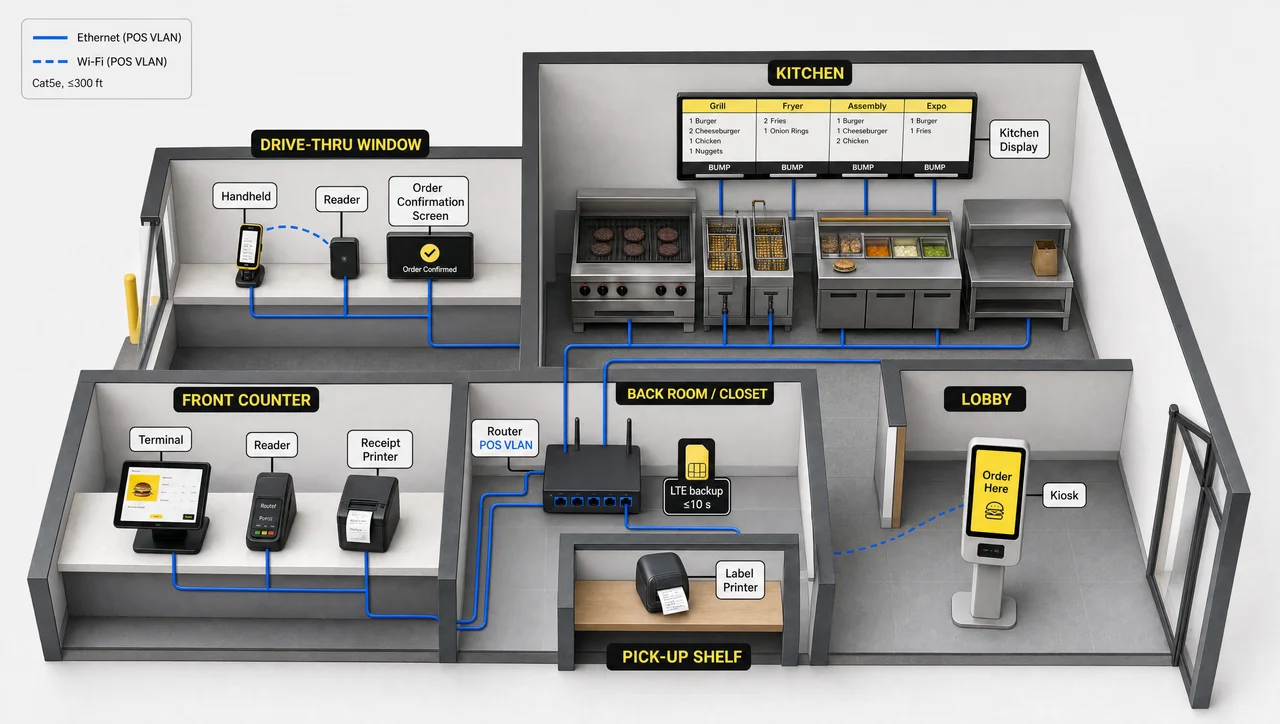
Place terminals and readers along the guest’s path at the counter and the window, so paying never forms a second line. Mount a kitchen screen or ticket printer above each prep station, such as grill, fry, assembly and expo, rather than one screen for the whole kitchen.
Restaurant POS Network, Backup Internet and Offline Mode
Toast publishes some of the most detailed network requirements in the category:
- Cat5e cable or better, no run longer than 300 feet.
- A power outlet within 6 feet of every device.
- A separate VLAN for POS devices, which Toast makes mandatory.
- Wi-Fi on 5 GHz with a signal no weaker than −65 dBm.
- Printers wired by Ethernet.
- At least 15 Mbps download as a recommended minimum.
| Store setup (Toast) | Orders per day | Download | Upload |
|---|---|---|---|
| 2 terminals, 1 KDS | About 250 | 3 Mbps | 1 Mbps |
| 10 terminals, 2 KDS | About 1,000 | 7 Mbps | 1 Mbps |
| 30 terminals, 4 KDS | About 2,000 | 15 Mbps | 5 Mbps |
Add a backup line. Toast’s router carries a SIM card and switches to cellular within about 10 seconds when the main internet drops.
Then learn what keeps working without internet, because it differs by vendor:
| Offline behavior | Toast | Square | Clover |
|---|---|---|---|
| When it starts | About 40 seconds after the connection drops | On supported devices | On Mini and Flex |
| Card payments | Yes, with a per-payment limit you set | Yes, limit you set up to $50,000 per payment | Yes, for up to 7 days by default |
| Upload deadline | Bring devices back online within 24 hours | Within 72 hours, or payments expire | Set by the merchant |
| What stops | Gift cards, loyalty, new online orders, menu edits, clock-outs | KDS has no offline mode | Not published |
Declined offline payments are the restaurant’s loss under all three. Set a per-payment limit that covers a large family order, not a catering ticket. For the kitchen to keep working offline on Toast, the router needs UPnP multicast and at least one hardwired Toast device acting as a local hub.
POS Payments, EMV and PCI Compliance
Since March 31, 2025, 51 of the 64 new requirements in PCI DSS v4.x are mandatory for merchants. A point-to-point encrypted (P2PE) reader shrinks the yearly self-assessment from 329 questions on SAQ D to 21 on SAQ P2PE. Every reader should accept EMV chip cards and tap payments; the US liability shift for counterfeit card fraud has applied to merchants without chip readers since October 2015.
POS System Installation Day
POS system installation planning steps run in a fixed order:
- Network, VLAN and backup router.
- Terminals.
- Kitchen screens and printers.
- Card readers.
- A test payment, plus a test ticket to every kitchen station.
Schedule the install after close. A restaurant POS installation done during service means half-working terminals in front of guests. If a local dealer handles restaurant POS programming and installation, ask for the network test results in writing before they leave.
Step 5. Plan POS Data Migration From Your Old System
POS data migration moves your menu, gift card balances and guest list, while sales history and saved cards usually stay behind. Knowing which is which decides what you export before the old system is switched off.
| Data | Moves to the new POS? | How |
|---|---|---|
| Menu, prices, modifiers | Yes | Toast Bulk Import uses CSV templates for items, modifier groups, prices and SKU/PLU codes. Changes cannot be undone, and the tool needs an RM Essentials, Pro or Enterprise package. Square imports items from .xlsx or CSV with modifier sets and taxes |
| Gift card balances | Yes, on Toast | Upload in .xlsx or .csv, up to 15,000 rows per file, with unmasked card numbers |
| Loyalty points | Yes, on Toast | Balance plus email or phone, with guest consent. Import takes 10–15 business days |
| Customer list | Yes | Square imports customers through the Dashboard |
| Sales history | No | No import path; export 12–24 months of reports and keep them |
| Saved cards on file | Usually no | Processor tokens do not transfer. A PCI-to-PCI transfer of card data can be requested, which Helcim says takes about 10 business days |
How do I migrate menus and data to a new POS without losing a week? Freeze menu changes seven days before the export. Then export, import and check the 20 best-selling items by price, modifiers and kitchen routing before anything else. Run the final loyalty and gift card balance file as close to go-live as the vendor allows, so no points are lost in the gap.
“Everything transfers automatically” is a sales line, not a migration plan. Menus, gift card balances and loyalty points can move, but sales history has no import path and card-on-file tokens stay with the old processor. Export the reports you need for taxes and forecasting before you cancel the old account.
Step 6. Set Up the Restaurant POS Menu for Speed: Combos and Modifiers
To set up a restaurant POS system for QSR speed, build combos and modifiers first, because every extra tap costs seconds at the window. Getting it right comes down to three choices: structure, modifiers and routing.
Structure. Toast organizes the menu in five levels: menu, group, item, subgroup and modifier group, with subgroups up to three levels deep. One structure feeds the POS, kiosks, online ordering and takeout, and each item’s visibility is set per channel. Menu schedules handle dayparts, so breakfast disappears at 10:30 without anyone touching a screen.
Modifiers. How to manage modifiers in restaurant POS without slowing the line:
- Make the side and the drink required with a minimum and maximum of one, so a combo cannot be sent without them.
- Keep add-ons optional, and allow repeat selections for double cheese or extra patties.
- Use nested modifiers for real choices only. Square allows up to three levels and up to five child sets per modifier.
- Order modifiers by how often guests pick them. On Square for Restaurants Plus, the kitchen display can show modifiers in a different order from the register.
Prices. Toast supports time-based prices, such as $10 from noon to 2 p.m. and $12 the rest of the day, plus location prices on its enterprise module and channel prices. Delivery menus can carry a markup by percentage or dollar amount on DoorDash and Uber Eats without changing in-store prices. Confirm state and local tax rates before launch; Toast checks them on its readiness call.
Kitchen routing. Assign each item to a prep station at the menu, group, item or modifier level; the lower level overrides the higher one. Choose whether a ticket goes to the station and expo, expo only, or the station only.
Sold-out items. When an item is 86’d on Toast, it is blocked on the POS, online and on delivery apps; Toast advises allowing a few minutes for the change to sync. Catering does not support 86ing, so set the item limit to zero there. On Square, an 86 also removes the item from Uber Eats and DoorDash. The same item should disappear from kiosks and menu screens too, which is the job of Step 7.
Test it. A combo with two changes should go from first tap to payment in about 30 seconds, with the ticket arriving at the right station.
Copying the printed menu one-to-one into the POS slows every order. Modifiers set up as separate items clutter the screen, and they print as extra lines on kitchen tickets. Build combos and modifier groups first, then add items.
Step 7. Connect Restaurant POS Integrations: Kitchen, Drive-Thru, Kiosks and Delivery
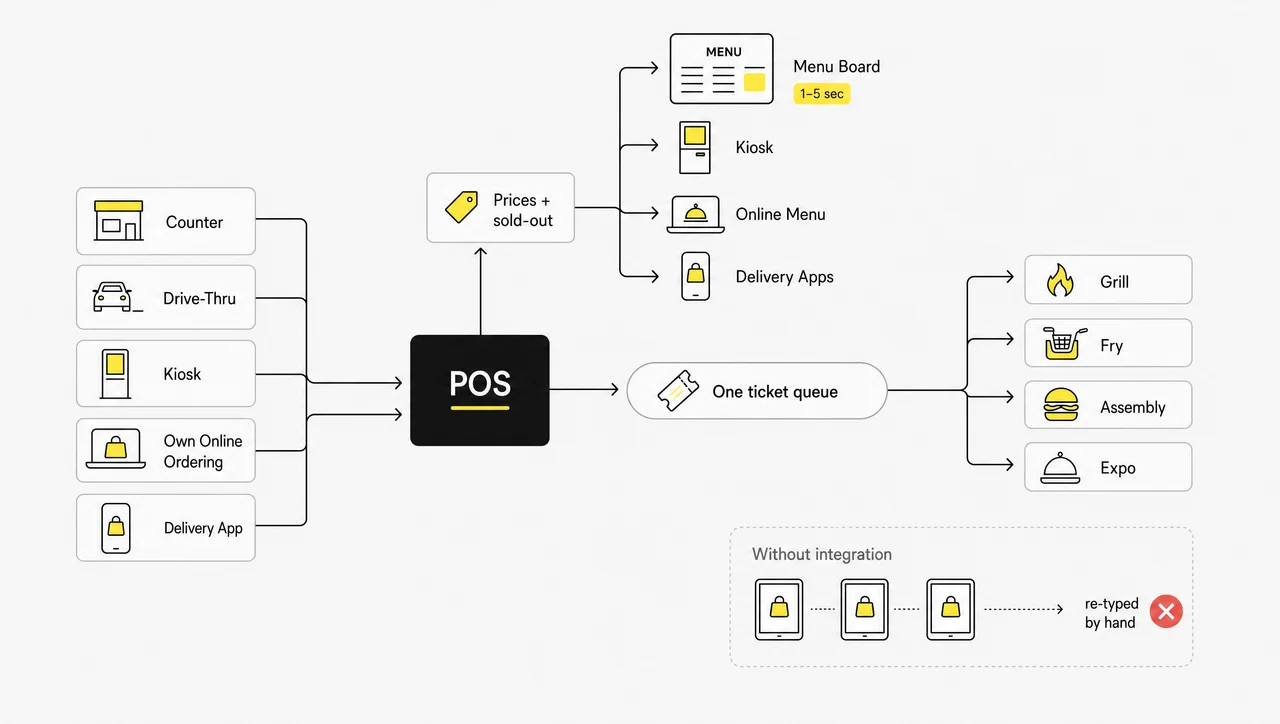
Restaurant POS integrations merge five order streams into one ticket queue, and that queue is what the kitchen cooks from. Connect each channel, then test it with a real order from that channel.
Online Ordering and Third-Party Delivery Integration
A third-party delivery integration with the POS sends DoorDash, Uber Eats and Grubhub orders straight to the register and the kitchen screen, with no tablet and no re-keying.
- Toast has direct DoorDash, Grubhub, Uber Eats and Caviar integrations at no Toast fee. Most other integrations go through Partner Connect at $25 a month per location.
- Square relaunched its Uber Eats integration on May 13, 2025. Menus and sold-out items sync live, and orders land on the POS and KDS without a tablet. DoorDash also connects natively.
- Middleware fills the gaps when a native link is missing. Otter starts at $79 a month, Chowly sets a minimum of $35 a month per location, and Deliverect quotes on request.
The cost of skipping this step is real. DoorDash charges $6 a week for its tablet, and every tablet order has to be typed into the POS by hand. Intouch Insight’s 2025 delivery report found more than one in ten delivery orders arrived with an error. Online ordering POS integration on your own site follows the same rule: one menu, one sold-out list, one ticket queue.
Kitchen Display System Integration
Set up stations and expo, connect bump bars, and turn on ticket timers. Check the offline setup: Toast’s kitchen screens keep working without internet only through a hardwired local hub, while Square’s KDS has no offline mode. Send one test ticket from each channel and confirm it reaches the right station.
Drive-Thru POS System and Order Confirmation Board
A drive-thru POS system feeds the order confirmation board, the timer and the window terminal. In the 2025 Intouch Insight study, average total time was 5 minutes 35 seconds, and the fastest brand, Taco Bell, averaged 4:16. A correct confirmation board raised accuracy by 26 points, and boards had little effect when crews did not use them. Connect the timer so managers see order totals next to wait times.
Hold AI voice ordering until the POS is stable. Taco Bell runs it in more than 890 US restaurants, yet in the 2025 study guests had to repeat their order 34% of the time with AI, against 22% with staff. AI-only orders were 81% accurate, while orders handed to an employee were 95% accurate.
Kiosk, Loyalty, Payroll and Menu Board Integrations
- Kiosks read the menu and sold-out items from the POS. Yum Brands has reported kiosk checks about 10% higher than at the counter, and BurgerFi saw kiosk tickets 18.5% higher, with 52% of guests accepting the upsell.
- Loyalty, scheduling and accounting connect through the POS marketplace. Toast’s list includes 7shifts, HotSchedules, QuickBooks, Xero and MarketMan.
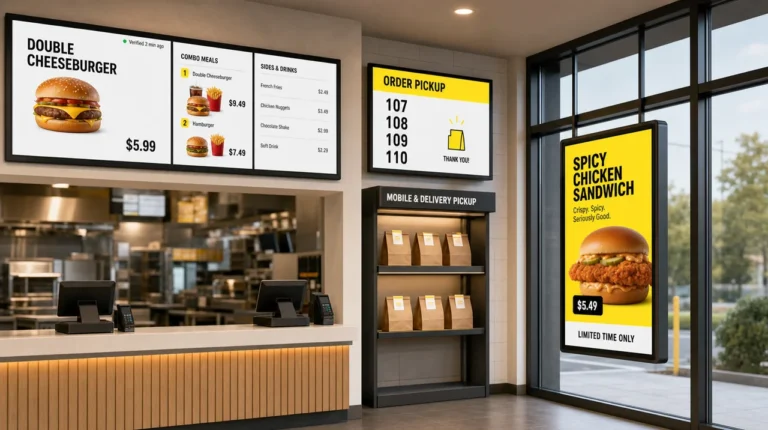
- Menu boards must take prices and sold-out items from the POS, or guests see one price on the board and pay another at the register. Square has no built-in menu boards and points sellers to marketplace apps, while Toast works through partners. With menu boards synced with the POS, a price changed at the register reaches the screen in seconds, and 86’d items drop off the board.
Decker connects to Toast, Square and Clover and shows a new price on screen in 1–5 seconds. At Burger Shop in Downtown Los Angeles, four counter screens were connected to the POS, and menu updates went from days or weeks to minutes. For drive-thru lanes and multi-store brands, QSR digital menu boards follow each store’s own POS prices.
Check every channel with one 86. Mark an item sold out on the POS, wait a few minutes, then confirm it is gone from the kiosk, the delivery apps, the online menu and the menu board.
Integrations do not go live on their own once they are switched on. A delivery app can be connected yet still send orders to the wrong station, and a menu board can sync prices but not sold-out items. Each integration counts as done only after a real test order from its channel.
See Your Menu Boards Follow the POS.
Connect one store, change a price in your POS and watch the board update in seconds. Decker’s 30-day trial covers up to five screens with no card required, and POS price and stock sync comes with the Professional plan. Start with Decker
Step 8. Run POS System Training by Station
POS system training in a QSR works best by station, so each crew member learns only the screens they will use. Training everyone on everything wastes the hours you have before launch.
QSR teams turn over too fast for one-time training. Black Box Intelligence put limited-service hourly turnover at 110% in the third quarter of 2025 and management turnover at 44–47%. Replacing one hourly employee costs $2,706. In August 2026, 3.5% of accommodation and food services workers quit in a single month, against 2.1–2.2% across the private sector (BLS). Restaurant POS training is a monthly routine, not a launch event.
Split training by role:
- Counter and drive-thru: order entry, modifiers, combos, payment, splitting checks, offline payments.
- Kitchen: reading the KDS, bumping tickets, recalling a ticket.
- Managers: voids, refunds, 86ing items, the offline payment limit, closing the shift.
Use a safe practice mode. Toast’s Test Mode simulates orders and payments without touching sales data. It applies to the whole restaurant, disables the cash drawer and does not pause online ordering, so pause it yourself when you train during open hours. Square has no training mode, so practice before opening with comps or voids. Those entries stay in reports.
Practice a rush. Toast’s onboarding includes a 60-minute session with a specialist, which covers the basics. Add a full practice shift: a manager fires 30–40 orders across every channel, including drive-thru and delivery, while the crew works the real screens.
Post cheat sheets at each terminal for voids, split checks, refunds, ticket reprints and what to do when the internet drops. Name one shift champion per shift for the first week. Staff training for POS pays off fastest when the system is simple: Jack in the Box said its move to Qu cut training time by more than half, from days to hours.
Step 9. Test the New POS System, Then Go Live Off-Peak
The smoothest way to implement a new POS system is a dress rehearsal, then a pilot store, then a quiet weekday launch. These steps to implement a new POS system smoothly fit into the week before and the week after launch:
- Readiness check. Confirm tax rates, offline procedures and the offline payment limit. Toast advises not taking payments until setup is complete.
- Test day. Run 20–30 orders through every channel. Include a void, a refund, a split check and a pulled network cable, then close the shift.
- Launch. Pick a weekday outside the peak. Keep the old card reader available until the first day reconciles.
- Seven days of close support. Keep the vendor on call. Reconcile the POS against the payment processor and the delivery apps every day. Upload offline payments within 24 hours; on Square, payments not uploaded within 72 hours expire.
- Review after two weeks. Pull speed of service, voids and refunds by employee, top items and labor cost as a share of sales. The National Restaurant Association put the limited-service median at 31.7% of sales for 2024, so a sudden jump after launch usually means overstaffing while the crew learns.
Outages are why the offline plan matters:
- Square, September 7–8, 2023. An outage lasted about 15.5 hours, and offline payments were not fully processed until the next afternoon.
- McDonald’s, March 15, 2024. A configuration change at a third-party provider took down POS systems in several countries for hours, and some restaurants took cash only or closed.
- AWS, October 20, 2025. The outage knocked out Toast POS at some restaurants, which fell back to taking orders by hand.
A store that runs a full week on the new system without a manual fallback is the proof that you have implemented QSR POS in your business in a way other locations can copy.
Launching every store on the same day multiplies one mistake across the chain. A wrong tax rate or a broken delivery link found in a pilot store costs one afternoon; found in 20 stores at once, it costs a weekend of refunds. Go live in one store first.
Step 10. Plan a Multi-Location POS Rollout for Franchise Stores
A multi-location POS rollout copies one proven pilot store, then moves in waves the support team can handle. Rollout speed is limited by trainers and support staff, not by hardware.
Build the rollout on four decisions:
- A brand-level menu template with local prices. On Toast, location-specific prices need the enterprise module.
- Permissions. Decide what a franchisee can change, such as prices or 86s, and what only the brand can change, such as items and layout.
- One integration set for delivery apps, loyalty and menu screens across all stores.
- Waves. Size each wave so the support team can stay with every store through its first week.
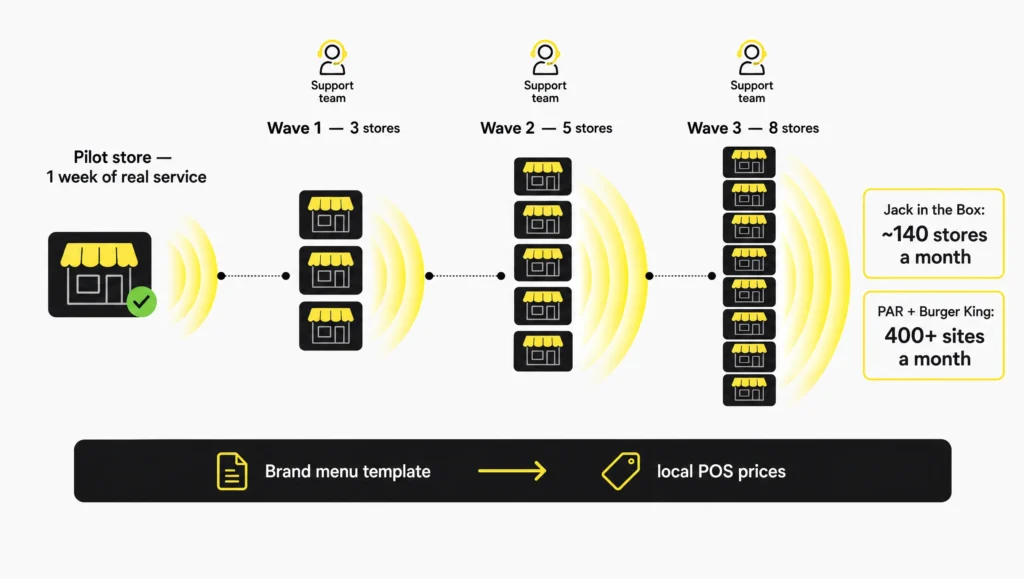
Real rollouts show the pace that is possible:
| Brand | Platform | Scale | Pace |
|---|---|---|---|
| Jack in the Box | Qu | 2,100+ restaurants | 15 months, about 140 a month, replacing a decades-old POS |
| Burger King | PAR Brink | Exclusive POS for North American traditional restaurants since October 2023 | 400+ sites a month in 2026, with 3,000+ more going live this year |
| Taco John’s | Cloud POS with digital ordering and loyalty | 324 restaurants in 21 states | Completed by May 2026 |
| Hungry Howie’s | Toast | About 500 locations | Selected in May 2026 |
| Wingstop | MyWingstop digital ordering platform | Piloted in about 150 of 1,926 US restaurants | Rolled out from April 2024, built to be cost-neutral for franchisees |
A franchise POS system is often set by the franchise agreement. Subway’s 2021 agreement added a $35 monthly technology fee, $155 a month for menu screens and a $200 monthly legacy support fee for stores that do not meet technology standards. Before a POS rollout, franchisees should know who pays for hardware and when the brand will require the switch. A POS rollout timeline with dates for each wave answers both questions.
Letting every location build its own menu breaks the chain’s prices within a month. Store-built menus drift on prices, modifiers and item names, and the boards and delivery apps drift with them. Build the menu once at brand level and let stores change only what the permissions allow.
When to Hold Off on a New QSR POS
Hold off on a new QSR POS when your seasonal peak is less than six weeks away. That is shorter than Toast’s typical 4–6 week onboarding, and Toast itself advises against switching in the busiest season. Wait if leaving the current contract costs more than a year of savings; on Toast’s Pay-as-you-go plan, that fee is $150 for every remaining month.
Skip the switch if the problem is a single missing integration, such as menu boards or delivery orders that do not sync, because an integration fixes that faster than a new POS. A chain that has not run at least one pilot store for a full week of real service should not schedule a multi-location wave yet. In each of these cases, the better time to implement QSR POS in your business is right after the peak, with the contract exit date and a working pilot in hand.
Key Takeaways: How to Implement QSR POS in Your Business
To implement QSR POS in your business, treat it as a ten-step project in four phases, and start the slow parts on day one. Hardware shipping, data imports and the menu build set the calendar; the installation itself takes one day.
- Planning: audit every channel, device and contract, name one owner, set a weekday go-live outside the peak, and agree who installs, builds the menu and answers support calls.
- Hardware and network: wire terminals, printers and kitchen screens by Ethernet on a separate POS network with a cellular backup, set offline payment limits, and export sales history before the old system goes dark.
- Menu and integrations: build combos and required modifiers first, route items to kitchen stations, and connect delivery apps, kiosks, the drive-thru board and menu screens to one sold-out list.
- Training and launch: train by station, rehearse a rush, launch one pilot store, keep the old card reader as a fallback, then roll out in waves the support team can handle.
Expect a few days on a self-installed system, 4–6 weeks with Toast’s vendor-led onboarding, and months for a chain.
Questions and Answers
1 How long does it take to implement a QSR POS?
To implement a QSR POS in your business on a self-installed system, plan a few days. Toast’s vendor-led onboarding typically takes 4–6 weeks per store, with hardware shipping in 7–14 business days. Chains take months: Jack in the Box moved more than 2,100 restaurants in 15 months.
2 Can I switch POS systems without closing my restaurant?
Yes. Install after close, keep the old card reader active until the first day reconciles, and launch on a weekday outside the lunch peak. Run a full test day before guests use the new system.
3 How much does POS system installation cost?
Square is free to set up yourself. Toast charges $1,000 per on-site day or $800 per day of remote support, plus $50 per cable termination. Network cabling and mounting are extra, because Toast’s installers do not do them.
4 Do I need new hardware when I switch POS?
Usually, yes. Toast hardware runs only on Toast, and new Toast accounts must buy new network equipment. Systems built on iPads may let you keep tablets, but check card readers and printers against the new vendor’s supported list.
5 What data can I move to a new POS?
Menus, prices and modifiers move through CSV or spreadsheet imports. Gift card balances, loyalty points and customer lists can also be imported. Sales history and card-on-file tokens stay with the old system, so export reports before you cancel.
6 How long does POS setup and training time take for QSR staff?
Toast’s onboarding includes a 60-minute training session, and most crew members are ready after one practice shift on their station. With hourly turnover around 110% a year, plan to repeat the training for new hires every month.
7 Will my menu boards and kiosks update from the new POS?
Only if they are integrated. Kiosks usually read the POS menu directly, while menu boards need a connection to the POS for prices and sold-out items. Test each one by 86ing an item and checking every screen.
8 What happens to card payments if the internet goes down?
Toast switches to offline mode after about 40 seconds without a connection, and orders and card payments keep running. Square stores offline payments for up to 72 hours. In both cases, declined offline payments are the restaurant’s loss, so set a per-payment limit.
Sources
- Toast: Remote and Onsite Onboarding Guide
- Toast: Network Requirements Overview
- Square: Process Card Payments With Offline Mode
- PCI Security Standards Council: Future-Dated Requirements of PCI DSS v4.x
- U.S. Bureau of Labor Statistics: JOLTS Quits by Industry
- QSR Magazine: The 2025 QSR Drive-Thru Report