Digital Signage in Restaurants: Zones, Costs and Setup in 2026


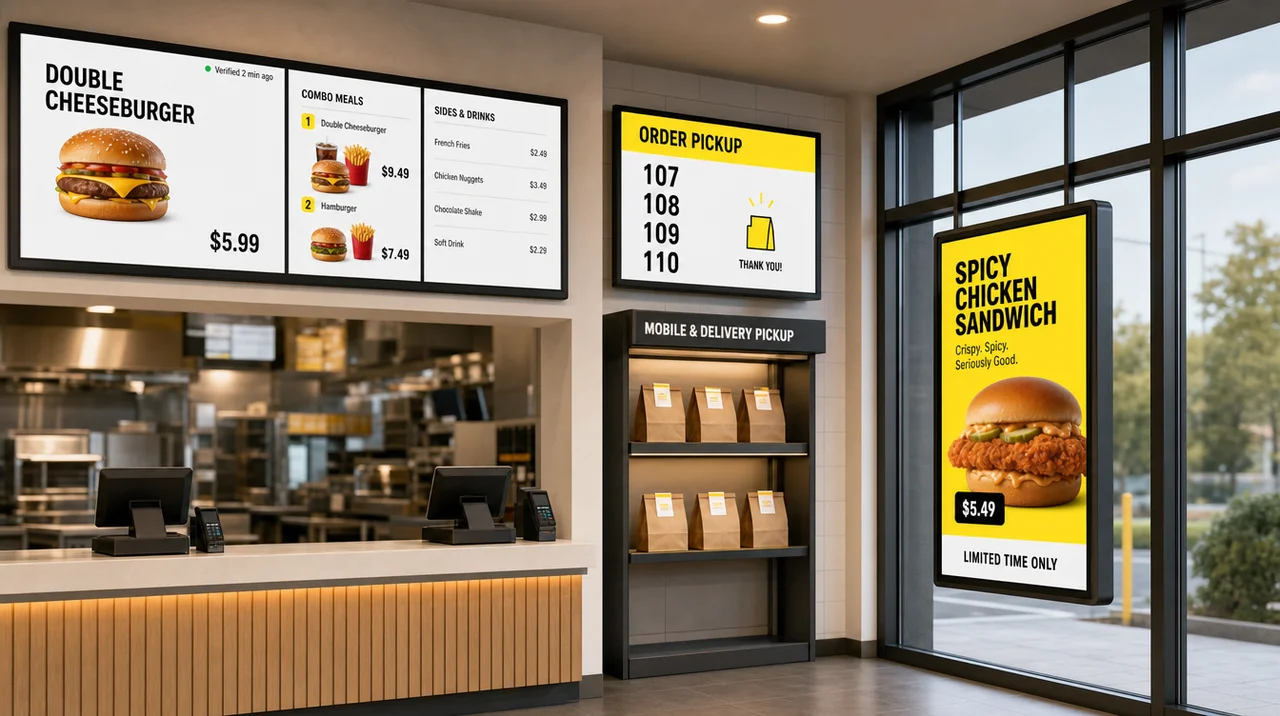
Digital signage in restaurants is a set of connected screens that staff update from one dashboard instead of reprinting menus and posters. It covers menu boards, drive-thru displays, pickup boards and promo screens. A basic setup needs a screen, a media player and cloud software, and most restaurants start at the counter and the pickup shelf, as the zones below show.
What Is Digital Signage in Restaurants?
Digital signage in restaurants is a network of screens that a team controls from one cloud dashboard. A menu, price or promotion then changes on every display at once. Each screen runs on four parts:
- A display: a TV or a commercial panel.
- A media player: a small device behind the screen that downloads and plays content.
- A content management system (CMS): cloud software where staff build layouts, playlists and schedules.
- Content: menus, prices, videos, order numbers, opening hours and promotions.
Most digital signage restaurants run today starts with 1–2 TVs and a player at the counter. A printed board, by contrast, changes only after someone designs, prints, ships and hangs a new version. Digital restaurant signage changes when a manager clicks publish, when a schedule fires or when the POS reports a sold-out item.
Screens vs Printed Menus and Posters
| Printed boards and posters | Digital signage | |
|---|---|---|
| Price or item change | Days: layout, print run, delivery, install | Minutes in the CMS; seconds when prices come from the POS |
| Breakfast to lunch | A second board or a manual swap | A schedule switches the screens at 11:00 a.m. |
| Sold-out (86’d) item | Stays on the board until someone covers it | Hidden or marked on every screen |
| Running cost | Every reprint and every seasonal poster | Screen, player and a monthly software fee |
| Main risk | A wrong price at the counter | A dark screen nobody notices |
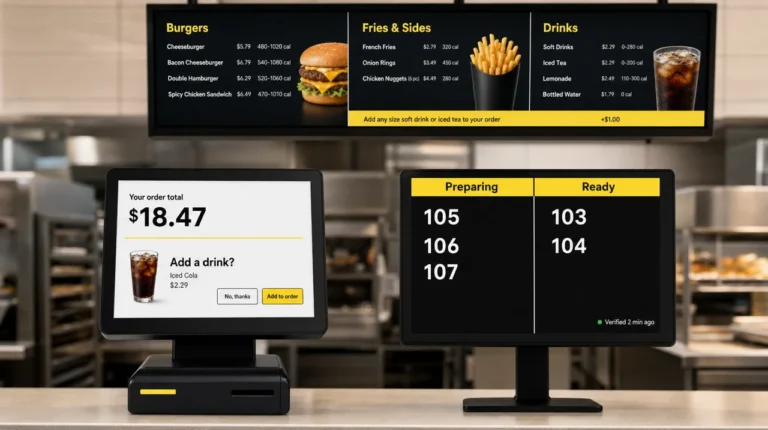
Two counter screens don’t count as signage by default. A kitchen display system (KDS) shows orders to the line cooks, and guests never see it. A customer-facing display on the POS terminal shows the order total and tip, and it turns into signage only when it plays promotions between orders. For the wider definition, see what digital signage means beyond restaurants. Next come the eight places where restaurants put these screens.
8 Places to Use Digital Signage in a Restaurant
Restaurants run digital signage in eight zones, from the front window to the back office. Each zone needs its own screen type and its own content. The fastest way to map how restaurants can use digital signage: start from where guests look and wait, not from a feature list.
| Zone | Screen | What to show | What to watch |
|---|---|---|---|
| Front window | High-brightness panel facing the street | Opening hours, bestsellers, today’s deal | Sun glare through glass |
| Patio and sidewalk | Weatherproof outdoor display | Menu for passers-by, happy hour times | Heat, rain, 2,500+ nits |
| Drive-thru lane | Outdoor menu board and order confirmation screen | Menu, combos, the order before payment | Direct sun, wind, 24/7 hours |
| Above the counter | Two to four 43–55-inch screens | Menu, prices, combos | Readable from the back of the line |
| Self-order kiosk | 22–32-inch touchscreen | Ordering, add-ons, loyalty sign-up | Controls within the ADA reach range |
| Pickup and waiting area | 32–55-inch screen | Order numbers, promos, reviews | Placed in sight of the pickup shelf |
| Dining room and bar | TVs or a video wall | Brand stories, events, sports, social posts | Sound off, captions on |
| Back of house | One staff TV | Shift notes, prep standards, daily targets | Kept apart from the KDS |
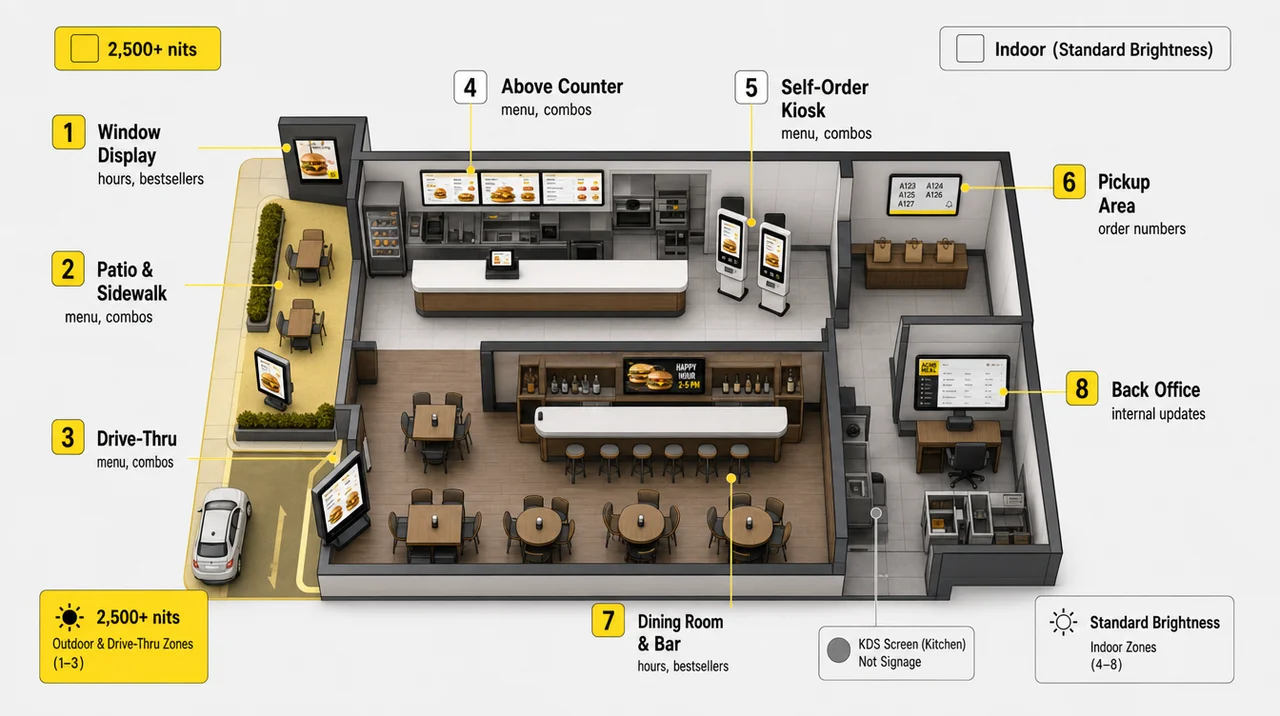
Digital signs for restaurants split into indoor and outdoor groups. Indoor digital signage for restaurants covers the counter, kiosk, pickup area and dining room. A quick-service restaurant often runs digital signage on 4–8 screens: two to four above the counter, one at pickup and one or two in the drive-thru. Restaurant window digital signage and restaurant digital street signage face outside, so they need two to ten times the brightness of a TV. A restaurant digital signage kiosk works differently again. It takes orders and payments, so it must connect to the menu, modifiers, taxes and the POS, not just show a picture. Under the 2010 ADA Standards, the kiosk screen’s operable parts must sit within a 15–48-inch reach range.
Which Zones Matter Most by Restaurant Format
- Quick-service: the counter, the drive-thru and the pickup board carry most of the load, because speed decides the check. Our QSR digital signage page covers a full setup for this format.
- Full-service: the entrance, the waiting area and the bar matter more than the menu, since servers still present the menu at the table.
- Café and coffee shop: dayparts drive everything. Coffee and pastry in the morning, lunch bowls at noon, cold drinks in the afternoon.
- Bar: game schedules, happy hour times and the drink list share the same walls.
Screens in the dining room can also earn money. Digital signage restaurant advertising sells short slots to beverage and snack brands that already supply the restaurant, and a digital signage advertising setup handles booking and proof of play. Beyond placement, the next question is what the screens actually earn.
Benefits of Digital Signage in Restaurants
The benefits of digital signage in restaurants are faster menu changes, a higher check, shorter perceived waits and one brand standard. Each of these benefits of digital signage for restaurants has its own signal to measure, listed in the table at the end of this section.
Menu Changes Without Reprints
A schedule switches the breakfast menu to lunch at 11:00 a.m. without anyone on a ladder. When the kitchen runs out of an item, staff hide it once and it leaves every screen, so guests stop ordering what the line cannot make. With digital signage, nobody carries USB drives between stores. According to Decker, its customers spend up to 80% less time updating menus and content after moving off manual updates.
A Higher Check Through Upsells and Limited-Time Offers
Digital signage in a restaurant sells what a busy cashier forgets to mention. A combo slot next to a burger, a drink suggestion at lunch and a dessert loop after 2 p.m. all push higher-margin items. Screens can also react to conditions: hot coffee on cold mornings, iced drinks above 80°F, a late-night menu after 10 p.m. Item order and visual focus matter as much as the deal, because guests read the top row and the highlighted tile first.
“Digital menu boards increase sales by up to 25%” is a vendor claim, not a benchmark. Figures published across the digital signage restaurant industry range from a 2–5% lift to 25%. Most of them come without a study, sample or date. Measure your own average check on one location for four weeks before and four weeks after launch.
Shorter Perceived Waits at the Counter and Pickup
David Maister’s 1985 paper “The Psychology of Waiting Lines” opens with a simple rule: occupied time feels shorter than unoccupied time. A pickup board with order numbers, a short brand video and a readable menu give the line something to do. Guests who can read the menu from the back of the queue order faster and ask the cashier fewer questions. An order status board also ends the “is my order ready?” loop at the counter.
“Screens cut wait times by 25–30%” mixes up two different waits. Screens change how long the wait feels, not how long the kitchen takes. If the wait itself causes complaints, fix the line first, then add the screen.
Brand Story and Social Proof
Dining room screens tell the story a menu has no room for. Show where the beef comes from, how the dough is made, who runs the kitchen and what event is coming on Friday. Live reviews and social media feeds on digital signage add proof from real guests. Only show reviews pulled from verified profiles, because a quote nobody can trace damages trust faster than no quote at all.
One Standard Across Every Location
Restaurants with several locations publish a new limited-time offer to every store in one step with cloud digital signage, then adjust prices for one region or one store format. Headquarters controls templates and brand rules, while each store manager changes local specials and sold-out items inside approved layouts. When screens read prices and availability from the POS, the price on the wall matches the receipt; how POS data reaches restaurant screens needs its own setup, so plan it early.
Lower Print Costs and Less Waste
Digital restaurant signs remove reprints, seasonal posters and price stickers. The savings are real but not free: screens, players and installation come first. The cost section below shows how to check the payback on your own numbers.
| Benefit | Who notices first | What to measure |
|---|---|---|
| Faster menu changes | Store manager | Minutes per update, wrong prices at the counter |
| Higher average check | Owner | Average check, attach rate of promoted items |
| Shorter perceived wait | Guests | Questions at the pickup counter, walk-outs, dwell time near promo screens |
| One brand standard | Franchisor or ops lead | Price and menu mismatches between stores |
| Lower print costs | Accounting | Dollars spent on reprints per year |
That is why the hardware choice below matters as much as the content.
What You Need: Screens, Players and Software
Every restaurant screen needs a display bright enough for its zone, a media player and a CMS. The CMS publishes content and reports screen status. Brightness, measured in nits, decides whether guests can read digital signage at all.
| Zone | Brightness | Hours a day |
|---|---|---|
| Counter and dining room | 350–500 nits (commercial indoor panel) | 12–18 |
| Window facing the street | 2,000–3,000 nits | 12–24 |
| Drive-thru, patio and sidewalk | 2,500–4,000 nits, weatherproof | Up to 24 |
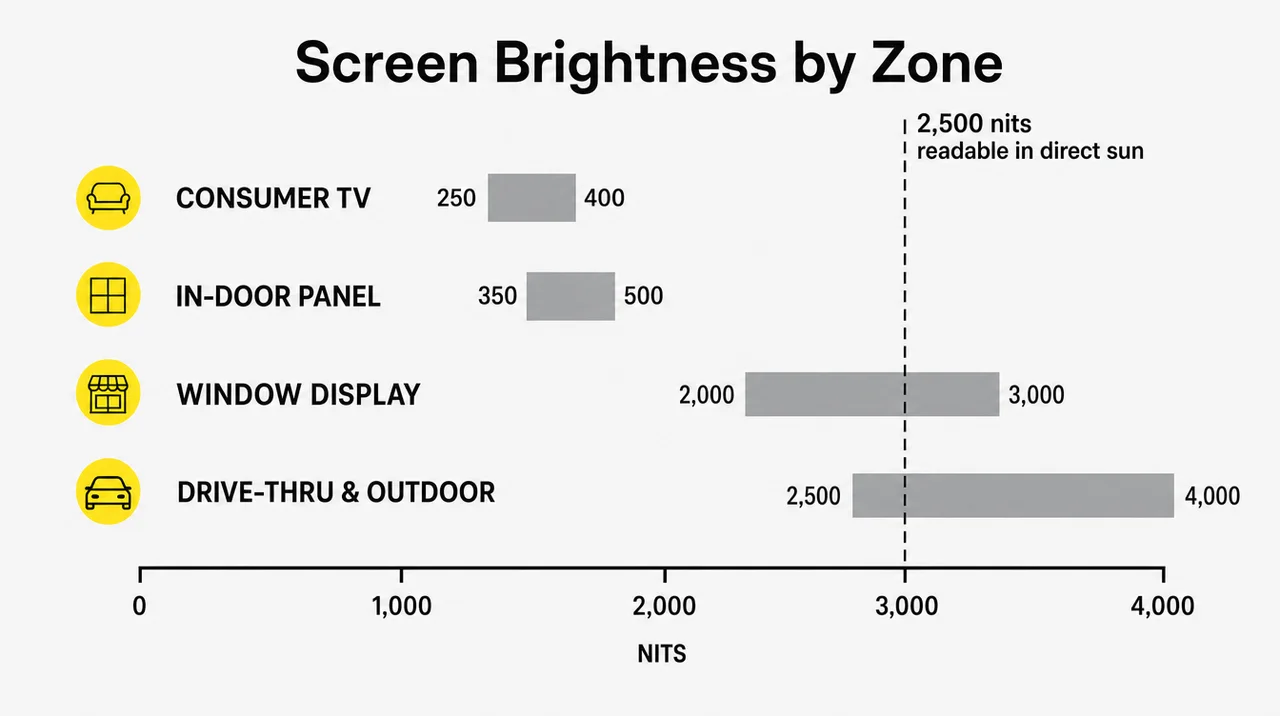
For comparison, Samsung rates typical consumer TV screens at 250–400 nits, which works indoors but washes out in a sunny window.
Consumer TV or Commercial Display?
A consumer TV costs less, and for one screen that runs eight hours a day away from the sun it does the job. Long hours change the math. Samsung notes that consumer TVs are designed for about eight hours of use a day and that commercial use voids the consumer warranty. Commercial displays carry three-year warranties and run 24/7. A restaurant that runs digital signage 18 hours a day puts about 6,500 hours a year on each panel, more than twice what a consumer TV is built for. After a power cut, a consumer TV may also wake up on the wrong input. If you already own TVs, signage software that runs on any TV costs the least to start with.
Media Player and Offline Cache
The player connects to the screen over HDMI and to the internet over Wi-Fi or Ethernet. A good player stores the latest content locally, so the screen keeps playing when the internet drops and catches up once the connection returns. Decker Player, an Android digital signage media player, works with any TV that has an HDMI port. If your stores still update screens from USB sticks, compare USB digital signage with cloud software before buying new hardware.
Monitoring: How You Know a Screen Went Dark
Restaurant digital signage monitoring answers one question: is every screen showing what it should right now? A light sensor on the panel confirms there is a picture. An infrared command switches the TV back to the right HDMI input after a power cut. A smart plug turns screens off at night to save the panel. Decker Verifier, a device for digital signage with remote management on site, does all three independently of the player and alerts the team when a screen fails.
For size, sign makers use a rough rule of about one inch of letter height for every 10 feet of viewing distance. Use high-contrast colors and leave space between categories, because clutter slows an order more than a small font. Test the menu from the back of the line before you order larger screens. Next, the content itself needs a way onto those screens.
How Restaurant Screens Get Their Content
Restaurant screens get their content in four steps, from the data source to a playback check. None of them requires a visit to the store.
- Source. A manager edits content in the CMS, a schedule fires, or the POS or ERP sends new prices and stock levels.
- CMS. The platform places each change into the right template, playlist and screen zone, for one store, a region or the whole chain.
- Player. The media player downloads only what changed and keeps a copy for offline playback.
- Screen and check. The display shows the update, and monitoring confirms that the screen is on and playing the right content.
Scheduling and Dayparting
Screens switch content on a schedule by time of day, day of week, location and store format. Plan a limited-time deal weeks ahead with start and end dates, and the screens change on their own at midnight on launch day. One template can serve breakfast, lunch and late-night menus with different items in each daypart.
POS and Inventory Data
Digital signage for restaurant operations works best when prices and availability come from the system that already holds them. With POS data, a sold-out item hides from every screen and a price change reaches the menu in seconds. Without it, someone must retype every change into the CMS, and the screen shows only what that person typed. As a result, the cost of a setup depends on both the screens and the data behind them.
How Much Digital Signage Costs a Restaurant in 2026
Restaurant digital signage prices come from four line items: screen, media player, installation and a per-screen software subscription. The first location sets the template, so every next store costs less to launch. A restaurant digital signage price quote that skips any of these lines hides part of the bill.
| Line item | Typical 2026 range | Paid |
|---|---|---|
| DIY setup (consumer TV and a stick or USB) | $200–$400 per screen | Once |
| Managed indoor setup (commercial screen, player, mount) | $600–$2,500 per screen | Once |
| Outdoor drive-thru display | $3,500–$8,000 per display before installation | Once |
| Mounting and installation | $100–$300 per indoor screen | Once |
| Software subscription | $0–$150 per screen per month | Monthly |
| Electricity | About $7–$9 per screen per month | Monthly |
The digital menu board price guide breaks down each line, and the broader cost breakdown for screens beyond the menu adds promo walls and lobby screens.
Simple ROI Math for One Location
No single ROI figure fits every restaurant, so run your own. Add up three yearly savings and compare them with the yearly cost:
- Print: reprints per year × cost per reprint.
- Staff time: hours spent on menu updates per month × 12 × hourly wage.
- Check lift: your measured change in average check × orders per year.
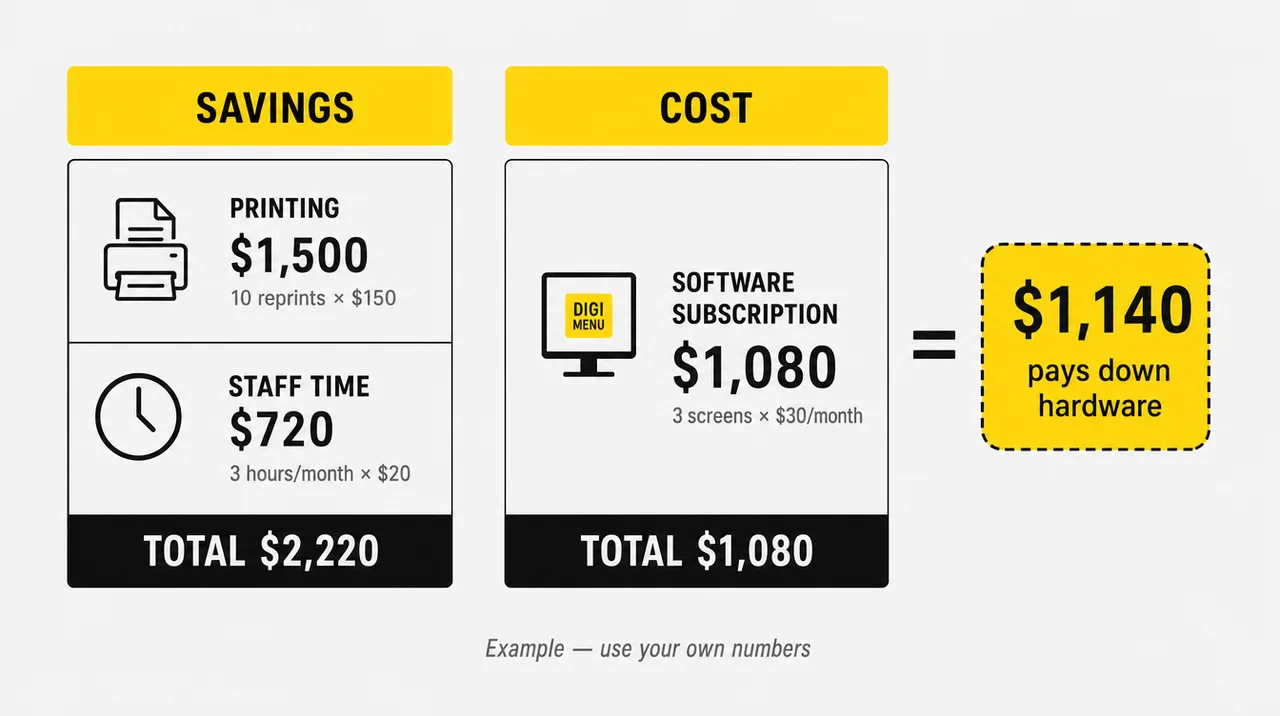
For example, a café that reprints its menu 10 times a year at $150 saves $1,500 on print. If a manager also saves 3 hours a month at $20 an hour, that adds $720. Three screens of signage software on a $30 monthly plan cost $1,080 a year. The savings cover that twice, and the remaining $1,140 a year pays down the hardware before any sales lift is counted. That is what cost-effective digital signage for restaurants looks like on paper. Swap in your own numbers; the restaurant digital signage ROI only holds if each input comes from your books. However, every setup also has weak spots, covered next.
Disadvantages of Digital Signage in Restaurants and How to Fix Them
The disadvantages of digital signage in restaurants are mostly operational: dark screens, stale content and skipped updates. An upfront cost also comes before the first saving. Each problem has a known fix.
| Problem | Why it happens | How to fix it |
|---|---|---|
| A black or frozen screen | Internet drop, power cut, TV on the wrong input | Offline cache, a picture sensor, remote input switching; Decker reports 60% less screen downtime |
| Stale content | Nobody owns the screens | Assign an owner, schedule promotions, rotate creative every 2–4 weeks |
| Staff skip updates | The CMS is hard to use | Locked templates and local edits only in approved zones |
| Upfront cost | Screens, players and mounting come first | Pilot one location, then copy the setup |
| Burned-out consumer TVs | 24/7 use beyond the design | Night shutdown by schedule, or commercial panels |
| Missing calorie counts | Chains with 20+ locations must post calories under FDA menu labeling rules | A calorie field in every menu template, checked on each change |
| Guests stop noticing | The same loop plays for months | Fresh deals by daypart, one animated element per screen |
The FDA rule has applied since May 7, 2018. Restaurant chains with 20 or more locations must keep calories on digital menu boards, the same as on printed ones. They also add a statement that 2,000 calories a day is used for general nutrition advice and offer written nutrition details on request. A digital board does not change the rule; it only makes the calorie field easier to forget when a manager edits a price.
“Set it up once and the screens run themselves” is how chains end up with dark screens. Without monitoring, the first report of a blank menu board comes from a guest. Even with automation, someone must own the content and check the alerts. In some restaurants that work outweighs the gain, as the next section shows.
When a Restaurant Is Better Off Without Screens
A single restaurant with fewer than 15 menu items that change less than once a quarter can skip digital signage, keep a printed board and spend the money elsewhere. If guests rarely wait more than two or three minutes and the restaurant has no pickup shelf, an order board has nothing to show. Without stable internet at the counter or a player with an offline cache, a screen goes stale or dark more often than paper. If the budget cannot cover screens and software for at least 12 months, the payback never arrives. And if nobody on the team can spend an hour a week on content, the screens turn into an expensive slideshow. Overall, the rest of this guide fits most restaurants with a line and a pickup shelf.
Restaurant Digital Signage Trends for 2026 and Beyond
The future of digital signage in restaurants is screens that react to time, weather, stock and order status. Loops that repeat the same slides all day are on the way out. Five shifts already show in the market:
- AI-picked content. Software chooses which items to feature based on weather, time and sales. Expect it as an option inside CMS platforms, not yet as a proven sales driver.
- Screen plus phone. QR codes on screens move guests to mobile ordering, loyalty sign-up and contactless payment.
- Live social proof. Ratings and guest photos rotate on dining room screens, pulled from review platforms.
- Proof of play. Chains and advertisers want evidence that a screen was on and showing the right content, not just a log that the file was sent.
- Retail media in the dining room. Beverage and snack brands pay for screen time in high-traffic restaurants.
“Dynamic pricing means surge pricing for burgers.” In February 2024, Wendy’s said it would invest about $20 million in digital menu boards and test dynamic pricing. The backlash was immediate. Within two weeks the company stated it would not raise prices when demand is highest and that the boards would help it feature items and run discounts. On restaurant screens, dynamic pricing usually means a cheaper afternoon, not a pricier lunch. Beyond trends, the platform choice decides how much of this a restaurant can use.
How Decker Runs Every Screen in a Restaurant
Decker is a cloud platform that runs every screen in a restaurant from one dashboard. It covers everything from the menu board over the counter to the promo display by the door.
- One account for every screen and store. Publish to one location, a group, a region or the whole chain, with roles for headquarters and store managers.
- Any TV with an HDMI port. Decker Player plays content and keeps an offline cache; Decker Verifier confirms each screen is on and restarts it remotely.
- Data from the systems you already use. Prices, items and availability come from the POS or ERP and reach the screens in 1–5 seconds.
- Templates for menus and promotions, plus schedules by daypart, weekday and location.
- Proven at scale: Decker digital signage runs on more than 13,700 screens across 490+ locations in 90+ cities, from single cafés to restaurant chains.
For the menu itself, Decker’s digital menu boards for restaurants cover layouts, dayparts and sold-out items. For the full venue, including promo screens, entertainment, waitlists and opening hours, see Decker’s digital signage for restaurants. Next, test it on one location.
Questions and Answers
1 What types of signage do restaurants use?
Restaurants run two kinds of signs. Printed ones include storefront signs, A-frames and paper menus. They also use restaurant digital signs: menu boards, drive-thru displays, self-order kiosks, pickup boards, promo screens and window displays. Our guide to types of digital signage lists every format.
2 What are the disadvantages of digital signage?
The main disadvantages come down to the upfront cost, dark screens after network or power failures, stale content when nobody owns it, and staff time to learn the software. Offline playback, screen monitoring and locked templates solve most of them.
3 How much does a digital display board for a restaurant cost?
An indoor digital display board costs $200–$400 as a DIY TV setup or $600–$2,500 as a managed commercial setup, plus $0–$150 a month for software. Outdoor drive-thru displays start around $3,500 before installation.
4 What are the 7 key elements of digital signage?
The seven elements are the screen, the media player, the CMS software, the content, the network connection, the schedule and the monitoring that confirms each screen is playing. Leave out the last one and a dark screen can go unnoticed for days.
5 What kind of sign is best for a restaurant?
The best sign depends on the zone. A bright outdoor display suits the street and the drive-thru, and a menu board suits the counter. Pickup needs an order board, and the dining room needs a TV with brand content. Most digital signage in restaurants starts with the counter menu, then adds pickup and window screens.
6 Can a restaurant use a regular TV as a screen?
Yes, with a media player, as long as it runs about eight hours a day and stays out of direct sun. For longer hours, check the warranty first: most consumer TV warranties exclude commercial use. For the reverse case, see whether a signage screen can double as a TV.
7 How can I create my own digital signage?
Connect a media player to a TV, sign up for a CMS, pick a template, add your menu and publish. A single screen takes about an evening; our step-by-step TV setup guide walks through each step.
8 Do digital menu boards have to show calories?
Yes, if the restaurant belongs to a chain with 20 or more locations that sells substantially the same menu items. Under FDA menu labeling rules, menu boards must show calories for standard items and a statement about the 2,000-calorie daily diet. The rule applies to digital menus as much as to printed ones.
9 What happens to restaurant screens if the internet goes down?
A player with an offline cache keeps showing the last published content. New prices, sold-out items and promotions reach the screens once the connection returns, and a monitored setup alerts the team if a screen goes dark.
Sources