What’s the Best POS for QSR? 9 Systems Compared on Fees and Speed


The best QSR POS system depends on your size: Square or Clover for one store with a small check, Toast for 2 to 30 stores and drive-thrus, SpotOn for growing teams, and PAR Brink, Oracle Simphony or Qu for chains of 50+. Below are 2026 prices, card rates and the benchmarks behind each pick.
Whether you run a burger counter or need the best POS system for fast food restaurant groups, a quick service restaurant decides three things when it picks a POS: how much of every check goes to card processing, how many seconds an order takes at the counter and in the drive-thru lane, and whether the price on the menu screen matches the price at the register. A fast food POS system that looks cheap on a pricing page can cost $1,000 a month more than a rival once a $12 average check meets a fixed per-transaction fee. The table below gives the short answer. Each system then gets its own breakdown with pros, cons and the facts that matter for counter service.
QSR POS Systems Compared: 2026 Prices, Rates and Features
This top QSR POS systems comparison covers nine platforms and the details that change a quick service restaurant’s monthly bill and line speed: software price, card rate, contract, hardware, drive-thru tools, kitchen and kiosk screens, and offline mode. Prices are as published in 2026. Vendors change plans often, so confirm the numbers on each vendor’s pricing page before you sign.
| POS | Best for | Software per month | In-person card rate | Contract | Hardware | Drive-thru tools | Kitchen and kiosk screens | Offline mode |
|---|---|---|---|---|---|---|---|---|
| Toast | 1–30 stores, drive-thru | $0 Starter or $69 Point of Sale | 3.09% + 15¢ Starter; 2.49% + 15¢ on Point of Sale | 1–3 years | Toast-approved devices only | Yes: drive-thru order stream, color-coded tickets, order-ready screens | KDS $674 + $35/mo; kiosk $1,034 + $90/mo | Orders and cards keep working; online orders, loyalty and menu edits pause |
| Square for Restaurants | One store, tight budget, online ordering | $0, $49 or $149 per location | 2.6%, 2.5% or 2.4% + 15¢ | None | iPad plus Square devices | No dedicated tools | KDS $30/mo and kiosk $50/mo per device on Plus | Yes, $100 per payment by default, up to $50,000 |
| Clover | Small checks, lowest flat rate | $59.95 Counter Service (direct) | 2.3% + 10¢ | None direct; up to 36 months through banks and resellers | Clover devices | Ask in a demo | Kiosk and KDS available | Ask in a demo |
| SpotOn | Growing groups, staff scheduling | $0 All-In or $55 per station | 2.79% + 20¢ or 2.45% + 15¢ | 2 years (All-In) or monthly | Proprietary terminals | Ask in a demo | KDS, kiosk, $375 handheld | Ask in a demo |
| Lightspeed Restaurant | Delivery-heavy counters | $69, $189 or $399 | 2.6% + 10¢ | Ask in a demo | iPad | Limited | KDS $30 per screen per month | Orders and receipts; reports pause |
| Revel Systems | iPad chains with a drive-thru | Custom quote | By processor | 3 years | iPad | Yes | Yes | Ask in a demo |
| Oracle MICROS Simphony | Multi-lane drive-thrus, large chains | Custom quote | By processor | Custom | Rugged Oracle workstations | Yes: multi-lane, curbside | Bump-bar KDS, kiosk | On-site server option |
| PAR Brink | Enterprise QSR chains | Custom quote | By processor | Custom | PAR or third-party | Yes, multi-lane | Yes, with local APIs for kiosks and menu boards | Local APIs keep in-store devices running |
| Qu | Enterprise fast casual and franchises | Custom quote | By processor | Custom | Ask in a demo | Ask in a demo | 100+ certified integrations | Claims 99.99% uptime |
Two patterns stand out. The systems with public prices (Toast, Square, Clover, SpotOn, Lightspeed) fight for single stores and small groups, while the enterprise platforms (Revel, Simphony, PAR Brink, Qu) quote every deal and win on drive-thru depth and integrations. And the lowest monthly fee rarely means the lowest total cost, because card processing on small checks outweighs the software bill.
The Best POS for QSR Depends on Store Count, Check Size and Drive-Thru
There is no single best POS for QSR: the right system depends on how many stores you run, how small your average check is, and whether a drive-thru carries your sales. Published rankings disagree for the same reason. One restaurant technology review ranks Toast first for quick service, while a 2026 restaurant buying guide calls Clover the best pick for counter service. Both are right for different restaurants.
- One store with a small check and no drive-thru: Square for Restaurants or Clover, the most common POS for QSR startups. Square costs nothing to start and needs no contract; Clover has the lowest flat card rate among the large brands.
- 2 to 30 stores, or any store with a drive-thru: Toast. It pairs restaurant-grade hardware with drive-thru order routing, kiosks and handhelds, at the price of a contract and locked-in payments.
- Growing groups that live on scheduling and loyalty: SpotOn, or Lightspeed if most orders come from delivery apps.
- Enterprise chains of 50+ units: PAR Brink, Oracle MICROS Simphony or Qu, the best POS system for enterprise QSR and fast-casual brands, with Revel for iPad-based chains that run a drive-thru.
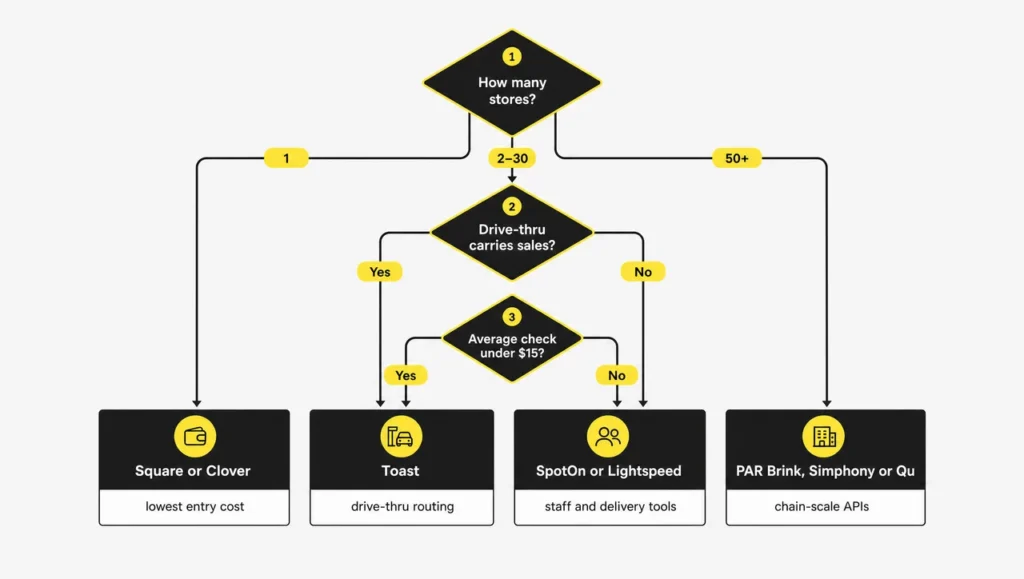
The breakdowns below follow the same order as the table. Each covers who the system fits, what it costs in 2026, the features that matter for quick service, and its strongest pros and cons.
Toast: Best for Most QSRs With 1 to 30 Locations
Toast is the default choice for independent quick service restaurants and small chains, and it is the name most restaurant owners on Reddit give first-time operators. It ran about 180,000 locations at the end of Q2 2026 after adding 9,500 in a single quarter.
Pricing. The Starter Kit costs $0 a month with card rates from 3.09% + 15¢, rising to 3.69% + 15¢ with online ordering, gift cards and loyalty add-ons. The Point of Sale plan costs $69 a month with rates around 2.49% + 15¢. Contracts run one to three years. A Toast Go 2 handheld costs about $494, a self-ordering kiosk about $1,034 plus $90 a month, and a kitchen display about $674 plus $35 a month.
What matters for quick service. Drive-thru tickets show up color-coded on the kitchen display, guests can watch an order-ready screen, and the system can text them when the food is up. Combos apply automatically as a discount when the items land on one check. Toast Go handhelds let staff take orders and payments in the line and at the curb. Toast Benchmarking compares your sales and menu prices against similar restaurants in your area, using data from its network.
Offline. Orders and card payments keep working without internet, and the kitchen display still gets tickets on a wired network. Online ordering, loyalty, gift cards and menu edits such as 86ing an item or changing a price stop until the connection returns.
- ➕ Pros: hardware built for kitchens and counters; deep QSR features in one system; support around the clock.
- ➖ Cons: works only on Toast-approved hardware with Toast payments; add-ons raise the card rate; operators report layered permissions and trouble editing another daypart’s menu mid-shift.
One owner on Reddit summed up the trade-off after switching a full-service concept to quick service: Toast had been the best tool, but the cost was no longer justified, so the restaurant moved to Square.
Square for Restaurants: Best for Single Stores and Online Ordering on a Budget
Square for Restaurants is the cheapest way to open a counter, and it suits single locations, cafés and quick service spots without a drive-thru. It also offers a quick service mode for counter ordering.
Pricing. Square Free costs $0, Plus costs $49 and Premium costs $149 per location per month. In-person card rates are 2.6%, 2.5% and 2.4% plus 15¢ on those plans; online orders run 3.3% + 30¢ on Free and 2.9% + 30¢ on paid plans, and keyed cards 3.5% + 15¢. There is no contract, and Plus and Premium come with a 30-day free trial. Hardware starts at $59. On the Plus plan, each kitchen display adds $30 a month and each kiosk $50 a month.
What matters for quick service. Square includes a free online ordering site that shares one menu with the register, real-time menu sync, and the Square Terminal, a handheld with a built-in receipt printer for line-busting. Offline payments are capped at $100 per transaction by default, adjustable up to $50,000. Gioia’s Deli in St. Louis used Square to bring in-store and delivery orders into one system.
- ➕ Pros: $0 entry and no contract; transparent published pricing; runs on an iPad you may already own.
- ➖ Cons: no dedicated drive-thru tools; kitchen displays and kiosks are paid add-ons; the 15¢ fixed fee pushes the effective rate near 3.9% on a $12 check.
Clover: Best for Small-Check Counters That Want the Lowest Flat Rate
Clover, owned by Fiserv, fits coffee counters, fast food stands and quick service restaurants with small average checks. The Counter Service Restaurant plan costs $59.95 a month bought directly from Clover, with card rates of 2.3% + 10¢ in person and 3.5% + 10¢ keyed. That is the lowest flat rate among the large POS brands.
Clover is also sold through banks and independent resellers, and their pricing and contracts differ from the direct plan, sometimes with terms of up to 36 months. Hardware runs from about $49 for a Clover Go reader to about $1,899 for a Station Duo, and the lineup includes a self-ordering kiosk and kitchen displays. Loyalty is built in, and a large app marketplace adds delivery, scheduling and accounting.
- ➕ Pros: lowest flat card rate among major brands; built-in loyalty; a wide range of devices for counters and lines.
- ➖ Cons: terms depend on who sells it; delivery relies on marketplace apps; drive-thru tools need checking in a demo.
One poké operator near a university, splitting sales about 60/40 between in-store and delivery, moved off Clover because managing delivery orders took too many steps.
SpotOn: Best for Growing Groups That Need Staff and Loyalty Tools
SpotOn suits quick service groups that are adding locations and want scheduling, loyalty and reporting in one system. As of July 2026 it sells two main plans. All-In costs $0 per station with card rates of 2.79% + 20¢ on a two-year contract with processing minimums. POS Essentials costs $55 per station with 2.45% + 15¢ on a month-to-month term.
A Station 15 terminal costs about $750 and a handheld about $375. SpotOn builds order screens around each restaurant’s workflow, supports combo builders, and times tickets on the kitchen display with color warnings. Its Teamwork scheduling app also works with Toast, Square, Clover, Lightspeed and Revel. Payroll connects through ADP and Gusto, and delivery through DoorDash Drive.
- ➕ Pros: strong staff and multi-location tools; screens set up around your process; around-the-clock support.
- ➖ Cons: proprietary terminals and payments; custom setup takes longer to launch; the All-In rate reaches about 4.5% on a $12 check.
Lightspeed Restaurant: Best for Delivery-Heavy QSRs
Lightspeed Restaurant fits counter-service concepts where delivery apps bring in a large share of orders. Plans cost $69 (Starter), $189 (Essential) and $399 (Premium) a month, with Enterprise on quote, and in-person card rates of 2.6% + 10¢. Kitchen displays cost $30 per screen per month.
Through its Deliverect integration, orders from every delivery platform land on one screen, and one menu edit updates all of them. A quick service mode cuts the taps needed to ring up and pay. The system runs on iPads, connects to more than 80 third-party tools, and operates at about 144,000 locations worldwide across all business types. Offline, it keeps taking orders and printing receipts, while reporting waits for the connection.
- ➕ Pros: delivery apps managed in one place; iPad hardware; strong reporting.
- ➖ Cons: limited drive-thru tools; higher entry price than Square or Clover; reviewers say setup is largely self-guided.
Revel Systems: Best iPad POS for Chains With a Drive-Thru
Revel Systems is an iPad POS for multi-unit quick service brands that need drive-thru management and complex modifiers. All pricing is custom-quoted, and contracts run three years. Revel lets you choose among several payment processors, and its Delivery XT module dispatches in-house drivers from a live map with a companion driver app.
- ➕ Pros: iPad hardware with drive-thru tools; in-house delivery management; choice of processor.
- ➖ Cons: no public pricing; a long contract.
Oracle MICROS Simphony: Best for Multi-Lane Drive-Thrus
Oracle MICROS Simphony is built for large quick service operators with complex drive-thrus. It manages multiple drive-thru lanes and curbside pickup by parking space, runs on sealed workstations that resist steam, grease and dust, works in more than 20 languages, and can run with an on-site server. Pricing and installation are custom-quoted.
- ➕ Pros: the deepest drive-thru tools on this list; rugged hardware; multilingual staff screens.
- ➖ Cons: no public pricing; many features cost extra; mixed user reviews.
PAR Brink: Best for Enterprise QSR Chains
PAR Brink is the enterprise QSR choice for chains with dozens to thousands of units. It runs at more than 21,000 restaurants and became the exclusive POS for Burger King’s traditional restaurants in North America, a rollout across more than 7,000 stores planned over about two years. Across all its products, PAR reported 174,300 active sites on June 30, 2026.
PAR’s 2024 release added local APIs, so kiosks, menu boards and other in-store devices keep exchanging data with the register even when the cloud connection drops. It also supports multi-lane drive-thrus and an open API for building a custom tech stack.
- ➕ Pros: proven at chain scale; open APIs; strong in-store reliability.
- ➖ Cons: more than a single store needs; sold through enterprise sales and integrators, with no public pricing.
Qu: Best for Enterprise Fast Casual and Franchise Networks
Qu is a cloud POS built for multi-unit QSR and fast casual brands that need central menu control across franchisees. It offers more than 100 certified integrations for loyalty, payments, labor and gift cards, claims 99.99% uptime through triple redundancy, and runs development sprints every three weeks. Pokeworks, a 73-location poke chain, picked Qu in June 2025. For a fast casual POS with franchise-wide menu control, Qu belongs on the shortlist next to PAR.
- ➕ Pros: central menu control for franchises; large integration catalog.
- ➖ Cons: no public pricing; designed for chains, not single stores.
The POS a big chain uses is not automatically the best one for you. McDonald’s runs its own in-house POS that no one else can buy, and Burger King’s rollout of PAR Brink took a dedicated team about two years. For an independent store or a small group, the nine systems above cover the realistic choices.
Operators on Reddit also describe NCR Voyix’s Aloha, a common legacy system, as dated and expensive to equip.
What a Quick Service Restaurant POS Has to Do
A quick service restaurant POS is the register, payment terminal and order router of a counter-service restaurant, built for short tickets and constant volume rather than tables and courses. Lightspeed defines a POS as the digital system that records sales, orders and payments; in QSR it also has to keep pace during a rush that never really stops at lunch.
Good QSR POS software is judged by the counter, not the back office. A POS system and a POS terminal are not the same thing. The terminal is one device. The system covers the touchscreen, card reader, receipt and kitchen printers, cash drawer, kitchen display, the software and the payment processor behind it.
Every quick service restaurant POS system, whatever the brand, should cover six features that separate it from a general one:
- Fast order entry on a touchscreen. QSR POS systems with touchscreen interfaces put best sellers on the home screen, combo builders and modifiers take one tap, and standard sales need no manager override. Vendors suggest a full order with modifiers and payment should take under 30 seconds at peak.
- A native kitchen display with bump bars. Tickets reach the right station the moment the cashier finishes, with no middleware in between.
- One queue for every channel. Counter, drive-thru, kiosk, online and delivery orders land in the same kitchen queue, so nobody juggles tablets.
- Offline mode. Orders and cards keep working when the internet drops, with clear limits on what pauses.
- Reporting by daypart. Hourly sales, sales per labor hour and item mix, so labor follows the lunch peak instead of guesswork.
- Order labels. Printed labels on bagged orders prevent handing the wrong bag to the wrong guest.
QSR POS vs General Restaurant POS
| Area | QSR POS | General restaurant POS |
|---|---|---|
| Order entry | Built for taps, combos and modifiers | Built around tables and seats |
| Kitchen display | Continuous ticket flow, station routing | Course timing and fire control |
| Channels | Counter, drive-thru, kiosk, online, delivery in one queue | Mostly table orders |
| Staff training | Learned within a shift | Longer, with table and course tools |
| Reporting focus | Peak-hour throughput and labor | Table turns and course pacing |
Types of Quick Service POS Hardware
- Countertop terminal: the main register, often with a customer-facing screen.
- Tablet or iPad POS: Square, Revel and Lightspeed run on iPads, which lowers hardware cost.
- Handheld: for line-busting, curbside and drive-thru orders taken before the speaker.
- Self-service kiosk: guests order and pay, and upsell prompts appear at every step.
- Cloud vs on-premise: cloud systems give remote access and automatic updates; on-premise servers, such as Simphony’s option, keep stores running when the cloud is unreachable.
Integrations and Payments to Check
- Payments: EMV chip, contactless and mobile wallets, split checks, tips, gift cards, and EBT where the state allows restaurant purchases.
- Online ordering and delivery: a commission-free ordering site of your own, every delivery app in one queue, and driver tracking if you run your own fleet.
- Loyalty: built into the POS rather than bolted on, so points follow the guest across channels. Boss It, a POS vendor, reports average orders 30% or more higher through kiosks for some of its clients, a vendor figure rather than independent research.
- Back office: QuickBooks or Xero sync, payroll and scheduling, so daily sales, taxes and tender types never get typed twice.
- Access and openness: role-based permissions and an open API for tools you will add later.
- Menu tools for QSR: pizza builders that price half and quarter toppings, and kitchen queues that move standard orders past a long custom one.
Which POS Vendors Have the Best QSR Benchmarks?
No independent study ranks POS vendors by speed, so the best QSR benchmarks among POS software providers come from three sources: drive-thru studies of restaurant brands, vendor data, and tests you run yourself. Searches for the fastest QSR POS system checkout speeds in 2025 find vendor claims, not audited measurements.
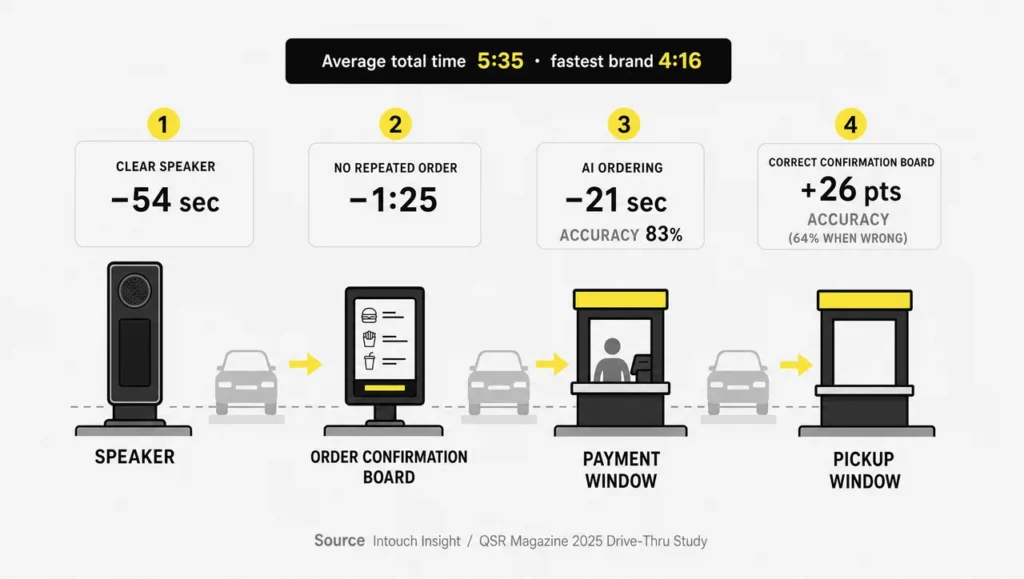
The industry benchmark is the annual Intouch Insight drive-thru study with QSR Magazine. It measures brands, not POS systems, but it shows where the seconds go:
- Average total time in the 2025 study was 5 minutes 35 seconds, up from 5:29 in 2024, across 165 visits per brand.
- Taco Bell was fastest for the fifth year in a row at 4:16.
- Order accuracy slipped to 87% from 89%.
- When the order confirmation board showed the order correctly, accuracy was 26 points higher than when it was wrong; with a wrong board, accuracy fell to 64%.
- A clear speaker cut 54 seconds; not having to repeat the order saved 1 minute 25 seconds.
- AI-assisted orders were 21 seconds faster in service time, but accuracy at AI locations was 83%.
Inside the restaurant, Intouch’s 2026 On-Premises Study of 753 visits across 10 brands found an average service time of 4 minutes 3 seconds, a minute faster than in 2025. The 2026 drive-thru results were presented on September 10, 2026, with full figures not yet public.
The other two sources are thinner. Toast Benchmarking compares your restaurant with roughly 180,000 Toast locations, which tells you how you perform against the market, not how Toast performs against Square. Independent reviews are scarce at the enterprise end: Gartner Peer Insights lists 14 POS products for Tier 1 quick service restaurants, and only two have a rating, each from a single review.
“Vendor X has the fastest checkout speed” is a claim, not a benchmark. No POS vendor publishes an audited, independent measurement of transaction time. Speed in a QSR comes from the screen layout, the confirmation board, the speaker and the order of the upsell, so test it on your own menu.
| Benchmark | What good looks like | How to test it in a demo |
|---|---|---|
| Taps per combo with two modifiers | A handful of taps on one screen | Ring up your best-selling combo with two changes |
| Card tap to approval | A few seconds | Run ten contactless payments in a row |
| Offline behavior | Orders and cards keep working, limits are clear | Unplug the router mid-order |
| Kitchen ticket time | Ticket on screen as payment completes | Watch the KDS while a cashier finishes an order |
| Price change reach | Register, online menu and menu screens update together | Change one price and check every screen |
| Support in a rush | A human answers on a Friday night | Call support during a peak hour |
Evaluating Toast on QSR Benchmarks
Toast scores well on kitchen ticket time and drive-thru routing, and its handhelds shorten the line before the speaker. Offline, orders and payments continue, but menu edits and online orders stop. Its own Benchmarking compares you with similar restaurants, which helps after launch more than at the buying stage.
Evaluating Square on QSR Benchmarks
Square is quick to set up and its quick service mode keeps tap counts low for simple menus. It has no dedicated drive-thru tools, and the offline cap of $100 per payment needs raising before a busy day. The 15¢ fixed fee is its weakest point on small checks.
Evaluating Clover on QSR Benchmarks
Clover leads this group on card cost, with 2.3% + 10¢ direct. Speed and offline behavior depend on the device and the reseller’s setup, so test both on the exact hardware you would buy.
Evaluating SpotOn on QSR Benchmarks
SpotOn’s custom screens can cut taps for complex menus, and its kitchen timers flag slow tickets. Setup takes longer than self-installed systems, and its All-In plan is the most expensive here on a $12 check.
What a QSR POS System Really Costs per Month
On small QSR checks, card processing costs far more than the software, so compare the effective rate on your own average check, not the monthly plan price. The fixed fee per transaction is the hidden lever: at a $12 check, 10 to 20 cents adds 0.8 to 1.7 percentage points to the advertised rate.
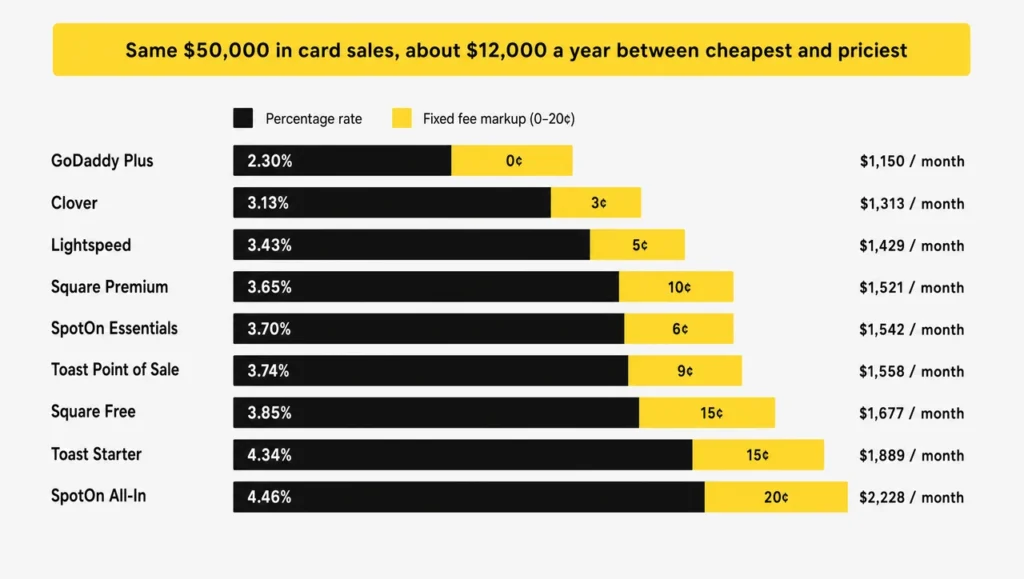
The table uses one example: $50,000 in card sales a month at a $12 average check, about 4,167 transactions.
| Card rate | Monthly processing | Effective rate | Plus software |
|---|---|---|---|
| GoDaddy Plus, 2.3% + 0¢ | about $1,150 | 2.30% | plan fee |
| Clover direct, 2.3% + 10¢ | about $1,567 | 3.13% | $59.95 |
| Lightspeed, 2.6% + 10¢ | about $1,717 | 3.43% | from $69 |
| Square Premium, 2.4% + 15¢ | about $1,825 | 3.65% | $149 |
| SpotOn Essentials, 2.45% + 15¢ | about $1,850 | 3.70% | $55 per station |
| Toast Point of Sale, 2.49% + 15¢ | about $1,870 | 3.74% | $69 |
| Square Free, 2.6% + 15¢ | about $1,925 | 3.85% | $0 |
| Toast Starter, 3.09% + 15¢ | about $2,170 | 4.34% | $0 |
| SpotOn All-In, 2.79% + 20¢ | about $2,228 | 4.46% | $0 |
The gap between the cheapest and the most expensive option is about $1,000 a month, or roughly $12,000 a year for one store.
A $0 plan is not a free POS. Toast Starter and SpotOn All-In cost nothing a month, yet on a $12 check they land at the top of this table, because the card rate pays for the software and the hardware. Add the costs that sit outside the plan: kitchen displays at $20 to $50 per screen per month, kiosks at $30 to $90 per month, online ordering and loyalty sold as add-ons, financed hardware, and reseller contracts.
Surcharges, Cash Discounts and Dual Pricing
A QSR POS can apply a card surcharge or show two prices automatically, so cashiers never calculate a fee by hand. State law limits how far that goes. As of July 2026:
- Connecticut and Maine ban surcharges; Massachusetts bans them on credit cards. Cash discounts remain legal in all three.
- Visa caps surcharges at 3% where they are legal.
- Colorado caps them at 2% or the actual cost, and Oklahoma at the lesser of 2% or cost.
- Card network rules ban surcharges on debit cards in every state.
- In Florida, restaurants must disclose surcharges on menus, bills and receipts.
Dual pricing also changes the menu itself: guests need to see both prices, so every printed and digital menu has to match what the register charges.
How to Choose a Fast Food POS System Without Regrets
Choose a fast food POS system by testing it on your own menu during a simulated rush, with your own staff, before you compare price lists. The best restaurant POS system for QSR on paper is not always the one your crew runs fastest.
- Size up the business. Count stores, channels (counter, drive-thru, kiosk, online, delivery, catering), average check and peak orders per hour.
- Look at the team. Staff turnover, the languages your crew reads and how long training can take. New hires should run a register within one shift.
- List the must-haves, including contract length, payment lock-in and whether you can keep your hardware.
- Demo two or three systems with your real menu. Ring up your top combos, run payments and unplug the router. One owner on Reddit put it simply: demo both and see which one your staff understands faster.
- Ask for references from operators with a similar volume and channel mix.
Avoid the mistakes owners repeat most:
- Choosing on the subscription price without working out the effective card rate.
- Judging a system in a quiet demo instead of a rush.
- Ignoring the delivery workload. A separate tablet for every delivery app slows the counter; look for one queue.
- Testing offline mode only during an outage.
A smooth demo does not prove a smooth rush. Demos run on short menus with a salesperson at the screen. Ask to ring up your own top ten items with real modifiers, then repeat it with a new hire.
- Skipping the contract and the permissions. Find out who can 86 an item, change a price or edit the dinner menu during lunch before you sign.
Once you have a shortlist, plan the rollout: menu build, payment approval, hardware delivery and staff training each take time. Our guide on how to implement a QSR POS walks through the steps and timelines.
In-Store Marketing at the POS: Where QSRs Lose Money
The biggest in-store POS marketing challenges in a QSR happen where the register meets the screens: wrong prices, sold-out items still on display, and promotions the boards never show. Every one of them costs either a sale or a guest’s trust at the counter, and POS marketing providers that QSR brands in the United States hire for loyalty or promos cannot fix them if the screens run on separate files.
| Problem | Where guests see it | Fix |
|---|---|---|
| The board price differs from the register | Menu board, drive-thru board | Pull prices from the POS instead of a design file |
| A sold-out item stays on the screen | Menu board, kiosk | Hide items the POS marks unavailable |
| A promotion runs in the POS but not on the screens | Counter and drive-thru | Schedule promos from the same data |
| The upsell arrives at the wrong moment | Speaker, cashier script | Offer it after the order, not in the greeting |
| The kiosk and the board show different combos | Lobby | One menu source for every screen |
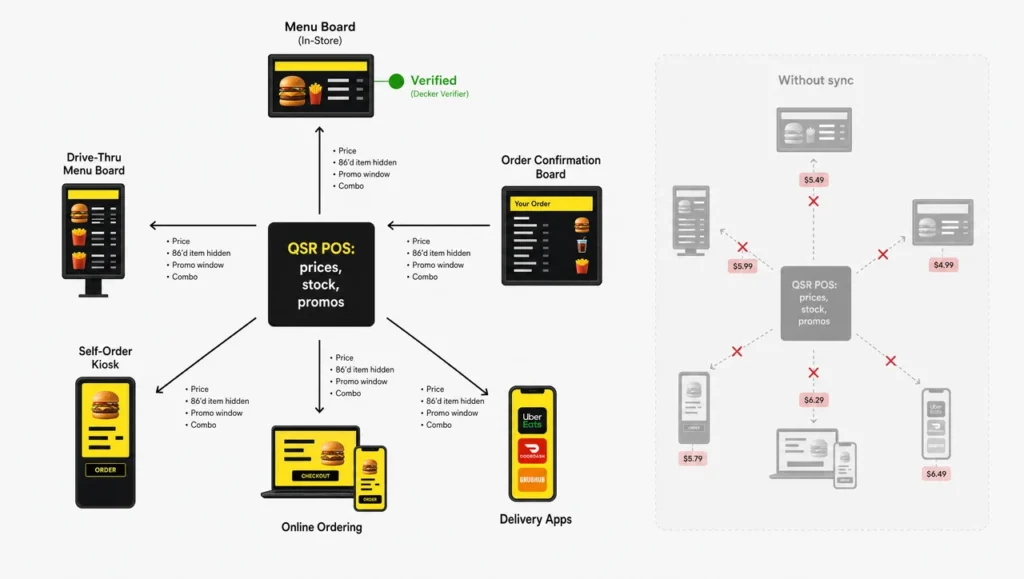
Timing matters as much as accuracy. In the 2025 drive-thru study, a suggestive sell offered after the order kept total time at 327.5 seconds, while one offered in the greeting pushed it to 364.2 seconds. Inside, 60.6% of 2026 on-premises visits included a suggestive sell. And as the accuracy figures show, an order confirmation screen that matches the POS lifts accuracy by 26 points.
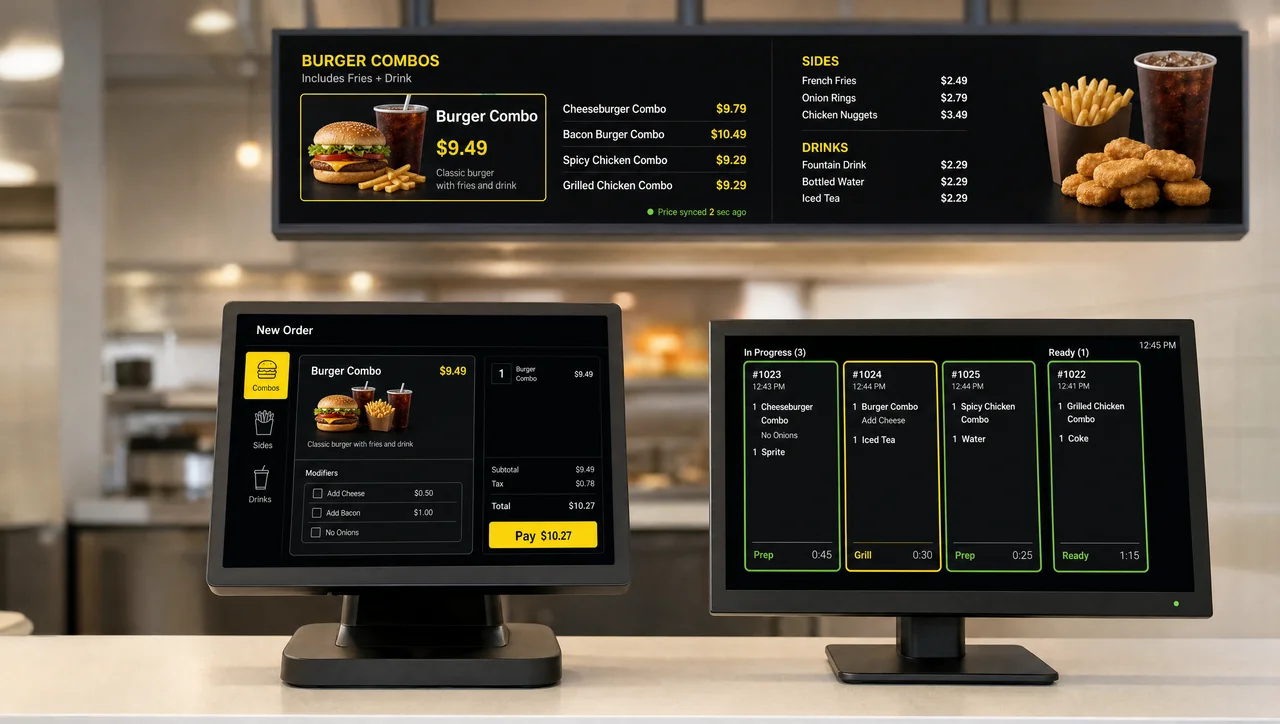
Decker connects the screens to the POS. Its QSR digital menu boards read prices and item availability from Toast, Square or Clover, so a price change reaches the board in 1 to 5 seconds and an 86’d item leaves the screen on its own. The player keeps the last menu in its offline cache if the store’s internet drops, and Decker Verifier checks that each screen actually shows the menu. Promo loops and order-status screens are covered by QSR digital signage.
When a QSR Doesn’t Need a New POS
A QSR does not need a new POS when switching costs more than it saves or when the problem sits outside the register. Check these conditions before you start demos:
- Your contract has more than 12 months left, and the early termination fee is larger than a year of savings.
- Your effective card rate is already under about 3% on your average check. Moving for a lower advertised rate may save nothing.
- You run one store with no drive-thru and online orders under 10% of sales. A basic register covers that workload.
- The real problem is on the screens or in the process, such as prices that do not match the boards, rather than in the POS itself.
- Your peak season starts in less than six weeks. Switch after the rush, not during it.
Questions and Answers
1 Which POS does McDonald's use?
McDonald’s runs its own in-house POS rather than a commercial system, so you cannot buy it. The company is modernizing its restaurants with Google, including an AI drive-thru assistant planned for a broader U.S. rollout in 2027. An independent store needs one of the commercial systems compared above.
2 What is the cheapest POS for a quick service restaurant?
Square Free costs $0 a month, but its 2.6% + 15¢ card rate is high on small checks. Clover direct charges 2.3% + 10¢, and GoDaddy charges 2.3% with no fixed fee on its Plus plan. Compare the effective rate on your average check, not the monthly price.
3 Do I need a POS with a drive-thru module?
Yes, if the drive-thru carries a large share of sales, as it does at Taco Bell, where more than 70% of sales flow through the lane. Toast, Revel, Oracle Simphony and PAR Brink include drive-thru tools. Square has none, and for Clover, SpotOn and Qu, check them in a demo.
4 Can I use my own iPad or hardware?
Square, Revel and Lightspeed run on iPads, so you can use devices you already own. Toast works only on Toast-approved hardware, and SpotOn and Clover sell their own terminals. Proprietary hardware usually cannot move with you if you switch systems.
5 Does a restaurant POS work offline?
Most do, with limits. Toast keeps taking orders and cards offline but pauses online ordering, loyalty, gift cards and menu edits. Square caps offline payments at $100 each by default, adjustable to $50,000. Card payments taken offline can still be declined later, and the restaurant carries that loss.
6 Can a QSR POS handle drive-thru and mobile orders together?
Yes. A QSR POS sends counter, drive-thru, kiosk, app and delivery orders into one kitchen queue. Drive-thru tickets can route to their own kitchen screen, and cashiers can hold one order open while they take the next.
7 How long does it take to switch QSR POS systems?
A single store usually takes from three to seven days with a simple setup to three or four weeks with a full menu build. Multi-location rollouts take two to three months. Menu configuration, payment account approval and hardware shipping cause most delays.
8 What POS do most quick service restaurants use?
Independent QSRs most often use Toast, which runs about 180,000 locations, along with Square and Clover. Large chains use enterprise platforms such as PAR Brink, which powers Burger King’s traditional North American restaurants, or build their own, as McDonald’s does.
9 Can I build my own POS?
Technically yes, with open APIs and tablet apps, but payment processing, card security compliance, kitchen displays and offline mode make it worthwhile only for very large chains. For one store or a small group, a commercial QSR POS costs far less to run.
10 Is QSR billing software the same as a QSR POS?
Not quite. QSR POS billing software covers checkout and receipts. A full QSR POS adds the kitchen display, drive-thru and online order routing, menu management, inventory and reporting, which are the parts that keep a counter-service line moving.