How VkusVill Cafe Centralized Digital Menu Boards Across 495 Locations

VkusVill Cafe replaced USB-based menu updates with centralized publishing through Decker across 495 locations. The platform now updates menus, prices, product availability, promotions, and time-of-day content from one control panel without requiring local staff to change files on each screen.
- locations connected
- 495
One platform manages menu publishing across the cafe network.
- local updates removed
- No USB drives
Employees no longer carry files to individual TVs.
- prices stay current
- Daily changes
Internal data updates flow into menu templates and screens.
About VkusVill Cafe

VkusVill Cafe is an in-store foodservice format within a large Russian grocery network. Across 495 locations, digital menu boards operate as part of the daily workflow and need to reflect current prices, product availability, regional differences, supply conditions, and the assortment available at each location.
VkusVill is a Russian grocery brand positioned around quality and natural products. The company opened its first stores in 2012. By November 2025, it operated more than 2,000 stores in 157 cities across Russia.
VkusVill has operated its in-store cafe format since 2019. The company’s official website includes a dedicated Cafe category, and products from this category are available at stores with an in-store cafe area. Ready-to-eat food and foodservice became part of the customer journey rather than a separate add-on service.
The Decker project covered 495 VkusVill Cafe locations. Prices changed every day, the assortment changed every week, and the USB-based workflow created delays and manual checks. The team needed a process that could publish the current menu centrally instead of replacing a file on every TV.
Project Goals for 495 Locations
The project had one primary goal. VkusVill Cafe needed to replace manual USB updates with centralized digital menu management across all 495 locations.
Before Decker, the team prepared separate instructions for individual TVs, sent the files to each location, and checked whether local managers had updated the menu. That process could work in a small network. Across 495 locations, every price change, assortment update, or promotion created a chain of manual tasks.
Guests could see the operational problem at checkout. The screen had to show current prices and available items so the final price or an out-of-stock product did not become a surprise. The implementation focused on four goals:
-
Remove USB drives
Take physical file transfers out of the menu update process.
-
Eliminate local publishing
Stop requiring employees at each location to publish menu files.
-
Automate live data
Update prices, assortment, and product availability from internal systems.
-
Centralize network control
Give the operations team one view of publishing across all locations.


How Decker Centralized Digital Menu Publishing
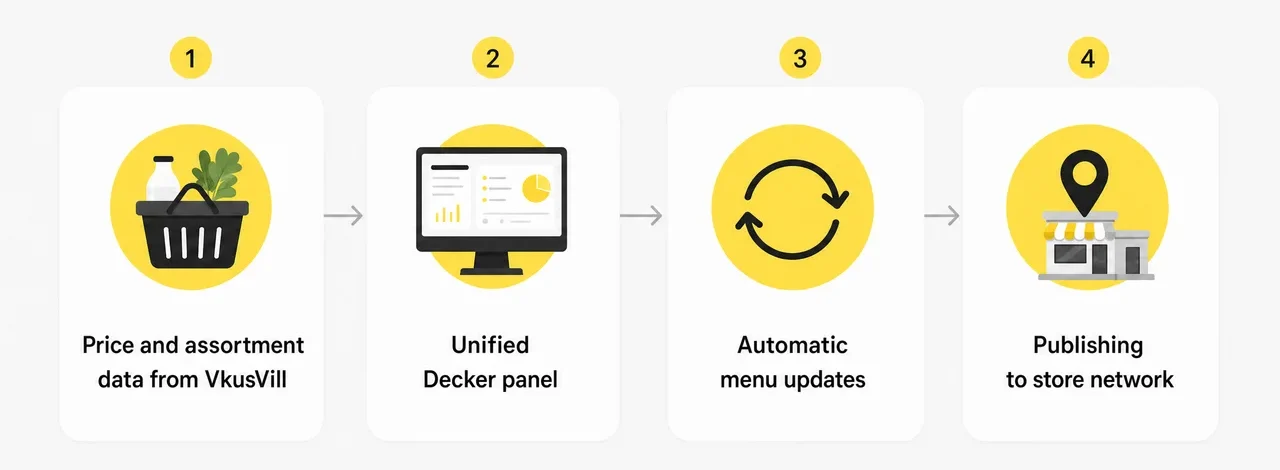
Decker connected the digital menu boards at VkusVill Cafe locations to internal pricing and inventory systems, then moved screen updates into one administrative platform. USB drives, manual instructions, and local publishing were removed from the menu update workflow.
When prices, assortment, or availability change in internal systems, Decker updates the data inside the menu template and publishes the current version to the screens. The content manager uploads creative assets once and launches a single campaign across a selected group of locations.
Local employees no longer transfer files, plug in USB drives, or treat every TV as a separate media device. The operations team manages publishing centrally instead of collecting confirmations from individual locations.
Time-of-day scheduling became an important cafe workflow. Morning screens can emphasize coffee, while evening screens can shift to other offers. Promotions, price changes, and product updates can launch without preparing a separate menu for each location.
Results Across the VkusVill Cafe Network
VkusVill Cafe moved menu updates from a local manual process to centralized publishing. The network stopped using USB drives, and screens began receiving synchronized menu, price, and availability updates.
The Decker rollout produced eight operational changes:
- USB drives were removed from the menu update process.
- Screen updates became automatic and synchronized.
- Location employees stopped participating in menu publishing.
- The operations team stopped checking every location manually.
- Screens began showing current information and the latest prices.
- Price and product availability stopped becoming surprises at checkout.
- Content and screen control became centralized across the network.
- The team gained a more transparent process for managing screen infrastructure.

Before and After Decker
The VkusVill Cafe project replaced per-screen USB updates with one managed digital menu workflow across 495 locations.
| Before Decker | After Decker |
| ❌ Menu updates used a USB drive on every TV. | ✅ USB drives were removed from the update process. |
| ❌ The team prepared a separate task for each TV. | ✅ Screens receive automatic and synchronized updates. |
| ❌ Location employees published and checked menus on site. | ✅ Location employees no longer participate in publishing. |
| ❌ The operations team monitored each location manually. | ✅ The operations team manages publishing from one platform. |
| ❌ Current prices and assortment were not guaranteed on every screen. | ✅ Screens show current menu information and prices. |
| ❌ Price or availability could surprise a guest at checkout. | ✅ Guests see current pricing and product availability before checkout. |
| ❌ Content and screen control were fragmented by location. | ✅ Content and screen control are centralized across the network. |
| ❌ The screen management process was difficult to track. | ✅ The team can follow a clear, centralized operating process. |
Client Testimonial

“When we started using Decker, I did not realize how much it would simplify the work not only at our locations but also for the design team.
Before Decker, we had to prepare a separate task for every TV, send the files to each location, and follow up to make sure managers had updated the menu. It was a constant cycle of USB drives and manual price changes.
Now our content manager uploads the content once and launches a single campaign across a dozen locations at a time. I know every screen will show current information and the latest prices. Guests notice the difference too. Price or availability no longer becomes a surprise at checkout.
For cafes, hourly scheduling is also useful. In the morning, we can emphasize coffee. In the evening, we can shift attention to other offers. Decker has made menu updates, content management, promotions, and location-level changes much easier.”