How Social Media Digital Signage Turns Screens Into Live Feeds


Social media digital signage displays live posts, hashtag feeds, mentions, reviews and user-generated content from Instagram, TikTok, Facebook, X and LinkedIn on the physical screens inside your business, and the feed refreshes itself as people post.
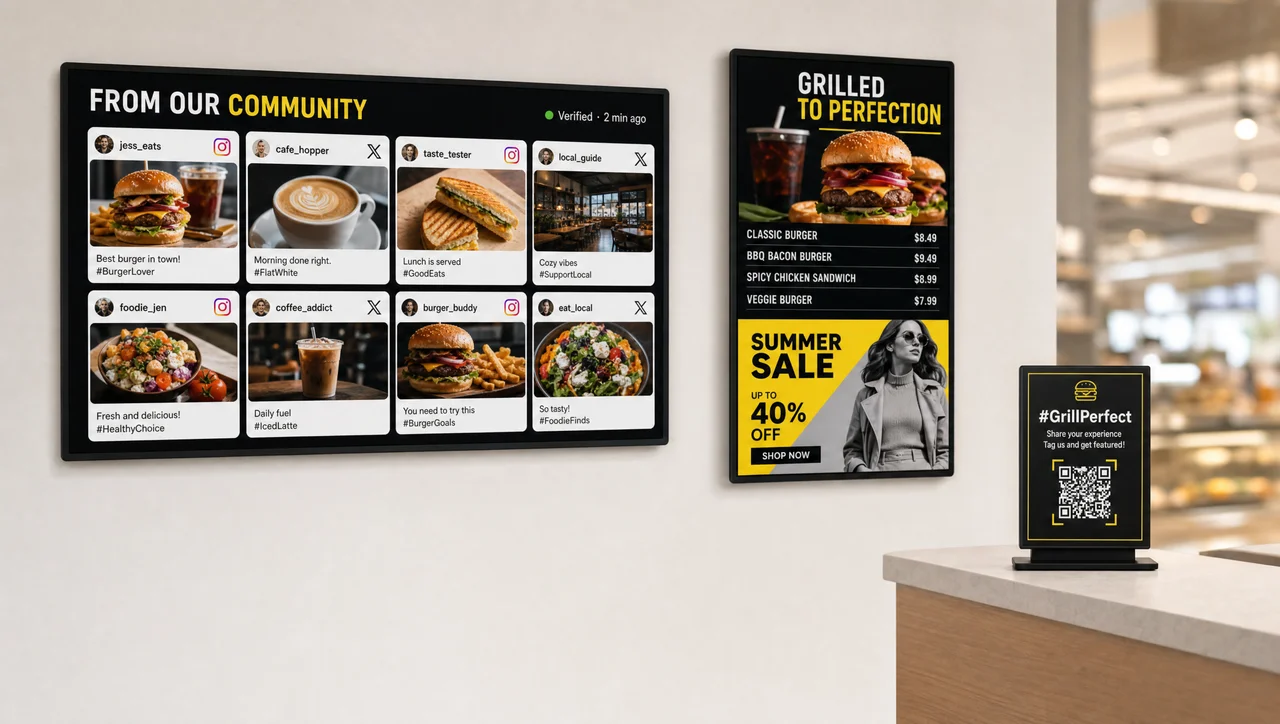
A customer walks into your coffee shop and sees the photo of your signature latte she posted yesterday running on the wall screen. Across town, students gather at a university lobby display showing a live X (Twitter) feed of campus events, adding comments that appear within seconds.
Down the block, a restaurant menu screen cycles guest photos of favorite dishes — an authentic showcase no marketing team could replicate at that volume.
None of this sounds futuristic today. Social media digital signage does exactly this to ordinary screens the moment they stop looping stock images. Here is what follows: what it covers, why it works, where it fits and how to set it up.
What Is Social Media Digital Signage?
Social media digital signage is a live feed that merges two things you already have: digital displays in your space and an audience publishing content about you online. The software pulls live social content through platform APIs, filters it, and plays it on your screens as a running feed instead of a fixed image.
Vendors sell it under two names that mean the same thing — social media digital signage and social media wall digital signage — so treat them as one category when you compare social media walls for retail, hotel or event use.
Think of it as a digital canvas. Tweets, Instagram photos, Facebook updates, LinkedIn milestones and customer reviews converge on the wall in real time, and ordinary screens become live communication hubs that keep people informed, entertained and connected. Nobody exports a JPEG, nobody carries a USB stick to the display, and the wall never shows last quarter’s campaign.
These displays turn up in high-traffic areas — malls, corporate buildings, conference centers, reception areas and public spaces — because the format rewards places where people already pause. The goal: make passersby stop, participate and contribute to the conversation. Unlike a printed poster, the screen gives a live, unscripted glimpse of what customers talk about, like and share right now — public opinion rather than brand copy.
Social Media Signage vs Static Billboards and Looping Slideshows
Static content gets ignored. Screens repeating one slideshow for a month stop registering with regular visitors after the second visit. A display refreshed once a quarter competes with a phone refreshing every second. Constantly updating content works differently: viewers glance at something familiar, notice something new, and actually stop to watch. Constant change transforms these screens into powerful engagement magnets, and moving content holds attention longer than a loop.
| Traditional signage or slideshow | Social media digital signage | |
|---|---|---|
| Update frequency | Manual, weekly or quarterly | Continuous, as posts arrive |
| Content source | Your design team | Your audience, plus your own channels |
| Manual effort per update | Design, export, upload, publish | None after setup, apart from moderation |
| Interactivity | None | Post, get featured, re-share |
| Credibility signal | Brand messaging | Real people, verifiable accounts |
The Engagement Loop: Post, Display, Re-Share
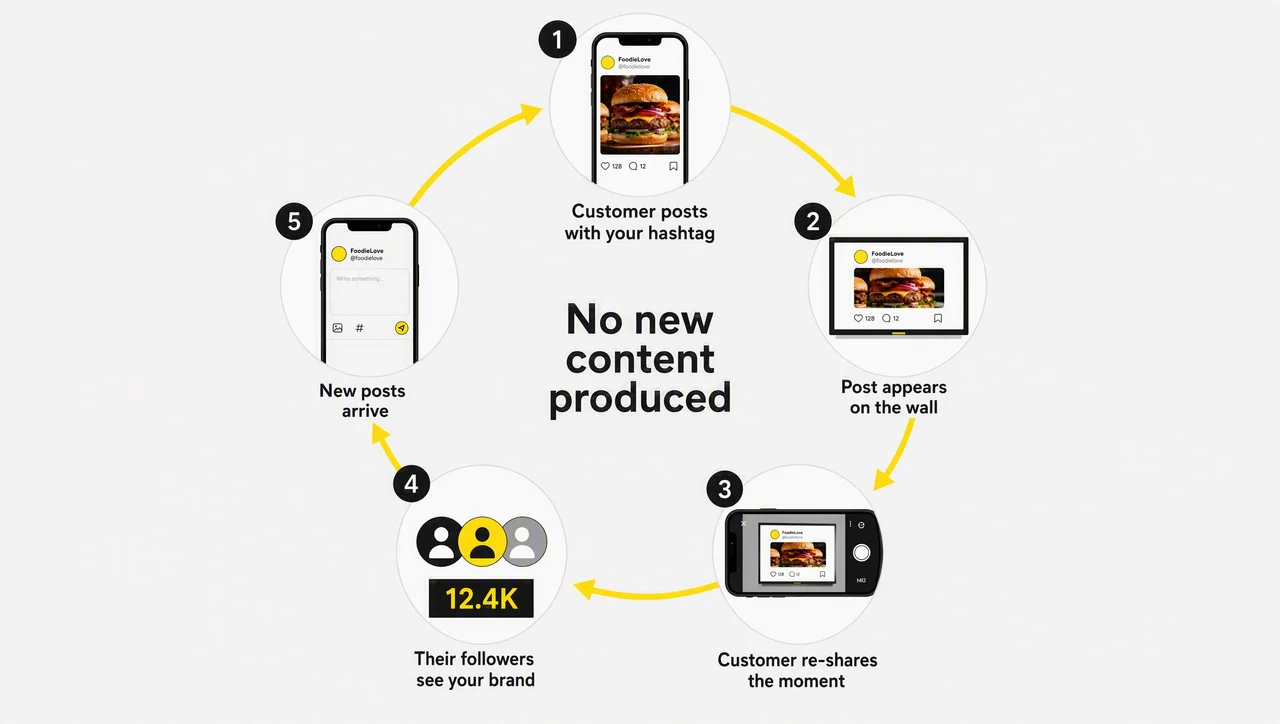
The loop, not the screen, makes this format work, and it runs as a two-way street. A customer posts about your brand, walks in, sees their own Instagram photo on your screen, and shares it again. That single moment builds social proof in the room, drives more UGC, and reaches people even further out.
Your audience becomes your content creator, your brand advocate and your marketing channel at once: passive viewers turn into active participants, and engagement grows through followers you never targeted.
Which Platforms and Content Types You Can Display
Most platforms support the major networks — Instagram, Facebook, TikTok and X — while some also integrate LinkedIn, YouTube and Pinterest. Office environments benefit from integrating workplace platforms such as Slack, Microsoft Teams and Webex alongside traditional social networks, and the same interface usually carries weather, currency or RSS widgets.
Posts form just one part of it. One cohesive display carries reels, stories, hashtag feeds, mentions, reviews, check-ins, videos, images, announcements, promotions, event updates and employee communications — which lets the same network serve retail marketing downstairs and internal communications upstairs.
| Platform | What it contributes | Typical environment |
|---|---|---|
| Food and product photos, reels, stories | Restaurants, retail, hotels | |
| X | Live comments and reactions to sessions | Conferences, campuses |
| Employee achievements, company news | Office lobbies, reception | |
| TikTok / YouTube | Short video, behind-the-scenes clips | Retail, events, malls |
| Slack / Teams / Webex | Internal announcements, milestones | Workplace screens |
In other words, one social wall serves marketing and internal communication from the same feed. The next question follows: not what a wall shows, but what it earns.
Why Put Social Media on Your Digital Screens
Social feeds on screens are the cheapest content a business can run, and the audience is already there: research from Hootsuite estimates 4.2 billion people worldwide use social media, an average of 144 minutes each day. Screens in retail, hotel and campus lobbies hold far more potential than they currently use, and the technology to close that gap already sits in most buildings.
Your audience arrives carrying that habit, and social media digital signage simply routes it into the channels you own.
It Builds Trust and Social Proof Instantly
Trust comes first, and it carries the most weight. A post from a paying customer reads as evidence; a banner reads as advertising. Industry research widely quoted in the sector reports that 90% of consumers trust user-generated content more than traditional advertising, and that 44.8% of internet users research products on social media before buying. That audience feels more likely to trust earned media — reviews, recommendations, influencer posts — than paid advertising.
Put that on a wall and the credibility does the selling. A post published under a real name reads as candid feedback, signals transparency and adds an authenticity no polished brochure can manufacture. Reviews and check-ins carry the same weight in a restaurant or hotel lobby.
⚠️ “Any public hashtag feed is safe to display” is not true. An open hashtag can be hijacked within minutes by anyone who types it, and one inappropriate post on a customer-facing screen undoes a lot of goodwill.
It Captures Attention, Increases Interaction and Dwell Time
The second argument covers engagement. Social posts on digital signage open a direct line to the customer, deepen involvement and build community. One widely cited figure holds that 91% of brand followers go on to visit the company’s website or app, so the audience in front of your displays already leans toward acting.
Format matters: posts with images and video collect more engagement than straight text, and displays read best when the text block stays short. Screens sit twenty feet from the viewer, not twenty inches. Offline the payoff shows up as dwell time in the shop, stronger sales promotion and better customer loyalty.
Your Content Never Goes Stale, and Costs Almost Nothing to Produce
The third argument covers economics. Social feeds update in real time, automatically. Feeds update themselves, so nobody manages a publishing schedule or refreshes content by hand. A post published to Instagram at 09:00 reaches the wall the same minute, and screens stay current without anyone lifting a finger.
Digital signage content automation in its simplest form: it cuts the time and money spent creating posts, relieves employees through automated playout, and keeps screens up-to-date by blending UGC with corporate content. Cost-effective updates need no intervention unless you approve posts first. Automation does not mean losing control: you determine in moderated processes whether content appears automatically or only after approval.
It Drives Website Traffic and Grows Your Following
The fourth argument covers traffic. A QR code linking straight to the company’s website works as the most efficient strategy: viewers scan it with a smartphone and land on the page, pulled by more information, special offers or exclusive content.
Growing an audience runs on three habits: ensure social media handles stay visible on every display, make following easy by incorporating QR codes beside the feed, and use popular hashtags to reach a wider audience. Embed the same feed on your website, mobile app and intranet and online presence grows without new production.
It Improves Employee Morale and Internal Engagement
The fifth argument points inward. An engaged workforce produces more, and employees who follow the business take ownership of their work and contribute to company goals. Most organizations miss one gap: some staff follow the corporate LinkedIn or Instagram, but rarely all of them.
Employee-facing signage closes it by putting customer accolades and reviews in the break room, which boosts morale and a sense of appreciation. That kind of recognition is hard to manufacture on purpose, and social media delivers it naturally. A second effect: staff read genuine accounts of how products and services get used, which regularly leads to new product ideas or process improvements.
Overall, those five arguments hold in any building with a screen. Specifically, the next section answers where they land hardest.
Where It Works: Industries and Use Cases
Social media digital signage works across industries, and the outcome that repeats in every vertical stays the same: better communication, increased visibility and stronger communities. Only the content mix changes.
Retail Stores and Point of Sale
Social platforms shape purchasing behavior, and one good photo of a product in real life often pushes a shopper from browsing to buying. Pair that with retail screens in the aisle and the timing works for you: reviews and check-ins create social proof at the moment someone stands in the aisle deciding whether to spend.
Retail screens showing branded content beside posts from happy customers who already bought spark enthusiasm in people who came in for something else — which is how retailers promote a lively community and lasting loyalty.
Restaurants, Cafés and Hospitality
Screens for restaurants and cafés show reviews, food photos and check-ins that shape dining decisions in the moment: real-time social proof helps a guest choose your establishment ahead of competitors down the street. The strongest version cycles guest photos between price panels, so the feed sits alongside price lists and promo loops.
Hotels and Travel Businesses
Travelers post constantly: photos, videos, recommendations, vlogs. They need one reason to tag your property, and a lobby wall supplies it. Hotels and resorts collect that UGC and run it on hospitality screens across the property, turning guest posts into live marketing.
Posts from other guests create a sense of community and show new arrivals what real stays look like — authentic moments, not campaign imagery. A guest who spots their post shares it again, and your brand meets an audience you never went looking for.
Events and Conferences
Events and conferences suit this format better than any other setting, and attendee posts do the work for you. Live updates, tweets, photos and reactions from attendees turn event and trade-show displays into a shared experience extending beyond the physical venue, which static event signage cannot match.
People love seeing their own post on a big screen, that excitement proves contagious, and every extra post generates organic promotional content while the event runs.
Posts from the floor split into three streams that give organizers an easy way to fill the schedule: photos and videos shot during the event, comments and reactions to sessions or speakers, and participant shoutouts. Run it through a moderation and scheduling tool so organizers control exactly what appears, filter out anything off-brand, and keep the display style consistent with the event branding.
Corporate Offices, Lobbies and Internal Communications
Office lobbies display employee achievements, company news and industry discussions from LinkedIn, while Slack or Teams updates keep staff informed on the same screen. Add anniversaries, company events, team milestones and live customer reviews and you have a culture feed that builds community inside the organization.
Most companies split the network into two circuits: employee-facing screens carry recognition and internal updates, external-facing screens in the lobby carry customer reviews and campaigns. Workplace communication screens and marketing screens share one dashboard while showing completely different content.
Educational Campuses
Campus screens feature student activities, events and academic achievements, making participation visible to everyone crossing the lobby. A screen by the cafeteria collects more attention than any noticeboard. Two ways of sourcing cover it: posts carrying university hashtags on Instagram, or a whitelist of approved student accounts. Screens set up this way showcase day-to-day life at the university, not the brochure version of it.
Public Spaces, Malls, Reception Areas and Event Rooms
Beyond the point of sale, live social feeds suit event rooms and reception areas, where visitors already have time on their hands, and public spaces where voices from across the social spectrum land in one place. The output device barely matters: a digital stele, a screen, a touchscreen kiosk or a high-resolution LED wall all carry the same feed.
In addition to the setting, the campaign format decides what a social feed does for you. Next come the mechanics.
Campaign Types That Work on Screen
Five campaign formats put social content on screen, and each one that follows builds community and participation — effective tools for marketing, engagement and communication at once. The format of the social feed changes; the wall behind it does not.
Hashtag Campaigns
Encourage users to post with one specific hashtag, aggregate those posts, and display them. A post that misses the tag never gets collected.
Hashtags amplify a campaign to a larger audience, because participants share both their content and the tag with their own networks. A post that names your hashtag pulls in the next one, so displaying the campaign tag across your signage increases brand visibility and keeps the feed supplied.
User-Generated Content (UGC) Campaigns
Posts created by customers carry this format: photos, videos, reviews and testimonials, curated and published to the wall. A post from a real customer carries more weight than a campaign asset, and testimonials collected this way cost nothing to produce. Feeds built from UGC keep filling themselves, because people publish knowing their content could reach the big screen.
Create branded groups or a dedicated social account, ask your audience to tag it, then curate posts in real time onto LED walls or kiosks — turning signage into an interactive gallery of your audience’s experiences.
Polls, Surveys and Interactive Q&A
Social media covers interaction as much as publishing. Run a poll via X or Instagram stories and push live results to dvLED video walls or kiosks as votes arrive. Ask questions tied to your brand, products or services to spark conversation and raise real-time engagement.
Promotions and Incentive Campaigns
During a store promotion or special event, prominently feature the campaign hashtag on your digital displays and reward participation. Two incentives do the work: discounts, and the chance to be featured on the screen. A post tagged during a retail promotion or hotel event earns both. Beyond the excitement and urgency, it gives you a clean way to track and aggregate social media engagement for the period.
Awareness and Educational Campaigns
Awareness campaigns inform the public about certain issues or topics. Three content types carry them well: informative content, personal stories and supportive messages. The mix increases awareness and engagement at once, and non-profits and campuses rely on it for exactly that.
Specifically, none of these formats requires new hardware or a new team. As a result, the build fits into five steps.
How to Set Up Social Media Digital Signage in Five Steps
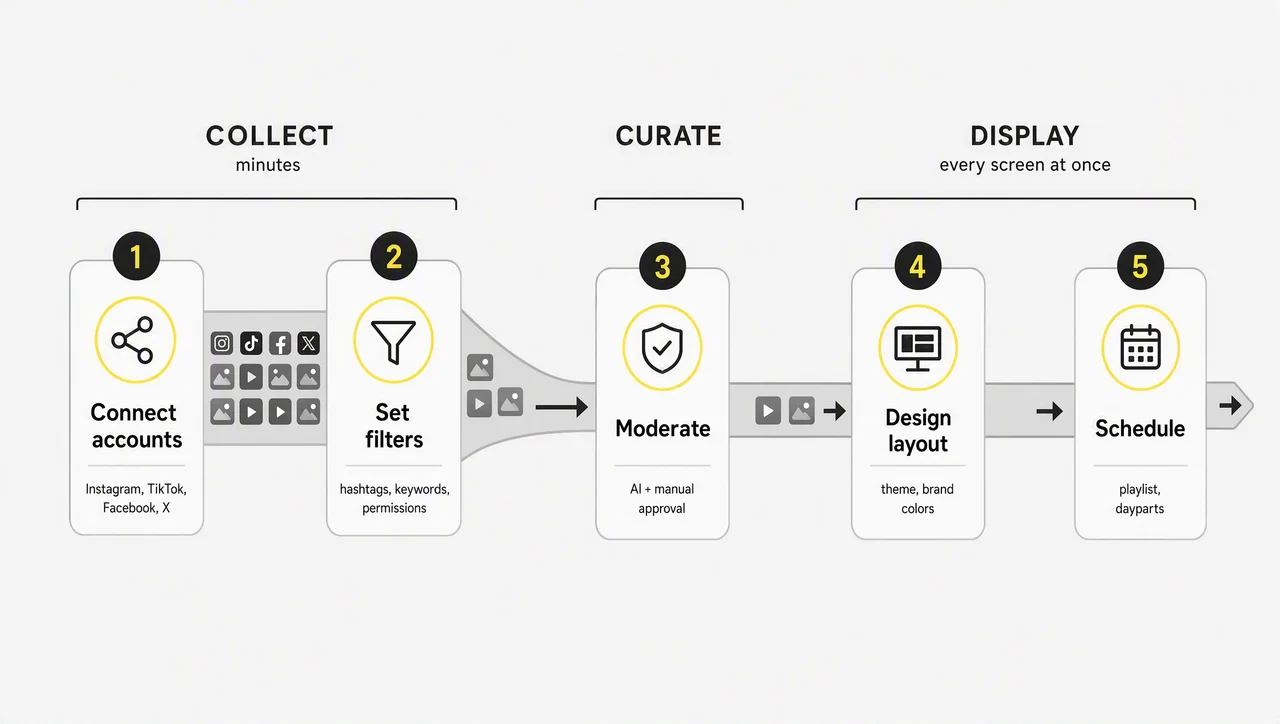
Setting up social media digital signage takes five steps that require neither a technical background nor expensive hardware. Modern solutions eliminate the technical complexity, and the whole logic reduces to collect, curate, display.
Step 1 — Choose Software and Connect Your Social Accounts
Start by choosing a digital signage CMS that supports digital signage social media integrations, then connect the accounts you want to pull content from. Instagram, TikTok, Facebook and X cover the most common starting points.
Check that management happens through one intuitive dashboard with user permissions, because a wall run by marketing, HR and store managers needs roles rather than a shared password. Confirm the tool works with the signage software you already use, or runs on the media player without installing separate apps.
⚠️ “Connect once and forget it” is not true of platform APIs. Social feeds require a business account on most networks, access tokens expire, and each network limits which accounts and hashtags a third-party tool may read. Ask the vendor who re-authorizes the connection and how you find out when a feed goes silent.
Step 2 — Collect and Choose What to Display
Step two decides what your screens actually show. Modern platforms collect posts, hashtags, mentions, reviews and UGC from several networks into one centralized dashboard and display them through customizable layouts. Hashtags, keywords and user permissions control what gets through, which means nothing reaches the wall by accident.
Four content mixes cover most cases:
- Your brand’s own posts from one or more platforms.
- Posts tagged with a specific campaign hashtag.
- User-generated content shared by your customers or guests.
- A mix of all three, rotating automatically.
Choose by asking what feels relevant to the audience in that space — Instagram works in retail, LinkedIn in a reception area. Across several brands or locations, a scheduler queues posts in advance so the hashtag feed never runs dry.
Step 3 — Set Your Moderation Rules
Before anything goes live on a public screen, set up moderation. It provides three controls: approve content before it displays, block certain keywords, and make sure nothing off-brand slips through. Robust platforms combine automatic filtering with a manual review queue, and you decide whether posts appear instantly or only after approval. Customer-facing screens make this step non-negotiable.
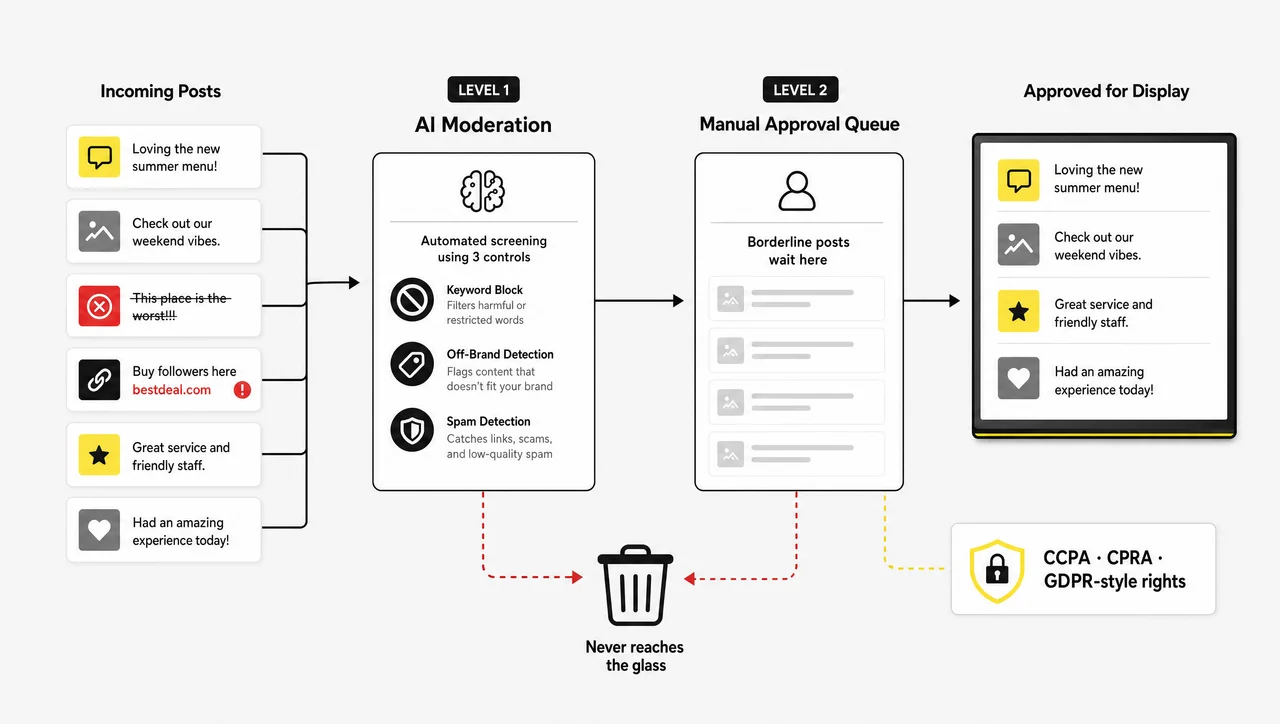
Moderation keeps a social wall brand-safe, and it also carries data privacy. A social feed republishes content created by other people, so CCPA and CPRA apply to the posts you collect, and end-to-end encryption should cover them in transit and at rest.
For visitors from the EEA, the UK and Switzerland, GDPR-style access and erasure rights apply to the same social content. User permissions decide who may push a social post to a customer-facing screen, and clear hashtag guidelines document the answer before anyone asks.
Step 4 — Design Your Layout
Keep it simple. Screens must stay readable from a distance, so favor images, reels and video over long blocks of text. Start from the ready-made themes the platform ships with — a dozen self-service layout options counts as normal — and match the result to your brand colors, fonts and style.
Content adapts to any screen size, so one layout serves several display formats and the same embed works on your website. A display should complement your marketing materials and the space, not read as a generic social media widget.
Step 5 — Schedule, Publish and Broadcast to Every Screen
With content and layout ready, set the schedule and push it live. The feed runs all day or sits in a playlist alongside other content: Instagram during peak hours, event updates or price panels at other times. A real signage platform earns its keep here.
In Decker the social wall is one item in a playlist, scheduled by daypart, location, venue format or day of the week, and published to every connected screen from one account without touching anything on site — the same engine that swaps a breakfast menu for a lunch menu also swaps a hashtag feed for an announcement loop. Decker’s scheduling and rotation rules cover both.
Displays synchronize in real time, so one publish reaches signage panels, TVs, LED walls and event screens simultaneously. Distribution runs one-to-many: screens in every location update quickly, without a site visit. Displays refresh the moment new social content meets the criteria you set in steps two and three, and that immediate refresh encourages continued participation.
However, a published feed and a playing feed differ, and that gap deserves its own section.
What a Live Feed Cannot Fix: Screens That Are Not Actually Playing
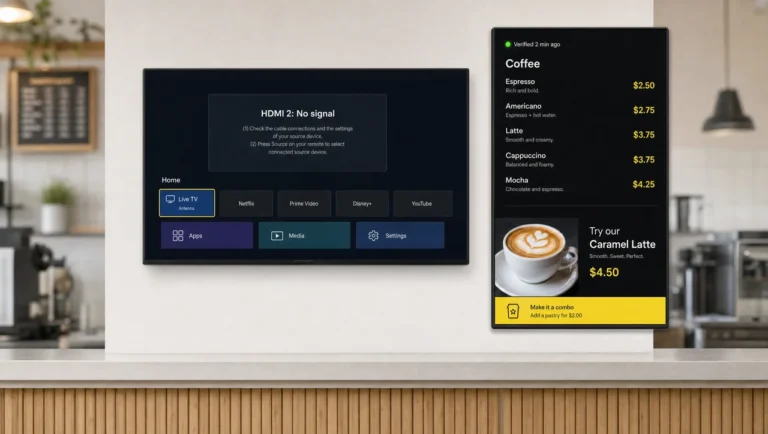
Every social wall platform reports the same thing — content was sent — and none of them confirms that it reached the glass. A media player freezes, a TV switches to the wrong HDMI input, a panel goes dark at closing and stays dark far longer than anyone expects — and the dashboard still shows a healthy green feed. On hundreds of screens, fresher content only deepens the assumption that it reached the glass.
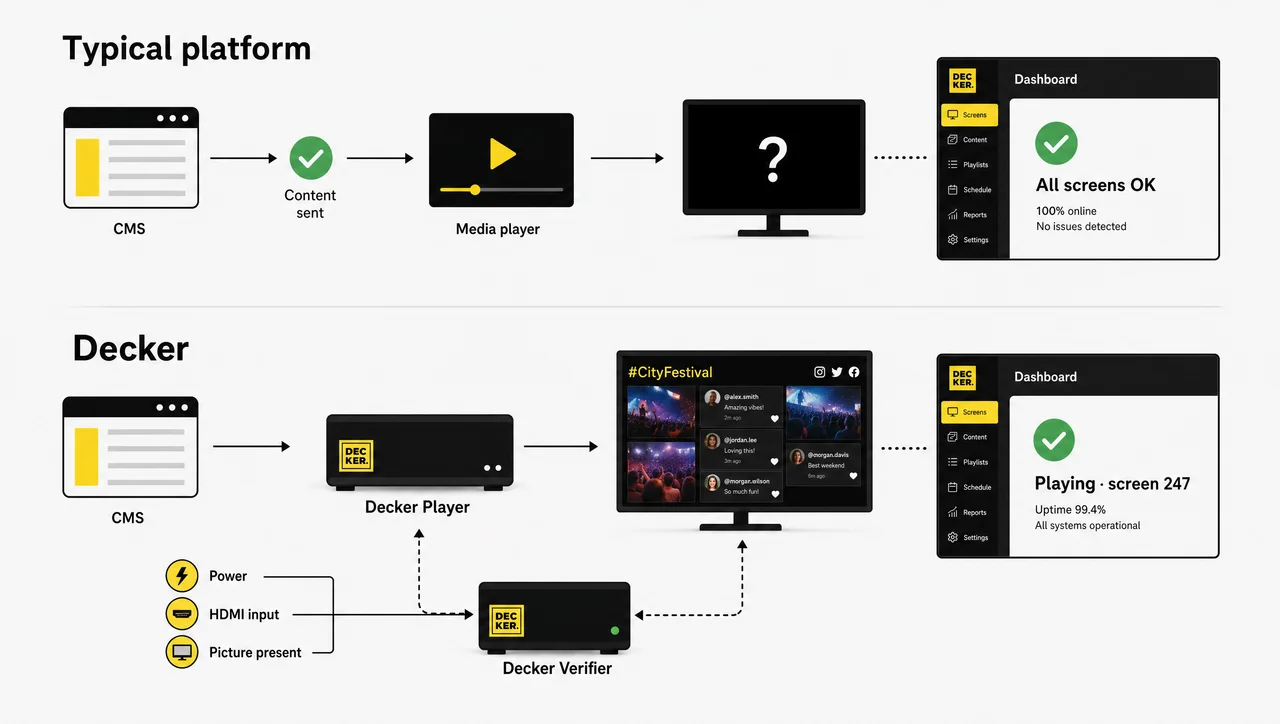
Decker was built on the opposite assumption. Behind each display sits a Decker Player that renders the content and a Decker Verifier that independently checks whether the picture is really there, restarts the player or the screen remotely, and switches the HDMI source back without a service visit.
That pair turns uptime into a number you can read per screen and per month instead of a hope. Decker connects 13,700+ screens across 490+ locations in 90+ cities, and company figures cite up to 80% less time spent on content updates and around 60% fewer screen outages after rollout.
Two consequences for a social wall. A social feed cannot repair a dark screen and does not replace device-level monitoring: stale posts and a frozen media player look identical from head office. Buying for more than a handful of displays, put uptime and verified playback on the requirements list beside AI moderation — that separates “the feed is live” from “the feed is live on screen 247.”
Therefore verified playback belongs on the same shortlist as moderation and analytics. In addition, the rest of that shortlist looks like this.
Features to Look For When Choosing a Platform
A social media wall is a different product from general signage software, so compare vendors on the capabilities that actually differ rather than on marketing pages.
⚠️ “Free social wall, unlimited screens” rarely survives contact with the invoice. Free tiers of a social media wall cap connected screens, refresh rate or the number of posts retained, and moderation is not available below the first paid tier. Check the current limits on the vendor’s own plan comparison before planning a rollout.
Core Features to Look For
- AI moderation. Automatic detection filters irrelevant or off-brand posts and keeps every display brand-safe before a human looks at it.
- Manual approval queue. A post that trips the AI moderation filter waits for a human; the two layers together make public hashtag feeds usable.
- Reactions. Audiences react instantly to Instagram posts and reviews they like on the wall, adding engagement without an app.
- Real-time updates. Posts published on Instagram reach the wall within seconds, and screens refresh without a manual push.
- QR upload. QR codes let audiences upload content with no social media account required — valuable at events and conferences where half the room never posts publicly.
- Multiple themes and layouts. Customize the appearance without design skills, optimized for retail, lobby and event screens of any size.
- Free embed features. A social media hub that offers the same feed for internal or external websites at no additional cost, alongside the physical displays.
- Built-in analytics. Engagement, impressions, dwell time and audience interactions tracked across every display.
- Data privacy. End-to-end encryption, secure CCPA and CPRA handling of every social post you collect, and a documented removal path.
Hardware and Software Compatibility
Compatibility answers the last objection from anyone who owns screens: most signage software runs on smart TVs and common media players, so no proprietary hardware blocks the start.
Supported output devices cover digital signage panels, TVs, LED walls, kiosks, projectors, reception screens, event displays, digital stele and dvLED panels, all broadcast from one centralized platform through a single media player per screen. Where the vendor supplies its own media player and monitoring device, as Decker does, you gain device-level control at the cost of standardizing what sits behind the screen.
Social-First Signage vs Traditional Digital Signage Tools
| Capability | Social-first platform | Other digital signage tools |
|---|---|---|
| Real-time social updates | Native | Limited, usually a web widget |
| AI plus manual moderation | Yes | Rarely |
| Studio for mixed media content | Yes | Varies |
| QR-code uploads without an account | Yes | No |
| Brand customization of the feed | Full | Limited |
| Audience analytics | Per display | Aggregate at best |
| Verified playback on the screen | Rare | Rare |
The table above splits the advantages cleanly: traditional tools play static content reliably, social-first solutions aggregate fresh content well, and almost nobody confirms what the screen really shows. That last row marks the gap Decker was built to close.
Overall, the tool sets the ceiling. However, day-to-day habits decide what actually reaches the wall.
Best Practices for Social Media Digital Signage
Setup takes the least effort; four operating habits decide whether a social media wall still earns its place in month six.
Set a refresh interval and test it. Stale posts defeat the purpose of a live feed, while rapid updates create excitement and slower transitions aid content absorption. Balance freshness against viewer comfort and test timings against your own audience and location.
Match your brand visuals in the layout. Colors, fonts and design aesthetics should make the feed belong to you, not read as a generic embed borrowed from a website.
Display your hashtag on screen. Tell people what to post and how to get featured. That single prompt drives more contributions than anything else, and costs nothing but screen space.
Place screens where people linger. Checkout lines, lobbies, waiting areas and the space by the front desk work best: people there have time to look, read and engage. A brilliant feed in a corridor nobody stops in wastes the license.
Similarly, some situations defeat all four habits. As a result, knowing when not to run a social wall matters as much as knowing how.
When Social Media Digital Signage Is Not the Right Fit
Social media digital signage underperforms in five situations, each with the condition that triggers it:
- Post volume is too low. If your hashtag brings in fewer than five fresh posts a week, the wall repeats itself within a day and quickly reads as neglected. Rotate branded content and reviews until volume grows.
- The screen has a transactional job. Social content does not belong on every panel: order-status and wait-time displays cannot afford the distraction, because they exist to deliver one piece of information fast.
- Nobody owns moderation. If no named person reviews the queue on a working day, restrict the wall to your own accounts or a whitelist.
- The environment stays regulated or deliberately quiet. Clinic waiting rooms, bank branches and exam halls carry compliance and tone constraints that unfiltered third-party content will eventually break.
- You cannot confirm what your screens are showing. On a network above a few dozen displays without device-level monitoring, adding a live feed multiplies failures you will never see. Fix visibility first — with Decker Verifier or any equivalent hardware check — then add the wall.
In contrast, everywhere the format fits, measurement comes next. As a result, two layers of data matter.
Measuring Engagement, Data and Results
Social feeds on digital signage create measurable improvements in customer engagement and brand visibility that businesses can report rather than assume, and companies running these systems record more social activity and stronger community connections. Two layers of measurement turn the performance of a social wall from a feeling into a number worth reporting.
Metrics to Track, Online and In Store
| Metric | What it tells you | Where to track it |
|---|---|---|
| Hashtag usage | Whether the on-screen prompt works | Instagram or wall dashboard |
| Mentions and UGC volume | Supply of content for the feed | Instagram and wall dashboard |
| Impressions and audience interactions | Reach per display | Built-in signage analytics |
| Foot traffic | Whether the screen pulls people in | In-store counters, retail POS |
| Dwell time | Whether the content holds attention | In-store analytics, event data |
| Screen uptime | Whether the feed ran at all | Device monitoring, HDMI status |
Use the numbers practically: analytics stay useful only when they change playback and content creation, not when they fill a slide. Hashtag trends show which campaign travels furthest; a screen scoring low on dwell time usually needs a new position, not new content. In Decker the uptime row comes from the device itself, not from a delivery log.
Audience Insights and Feedback Collection
Beyond display metrics, the format taps a wealth of user data. Posts that draw reactions reveal customer preferences better than a survey, and post types, hashtags and user demographics build a detailed profile of your clientele. Reviews and mentions on the wall double as a live read on customer sentiment, and feeds tagged by campaign separate one promotion from another.
The screen also opens a research channel: a QR code on the wall leads to a feedback form or survey on the company’s website.
Therefore the loop closes where it started: posts arrive, screens show them, numbers come back.
Questions and Answers
1 What social media platforms can I display on my screens?
Most platforms that run social feeds offer the major networks, and some add LinkedIn, YouTube, Pinterest and workplace tools such as Slack, Microsoft Teams and Webex. The exact list depends on the software you choose, so check integrations before you commit to a contract.
2 Can I display Instagram feeds on digital signage?
Yes. Feeds of posts, reels, stories, hashtags and UGC route to digital signage displays through an aggregator, with no manual file transfer. Instagram requires a business account, and the API connection needs periodic re-authorization.
3 What types of content can be shown on digital signage?
Anything the platform can pull or you can upload: reviews, testimonials, announcements, promotions and event updates alongside the social feed. One network serves retail marketing downstairs and employee engagement upstairs, split by screen or by daypart.
4 Do I need special hardware to run social media digital signage?
No. A screen, an internet connection and the right software cover the minimum, and smart TVs with common media players handle the rest. Vendors supplying their own media player and monitoring device, Decker among them, add remote recovery and uptime reporting on top.
5 How do I get customers to actually post content for my screens?
Put the campaign hashtag where people see it, on the screens and in the space itself. Seeing their own Instagram post on a big screen works as a surprisingly effective motivator; a discount at the till makes it stronger. A post from one guest usually pulls in two more.
6 Is social media digital signage difficult to set up and manage day to day?
Setup takes a few clicks — easy enough for a store manager — and the feed then runs itself. Moderation forms the ongoing task, plus reconnecting accounts whenever an API token expires. Under CCPA and CPRA a person may ask you to remove their post, so keep a takedown path documented.
7 Can I mix social posts with menus and promotions on the same screen?
Yes, and most businesses should. Treat the social wall as one item in a playlist and give it the slots where people wait rather than the slots where they order. You set the rules once and they run on their own.
8 How do I know the feed is actually playing on every screen?
Most platforms only confirm that content was sent. To know it reached the glass you need monitoring at device level: player status, screen status, HDMI input and remote restart.