
A Digital Beer Menu Board That Changes With Every Keg in Your Bar
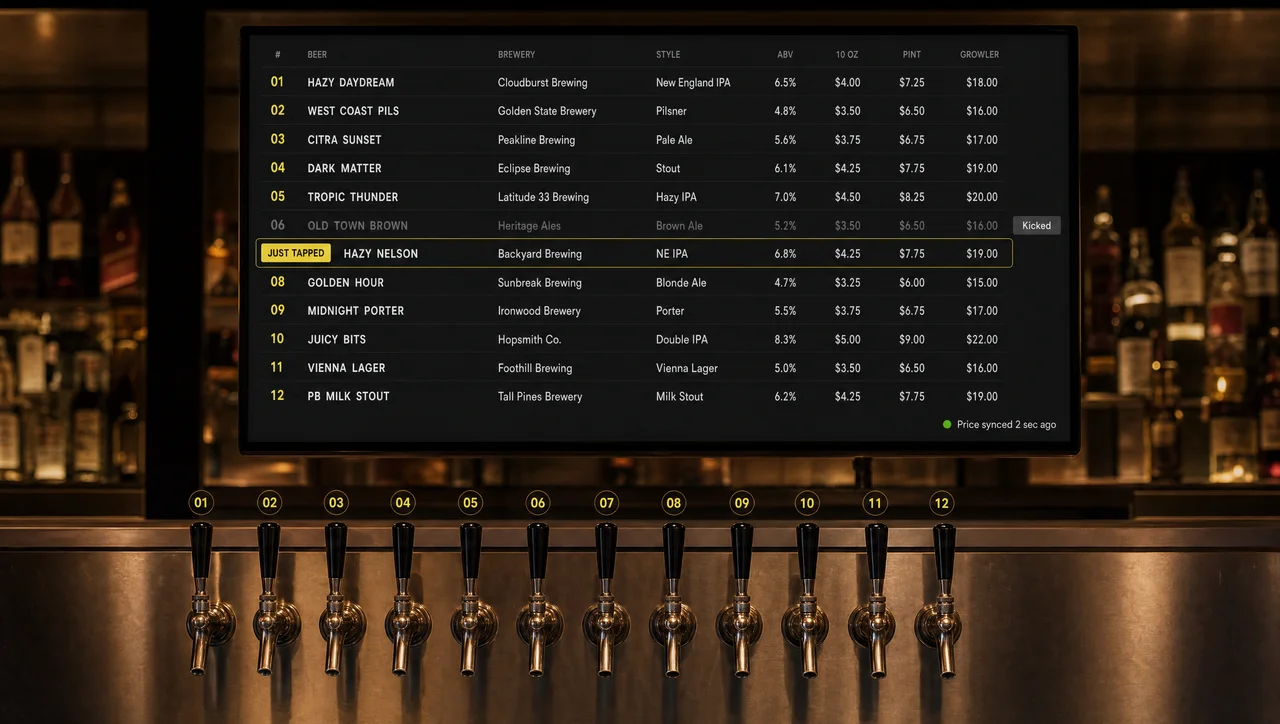
A digital beer menu board from Decker turns the TV behind your bar into a tap list that reads prices, pour sizes, and stock from your POS. As a result, when a keg kicks, its line leaves every screen in 1–5 seconds; when happy hour starts, the board switches drink prices by schedule and switches them back on time.
-
Kicked keg = gone Digital tap list follows the POS
Mark a beer as 86’d at the register, and its line leaves every digital beer menu board in 1–5 seconds.
-
Every room in sync One beer menu board, every bar area
The main bar, patio, and upstairs screens show the same draft list after a single change in the POS.
-
Happy hour on time Happy hour menu board on schedule
Drink prices start and end per location within your state’s limits; as a result, nobody rewrites prices at 7 p.m.
Benefits of a Digital Beer Menu Board for Bars and Pubs
A digital beer menu board is a screen that keeps the draft list, the most-read part of a bar’s menu, as current as the register, so guests order only beers you can pour. Draft made up 52.3% of on-premise beer volume in the US in the year to early 2025 (CGA by NIQ), and it changes more often than anything else on the menu.
-
Fewer “What's on draft?” questions
Guests read the tap list from any seat instead of asking the bartender to recite it, so staff spend the shift pouring rather than repeating the lineup.
-
No orders for a kicked keg
A beer marked sold out in the POS leaves all digital beer menu boards in the bar within seconds. Nobody orders it, waits, and gets turned away during the Friday rush.
-
No weekly reprints
Tap rotations and distributor price changes go live without printing, laminating, or rewriting chalk, because the digital beer menu reads the same data the register uses.
-
The board and the register agree
Each pour size carries its own price from the POS. Draft prices rose about 1.8% a year (CGA by NIQ, 2025), and every one of those small steps reaches the screen by itself.
-
Bigger pours get noticed
Ten-ounce, pint, flight, and growler prices show on one line, and rules can highlight a featured beer or a larger pour at the hours when it sells best.
-
One edit for every room and location
The main bar, the patio, and the upstairs room show the same tap list, and a group of bars updates from one change instead of one board at a time. As a result, tap lists match in every room.


Bar Menu Board Options: Chalkboard, Letter Board, or Screen
A bar menu board comes in three forms: a chalkboard rewritten by hand, a letter board with swappable characters, or a screen that shows a digital bar menu from live data. The first two cost less on day one, but every change needs a person, a ladder, and time in the middle of service. A screen costs more up front and nothing per change after that.
| Chalkboard | Letter board | Digital bar menu board | |
|---|---|---|---|
| Changing one beer | Someone rewrites it by hand | Someone swaps the letters | The POS change shows in 1–5 seconds |
| What each line shows | Shows name and price | Shows name and price | Shows style, ABV, IBU, and a price per pour |
| Several pour sizes | Crowded, often left out | Limited by the letter set | Keeps two to four prices on one line |
| Reading in a dim bar | Depends on handwriting | Needs room light | Uses a backlit, high-contrast dark theme |
| Happy hour prices | Needs a second board or an eraser | Needs a second board | Changes by schedule |
| Several rooms or bars | Each board needs a visit | Each board needs a visit | One edit updates every screen |
| Cost per change | Uses chalk and staff time | Uses letters and staff time | Adds no cost after setup |
| Upfront cost | Costs the least | Costs little | Needs a TV, a player, and a plan; one screen is free |
Like other digital menu boards, screen-based bar menu boards pay off when tap lists rotate weekly and each beer carries several pour prices. A bar with fewer than five permanent taps can stay on chalk, as the FAQ below explains. Most bars that rotate kegs, however, reach the point where the chalkboard lags behind the cooler, and that is where the layout of each tap line starts to matter.
What a Digital Beer Menu Board Shows on Each Tap Line
Each line of a digital beer menu board pulls its fields from data that Decker already holds, so nobody types a beer twice. The table shows where every field comes from and what makes it change on screen:
| Tap line field | Where Decker takes it from | When it changes on screen |
|---|---|---|
| Beer name, brewery, style | The beer’s item in the POS | When the bartender puts a new beer on tap |
| Price for each pour size | The item’s sizes in the POS | Within 1–5 seconds of a price edit |
| ABV, IBU, tasting note | Stored with the beer item | Comes back when the beer returns to a tap |
| Calories | Stored with the menu item | Stays in place across kegs |
| Sold-out status | The 86 flag in the POS | The line leaves the screen in 1–5 seconds |
| Just tapped or Last keg tag | A rule by date or stock | Turns on and off by itself |
| Happy hour price | A schedule set per location | Starts and ends at the set minute |
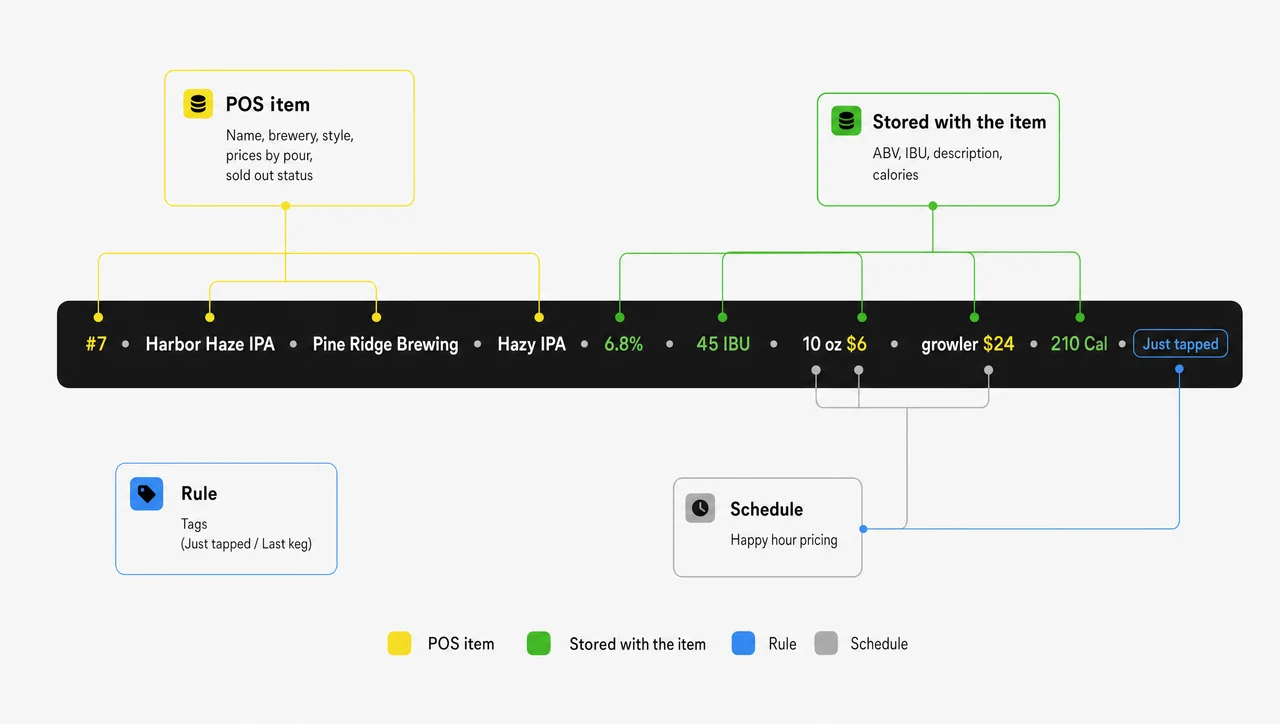
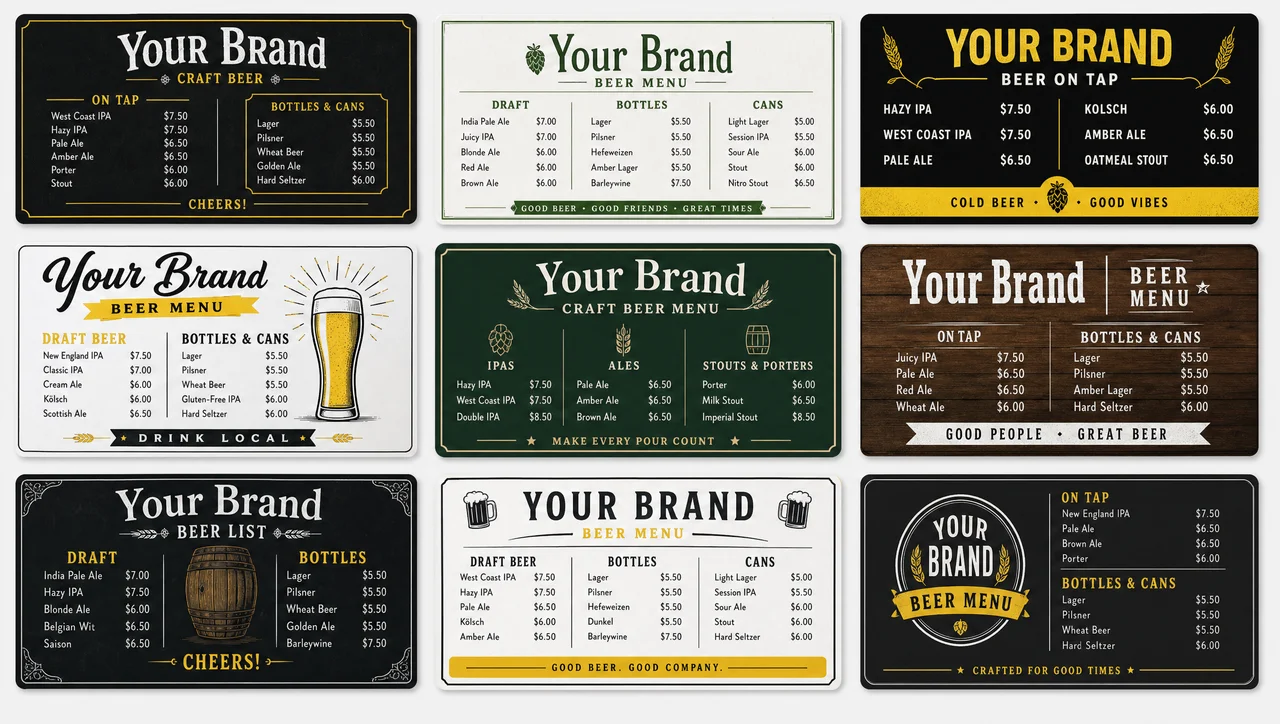
Because every field follows a source, the layout itself never needs an edit when a keg changes. Pick a starting design from the beer menu templates, and the data fills it from then on. Next comes the moment every tap line exists for: the keg running out.
A Digital Tap List That Changes When the Keg Does
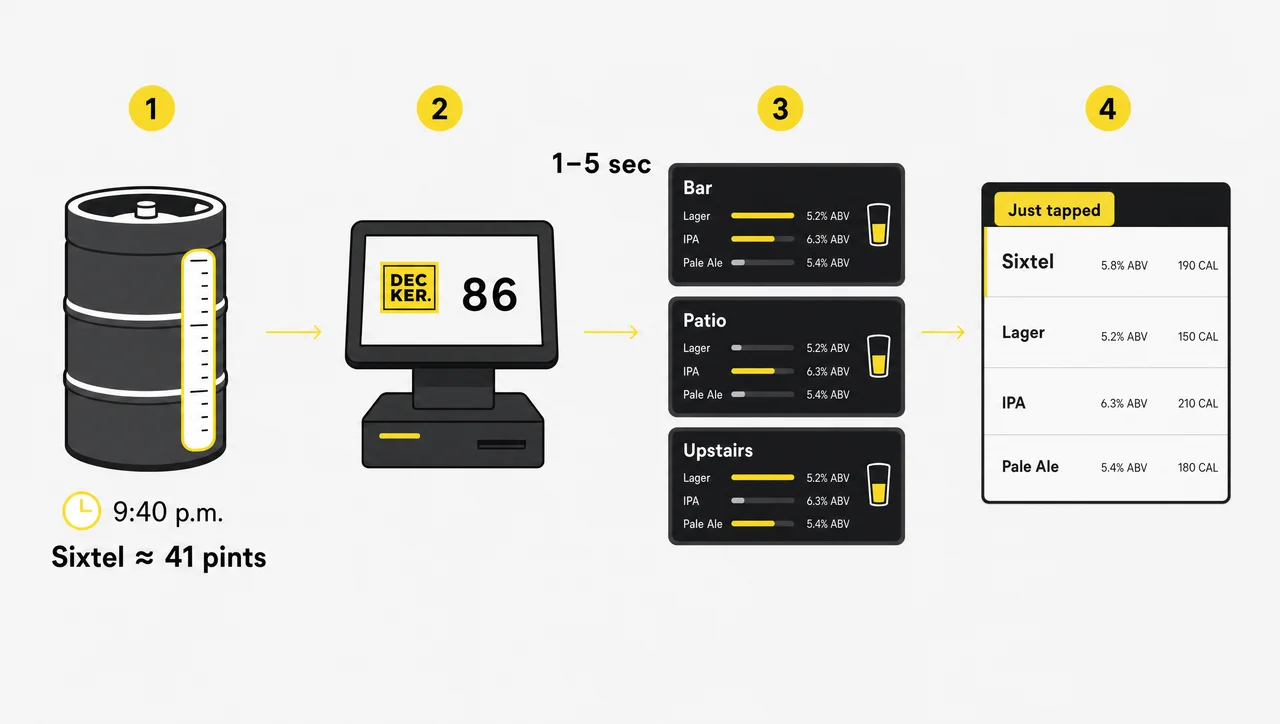
A digital tap list in Decker is a live list that follows the keg, not the chalk: the bartender marks a beer as sold out in the POS, and its line leaves every screen in 1–5 seconds. Imported draft sales grew 13.7% in a year (CGA by NIQ, 2025), so tap lists rotate faster than anyone can rewrite a board.
-
Step 1.
A keg kicks at 9:40 p.m.
A sixtel holds about 41 pints and a half barrel about 124, so a small keg can run dry in the middle of a busy Friday. The bartender marks the beer as 86’d at the register, as with any sold-out item.
-
Step 2.
The line leaves every screen
Within 1–5 seconds, the beer disappears from the bar, the patio, and the upstairs room. The other taps on the screen don’t blink or reload while it happens.
-
Step 3.
The next beer goes on
The new beer goes into the POS with its pour prices, and its line appears by itself. If the beer has poured here before, its ABV, description, and calories come back with it, and a rule can tag it Just tapped.
-
Step 4.
A price change follows the same path
When a distributor raises a keg price, update the pint in the POS, and the board follows. If the internet drops, the player keeps the last tap list in its offline cache until the connection returns. In addition, bars without Toast, Square, or Clover can feed the same data from a spreadsheet.
Happy Hour Menu Board That Starts and Ends on Time
A happy hour menu board in Decker switches drink prices on a schedule that starts and ends the discount at the minute your state allows, not when someone remembers. The same digital drink menu also changes when the kitchen closes and when last call comes.
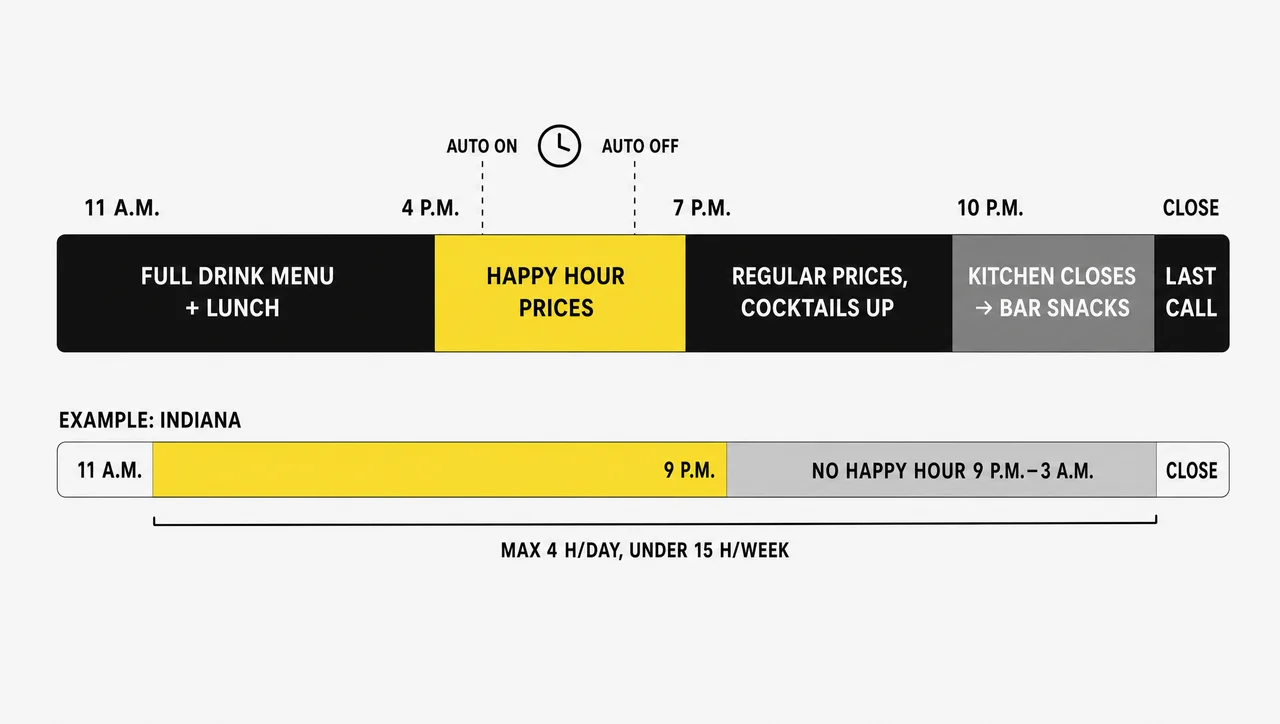
| Time | What the drink menu board shows |
|---|---|
| 11 a.m.–4 p.m. | Shows the full drink menu and the lunch food panel |
| 4–7 p.m. | Shows happy hour prices within your state’s limits |
| 7–10 p.m. | Shows regular prices; cocktails and wine by the glass move up |
| 10 p.m. | The kitchen closes, and the food panel switches to bar snacks |
| Last call | Shows a last-call note, and food items leave the board |
States set the rules. Seven still ban happy hour outright, including Massachusetts (since 1984) and Utah, while many others cap the hours or the size of the discount. Indiana, for example, has allowed happy hour since July 1, 2024, but for no more than four hours a day, fewer than 15 hours a week, and never between 9 p.m. and 3 a.m. Check your state’s rules and set the schedule per location; in a state with a ban, the board still runs the kitchen-close and last-call changes. Menu board dayparting covers beer, cocktails, wine by the glass, and NA drinks alike. Pubs, however, add a second menu to the wall.
Pub Menu Boards: Kitchen Menu and Taps on One Wall
Pub menu boards are screens that carry two menus at once, the taps and the kitchen, and both come from the same POS, so a sold-out dish leaves the screen just like a kicked keg. A 55-inch screen shows about 12–16 lines comfortably, and letters need about an inch of height for every 10 feet between the screen and the farthest table.
-
One portrait screen for up to 16 taps
A small pub fits its whole draft list on one vertical screen behind the bar. Portrait orientation stacks more tap lines than landscape on the same panel.
-
Two screens: taps and food
Once tap lists pass about 16 taps, or the pub serves a full kitchen menu, split the wall. After the kitchen closes, the food screen switches to bar snacks on schedule.
-
Three screens: taps, cans and bottles, food
A gastropub with a long bottle list gives packaged beer its own screen, so the draft list stays readable. As a result, every screen updates from the same data.


A Brewery Menu Board for Taprooms: Releases, To-Go, and Two Sites
A brewery menu board is the screen that sells a taproom’s newest beer first, because guests read the board before they read the cans. The US had 3,784 taprooms and 3,525 brewpubs at the end of 2025, and craft breweries closed 481 sites while opening 300 that year (Brewers Association), so every release has to move fast.
-
Release days on schedule
Set a release date once, and the new beer appears on the board that morning with a Just released tag that drops off after the first week.
-
Crowlers and growlers to go
A to-go zone lists crowler and growler fills with their own prices. When a beer can’t be filled to go, a rule hides it from that zone only.
-
Taproom and second location in sync
A brewery that pours at its taproom and a second bar publishes one beer list to both. As a result, tap lists at each site match on release day.


Why Bars Pick Decker Over a Standalone Tap List App
Decker runs the digital beer menu board from the POS that the bar already uses, while many standalone tap list apps keep a second copy of the menu that someone has to update by hand. Two copies drift apart, and the guest who reads one price and pays another is the one who notices.
| Standalone tap list app | Decker | |
|---|---|---|
| Where the tap list lives | Often lives in a separate tool, typed in by hand | Lives in your POS (Toast, Square, Clover) or a spreadsheet |
| When a keg kicks | Someone opens the app | The bartender marks the beer 86’d at the register |
| Pour prices | Often typed by hand, so they can drift from the POS | Follow the POS for every size |
| Happy hour | Someone switches it by hand | Changes by schedule per location |
| Calories for chains | Need re-entry with each keg | Stay with the menu item |
| What the screens show | Show beer only | Show beer, cocktails, wine, and food |
| Proof the screen shows it | Not checked | Decker Verifier checks the panel |
| Rooms and locations | Updated screen by screen | One edit updates a group |
Decker Verifier with remote management checks the panel itself, so a screen left on the game channel or frozen on last night’s list gets flagged and restarted remotely. Decker Player, an Android media player, connects digital menu boards for bars to any TV over HDMI. One screen stays free; in addition, pour prices and kicked kegs sync from the POS on the Professional plan, and a month-long trial runs on as many as five screens, no card needed.
⚠️ “Updating the tap list from a phone in seconds keeps the board accurate.” Not quite: a second app still means a second copy of every price, and that copy falls behind the register the first time someone forgets it.
Set Up a Digital Bar Menu With Decker
Setting up bar digital menu boards with Decker takes five steps that start from the POS your bar already runs. Game-day broadcasts and event promos, however, run on the other screens in your bar, and those screens use the same players.
-
Step 1.
Connect your POS or a spreadsheet
Link Toast, Square, or Clover, or upload a spreadsheet. An item rung up as IPA 16oz at the register still lands on the right tap line with the right pour price.
-
Step 2.
Pick a tap list layout
Start from a ready layout or your bar’s own style. One portrait screen holds about 16 taps; a longer draft list or a kitchen menu gets a second screen.
-
Step 3.
Plug in a Decker Player
Plug the player into the TV over the back bar through HDMI and put it on the bar’s network. The TV already mounted there works fine.
-
Step 4.
Set the bar's hours once
Enter happy hour, kitchen-close, and last-call times for each location, within your state’s limits. From then on, the drink menu switches without anyone touching it.
-
Step 5.
Kick a test keg
Mark one beer as 86’d in the POS and watch its line leave the screen in 1–5 seconds. As a result, you see the whole loop work before the Friday rush.
Related Scenarios
-
 Learn more
Beer Menu Templates
Ready tap list layouts for any barStart from a beer menu layout and fill it from your POS instead of designing from scratch.
-
 Learn more
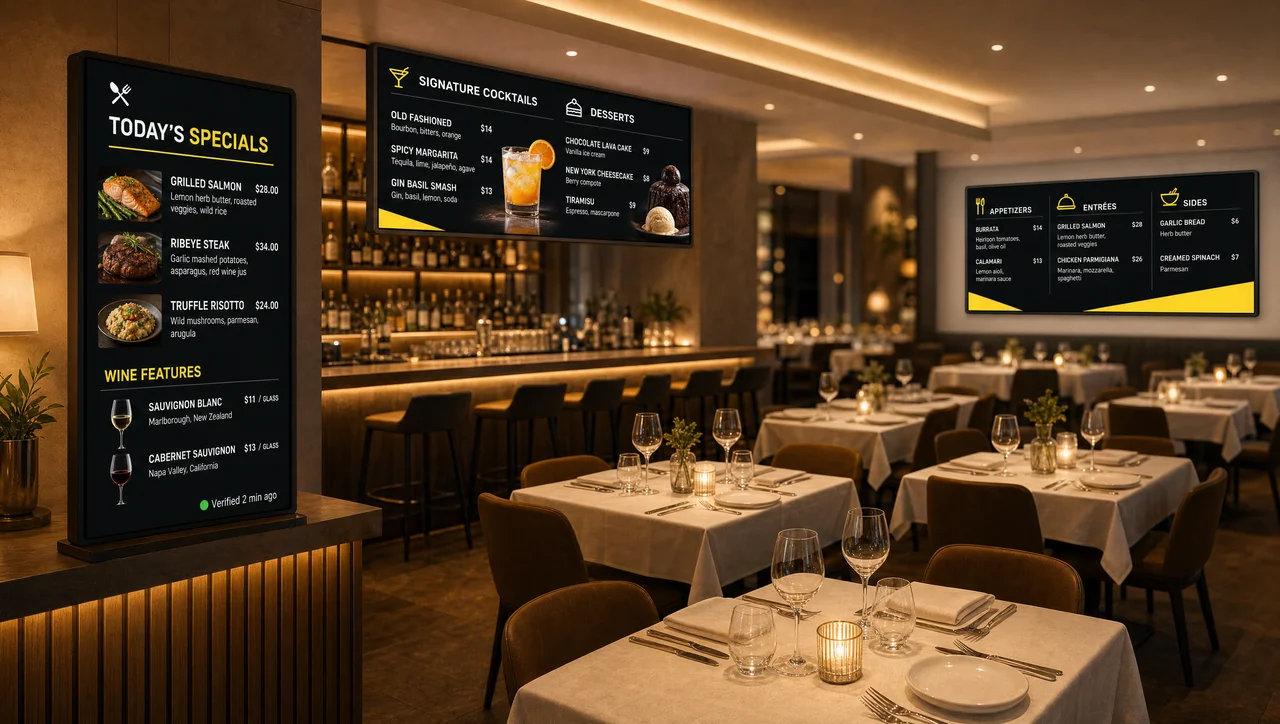
Digital Menu Boards for Restaurants
Full menus for the dining roomMenu boards that restaurants run with a full kitchen, from counter to dining room.
Digital Tap List FAQ for Bars and Pubs
Can I use the TV behind the bar as a menu board?
Yes, if the menu gets a screen of its own. A TV that also carries the game needs someone to switch inputs, while a Decker Player on a dedicated TV keeps the tap list up from open to last call. Bars open 12 or more hours a day get a longer life from a commercial display than from a consumer TV built for evening viewing, and TV menu boards for a bar need only a player and an HDMI cable to start.
Do bartenders need a separate app to update the tap list?
No. Marking a beer as sold out or changing a pint price in the POS updates the board, because Decker reads the same data the register uses. Bars without a supported POS can keep the list in a spreadsheet instead.
Which POS systems does Decker read for a bar?
Toast, Square, and Clover connect directly, and a bar on another register can keep beers, pour sizes, and prices in a spreadsheet instead. Automatic sync of prices and sold-out kegs is part of the Professional plan.
Can one beer show different prices for different pour sizes?
Yes. Each pour size, from a 4–5 oz taster to a 64 oz growler, carries its own price from the POS and shows on the same tap line. Any other field on that line, including tags and calories, can follow a rule as well.
What happens to the tap list if the internet drops?
The screen behind the bar keeps the last tap list it received, because the player stores it locally. A keg marked 86’d during the outage leaves the board as soon as the bar’s network returns, so staff only need to mention that one beer in the meantime. Decker Verifier sends an alert if the screen itself goes black.
Do chain bars have to show calories for beer on the board?
Under the FDA menu labeling rule, in force since May 7, 2018, chains with 20 or more locations must post calories for beers listed on the menu board as standard items. Beer on tap that isn’t listed on the menu, and beers listed for fewer than 60 days a year, are exempt. In Decker, calories stay with the menu item, so a beer that returns to a tap brings its count back without retyping.
When does a bar not need a digital beer menu board?
A bar that pours fewer than five drafts and changes a keg less than once a month gains little from a digital beer menu board, because the list barely moves. The same goes for a venue where draft brings in less than a quarter of beer sales, well below the 52.3% national on-premise share, since a printed bottle list carries most of the menu. A seasonal beer garden open fewer than 90 days a year rarely earns back a screen and a mount before it closes. And if two rotating taps are the only change and staff announce them at the bar, a chalkboard by the register does the job.
What does Decker cost for a bar?
A bar pays per screen, not per tap or per location, so a six-tap bar with one screen behind the counter can stay on the free plan. Syncing pour prices and kicked kegs from the POS takes the Professional plan, and a free 30-day trial runs on as many as five screens. The plan you pick sets the rate per screen.
Put Your Tap List on the Screen Behind the Bar
Kick a test keg in your POS and see the line leave your digital beer menu board before the next pour. In addition, one screen stays free.


