
Restaurant digital menu board system that keeps every display current
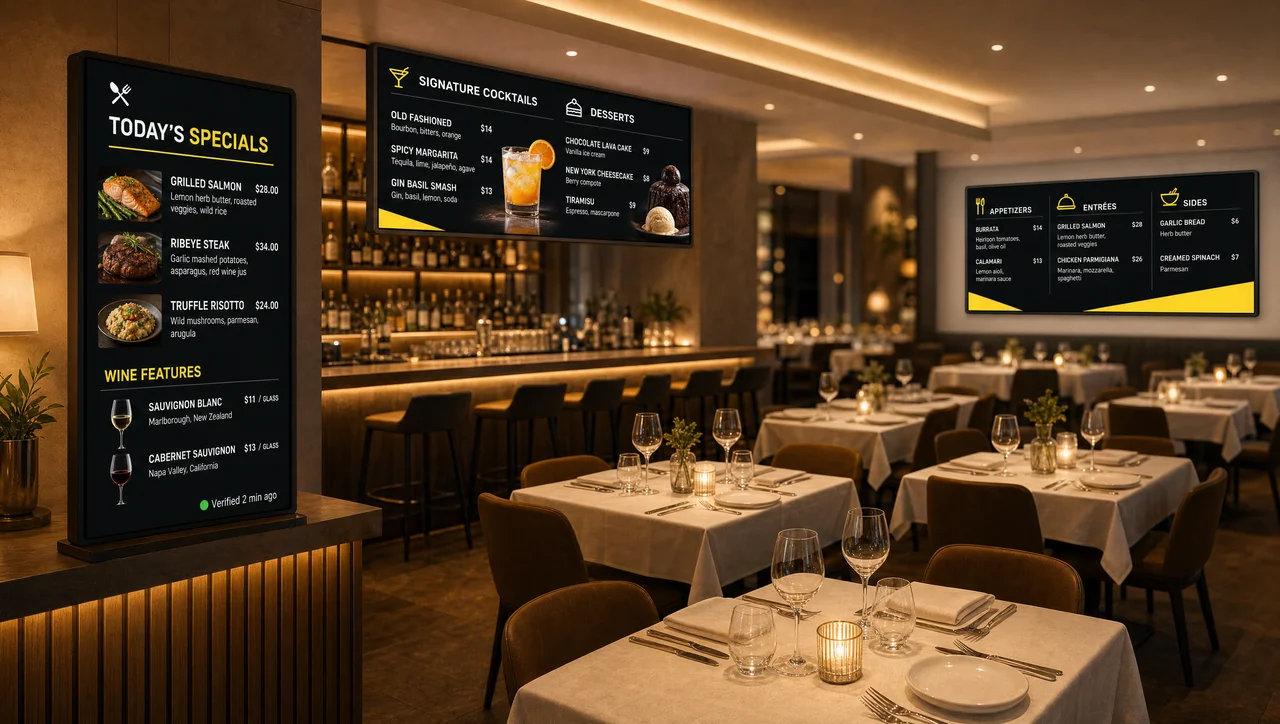
Digital menu boards for restaurants are screens that carry your menu, prices and specials in the dining room and change without a reprint. Decker runs them from your POS, so a price edited at the terminal reaches the wall in seconds, and hardware confirms the screen is really showing it.



-
Seconds, not days A POS price edit redraws the board
Restaurant digital menu boards at Decker clients update from a POS edit in seconds. The old print cycle took 1–2 days: designer, email, USB stick.
-
86 it in the POS Sold-out dishes leave the board
Mark the halibut unavailable halfway through service and it drops off the board before the next party is seated.
-
Lit, not just sent Hardware confirms the board is on
Decker Verifier restarts a dark host-stand screen remotely, so a failed board never runs a whole dinner service unnoticed.
Where digital menu boards for restaurants go in a full-service dining room
Digital menu boards for restaurants show menu items, prices and availability on a screen, and software drives them instead of a print run. They cut the printing out of a menu change, put specials in front of guests while they wait, and give a room one place to promote dessert, wine and the dishes with the best margin. In a full-service room the board works where guests wait, not where they order — the table menu still takes the order.
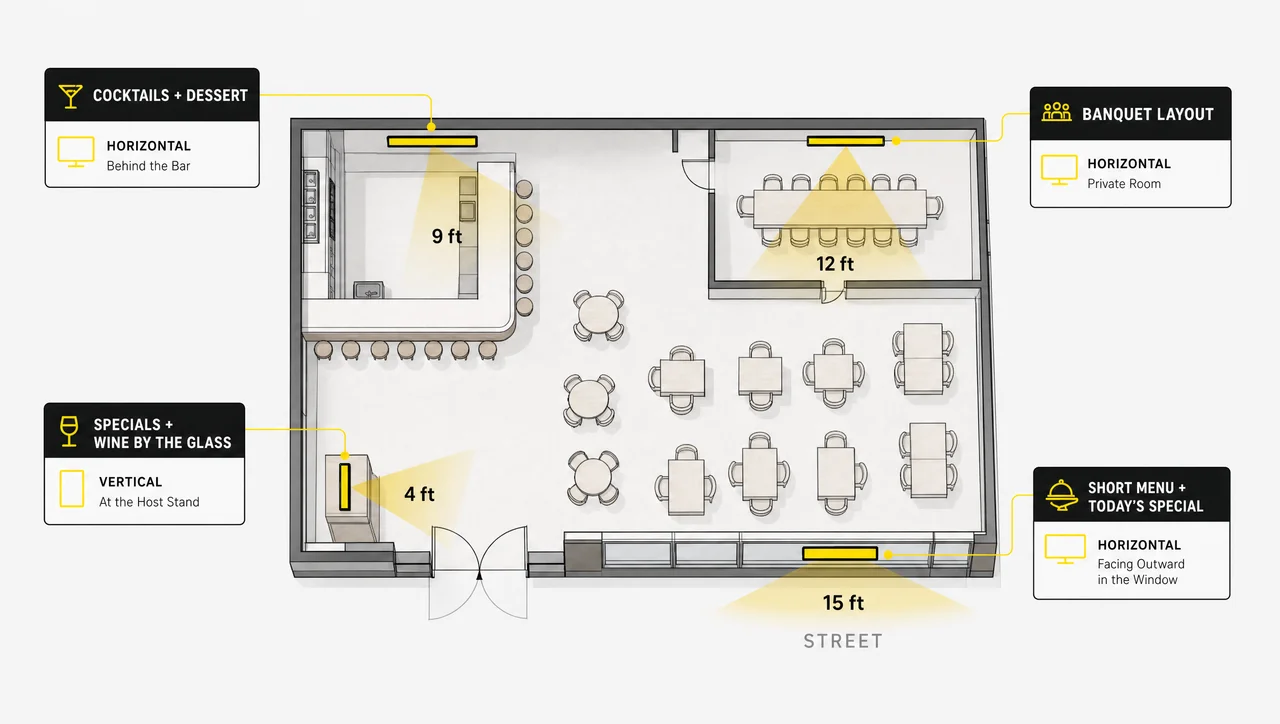
So the digital menu boards restaurants of this type install differ from the wide counter displays you see in fast food. For most full-service restaurants digital menu boards earn their place in four spots, and each spot shows a different part of the menu.
-
Host stand and waiting area
The first screen most full-service rooms buy. Tonight’s specials, the wine-by-the-glass list and a rough seating estimate hold a party of four while they wait, so they sit down already knowing their starter. This zone also does the work of queue and wait-time screens without a separate system.
-
Bar-back and service station
Guests waiting for a table drift to the bar, and the bar-back wall becomes the only surface they read for ten minutes straight. Cocktails, dessert and the two dishes with the best margin belong here, laid out for a seated eye line rather than a queue.
-
Private dining and events room
A room that runs a fixed banquet menu on Tuesday and an à la carte brunch on Sunday cannot keep a printed board. One screen holds two saved layouts, and the room changes character between bookings.
-
Window-facing board
A restaurant menu board digital display facing the sidewalk sells to people who have not walked in yet. It runs a short version of the menu with prices and today’s special. Only this placement needs the weather-rated hardware behind outdoor digital menu boards for restaurants. Placement, however, decides only where a board hangs, not what it does.


Restaurant digital menu board system features
A restaurant digital menu board system is one that pulls prices from the POS and redraws the layout without a designer, which is what separates it from a design tool. Decker builds the same engine into every kind of digital menu board software in the food vertical, and this page covers what it does in a full-service room.
-
POS-driven pricing
Digital menu boards for restaurants read price, name, description and availability from the system that already runs the room. Nobody retypes a number, so nobody mistypes one.
-
Auto-regenerated layout
Change an item and digital menu boards for restaurants redraw themselves: fonts resize, columns rebalance, the item lands in its category. The design step between a decision and a screen disappears.
-
Dayparting
Digital menu boards for restaurants switch themselves. The lunch board publishes at 11, the dinner board replaces it at 4, and nobody has to remember.
-
Per-location targeting
A price that works downtown often fails at the second address. Restaurants with more than one room keep a separate price list and separate specials per address, while the brand layout stays identical.
-
Promo zone inside the menu layout
A reserved strip inside the menu itself — dessert, a wine flight, a seasonal cocktail — rotates without pushing the food menu off the screen.
-
Menu-to-sales reporting
Menu boards report which layout ran, in which room, in which hours, matched against what actually sold. Most restaurants reconstruct this in a spreadsheet, if at all.
-
Playback verification
Menu boards confirm playback rather than assume it. The platform reports not that the menu went out, but that the screen shows it right now.
-
Roles for GM, marketing and kitchen
A GM pushes tonight’s special. Marketing owns the seasonal layout. The kitchen 86s an item. Nobody changes a price they do not own. In other words, what separates digital menu board software restaurant teams can live with from a drag-and-drop editor comes down to the source of the numbers. Specifically, that raises one question: what happens between a price change and the wall.


From a price change in the POS to what guests read on the wall
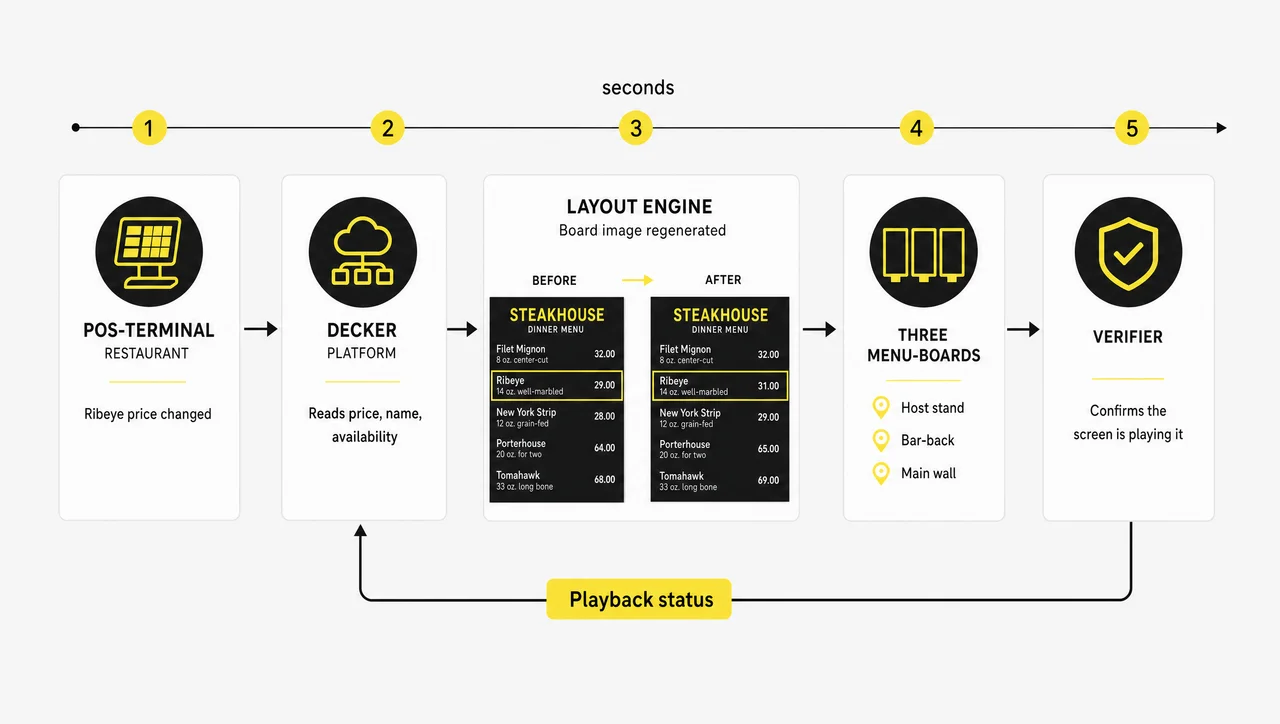
Digital menu boards for restaurants that are driven by a POS update in seconds, with no designer in the chain. Two things separate a digital restaurant menu board from a screen with a JPEG on it: where the data comes from, and who redraws the layout. A modern restaurant digital menu board answers “the platform” to both, and the path runs five steps.
-
Step 1.
Change the item in the POS
You connect your POS once through POS integration, and after that a manager raises the price of the ribeye, renames a dish, or marks the halibut unavailable inside the normal routine. Running a digital menu board for restaurant service should never mean keeping the menu current in two places.
-
Step 2.
Decker reads the change
The platform picks up price, name, description and availability, then syncs that item data to every board that carries it. Decker integrates with your POS through Toast, Clover and other POS brands without a middleware layer, so there is no export, no file and no second copy of the menu.
-
Step 3.
The layout regenerates
Decker rebuilds the board image around the new data. Typography, spacing and column balance adjust, so a longer dish name does not break its row.
-
Step 4.
The board updates on the chosen screens
The new layout reaches the screens that should have it: one room, one location, or every address at once. On a multi-site digital menu board restaurant groups run, corporate and local changes stay separate.
-
Step 5.
Verification confirms the screen is playing it
Decker Verifier checks that the display is on, the player is running and the right content is on air, visible in the dashboard without anyone walking the floor. Beyond a single price edit, however, a full-service menu changes in three ways a fixed menu never does.
Specials, seasonal menus and 86’d dishes
Restaurant digital menu boards are built for menus that move: daily specials, seasonal changes and 86’d dishes are three events a printed board cannot follow. A quick-service menu holds still; a full-service menu moves on three different clocks at once — daily, seasonally, and mid-service. Dynamic digital restaurant menu boards exist for exactly that, in a room with waiters in it.
| Menu event | On a printed board | On a Decker board |
| Daily chef’s specials | Handwritten insert or a chalk rewrite before every service | Loaded with the day’s POS items, live before doors open |
| Seasonal menu change | Full redesign and reprint, two to six weeks of lead time | New layout published once, applied to every room |
| Item 86’d mid-service | Server tells each table individually for the rest of the night | Marked unavailable in the POS, off the board in seconds |
| Wine or dessert list swap | Separate print run, separate reorder cycle | Saved layout, swapped on schedule or on demand |
| Lunch → dinner switch | Two printed sets, staff swaps them by hand | Automatic at a fixed hour, per location |
The third row changes a service, and it is the strongest argument for digital menu boards for restaurants that serve at tables. When a dish runs out at 7:40 on a Friday, restaurant menu boards digital or printed behave very differently.
A printed board keeps selling it for another two hours, and every table that ordered it becomes an apology, a re-fire and a slower ticket. On a board driven by the POS, the item leaves the wall before the next party sits down.
⚠️ “Set it and forget it” is not true for a restaurant board: without a POS link, someone still retypes prices by hand — the work moved from the printer to a keyboard, it did not disappear.
As a result, the gains show up as numbers a restaurant can measure rather than as a feeling that the room looks smarter.
The advantages of digital menu boards in restaurants, in numbers
Digital menu boards for restaurants deliver three gains that measure cleanly — update time, screen uptime and price accuracy — and you can check all three against your own operation rather than take them on trust.
| What changes | Measured result |
| Time spent updating menus and content | Up to 80% less |
| Screen downtime across the network | 60% fewer incidents |
| Price-change cycle, decision to screen | From 1–2 days to seconds |
| Print, delivery and swap-out of menu boards | Removed from the process |
| Menu variation between locations | Per-address pricing and specials instead of one menu for all |
| Menu-to-sales attribution | Which menu ran where and when, matched to sales |
Restaurants running more than one address report the last row as the reason they stayed. Restaurants with a single room rarely require it in year one. Restaurants testing a dish in one location and not another read this table first. Once the POS drives the board, the platform already knows which layout ran on which screen at which hour, so the question “did the new dessert placement do anything” stops being a guess.
Screen count, room count and hardware tier decide the budget, and digital menu boards for restaurants cost is billed per screen rather than per site. Numbers like these, however, only pay off on a screen people can actually read from where they stand.
Restaurant digital menu board size chart and player requirements
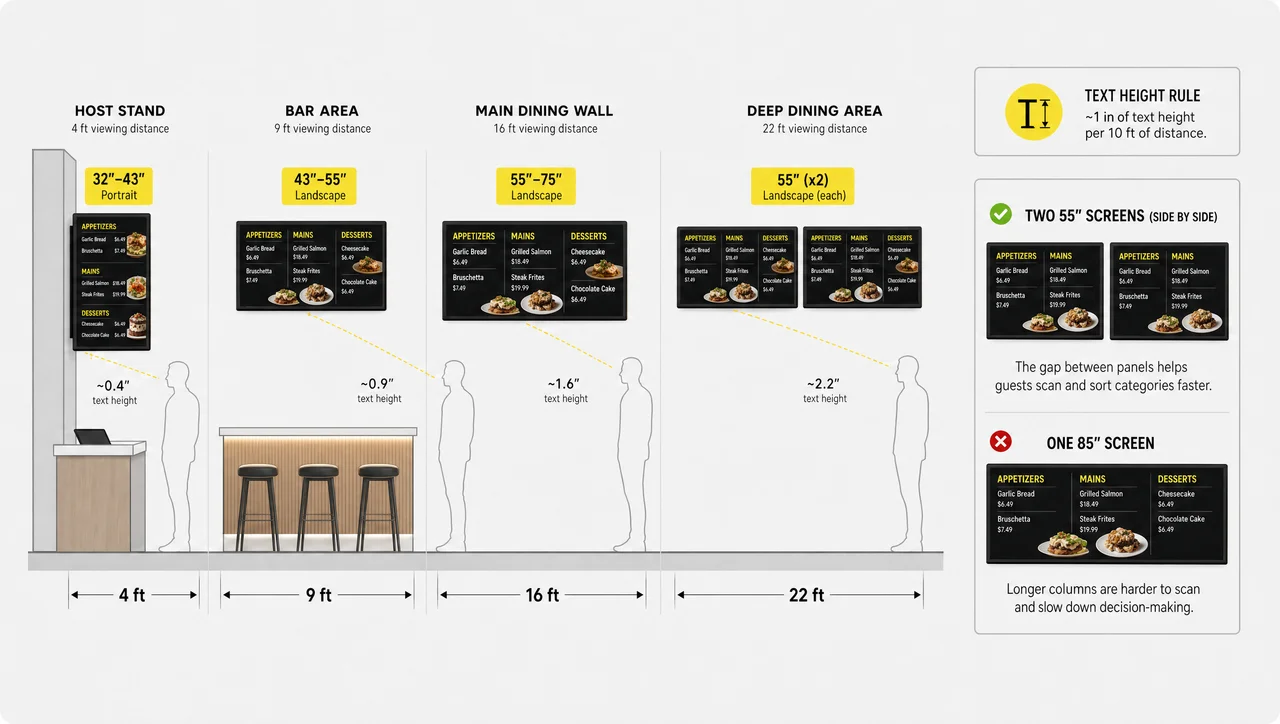
Restaurant digital menu boards show prices that are only worth showing if a guest can read them. Screen size for a restaurant menu board follows viewing distance: 32 inches at the host stand, 55 and up on the main wall. The rule that holds across dining rooms runs roughly one inch of text height per ten feet of distance, and this restaurant digital menu board size chart comes from that.
| Placement | Viewing distance | Diagonal | Orientation | Typical use |
| Host stand | 3–6 ft | 32–43″ | Portrait | Specials, wine by the glass, seating estimate |
| Bar-back / service station | 6–12 ft | 43–55″ | Landscape | Cocktails, dessert, high-margin items |
| Main dining wall | 12–20 ft | 55–75″ | Landscape | Full menu by category |
| Deep dining room | 20 ft+ | 2–3 restaurant digital menu board screens, 55″ each | Landscape | One category per panel |
| Private dining room | 8–15 ft | 43–55″ | Either | Fixed banquet layouts, swapped per booking |
Large digital restaurant menu boards do not always answer a deep room. Screens split into two 55-inch restaurant menu board digital screens side by side show categories faster than one 85-inch display, because the eye sorts across a break more easily than down a long column.
- Screens in a full-service room carry different content at different distances, which is why one wide board rarely replaces two placed ones. The screen at the host stand shows tonight’s specials, and the screen above the bar shows the drinks list.
- The same logic governs a single digital menu board restaurant screen at the host stand: portrait beats landscape, since a standing guest scans vertically. The screen there shows a short list, not the full menu.
- Displays require a duty-cycle check. Displays rated for consumer use dim and shift colour under a full service day, and displays that have gone yellow show food worse than no screen at all. Displays built for commercial duty hold brightness for years instead of months.
- A restaurant digital menu board display should run commercial-grade above ten open hours a day. The display carries that rating in its spec sheet, and the display you already own probably does not.
- Displays in a bar-back position also require a matte panel, because a digital menu board restaurant display reflects every pendant lamp above it.
Every restaurant menu board requires its own digital signage player behind the screen, and a digital signage player for restaurant digital menu boards has to survive heat, dust and a power cut at closing time.
- Players hold the content locally, display it on schedule and keep showing the menu when the internet drops. Players also keep the last published menu on disk, which is what keeps the board readable through an outage.
- Players require one device per screen, no exceptions: two digital menu board restaurant screens sharing a player cannot show two different menus, and a splitter on one output will not work. One restaurant digital menu board player per screen is the rule.
- Players report their own status back to the platform, so the room does not depend on someone noticing a frozen box. The player behind the host-stand screen shows one menu, and the player behind the bar wall shows another.
- Decker Player runs on Android, and an existing television can become a digital tv menu board for restaurant use once it passes screen compatibility.
In addition to reading distance, US chains have a second constraint on what the board must show.
Calorie counts and menu labeling on the board
Digital menu boards in restaurants that belong to a chain are regulated content, not just marketing. FDA menu labeling rules require chain restaurants operating 20 or more US locations under the same name with substantially the same menu to show calorie counts on menus and menu boards, in type no smaller than the item name or price, with the standard 2,000-calorie daily reference posted alongside.
- The calorie figure sits in the same item record as the name and the price, so the board never carries a number the kitchen already changed.
- The board template enforces type size and contrast, rather than whoever lays out the menu that week.
- One recipe change updates every location at once, instead of a reprint cycle per address.
Allergen disclosure follows the same logic. An allergen note attached to the item travels with it to every menu board, and the kitchen never has to remember which printed insert still carries the old recipe.
A menu board that shows nutrition information from the POS keeps compliance and service on one record instead of two. Restaurant digital menu boards under FDA menu labeling therefore change one thing at the source and stay compliant everywhere. Compliance covers what the board must display, but it says nothing about whether the board is actually lit.
When screens confirm they are actually showing the menu
Restaurant digital menu boards show nothing at all when a screen fails quietly, and most platforms only report that content went out. Decker Verifier monitors the display and the player separately and restarts both without a service visit. Verified playback turns a restaurant digital signage menu board into something you can leave unattended.
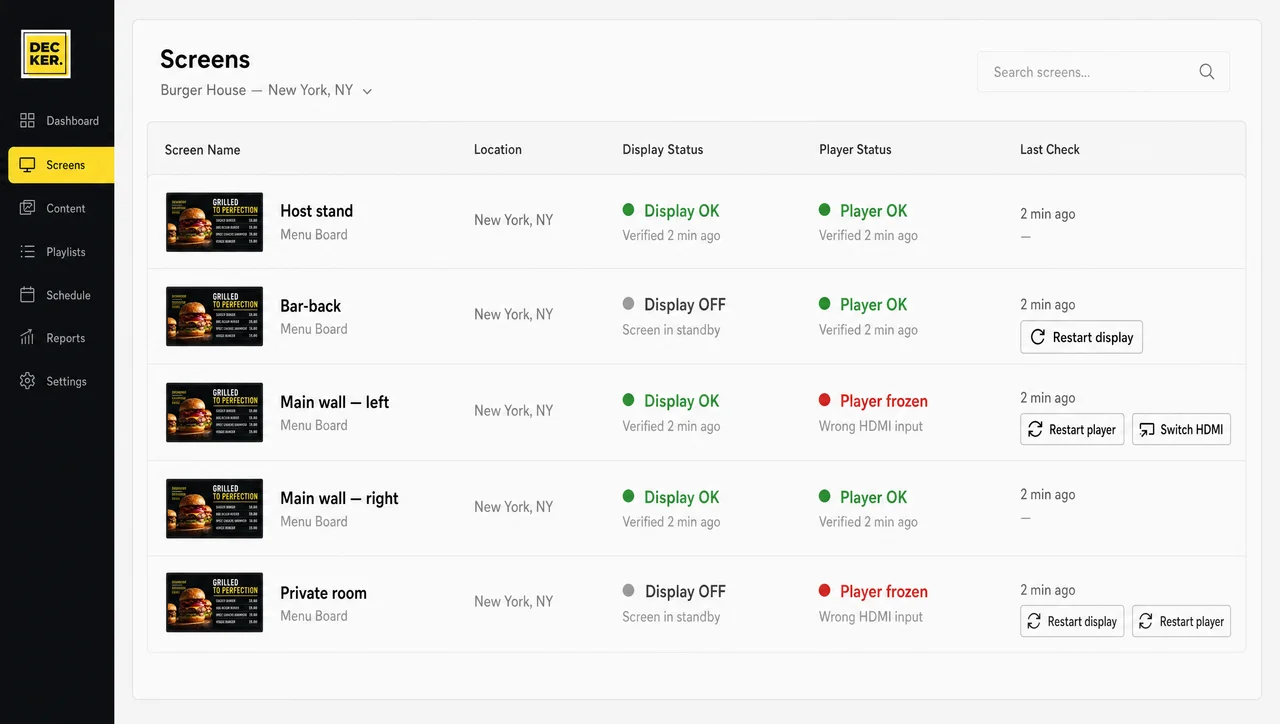
-
Display status
The Verifier reads the state of the screen, not of the instruction sent to it. A television on the wrong HDMI input, in overnight standby, or with a dead backlight registers as a problem rather than a healthy screen.
-
Player status
Decker monitors the player independently of the display, so a frozen device stays distinguishable from a dark screen — two failures that look identical from the office, two different fixes.
-
Remote restart and HDMI switch
Power-cycle the display, restart the player, or push the input back to the right channel from wherever you are. Remote recovery is not available without Decker Verifier: a software-only platform cannot restart the television in front of a frozen box. That is what managed digital menu boards for restaurants should mean. However, no hardware suits every room.


When a restaurant should not put its menu on screens
Digital menu boards for restaurants are not always worth the spend: a restaurant that reprints its menu twice a year gains almost nothing from putting it on a screen. Five situations where the honest answer is not yet.
- Your menu changes less than three times a year. The whole case for a board rests on update speed. If prices hold for six months at a stretch, a well-made printed board costs less and looks the same to a guest.
- One room, one screen, under about 40 items. A single easy digital menu board for restaurant use is a design purchase, not a system one. A menu board in one room cannot earn back per-location targeting, because there is no second room to target.
- Your prices do not live in a POS. A menu board cannot pull a price that exists only in a spreadsheet or in the owner’s head, and it still requires someone typing into it. Fix the source of truth first.
- Fine dining where a screen contradicts the room. Where staff present the menu rather than post it, a menu board at the entrance does not fit the format and cannot be softened into fitting. A private-dining or back-of-house screen may still work.
- Fewer than 3 screens across fewer than 2 addresses. Below that, central publishing cannot pay for itself, because a single manager can walk to every screen in under a minute.
Free digital menu boards for restaurants start with a layout, not a licence. Decker’s free menu board templates are ready-made restaurant boards you recolour, rename and price for your own room, then run on a screen you already own.
Free digital restaurant menu boards software covers the design side and stops at the door of the second location: it will not hold a daypart, target one address or tell you a screen went dark. Fit a template to your menu now, and come back when the second address opens. If the room does fit, however, the next question is which system to put in it.
Six checks before you buy digital menu boards for restaurants
The best digital menu boards for restaurants are the ones that prove themselves on whether prices arrive from the POS on their own. Answer these six before you compare signage vendors for restaurants or shop digital menu boards for restaurants for sale.
-
Step 1.
Does it read your POS, or does someone retype prices?
Ask to see the connection, not a slide about it. If changing a price means opening a design editor, the answer is no.
-
Step 2.
Does the layout regenerate, or does a designer redraw it?
Change a dish name to something twice as long and watch the row. A system rebalances; a template breaks. That separates intelligent digital menu boards for restaurants from a slideshow with prices in it.
-
Step 3.
Can one location differ from another?
Two addresses, two price lists, one brand layout. If per-location pricing works as a workaround rather than a feature, it stays a workaround at ten locations.
-
Step 4.
Do you learn about a dark screen before a guest does?
Ask how the platform knows a screen went off. “The player checked in” does not mean “the display shows the menu.”
-
Step 5.
Who on staff can publish, and who cannot?
A GM should post tonight’s special without being able to touch the seasonal price list. Share one login and someone eventually publishes the wrong thing.
-
Step 6.
What happens on day 400, not day 1?
Setup looks easy at every vendor. Ask about year two: who replaces a failed player, what a screen swap costs, and whether anyone has to drive anywhere. Similarly, the adjacent scenarios below cover the rooms and formats this page deliberately leaves out.
Related scenarios
Restaurants Digital Menu Boards FAQ
Top digital menu boards for restaurants?
The ones that update themselves. Ranked by what saves time, the top digital menu boards for restaurants read prices from the POS, regenerate the layout, run different menus per location, and confirm on hardware that the screen is live. Templates and app libraries decorate the top of those four.
How much does a digital menu board for a restaurant cost?
It depends on screen count, commercial displays versus existing televisions, and location count. Hardware costs a one-time spend per screen; the platform bills per screen as a subscription.
Do I need a separate player for each screen?
Yes, one per screen, always. Two displays sharing a device cannot show two different menus — exactly what a dining room needs when the host stand runs specials and the bar wall runs cocktails.
Can the board show a different menu at lunch and at dinner?
Yes, on a schedule set once. The lunch layout publishes at your lunch hour and dinner replaces it at yours, per location, with no one touching a screen. Weekends and holidays run their own schedule.
What happens to the board if the internet drops during service?
The player keeps playing. Players store content locally, so the menu stays up. Only updating pauses: a price changed during the outage lands on screen when the connection returns.
Can I run different prices in two locations of the same restaurant?
Yes. Each location keeps its own price list and specials while layout and branding stay identical. A central change reaches one address, a region, or all of them.
Does the menu board work with my POS?
Decker connects to the major restaurant POS platforms, listed under Toast, Clover and other POS brands. If yours is missing, ask — most connections come down to whether the POS exposes item and price data.
Do I have to show calorie counts on the board?
If your group operates 20 or more locations under the same name with substantially the same menu, FDA menu labeling rules require calorie counts on menu boards, in type no smaller than the item name or price. Below that threshold it stays optional, though many independents post them anyway.
Can a manager update the board without a designer?
Yes, and normally they do not update the board at all. They update the POS and the board follows. For non-item content such as a seasonal message, a manager publishes from their own login without touching the price list.
What size screen do I need for the host stand?
32 to 43 inches, mounted portrait, covers almost every host stand, since guests stand three to six feet away. Go larger only if the waiting area runs deep enough to read the board from across it. Overall, the fastest way to settle sizing is to show us the room.
See your own menu on a board before you buy a screen
Send us your current menu and your POS. We will connect your POS data to a test board, render the same items on it, and tell you how many screens your dining room actually needs. Request a demo or ask for a quote — no contract required to see it.


