Digital Signage Types: How to Choose the Right Format for Each Screen


The types of digital signage divide along four axes: function (menu boards, dashboards, advertising, interactive), placement (indoor, outdoor, mobile), screen technology (LCD, LED, touchscreen, high-bright) and form factor (video walls, LED walls, enclosures, totems, kiosks) — 16 formats, each with its own hardware and software requirement. Specifically, the four axes below determine the panel, the housing and the software, in that order.
What Are the Different Types of Digital Signage?
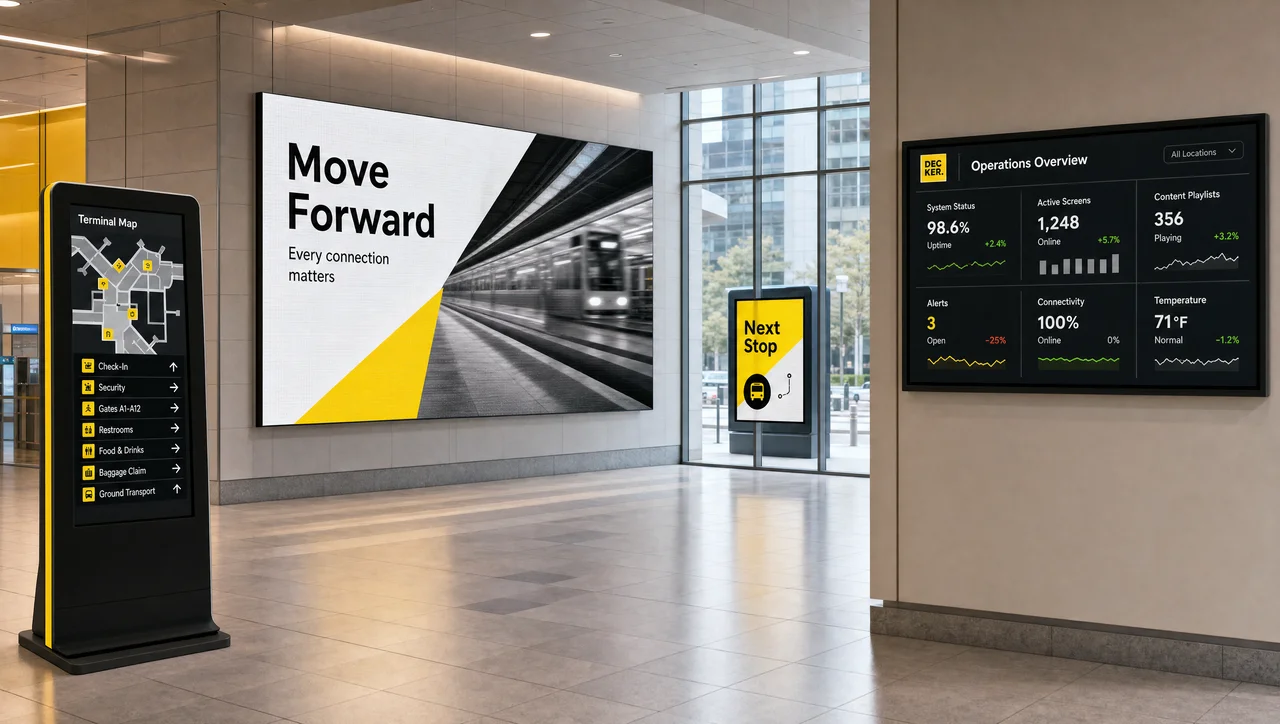
There is no single list of digital signage types, because four classification axes are in use at the same time — and any given screen sits on all four of them. A touchscreen ordering terminal in a burger restaurant is an interactive type by function, an indoor type by placement, an LCD type by panel technology and an enclosure type by form factor. Vendors quote whichever axis suits their catalogue, which is why one guide counts four types of digital signage and the next counts ten.
One definition applies before any classification does: digital signage is a screen network managed centrally from software, where content, schedules and playback status are controlled remotely rather than at each display. All sixteen formats inherit that model, and what separates them is the hardware it runs on and the conditions under which it holds.
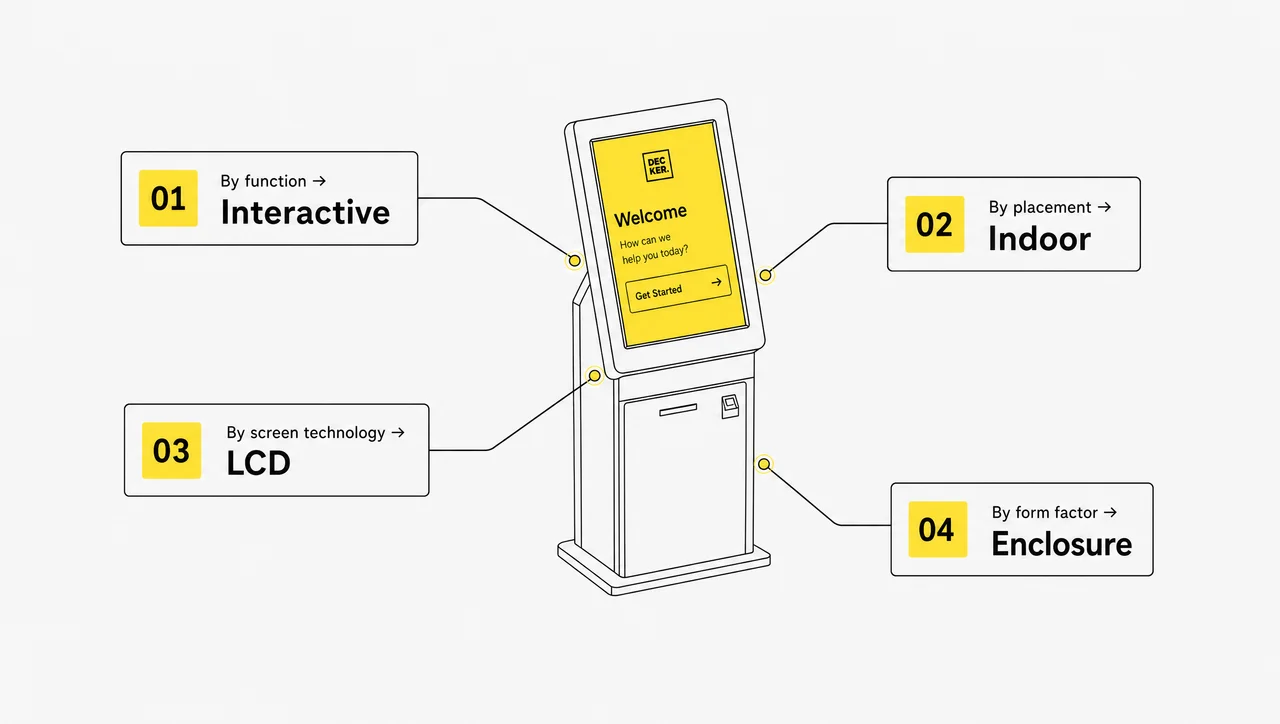
The four axes, in the order a specification meets them:
- By function — what the screen does: menu boards, corporate dashboards, advertising and environmental displays, interactive signage. types by function.
- By placement — where it hangs: indoor displays, outdoor billboards, mobile and transit screens. types by placement.
- By screen technology — what the panel is: LCD, LED and OLED, touchscreen, high-bright. types by screen technology.
- By form factor — how it is built and housed: video walls, LED walls, outdoor enclosures, totems, kiosks — five types by form factor.
⚠️ “There are four types of digital signage” is accurate only for the functional axis. Adding placement, panel technology and form factor brings the practical count to 16, and a specification needs an answer on all four axes rather than one. Next comes the axis that determines everything downstream: what the screen is required to do.
Signage Types by Function
The functional types of digital signage answer one question that constrains every later choice: what work does this screen perform during a shift — pricing, internal reporting, advertising, or interaction. Function determines the content model, the data sources and the software features required, so it is settled first.
1. Menu Boards and Drive-Thru Screens
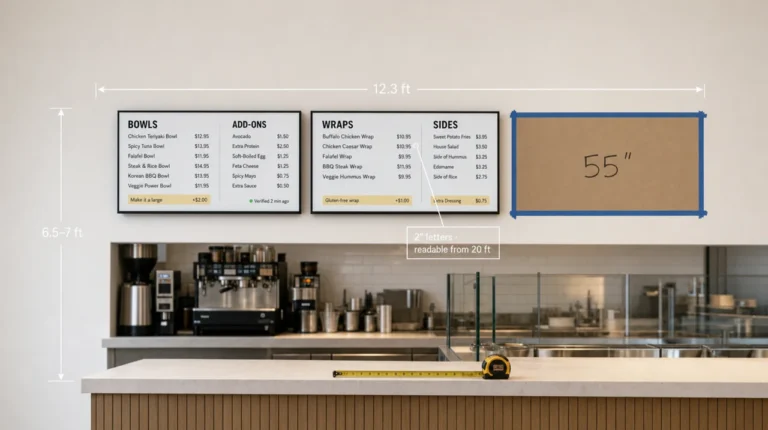
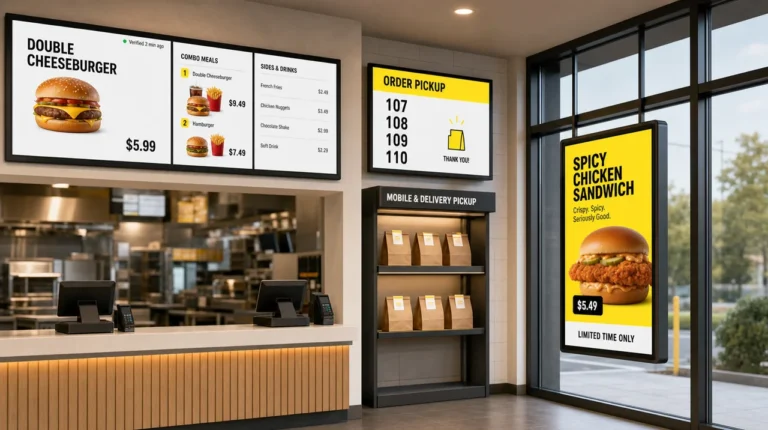
Menu boards are the format most operators have already used without naming it: food, drinks, prices and combinations above a counter, in a food court, or at a drive-thru lane. The defining property is not the image but the data source. Menu board screens connect to the POS and update prices, combinations and high-margin positions without a designer in the chain, hiding sold-out items and switching from breakfast to lunch on a schedule. A drive-thru lane typically runs 2 or 3 digital signage displays: the menu itself, an order-confirmation screen and, increasingly, a queue indicator.
Branded templates hold the layout constant across a chain while the values change underneath. In Decker the menu is bound to the client’s POS: when a price or an item changes, the platform regenerates the menu image, preserving fonts, layout and currency formatting without a design step. An item marked unavailable is removed from the screen automatically. In the Burger Shop deployment in Downtown LA, that reduced menu updates from days or weeks to minutes. Best for: restaurants, QSR, coffee shops, bars, bakeries, convenience stores with a hot-food zone, staff cafeterias — anywhere a price list changes more often than the layout around it, which is the operating condition digital menu boards are built for.
2. Corporate Dashboards and Internal Communication Screens
Corporate dashboards are the format directed inward rather than at customers: production metrics, sales figures, shift announcements, safety reminders, meeting-room status. The content is pulled from systems that already hold it, which is what separates a dashboard from a slide deck someone updates each morning.
The same type covers recognition content — employee achievements, service milestones, safety-streak counters — and public status boards such as flight schedules, train arrivals and traffic conditions. Those are dashboards by mechanism, whatever the audience reads them as.
Uniformity is the operational argument: every employee, from head office to third shift, sees the same value at the same moment. Screens in break areas and production corridors reach the part of a workforce that has no work laptop, which is usually why dashboards and live KPIs clear an internal budget ahead of customer-facing screens. Best for: offices, warehouses, manufacturing floors, break rooms, reception areas.
3. Advertising and Environmental Displays
Advertising displays carry a specific message — a promotion, a launch, a seasonal offer. Environmental displays carry a state: ambient video, brand content, motion that gives a space a finished character. Both run as scheduled loops, so the difference lies in intent rather than in hardware. Environmental loops frequently include background music or ambient audio, and 4K and 8K assets appear here because viewing distance is short enough to resolve them.
What separates this format technically is synchronisation. A single promotional screen is a playlist; twelve screens across a shop floor, a lobby and a stairwell running one campaign in the same frame is a network, and that is a software problem rather than a display problem. Store-level and region-level targeting belongs to the same axis: most platforms were designed on the assumption that every location shows identical content, which is the assumption chains are now discarding. Best for: retail floors, shopping malls, hotel lobbies, gyms, event venues, transport hubs.
4. Interactive Signage and Wayfinding
Interactive digital signage gives the viewer a way to act on the screen rather than only read it. Input arrives through touch, through a QR code that transfers the session to a phone, through a motion sensor, or through voice and gesture control in more complex installations. Wayfinding is the most common scenario and the one that returns its cost fastest in large buildings. The same input layer runs quizzes, polls and short surveys, which is how a screen collects opinion from people who would not complete a form.
The constraint is structural: an interactive screen serves one person at a time. A display addressing a hundred passers-by and a screen guiding one visitor through a five-step flow are not interchangeable, and using the second for the first task wastes it. Session timeouts, input handling and route logic are what separate working interactive digital signage from a panel with a touch layer bolted on, and the same applies to wayfinding and directories in buildings with more than one floor. Best for: hospital lobbies, airports, campuses, large retail floors, apartment and office buildings. However, function alone does not determine what to purchase: the same menu board requires different hardware indoors and outdoors.
Indoor vs Outdoor Digital Signage
Placement is the axis that decides digital signage hardware, and the decision is not reversible: an indoor display moved outdoors fails, typically within one season. Three factors separate the two — audience composition, viewing distance, and the environmental load on the enclosure.
Indoor digital signage screens rarely require more than 700 cd/m², while outdoor units start near 2,500 cd/m² to remain readable against direct sun. Indoor audiences are self-selected: people already inside the building for another reason. Outdoor audiences are everyone who passes, a larger and less qualified group, which is why outdoor signage carries advertising while indoor signage carries operational content.
| Indoor | Outdoor | |
| Audience | People already in the space | Everyone passing by |
| Primary job | Operations, menus, wayfinding, internal comms | Advertising and brand reach |
| Build | Standard commercial panel | Sealed enclosure, IP-rated, temperature-tolerant |
| Brightness | 350–700 cd/m² is usually enough | 2,500 cd/m² and up to fight sunlight |
⚠️ “Outdoor-rated” on a specification sheet does not mean that any screen survives outside. Without a rated enclosure and enough output to compete with direct sun, an outdoor install fails on the first week of rain or becomes unreadable by mid-morning.
5. Indoor Digital Displays
The plain indoor display is the oldest of the types of digital signage still in service: a commercial panel on a wall bracket or floor stand, with no touch layer. It remains the most deployed format in the world and the most underestimated. Indoor screens publish announcements, promotions, news, menus and internal notices on a schedule, and more capable configurations react to triggers — time of day, weather data, foot-traffic counts, or an event in a connected system.
The weakness is familiarity, because a screen showing the same loop for six months stops being read, in the same way as the printed poster it replaced. Content rotation is therefore a requirement of the format rather than an optional refinement.
6. Digital Billboards
Digital billboards are the outdoor format most people picture first. They perform the function of printed billboards with two differences: the creative can be replaced in minutes rather than through a print-and-crew cycle, and one structure can carry several advertisers in rotation. They occupy high-traffic roads and building faces, and they support full-motion video and animation.
They also carry the only regulatory constraint in this list, since roadside billboards are subject to local rules on brightness, dwell time and transition effects, because a moving image in a driver’s peripheral vision is a safety question rather than a design one. Federal Highway research on driver distraction is the basis for most of those rules, so the ordinance is worth reading before the creative is designed.
7. Mobile and Transit Displays
Mobile signage mounts the screen on a vehicle — a truck, a trailer, a branded cart — and moves it to the audience instead of waiting for the audience to pass. Transit displays are the fixed equivalent: screens inside buses, trains and stations.
The attention argument holds under a specific condition. A stationary billboard can be deferred because it remains in place tomorrow, while a screen leaving the field of view within roughly twenty seconds creates urgency. That mechanism applies to time-boxed events and launches and does little for continuous campaigns.
The cost argument runs the other way, since a mobile display is an operation rather than a purchase: route planning, a driver, fuel, insurance, vehicle maintenance and a power system that tolerates vibration. Compared with a wall-mounted display of equivalent size, running cost sits in a different category. In contrast to placement, the next axis is fixed at the factory: the panel technology inside the frame.
Digital Signage Screen Types: LCD, LED, Touchscreen and High-Bright
Digital signage screen types are defined by panel technology, and that choice sets three parameters which cannot be changed later: brightness, expected service life and cost per screen. Most of the terminology confusion in this market originates here, because the marketing names overlap with the engineering ones.
| LCD | LED-backlit | OLED | High-bright | |
| What it is | Backlit liquid crystal panel | LCD with LED backlight | Self-emitting pixels | LCD or LED tuned for output |
| Brightness | Lowest | Higher | Moderate | 1,000–3,000 cd/m² typical |
| Lifespan | Shortest | Roughly double LCD | Shorter than LED | Depends on base panel |
| Upfront cost | Lowest | Moderate | Highest | High |
| Use it for | Indoor, close viewing | Most indoor and semi-outdoor | Premium indoor showcases | Windows, sunlit areas |
8. LCD Screens
LCD is the entry price point: a standard-definition backlit liquid-crystal panel available in portrait, landscape and square formats. LCD screens check every requirement a low-budget indoor installation has and none that daylight imposes. Image quality is adequate at normal viewing distance, but output is lower than the alternatives, which rules the panel out for shop windows and long sight lines, and service life is the shortest in the group.
For a lobby screen, an over-counter menu board or a corridor display, none of those limits apply and the price advantage is real. For any position facing daylight, the panel is the wrong specification.
9. LED and OLED Screens
An LED screen is an LCD panel with an LED backlight in place of a fluorescent one. That substitution raises brightness and contrast, lowers power draw, and — the parameter that matters most in continuous duty — roughly doubles the service life of a standard LCD under normal operating conditions. Shapes and sizes match the LCD range, and both display-only and touch-enabled versions exist.
OLED occupies a narrow position alongside: self-emitting pixels, high contrast, thin and in some builds flexible, but lower peak output than LED and shorter life under continuous commercial duty. It appears in flagship stores and premium hospitality, rarely in installations running sixteen hours a day.
⚠️ An “LED screen” and an “LED wall” are different types rather than two names for one product. The first is an LCD panel with LED backlighting; the second is a bezel-free surface assembled from individual LED tiles. Confusing them shifts a quotation by an order of magnitude.
10. Touchscreen Displays
A touchscreen is a standard LCD or LED panel with a sensing layer that registers the position of a finger, plus software that converts those coordinates into an action. Capacitive layers read the electrical conductivity of the human body; infrared frames detect interruption of a light grid across the surface. The mechanism matters for procurement, because the two layers behave differently with gloves, dirt and direct sun.
Retrofitting touch onto a display-only screen is possible and generally inadvisable. Purpose-built panels are calibrated as a single unit and tolerate public use better, and a touch layer that drifts out of calibration is worse than no touch layer at all.
11. High-Bright Screens
High-bright is not a panel technology but a brightness specification applied on top of LCD or LED. A high-bright digital signage screen produces up to 8x the output of a standard large-format panel, running from roughly 700 to 7,000 candela per square metre, with 1,000–3,000 covering most real installations against the 350–500 typical of an office display.
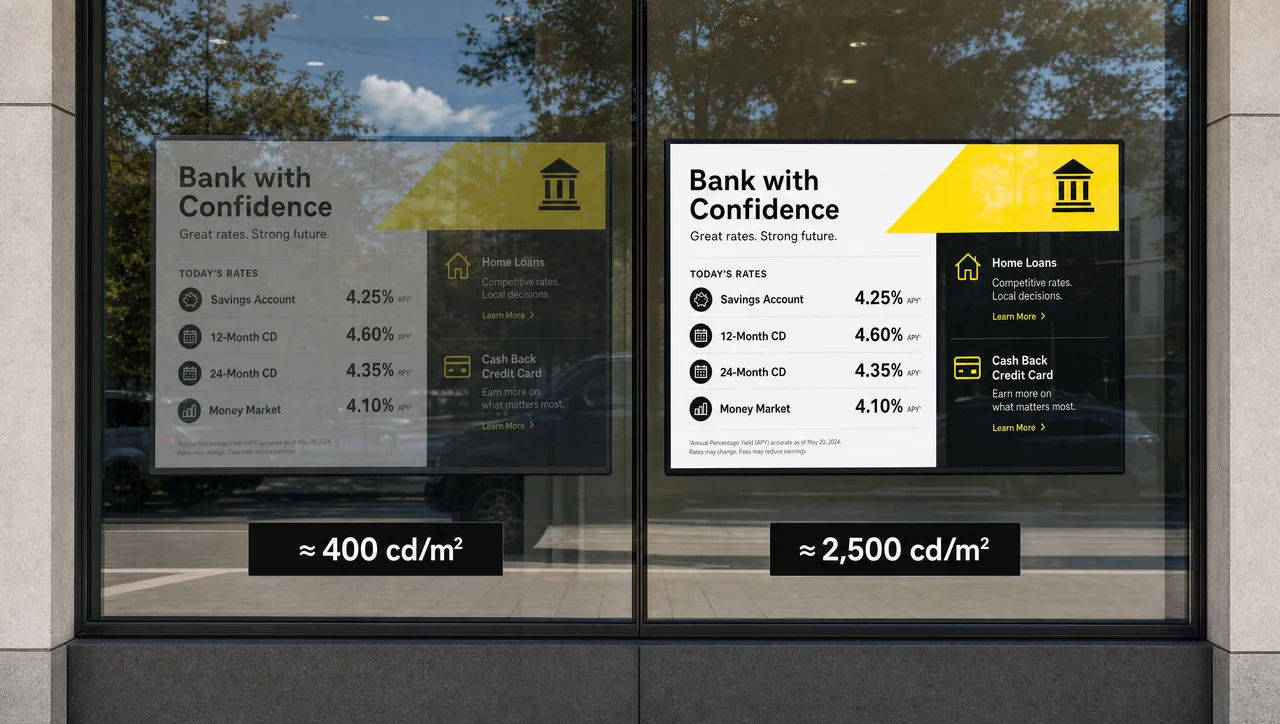
The unit is worth knowing, because it is the only number that reliably predicts readability. Digital signage brightness is quoted in candela per square metre, and one candela is approximately the luminous intensity of a single candle; the SI base unit is maintained by NIST. A sunlit window, an outdoor position or a location under high-glare floodlights requires this specification; a shaded indoor position does not, and the premium there returns nothing. Panel technology therefore sets the ceiling on brightness and service life. Beyond the single panel, two formats address a surface that no one sheet of glass can cover.
Large-Format Types: Video Walls and LED Walls
These two large-format types solve the same problem — a display that is bigger than any single panel — and they fail in entirely different ways. The choice between them is the most expensive decision in the whole classification.
12. Video Walls
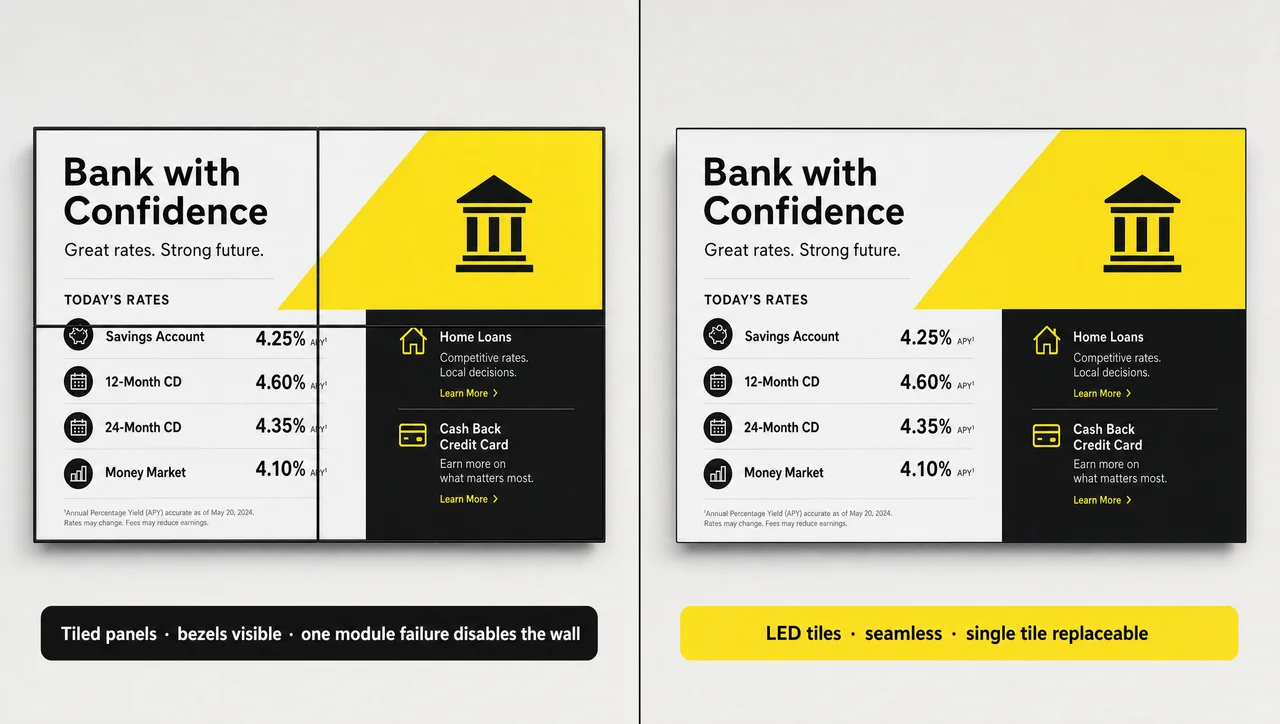
A video wall is an array of panels tiled into a grid and synchronised so that they behave as one surface. A digital signage video wall usually begins at 4 screens and scales from a 2m x 2m footprint upward. Tiled screens synchronise frame by frame, which is what separates a wall from four televisions on a common bracket.
It is the cheaper route to large format and it is flexible, but it carries a single point of failure: one dead panel makes the wall unusable until it is replaced, because the image no longer resolves across the grid. Every panel has a bezel, so thin dark lines run through the picture. Video walls remain an indoor format, and the grid geometry of a given video wall setup follows from the aspect ratio the content requires rather than from the wall available.
13. LED Walls
An LED wall is assembled from individual LED tiles seated in cabinets, forming one seamless surface with no bezel in the image. LED walls used in digital signage start around 85 inches and scale upward without a practical ceiling, in flat or curved builds, indoors and outdoors.
The maintenance model is the substantive difference: a damaged tile is replaced individually while the remainder of the wall continues to run. Image quality is governed by pixel pitch, the distance between adjacent LEDs. A small pitch produces a sharp image at close viewing distance and costs considerably more; a larger pitch is correct when the nearest viewer stands twenty metres away. Similarly to panel choice, the housing around a screen forms a classification of its own.
Enclosure and Form-Factor Types
The last three formats are defined by the box around the screen rather than by the screen itself — a conventional panel with its cabling and media player, sealed into a standalone unit. The enclosure determines where the unit can stand and which task it can perform.
14. Outdoor Enclosures
Outdoor digital signage enclosures are typically rated IP65 under IEC 60529: sealed against dust and against low-pressure water, which covers rainfall and road spray from passing traffic. Beyond sealing, the unit requires a high-bright panel to remain readable in sun and thermal management to survive both summer heat and freezing nights. Battery-powered variants exist for short-term placement without a mains supply — construction sites, festivals, temporary retail — with runtime as the limiting parameter.
15. Totems and Freestanding Displays
A totem is a vertical, freestanding pillar that places a screen where the message is relevant, with no wall or fixture required. Its three functions are brand visibility at an entrance, in-situ promotion beside the product, and presentation of high-value goods such as cars, where the screen carries specification data the object itself cannot.
Totems are the only type on this list selected primarily for a spatial reason rather than a technical one, since no other format places a screen in open floor area.
16. Kiosks and Self-Service Terminals
A kiosk is a standalone touchscreen unit built for one person at a time — the format most consumers already recognise from ATMs, self-checkout lanes, cinema box offices and fast-food ordering terminals. Gas-pump screens and bank terminals belong to the same family, and the accessibility requirements the U.S. Access Board applies to self-service terminals cover this digital signage format as well.
The operational case is throughput: transferring the ordering process to the customer raises transactions per hour on the same floor area, which is why quick-service chains adopted kiosks first. The constraint is reach, because a kiosk addresses one person, so its function is collecting information from that customer — an order, a check-in, a preference — rather than broadcasting to a room, and deployments that treat it as an advertising surface underperform on both counts, which is why interactive kiosks and touchscreens are specified against throughput targets rather than against impressions. Overall, the hardware axes determine what a screen is capable of; the software determines whether that capability is realised without manual work.
Types of Digital Signage Software
Signage software splits into three deployment types — cloud-hosted, on-premise and self-hosted open-source — and the type selected constrains which signage formats can actually be operated. This is the part of the specification most often deferred, and the part that is hardest to reverse afterwards.
| Cloud-hosted | On-premise | Open-source | |
| Where it runs | Vendor infrastructure | Your own servers | Your own servers |
| Suits | Multi-location networks | Closed networks, strict data policy | Technical teams, small counts |
| Main cost | Subscription per screen | Licence plus infrastructure | Staff time, not licence fees |
| Watch out for | Network dependency | No automatic updates | You are the support desk |
| Fits which types | All 16 formats | Most, with local content limits | Simple loops and dashboards |
Cloud-hosted signage software runs 5 screens and 5,000 screens through the same workflow, which is why multi-site networks default to it. A second split matters as much: a CMS versus a full platform. A content management system creates, schedules and organises content; a platform adds device management, POS and data integrations, user roles and fleet-wide playback monitoring. At three screens in one café the distinction is academic. At 400 screens across 90 cities it is the entire operation, and a signage CMS alone will not cover it.
The rule that reduces cost: match the software type to the signage type. Kiosks require input handling and session timeouts. Menu boards require software that integrates with a POS through an API and syncs the data on every price change, or the automation argument collapses. Advertising networks require personalised targeting by audience demographics, location, time of day and preference, built from drag-and-drop templates rather than a design cycle.
⚠ “Free forever” rarely survives contact with a rollout. Vendors advertise unlimited screens, but only within a capped tier, and phrases such as “no credit card” or “without contract” describe the sign-up rather than the operating limit. The cap on screen count, update frequency or integrations surfaces at the moment a pilot becomes a deployment. Free and open-source options remain viable, provided the operating load is understood: open-source digital signage software cannot escalate to a vendor when a screen fails at 07:00, and that call lands on an internal team. Therefore verification belongs in the selection process itself. Request a demo on the vendor’s own hardware rather than on a slide, and start a trial on one screen in a real location; most vendors allow a buyer to try it free for a limited period, which is long enough to expose whichever of the four axes the product handles poorly.
Digital Signage Devices: What Hardware Each Type Needs
Every signage type requires two devices behind the glass: one that plays the content, and one that confirms the content played. Most of the market supplies only the first.
The playback device is a media player — a small computer that pulls content from the platform and drives the display, ranging from a smart TV’s built-in application through consumer streaming sticks to a dedicated signage player. Beyond a single screen in a low-traffic room, the dedicated player is preferable on connectivity, content control and the fact that it is designed for continuous operation rather than for evening video streaming. What a digital signage player has to render sets its specification, and screen and hardware compatibility decides which panels it can drive at all.
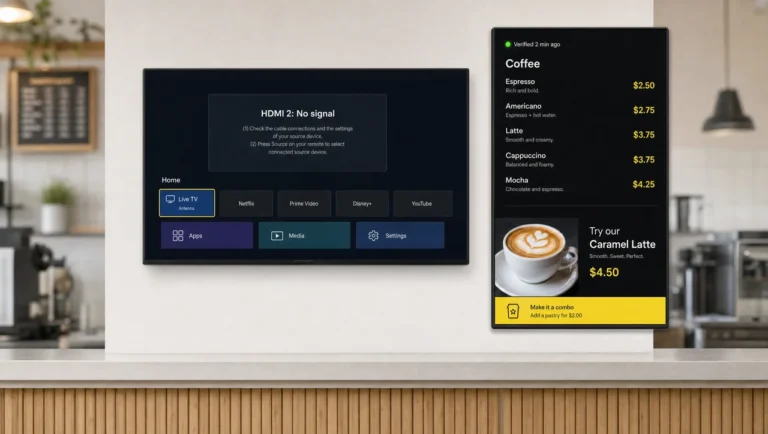
The second device is the one the category usually omits. Sending content to a screen is not equivalent to content appearing on it: the display may be powered off, set to the wrong HDMI input, or holding a frozen frame, and head office learns about the state from a customer. Decker installs a Player and a Verifier behind each screen — the Player runs the content, the Verifier independently monitors display and player, switches the HDMI source, cycles power and restarts remotely without a site visit. Verified screens report their own state, so that digital signage network of 13,700+ screens across 490+ retail locations reports uptime as a comparable figure rather than an assumption.
⚠ “It works offline” is half a specification. Playback continues from local cache when the network drops, but scheduled updates, price changes and playback confirmation resume only when connectivity returns. An offline cache protects the picture, not the accuracy of what the picture shows. Devices therefore determine whether a format performs in a location or only in a specification. Next comes the question of combining all four axes for one specific room.
How to Choose the Right Type for Your Screens
Choosing among the digital signage types requires three answers that arrive in this order: what the screen must accomplish, where it physically sits, and who stands in front of it. Panel, enclosure and software tier follow from those three.
| Answer to “what is it for” | Function type | Typical panel | Form factor |
| Sell food, show prices | Menu board | LED, indoor | Wall-mounted panel |
| Inform staff | Corporate dashboard | LCD or LED | Wall-mounted panel |
| Run campaigns indoors | Advertising / environmental | LED or LED wall | Panel, video wall, totem |
| Run campaigns outdoors | Digital billboard | High-bright LED | Outdoor enclosure |
| Let people find or order | Interactive | Touchscreen | Kiosk or totem |
| Fill a large wall | Large format | Video wall or LED wall | Tiled or tiled-seamless |
Two qualifications apply here. The sector shifts the weighting but rarely changes the format: a hospital and a hotel both require wayfinding and specify the same touchscreen, and that overlap repeats across most of the industries that deploy screens at scale. And the type decision is the budget decision, since panel and enclosure account for most of the variance in what a deployment costs. In other words, the cheapest correct format outperforms the most capable wrong one.
When Each Type Is the Wrong Choice
Most guides list what each format is suited to. The more useful list is the inverse, because a mismatched type is the common reason a signage deployment is switched off within a year.
- A kiosk is the wrong choice when the objective is reach. It serves one person at a time; where impressions matter more than transactions, a broadcast display in the same position reaches more people for less.
- A video wall is the wrong choice outdoors, and wherever a single panel failure is unacceptable. One dead module removes the surface from service, so either a spare panel is stocked or an LED wall is specified instead.
- A standard LCD is the wrong choice in any window position. At 350–500 cd/m² it is unreadable in direct sun by mid-morning; below roughly 1,000 cd/m² a window installation buys a screen nobody can read.
- A fine-pixel-pitch LED wall is the wrong choice for a distant audience. At twenty metres a fine pitch delivers detail the eye cannot resolve, and the premium over a coarser pitch is substantial.
- Mobile signage is the wrong choice for permanent campaigns. Route planning, a driver, fuel and maintenance make it viable for a launch window and expensive for anything running year-round.
- Automated menu boards are the wrong choice without a POS integration. With no live data source, a digital menu board is a manually updated poster with a power bill, and the update cycle returns to quarterly within months. As a result, the shortlist for most specifications is shorter than the catalogue suggests. The table below compresses it.
Pros and Cons of the Main Signage Types
| Type | Strongest at | Weakest at |
| Menu board | Automated pricing accuracy | Needs a live POS connection to earn its keep |
| Corporate dashboard | Uniform internal messaging | Depends on other systems being clean |
| Advertising / environmental | Attention and brand mood | Effect fades without content rotation |
| Interactive | Depth per person, self-service | Serves one viewer at a time |
| Indoor display | Cost per screen, flexibility | Ignored when the loop never changes |
| Digital billboard | Reach and rapid creative swaps | Local rules on brightness and dwell time |
| Mobile display | Urgency, time-boxed campaigns | Operating cost in a different league |
| Video wall | Cheapest route to large format | Bezels; one failure disables the wall |
| LED wall | Seamless, indoor and outdoor | Highest upfront cost |
| Kiosk | Throughput and self-service | Very limited audience per unit |
Overall, no format wins outright; each column above is a trade accepted deliberately. Meanwhile, the specifications quoted here are sourced below.
Questions and Answers
1 What are the types of digital signage?
Signage formats group into four categories: by function — menu boards, dashboards, advertising and environmental displays, interactive signage; by placement — indoor, outdoor, mobile; by screen technology — LCD, LED and OLED, touchscreen, high-bright; by form factor — video walls, LED walls, enclosures, totems, kiosks. Sixteen formats in total, and a specification normally touches all four categories at once.
2 What are the different types of digital signage used for?
Menu boards display prices and availability from a POS. Dashboards distribute internal metrics and announcements. Advertising and environmental displays run campaigns and set the state of a space. Interactive screens handle wayfinding, check-in and self-service ordering. Outdoor formats carry advertising to passing traffic.
3 What are the types of digital signage devices?
Three device classes sit behind a screen: media players that pull and render content, from smart-TV applications and streaming sticks to dedicated signage players; monitoring devices that verify a display is actually showing content and restore it remotely; and the display itself — a commercial panel, an LED tile array or a sealed outdoor unit.
4 What are the types of digital signage software?
Signage software comes in three deployment types — cloud-hosted, on-premise and self-hosted open-source — cross-cut by a second distinction between a CMS, which manages content and schedules, and a full platform, which adds device management, POS and data integrations, user roles and playback monitoring across the fleet.
5 Is free digital signage software actually free?
Open-source software carries no licence fee, but hosting, updates and support become an internal responsibility. Free commercial tiers cap screen count, update frequency or integrations, and the limit surfaces when a pilot becomes a deployment, so the cap is worth reading before the pilot.
6 What is the difference between a video wall and an LED wall?
A video wall tiles complete panels into a grid, so bezels show as thin lines and one panel failure disables the surface; it is indoor-only and cheaper. An LED wall is assembled from LED tiles forming a seamless picture, works indoors and outdoors, and allows a damaged tile to be replaced on its own.
7 Is an LED screen the same as an LED wall?
No — an LED screen is an LCD panel using LED backlighting, one sheet of glass in a frame. An LED wall is a modular surface assembled from LED tiles in cabinets, with no bezel. They are different types at very different price points.
8 What is the difference between indoor and outdoor digital signage?
Indoor screens address people already inside a building and prioritise content flexibility. Outdoor screens address passing traffic and prioritise survival: a rated enclosure, brightness sufficient to compete with sunlight, and thermal tolerance. Indoor hardware placed outside fails, usually within the first season.
9 Which type of digital signage is best for a small business?
For most single-location businesses, one commercial-grade LED panel on a dedicated media player covers the requirement. The functional type follows the objective: a menu board where food is sold, an indoor display where offers are promoted, a touchscreen only where customers genuinely need to search or order themselves.
10 Can a regular TV be used for digital signage?
For light use in a low-traffic room it is workable, but consumer televisions are not built for continuous operation, produce lower output and provide no remote diagnostics, so failures surface as customer complaints. In multi-screen deployments the missing element is not the panel but remote verification and recovery.
11 How many signage types does one platform need to support?
More than the initial plan assumes, because a restaurant starting with two menu boards adds a promotional screen, then a kitchen dashboard, then a queue display. A platform that already handles menu boards, video walls, corporate screens and touch kiosks avoids running two systems eighteen months later.
Sources
- IP code (IEC 60529) — ingress protection ratings for electrical enclosures
- NIST — the candela, SI base unit of luminous intensity
- U.S. Access Board — accessibility guidelines for self-service transaction machines and kiosks
- U.S. DOT National Transportation Library — driver distraction and digital advertising billboards