How to Change Menu Prices Without Reprinting on Paper, Boards, QR Menus and Screens



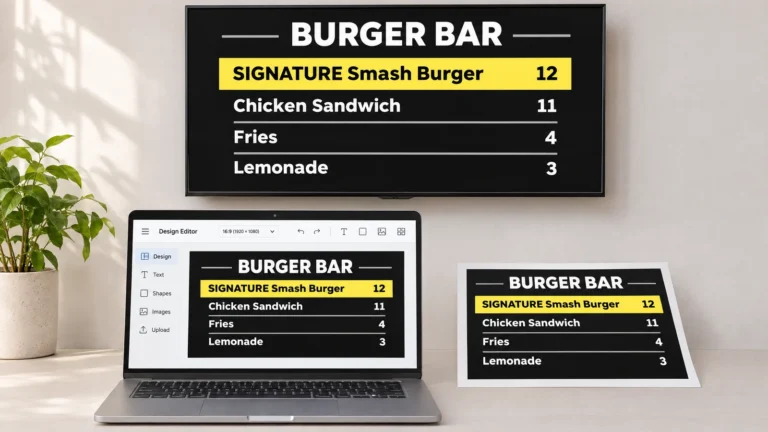
How to change menu prices without reprinting comes down to where your menu lives. Paper menus require a sticker, a price strip or a fresh insert in their covers. A wall board takes new letters or chalk. A QR menu takes an edit to the page, not a new code. A screen takes a new file, or a price pulled from your POS that updates every board in seconds.
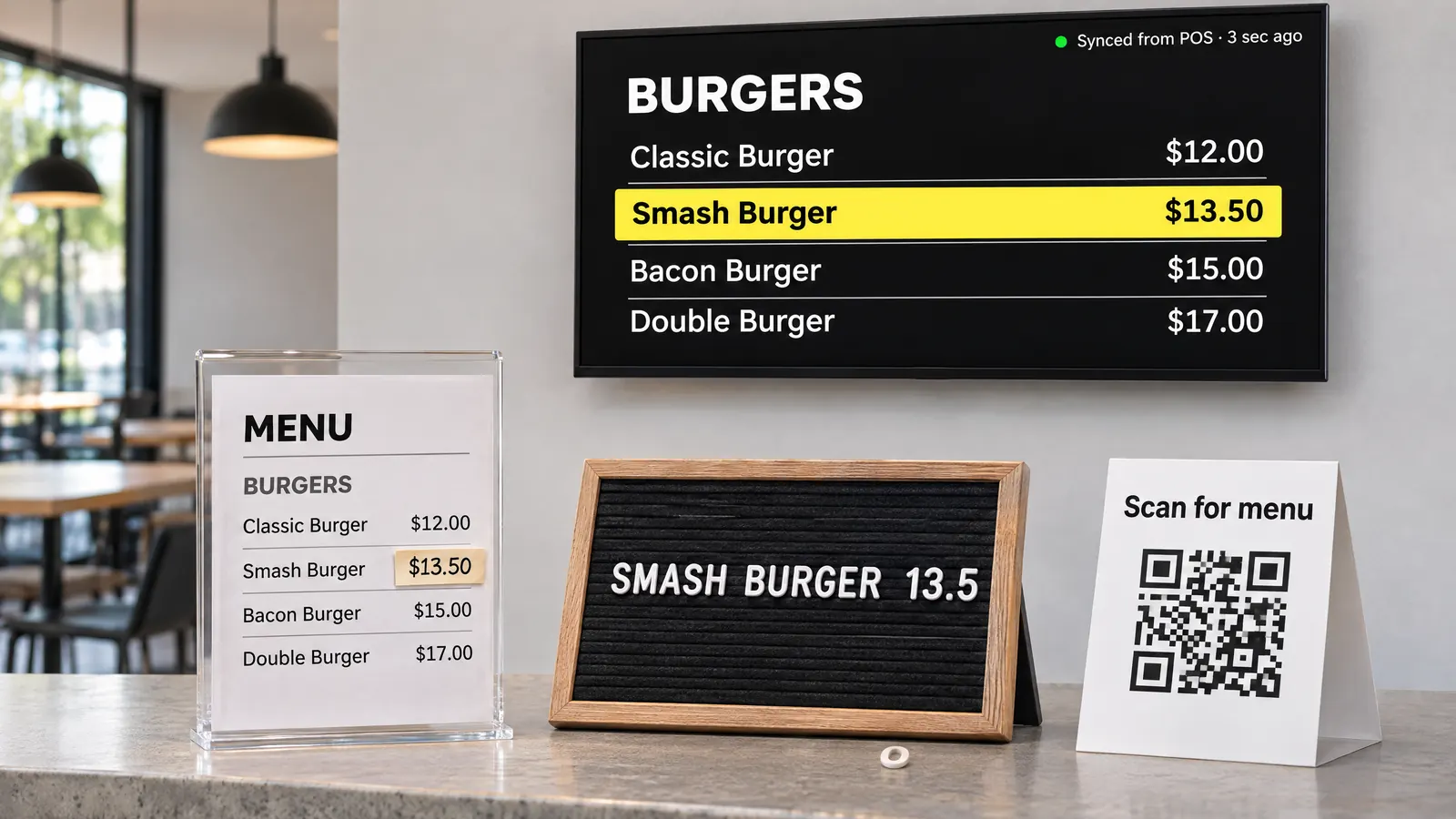
- A price sticker fixes one menu, a POS price change fixes every screen.
- The QR code stores an address, not your prices.
- Reprinting pays off only when the menu changes a few times a year.
Next: why reprinting falls behind, then the fix for each menu type.
Why Reprinting Can’t Keep Up With Menu Prices
Reprinting falls behind because menu prices rose about 0.3% a month in 2026, and each print run takes days. Every run also has to reach every copy in the building. The 0.3% figure is the National Restaurant Association’s average for the first 10 months of 2026, and its 2026 State of the Restaurant Industry report found that 90% of full-service and 85% of limited-service operators raised prices last year. The Bureau of Labor Statistics puts food away from home up 3.5% for the 12 months ending September 2026.
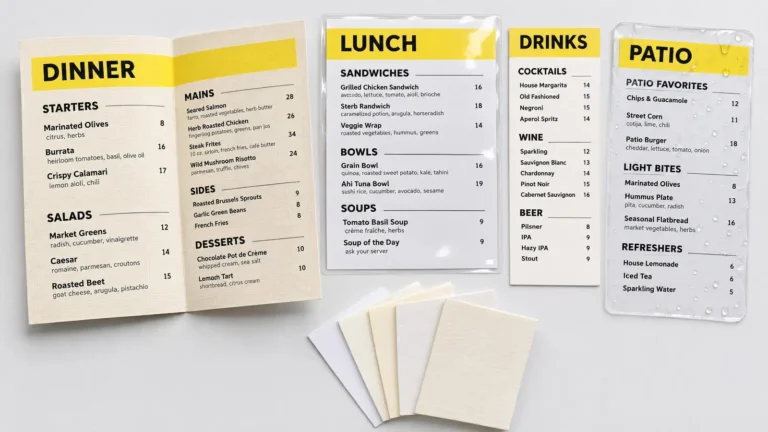
Each menu reprint costs money for design and printing, days while old menus stay on the tables, and a fresh chance for a typo. Our guide to menu paper breaks down what a reprint costs per copy and per run.
Printed menus also show the gap: an online menu updates within minutes, while a print run takes days. In that window, a single price can show as $12.95 on the table menu, $13.50 on Google and $15.25 on DoorDash for the same smash burger. Old menus also hide where nobody checks, even after you change menu prices without reprinting:
- the takeout stack by the register
- bar menus and the drinks card
- room-service menus in a partner hotel
- catering menus and party packages
- flyers on the counter and in delivery bags
As a result, the first step to update menu prices without reprinting is knowing every copy you’re patching.
Stop patching menus one copy at a time. Connect Toast, Square or Clover, and a price changed at the register reaches every Decker screen within seconds. Try every feature free for 14 days on up to 5 screens, no card. Try it free
How to Change Menu Prices Without Reprinting: 9 Fixes Compared
How to change menu prices without reprinting depends on the medium: paper and boards are patched, screens and QR pages are edited. The table compares nine common menu types by the fix that works, how long one price change takes and when the fix stops being worth it.
| Menu type | Fix without reprinting | Time per price change | Up-front cost | How it looks to guests | When it stops working |
|---|---|---|---|---|---|
| Printed table menus | Removable price sticker or price strip | Minutes per copy | $ | Visible up close | Stickers wear or get peeled |
| Menus in clear sleeves or covers | Swap the insert sheet | Minutes per copy | $ | Clean | Every cover still needs a new sheet |
| Laminated card | Reprint one sheet at home and laminate it | Hours | $ | Clean | More than a few changes a year |
| Letter or magnetic board | Swap the numbers | Minutes | $ | Clean if letters match | Missing or mixed-up digits |
| Chalkboard | Erase and rewrite | Minutes | $ | Depends on handwriting | Ghosting and smudges |
| Lightbox or backlit panel | Price-strip overlay or a new panel | Days | $$$ | Overlay shows in the light | Any change beyond one line |
| TV playing a file from a USB stick | Re-export the file and reload every TV | Hours | $$ | Clean | More than one screen or location |
| PDF behind a QR code | Replace the file at the same link | Minutes | $ | Clean | A new file gets a new address |
| POS-connected digital menu board | Change the price once in the POS | Seconds | $$ | Clean | Rarely, if the POS link stays on |
In other words, the more often a price moves, the further down this table you should be. Menus that show a new price every week belong in the bottom rows.
How to Change Prices on a Printed Menu
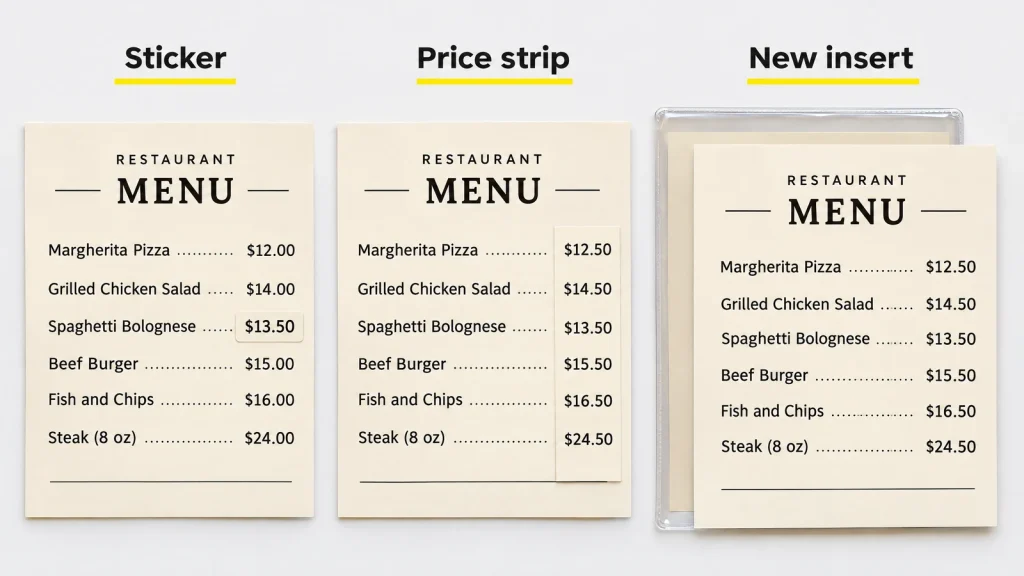
On a printed menu, prices are patched with a sticker, a price strip or an insert, and each fix wears out. Reprinting a single sheet yourself is the fourth option.
Menu Price Stickers and Price Strips
Menu price stickers offer the fastest patch. Match the sticker to the paper color and cover one price, or run a single long price strip down the whole price column so the new numbers line up.
- Removable stickers come off cleanly when the next change comes.
- They wear at the edges, and some guests peel them off.
Don’t cross out prices on the menu by hand or write the new number over the old one. Typsy, a hospitality training platform, calls that look messy and notes it makes a price rise more noticeable.
Menu Inserts, Sleeves and Clear Menu Covers
Menus in menu sleeves or clear menu covers require only a new sheet: the cover stays, and the page inside changes. That makes menu inserts the cleanest fix for table menus.
- Print one insert sheet per cover instead of a whole new menu.
- For a short gap, slip in a small card that reads “Updated prices effective December 1.”
- You still print the sheet and swap it by hand in every cover, and it does nothing for the wall or the drive-thru.
Reprint One Sheet Yourself
If you have the source file, fix the price and print the page. A menu built in Canva takes a few clicks, and our Canva guide shows how to update prices on a Canva menu.
No file? You can rebuild the page from a scan:
- Scan the menu at 300–600 dpi.
- Match the font with Adobe Fonts or WhatTheFont.
- Fill over the old price with the background color, or use content-aware fill, then type the new price.
- Print on legal-size 8.5 × 14 in paper and run it through a home laminator.
Have a second person proofread every price before you print.
Split the Menu: Print What’s Stable, Move What Changes
A hybrid menu keeps paper for the dishes and prices that rarely move. Specials, seasonal items and anything tied to a volatile ingredient go on a board, a screen or a QR page, so you change menu prices without printing anything. Items whose cost swings week to week, like oysters, lobster or a dry-aged steak, are often listed as MP, or market price; as a result, the printed menu never carries a number that goes stale.
Changing Prices on Wall Boards: Letters, Chalk and Lightbox Panels
Wall menu boards are changed by hand: letters and chalk take minutes per line, while a lightbox panel requires new film. How much work that is depends on the board.
Letter and magnetic boards. Swapping the tiles for one price takes a minute, as long as you have the right digits in the drawer.
Chalkboards. Prices on a chalkboard require erasing and rewriting each line by hand, and the result depends on who holds the marker that day. Liquid chalk markers look sharp but can leave ghosting on some surfaces, so old prices show through after a few rounds.
Lightbox and backlit panels. The price is printed on the backlit film itself, usually duratrans. A new price means a new film or a price-strip overlay stuck on top, and the overlay casts a visible edge once the light is on. Overall, per change, this is the most expensive menu to update.
Menus on a TV: Why the File Is the Problem
A menu on a USB stick is a printed menu in disguise: every new price requires a new file, loaded by hand. Someone has to export it and carry it to each TV, so the screen is digital but the workflow isn’t.
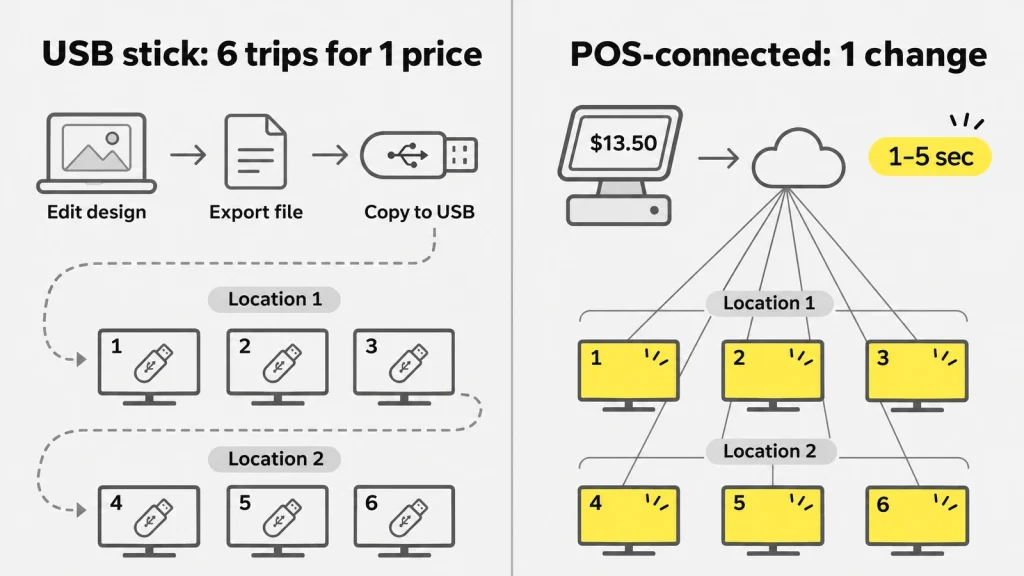
One price change runs through the same chain every time: edit the design, export a PNG or MP4, copy it to the stick, walk to each TV, swap the file and check that the slideshow now plays the new version. In other words, 3 screens across 2 locations mean six trips to a TV for a single price.
If you’re still setting up the screens, our guide to putting a menu on a TV covers the hardware.
Done carrying a flash drive to every TV? Connect your menu TVs to Decker once, and the next price change goes out from one dashboard to every screen at every location. Free for 14 days on up to 5 screens, no card. Try it free
QR and Online Menus: Change the Page, Keep the Code
A QR code stores the address of your menu, not its prices, so you edit the page and keep the printed code. That works as long as the address never changes. Live web menus behind a QR code show the new price the moment you save.
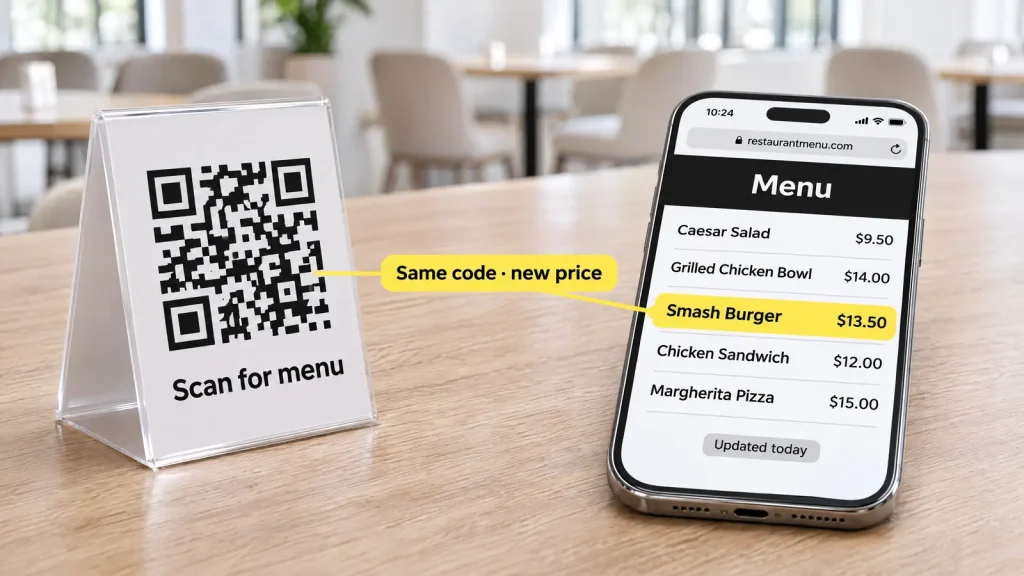
So can you change a QR code menu without reprinting the code? With a PDF, the answer depends on the link. When you change the PDF behind a QR code, replace the file at the same address. If your file host gives the new PDF a fresh link, the code on the table keeps opening the old file. Switching a shared file from public to unlisted can also break the link the code points to.
The code type matters too. A static QR code has the address baked in for good. A dynamic code points to a short redirect you can repoint later.
After every change, check like a guest: scan a table code on mobile data, then open the menu link in a browser where you’re not signed in.
You will need to reprint the QR code itself when:
- the menu moves to a new web address
- a static code was printed with the wrong address
- the code points to one specific PDF file rather than a page
However, Google and delivery apps don’t read your QR page. Update your Google Business Profile, DoorDash and Uber Eats the same day, and allow 24–48 hours for Google to show the change.
POS-Connected Menu Boards: Change the Price Once
A POS-connected menu board is a screen that reads prices from the register, so one POS change updates every board. Prices changed in Toast, Square or Clover show up on screens in every store without a file, a flash drive or a print run. The POS becomes your single source of truth, the same system that already rings up the check.
That changes what it takes to update menu prices without reprinting:
- Prices and availability. Toast, Square and Clover pass items, prices and availability straight to the boards. An item 86’d in the POS reaches the board as fast as a new price.
- Dayparts. Breakfast-to-lunch switches and a dinner panel with dinner prices run on time-of-day rules, not on someone remembering to swap a file.
- Several locations. Each store connects its own register, and its boards read only that store’s prices and stock.
In Decker, a new price appears on screen 1–5 seconds after the POS reports it; integrations that sync on a timer follow the source’s schedule. Registers outside Toast, Square and Clover can feed boards from a spreadsheet. POS price sync and daypart automation are part of the Professional plan at $12 per screen/month; the free Starter plan keeps 1 screen free forever but doesn’t sync prices from the POS. Paid features come with a free trial on up to 5 screens, no credit card. We checked these prices and terms on deckerapp.com on 11/27/2026. The full setup is on the POS integration page. Specifically, the table shows how five everyday changes play out on paper and on POS-connected screens.
| Change | Paper menu | POS-connected screen |
|---|---|---|
| New price on one item | Sticker or reprint every copy | Change it once in the POS, on screen in 1–5 seconds |
| Item sells out mid-shift | Staff tell each guest | 86 it in the POS and the board follows |
| Lunch vs dinner price | Two printed menus, swapped by hand | Panels switch on a time-of-day rule |
| LTO reaches its end date | Pull flyers, cover the line | Panel ends on its date |
| 2 locations, different prices | Two separate print runs | Each store’s register feeds its own boards |
How to Avoid Mismatched Prices During the Switch
Most price mistakes happen in the days that pass between the decision and the last old copy leaving the room. Give every change an effective time, an owner and a guest’s-eye check. If you’re working out how to update restaurant menu prices without reprinting, these six habits keep every copy in step:
- Effective time on every change. Keep one line per change: item, old price, new price, from when, who approved it.
- Check add-ons and modifiers. Add-on prices for oat milk, extra cheese and side upgrades often show the old amount after the base item is updated.
- Pull every old copy. Takeout menus, bar menus, catering menus and flyers often show the old price for weeks.
- Check like a guest. Scan the QR on mobile data and run a test order on your best seller.
- One line for staff. Tell servers and cashiers what changed and from what time, before service starts.
- Log the change. Date and reason. If one item changes every few weeks, fix the purchasing or list it at market price.
The full channel checklist, with owners and a daily routine, is in our guide on how to update a restaurant menu. However, small changes rarely need an announcement; for bigger ones, a short, honest note works better than hiding the change.
When to Stop Reprinting Menus
Stop reprinting menus when a year of print runs costs more than a screen, which usually happens once prices change monthly. A second location gets you there faster. Run your own numbers with one formula:
Reprint cost per year = (copies × cost per copy + design hours × hourly rate) × print runs per year
An illustrative example: 60 counter and takeout menus at $1.50 each, plus 2 design hours at $25, comes to $140 per run. At 8 reprint runs a year, that’s $1,120. For comparison, one POS-connected screen on Decker’s Professional plan costs $144 a year in software, plus the TV and player you buy once.
The number of runs tends to grow, not shrink. Prices usually move in small steps, and Typsy supports that approach: a $0.25 rise is less likely to be noticed than a $0.95 one. Printed menus require a new run for every one of those steps. Before you reprint menus again, re-cost the dish so the new price holds longer.
Signs it’s time to move the changing part of your menu to a screen:
- prices change more than once a month
- you run breakfast, lunch and dinner dayparts
- items regularly sell out during a shift
- you have more than one location
- dine-in and delivery prices keep drifting apart
However, table menus can stay: many operators keep a short printed menu that shows the stable items and move only the wall and counter menu to screens.
When Reprinting Is Still the Right Call
Reprinting is still the right call for a menu that changes once or twice a year and keeps its prices for months. Print also wins in these cases:
- The menu changes once or twice a year. Two print runs a year rarely justify new hardware.
- The menu is part of the brand. Fine-dining menus on heavy stock, with custom typography, offer guests a design object to hold.
- The menu is small. One location and roughly 15 items fit on a sheet you can reprint in an afternoon.
- The wall has no power or network. A screen needs an outlet and a connection where the board hangs.
- One person makes every change once a season. With no daily price moves, a print run fits the routine.
Questions and Answers
1 Can I put stickers over the prices on my menu?
Yes, as a short-term fix. Use removable stickers that match the paper color, or one strip down the whole price column so the numbers line up. Replace them as soon as they wear or get peeled. Don’t cross out the old price or write over it by hand, since that draws attention to the increase.
2 How do I change prices on a laminated menu card?
Reprint the sheet and laminate it again. A marker on top of the lamination looks like a crossed-out price and rubs off in service. No source file? Rebuild the page from a 300–600 dpi scan, then print and laminate at home.
3 Can you change a QR code without reprinting it?
Yes, if the code opens a permanent address. Edit the live menu page, or replace the PDF at the same link. If the new file gets a different address, or a static code was printed with the wrong one, you need a new code.
4 How do I update menu prices on a TV without a USB stick?
To turn the TV into a digital menu board, connect it to a cloud signage account through a small media player or the TV’s own app. You change the menu once in the dashboard, and all screens pick it up.
5 Do I need to tell customers before changing menu prices?
Prices that move by a small amount usually don’t require an announcement. For a large increase or a change on a favorite item, a short, honest note at the counter works better than a long explanation. Give staff one line to say if a guest asks.
6 How fast does a price change show on a digital menu board?
New prices show on a POS-connected board 1–5 seconds after the register reports them. Google can take 24–48 hours to show an edited menu, and a printed reprint takes days from file to table. Boards fed by a USB stick update only when someone reloads the file.
Sources
- National Restaurant Association — Menu Prices (Restaurant Economic Insights, November 10, 2026)
- National Restaurant Association — 2026 State of the Restaurant Industry: press release (February 12, 2026)
- National Restaurant Association — Rising food costs, tight supplies: more challenges for industry
- U.S. Bureau of Labor Statistics — Consumer Price Index – September 2026 (released October 14, 2026)
- Typsy — How to increase menu prices without losing sales (Mike Walmsley)
- Google Business Profile Help — About the menu editor
- Bitly — Static vs. Dynamic QR Codes
- 4OVER4 — Backlit film for menu boards and lightboxes
- Uchida of America — How to erase chalkboard markers
- Decker — Pricing (prices last updated 10/26/2026, checked 11/27/2026)