Menu Paper for Restaurants: Sizes, Weights, Finishes and Print Budgets



In 2026, most US restaurants print menus on letter (8.5 × 11), legal (8.5 × 14) or tabloid (11 × 17) sheets of 80–100 lb cover stock. Pick menu size paper by item count, laminate the menus guests handle every day, use synthetic stock on patios, and budget by how often price changes force a reprint.
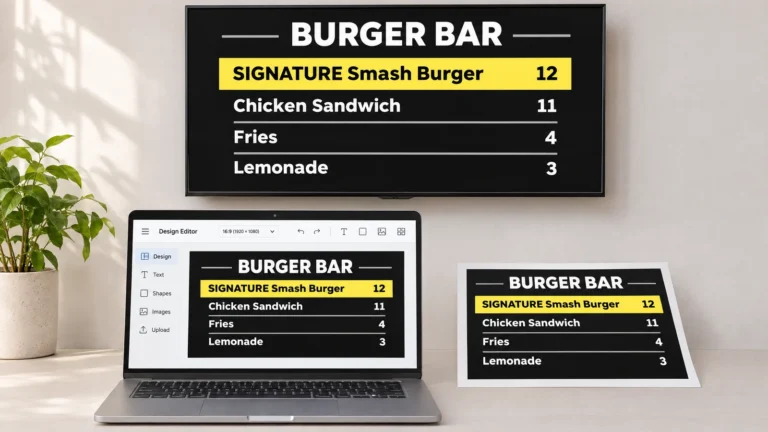
Paper works at the table; the wall menu works better on a screen. A digital menu board pulls new prices from your POS in seconds, with no reprint. Try Decker free
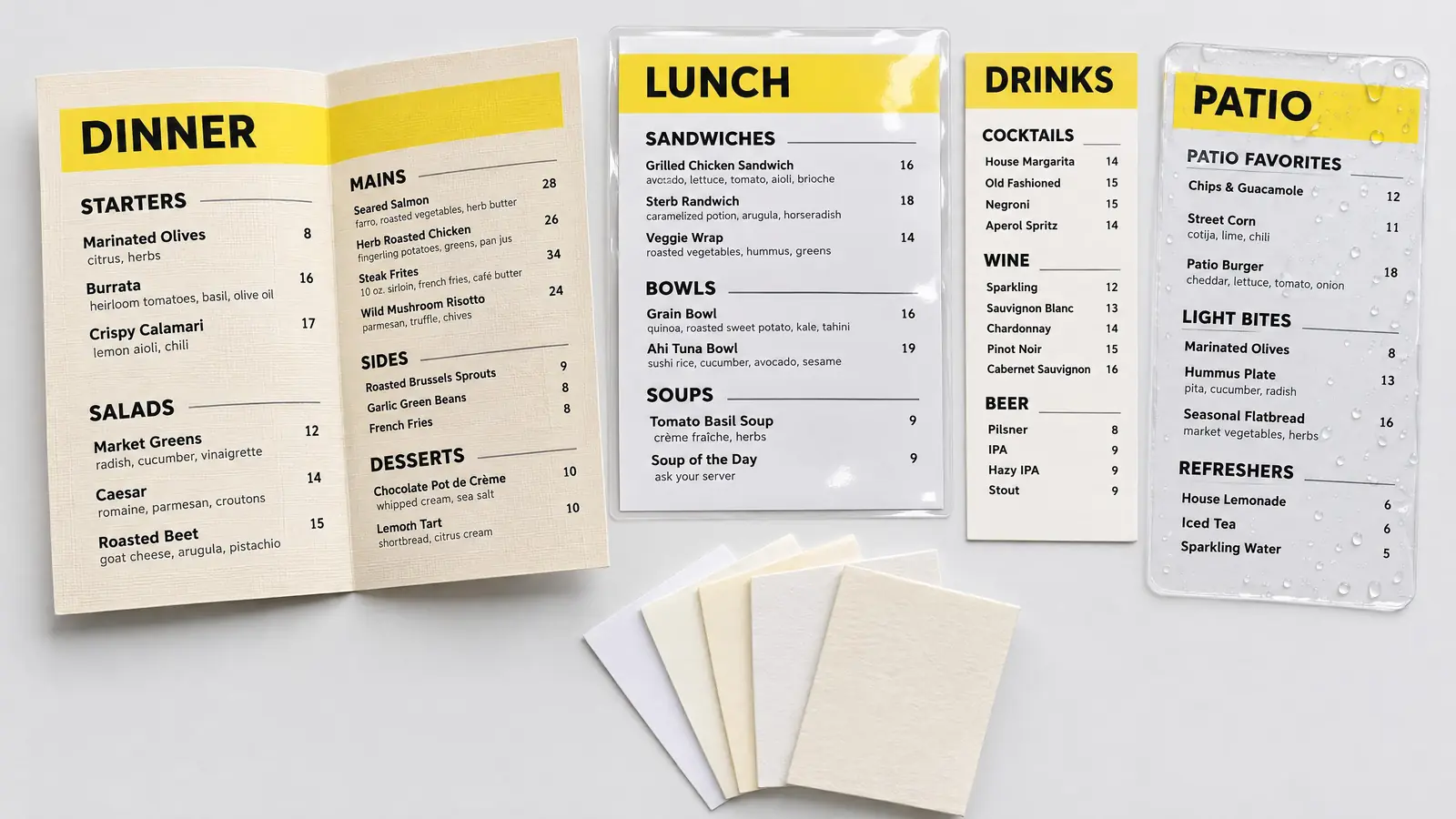
Menu paper samples: a folded dinner menu on linen cover stock, a laminated lunch menu, a narrow drink card, a waterproof patio menu, and paper swatches of different weights.
This guide covers sheet sizes that fit menu covers and office printers, paper weights in pounds and gsm, lamination and waterproof stock, where to print, and what a year of reprints costs one location. Next comes the stock, because it decides how long each copy survives.
Menu Paper at a Glance: Which Stock for Which Menu
Menu paper that guests handle for a season needs stiff cover stock; a sheet replaced every morning can be light text paper. The choice depends on how long one copy has to last and how many hands touch it before the next reprint. A paper menu passed to every table for months takes far more wear than a specials sheet that runs through an office printer each morning. The table matches common menu types to sheet size, stock and finish.
| Menu type | Typical sheet, inches | Paper | Finish | Typical life |
|---|---|---|---|---|
| Dine-in single page | 8.5 × 11 or 8.5 × 14 | 80–100 lb cover | matte; laminated if wiped daily | a season |
| Folded dinner menu | 11 × 17, folds to 8.5 × 11 | 80–100 lb cover, scored | matte, linen or uncoated | a season |
| Takeout tri-fold | 8.5 × 11 or 8.5 × 14 | 70–100 lb text | gloss or uncoated | one order |
| Daily specials insert | 4.25 × 11 or 5.5 × 8.5 | 60–80 lb text | uncoated | a day to a week |
| Table tent | 4 × 6 | 100 lb cover or heavier | gloss or matte | a few weeks |
| Bar, patio or pool menu | 4.25 × 11 or 8.5 × 11 | synthetic, 8–14 mil | wipeable | several months |
| Kids menu | 8.5 × 11 | 60–70 lb text | uncoated, takes crayon | one visit |
Most restaurant menu paper is cover stock, also called cardstock, at 80 to 100 lb, or about 216 to 270 gsm, so a typical paper menu feels stiff in one hand. Inserts, takeout menus and kids menus use lighter text paper, while menus that get wet go on synthetic paper or under lamination. Before choosing a weight, though, settle the sheet size.
Menu Size Paper: Standard Sheet Sizes for Printed Menus
Menu size paper in the US comes down to a few sheets that cover most menus: letter, legal, tabloid and narrow cards. Half letter and 12 × 18 fill the gaps at both ends. Each one decides how many items fit, which printer can run it, and whether it slides into the menu covers you already own.
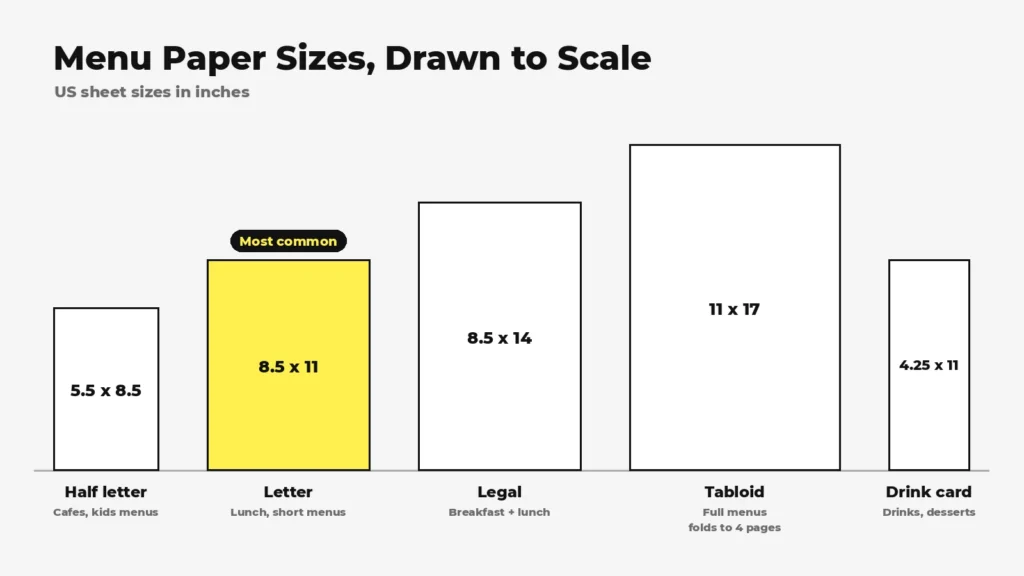
Menu size paper chart drawn to scale: half letter 5.5 x 8.5, letter 8.5 x 11, legal 8.5 x 14, tabloid 11 x 17, and a 4.25 x 11 drink card.
| Sheet | Size, inches | Best for | Prints on |
|---|---|---|---|
| Half letter | 5.5 × 8.5 | cafés, brunch, desserts, kids menus | any office printer, or a letter sheet cut in half |
| Letter | 8.5 × 11 | lunch, cafés, counter service, short dinner menus | any office printer |
| Legal | 8.5 × 14 | breakfast and lunch on one page, bar and pub menus | printers with a legal tray or manual slot |
| Tabloid | 11 × 17 | full menus, flat or folded into four pages | a tabloid printer or a print shop |
| Large format | 12 × 18 or 13 × 19 | long full-service menus | a print shop |
| Narrow card | 4.25 × 11 or 4.25 × 14 | drinks, wine, desserts, tasting menus | the manual or bypass slot |
| Table tent | 4 × 6 | specials and drinks on the table | a print shop |
Letter is the default: it fits every office printer and most menu covers. Legal adds three inches of height, about 27% more room, without a fold. Imported A4 sheets (8.27 × 11.69 in) are slightly narrower and longer than letter, so they sit loose in letter-size sleeves.
How Many Items Fit: The 12-Point Rule
Choose the type size first and the sheet second. Item names and descriptions read comfortably at the table at 12 point or larger, set in upright type rather than italics. Some designers accept 10–11 point for descriptions, but rarely for prices. A simple test: a guest should see the whole menu without turning it more than once.
A smaller font is not a fix for a crowded menu. Dropping item names below 12 point makes them hard to read in dim light; if the menu fits only that way, move up one sheet size, from letter to legal or from legal to 11 × 17.
Folded and Tri-Fold Menus
Folding turns one sheet into several pages:
- An 11 × 17 sheet folded in half becomes a four-page menu that closes to 8.5 × 11: cover and hours on the front, food inside, drinks or desserts on the back.
- A letter sheet folded in half closes to 5.5 × 8.5, a good size for brunch and kids menus.
- A tri-fold from a letter sheet has panels about 3.67 inches wide; from legal, about 4.67 inches. The panel that folds inside is trimmed 1/16 to 1/8 inch narrower so the menu closes flat.
Heavy cover stock cracks along the fold unless the print shop scores it first, pressing a crease line into the sheet before folding. Synthetic stock bends instead of cracking. Keep text and photos off the fold lines.
Fit the Sheet to Your Menu Holder
If you use menu covers or clear sleeves, the holder picks the size for you. Measure the inside of the sleeve or the photo corners, not the outside of the cover; most take 8.5 × 11 or 8.5 × 14. A sheet cut to the exact size slides in without buckling, and a print shop can cut odd sizes to fit. With the size fixed, the next decision is the stock itself.
How to Choose Restaurant Menu Paper: Weight, Finish, and Texture
Restaurant menu paper is chosen on three properties: weight, which sets stiffness, finish, which sets glare and spill resistance, and texture. Texture sets the tone of the room, but weight comes first, because it also decides which printer can run the sheet.
Paper Weight: Text vs. Cover Stock
US paper is sold by basis weight in pounds, and the number means different things for the two paper families. Text paper is the flexible sheet used for flyers and inserts. Cover stock, often called cardstock, is the stiff sheet used for main menus. Metric weight in gsm, grams per square meter, compares the two directly.
| Stock | Metric weight | Typical menu use |
|---|---|---|
| 60 lb text | 89 gsm | kids menus, takeout inserts |
| 80 lb text | 118 gsm | takeout tri-folds, daily specials |
| 100 lb text | 148 gsm | sturdier takeout menus and inserts |
| 65 lb cover | 176 gsm | weekly menus printed in-house |
| 80 lb cover | 216 gsm | main dine-in menus |
| 100 lb cover | 270 gsm | folded dinner menus, menus without covers |
| 130 lb cover | 352 gsm | table tents, premium single cards |
An 80 lb cover sheet is about 0.0118 inch thick, stiff enough to hold its shape in one hand. Most office printers take up to about 80–100 lb cover through the manual or bypass slot, so check your printer’s spec sheet before buying a case. Print shops run 80–130 lb cover and heavier.
A heavier sheet is not always a better menu. A 130 lb cover card jams most office printers, while 80 lb cover at 216 gsm already holds its shape in one hand and runs through the manual slot.
The practical rule ties menu paper weight to the reprint cycle: anything replaced weekly goes on text paper or 65 lb cover that runs through your own printer, and anything that must last a season goes on 80–100 lb cover.
Coated vs. Uncoated Finish
- Gloss makes food photos look saturated but reflects overhead light and shows fingerprints.
- Matte or silk reads under any lighting and resists glare, which is why most dine-in menus use it.
- Uncoated paper takes a pen, a stamp and home-printer ink well, feels natural, and absorbs grease, so it suits menus replaced often.
A UV coating or spot gloss sits between bare paper and lamination. It protects against light splashes and keeps the feel of paper.
Texture, Color, and Recycled Stock
Texture signals the kind of meal before the guest reads a word. Linen and felt finishes suit fine dining and wine lists, parchment fits steakhouses and Italian rooms, and kraft and other uncoated browns suit bakeries, breweries and farm-to-table spots. White and cream remain the easiest colors to read. Dark stock needs white or metallic ink, which is specialty printing most office printers cannot handle. For a greener menu, recycled stock with 30–100% post-consumer content or FSC-certified paper prints as cleanly as virgin stock. For menus that get wiped down every shift, the paper alone is not enough.
Laminated Menus: When Lamination Pays Off
Laminated menus are menus sealed in plastic film that survive wiping and spills, yet every price change still means a reprint. A laminated menu seals each price in plastic, so a change needs a new print and a new lamination. Lamination bonds clear plastic film to both sides of a printed sheet under heat and pressure. US online printers commonly offer 3 mil film in matte or gloss on restaurant menus; 5 mil feels sturdier, and 10 mil makes a rigid card.
Three choices change how a laminated menu performs:
- Matte or gloss film. Matte lamination cuts glare under pendant lights; gloss film makes colors brighter but reflects.
- Sealed or flush edge. A sealed border leaves a clear rim of film around the sheet, so liquid cannot reach the paper. A flush cut trims film and paper together, and the exposed edge can soak up water.
- Rounded corners. Square corners bend and peel first; rounded ones last longer.
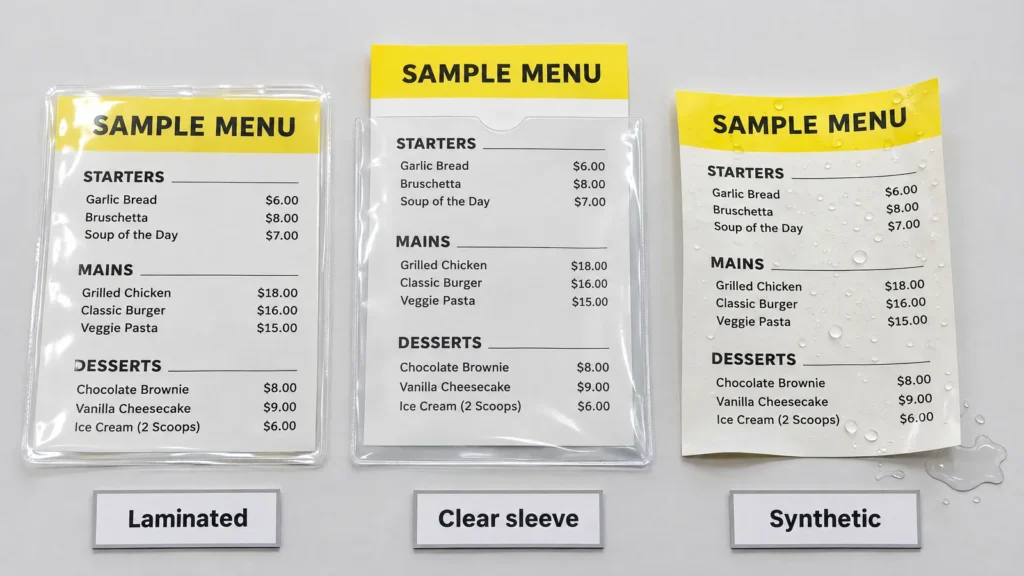
Laminated menus compared with a paper menu in a clear sleeve and a waterproof synthetic menu with water beading on the surface.
Lamination is not the only way to protect a menu. Compare the options by what happens when a price changes:
| Option | Wipes clean | Change one page | Feel | Best for |
|---|---|---|---|---|
| Lamination, 3–10 mil | yes | no, reprint and relaminate | rigid, plastic | diners, family dining, daily handling |
| Clear sleeve or menu cover | yes | yes, swap the insert | depends on the cover | menus that change monthly |
| UV coating or spot gloss | light splashes | no | paper | upscale rooms, short seasons |
| Synthetic stock | yes | no | thin, flexible | patios, bars, pools |
| Uncoated cover stock | no | no | natural | menus replaced daily or weekly |
Laminated is not the same as waterproof. A flush-cut laminated menu still exposes paper at the edges, and a cracked fold lets water in. Only a sealed border or a synthetic sheet keeps the whole menu dry.
In contrast, synthetic stock is waterproof by design and needs no film at all.
Waterproof Menu Paper and Synthetic Stock
Waterproof menu paper is a synthetic sheet, most often polyester, that resists water, grease and tearing without lamination. It wipes clean with sanitizer, looks like coated paper but behaves like thin plastic, so, unlike a laminated menu, it folds without cracking and never peels at the edges.
Synthetic stock earns its price where menus get wet or handled hard: patios, pool bars, beach cafés, food trucks, family restaurants and kids menus. Thickness is quoted in mil or points. Listings in Google results in November 2026 ranged from 7.7 mil tear-resistant stock at a national print chain to 8 pt synthetic at online printers and 14 mil flat menus at a waterproof-menu specialist, which prints folded menus on 11 mil. Thicker sheets feel stiffer; thinner ones fold more cleanly.
Printing is the catch. Ink has to bond to plastic, and a menu that smudges or scratches defeats the purpose. Most synthetic paper is made for laser printers or commercial presses, while inkjet printers need sheets built for inkjet. Check the paper maker’s list of compatible printers, order a sample pack, and run one test copy before buying a case, or send the job to a print shop.
Synthetic stock costs more up front and less over time. One online printer listed 50 synthetic 8 pt menus for $74.50, or $1.49 each, in November 2026, against $1.14 for each full-color paper menu in a 50-copy run at another. The difference pays back only if the menu outlasts the prices printed on it.
Even waterproof menus go stale when prices change. However, a digital menu board updates from your POS in seconds. Try every feature on up to 5 screens, no card. Start free
Where to Print Menus: Home Printer, Print Shop, or Online
Where to print menus depends on run size, which decides between a home printer, a print shop and an online printer. The deadline narrows it further: a home or office printer for test copies and daily inserts, a retail print center or local shop for same-day runs, and an online printer for larger, cheaper orders. The smaller the run, the narrower your menu paper choice.
| Option | Best for | Turnaround | Paper choice | Watch out for |
|---|---|---|---|---|
| Home or office printer | 1–20 copies, test prints, daily inserts | minutes | letter and legal, up to about 80–100 lb cover | no edge-to-edge printing, ink cost, jams on heavy stock |
| Retail print center (FedEx Office, The UPS Store, Staples) | small runs needed today | same day or next day | in-store stocks, some lamination | higher price per copy |
| Local print shop | 25–500 copies, scoring, custom cuts, specialty stock | a few business days | the widest choice | minimum orders, proof rounds |
| Online printer | 50 or more copies in standard sizes | about 5 business days plus shipping | a fixed list of stocks | shipping time, template rules |
If the menu itself is still a draft, finish the item list and the prices before you order paper.
Preparing the File
Most reprints that go wrong fail at the file, not the paper. Before sending a menu to any printer:
- Set the document to the trim size plus 0.125 inch of bleed on every side: an 8.5 × 11 menu becomes an 8.75 × 11.25 document.
- Keep text and logos at least 0.125–0.25 inch inside the trim line.
- Use CMYK color, not the RGB your screen shows.
- Place photos at 300 DPI at print size; a full-width photo on a letter menu needs about 2,550 × 3,300 pixels.
- Embed fonts or convert them to outlines.
- Export a print-ready PDF, not a PNG or a screenshot.
- Download the printer’s template and order one proof or test copy before the full run.
Once the file is right, the next question is how often you will send it again.
What Menu Printing Costs and How Often You Reprint
Menu printing cost depends less on menu paper than on reprints, since every price change that hits a menu restarts the order. Seasonal swaps and typos do the same. A run of good menus is cheap; a run that goes out of date in six weeks is not.
Cost per Copy
Prices listed by US online printers, checked on November 12, 2026, before shipping and sales tax:
| Menu | Quantity | Order total | Per copy |
|---|---|---|---|
| Full-color paper menus, 100 lb gloss text | 50 | $57.11 | $1.14 |
| Same menus | 200 | $106.55 | $0.53 |
| Same menus | 500 | $155.97 | $0.31 |
| Laminated menus | 10 | $46.95 | about $4.70 |
| Synthetic waterproof menus, 8 pt | 50 | $74.50 | $1.49 |
What Triggers a Reprint
- Prices. US prices for food away from home rose 3.5% in the 12 months ending September 2026, according to the Bureau of Labor Statistics: 3.8% at full-service restaurants and 3.2% at limited-service ones. A menu printed once a year falls behind the register within months.
- Seasonal menus and limited-time items, usually two to four times a year.
- Items added or dropped for good.
- Typos and wrong prices caught after the run.
- Wear: torn, stained or faded copies.
- Calorie labeling. Chains with 20 or more locations must show calories next to each standard item on menus and menu boards, plus the statement that 2,000 calories a day is used for general nutrition advice, so a recipe change means new calorie counts in every store.
Here is what that rhythm costs one location, using the prices from the table:
| Reprints a year | 50 paper menus at $57.11 a run | 40 laminated menus at $187.80 a run |
|---|---|---|
| 2 | $114 | $376 |
| 4 | $228 | $751 |
| 6 | $343 | $1,127 |
| 12 | $685 | $2,254 |
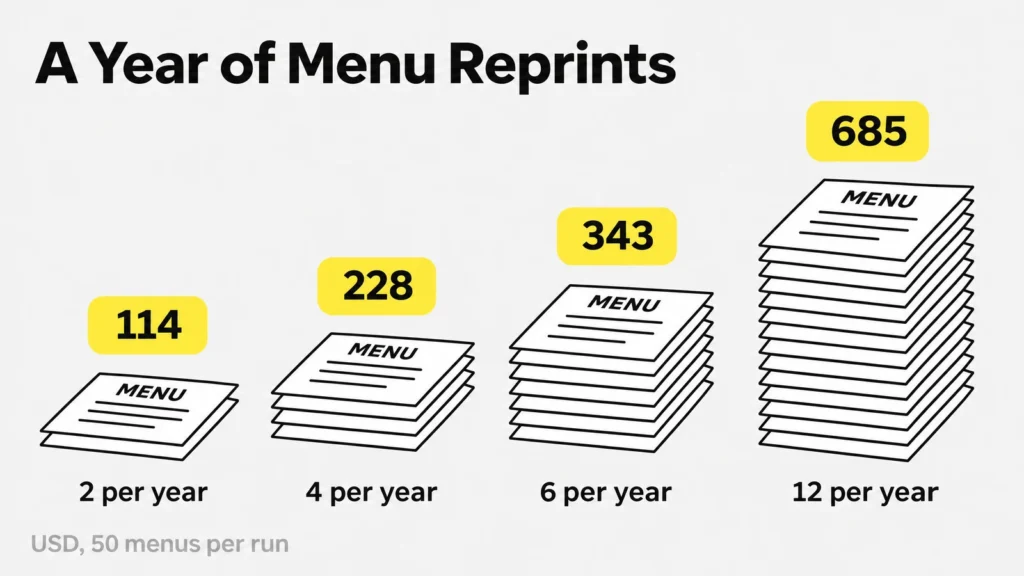
Menu printing cost over one year: 50 paper menus reprinted 2, 4, 6, and 12 times cost $114, $228, $343, and $685.
The totals leave out shipping, tax and the time spent editing the file. Printed boards above the counter cost more per change: replacing one backlit panel runs about $80–110, and a board with four panels repeats that cost four times.
What Drives the Price Beyond Paper
- Quantity. Per-copy prices fall fast with volume, from $1.14 at 50 copies to $0.31 at 500, but copies thrown out after a price change erase the discount.
- Finishing. Lamination, scoring, folding, rounded corners, foil and die cuts each add a line to the quote.
- Speed. One online printer adds 25% for two-day production, 50% for next day and 100% for same day.
- Proofs and revisions. Hard-copy proofs and design changes after proofing cost extra.
- Shipping and storage. Small orders pay proportionally more for shipping, and a 500-copy run needs dry storage.
A bigger run is not cheaper if prices change first. Size each run to one price cycle: if prices move every quarter, print for a quarter, and keep the prices on an insert so the cover survives several cycles.
As a result, the menus that change most often are the first candidates for digital menu boards for restaurants.
When Prices Change Faster Than You Can Reprint
Keep table menus on paper and move the wall menu to a screen, the menu that changes with every price. The board above the counter also follows every limited-time offer and sold-out item. Guests like holding a menu at the table, and a well-printed paper menu does that job for a season. The counter board is different: it has to match the register every hour. A QR menu solves the same problem for phones, but not for the line at the counter.
Decker runs menu boards on the TVs or commercial displays you already have, through a Decker Player connected by HDMI. Prices and sold-out items come from Toast, Square or Clover, or from an Excel sheet, through menu boards that sync with your POS. A new price appears on screen within 1–5 seconds, and an 86’d item drops off the board on its own. Breakfast switches to lunch on a schedule, with no one swapping panels mid-rush. In the Burger Shop case in Downtown Los Angeles, four screens connected to the POS took menu updates from days or weeks down to minutes. Automatic POS sync comes with the Professional plan, and one screen stays free forever. However, a screen is not the right answer for every restaurant.
When You Don’t Need a Digital Menu Board
A digital menu board is a poor buy for some restaurants, and four conditions show when. If your prices change fewer than twice a year, a paper menu costs less over three years than any screen and software plan. If you serve only at the table and have no menu on the wall, there is nothing for a screen to replace. If your whole run is under 20 copies that you print in-house in under an hour, menu size paper and an office printer already give you fast updates. And if there is no power outlet on the wall where the board would hang, budget for an electrician before you budget for a screen. Overall, paper wins where prices hold still, and screens win where they move.
Questions and Answers
1 What paper is best for restaurant menus?
For most dine-in menus, 80–100 lb cover stock (216–270 gsm) in a matte finish is the best paper for menus that guests hold at the table: stiff in one hand, readable under any light, and available at most print shops. Use lighter text paper for inserts and takeout, and synthetic paper or lamination for menus that get wet.
2 What size paper is used for menus?
Most US menus use letter (8.5 × 11), legal (8.5 × 14) or tabloid (11 × 17) sheets. Narrow 4.25 × 11 cards hold drinks and desserts, and 5.5 × 8.5 suits cafés and kids menus. Pick menu size paper by how many items fit at 12-point type, then check that the sheet fits your menu covers.
3 Should restaurant menus be laminated?
A laminated menu fits menus that guests handle every day and that keep the same prices for at least a few months, such as diner and family-restaurant menus. Skip lamination if prices change monthly: a paper menu in a clear sleeve lets you swap one page instead of reprinting and relaminating the whole menu.
4 Can any printer print on waterproof menu paper?
No. Most synthetic menu paper is made for laser printers or commercial presses, and an inkjet printer needs sheets made for inkjet. Check the paper maker’s list of compatible printers, run one test sheet, and send large runs to a print shop so the ink bonds and does not smudge.
5 Where can I print restaurant menus?
Retail print centers such as FedEx Office, The UPS Store and Staples print small runs the same day. Local print shops handle scoring, custom cuts and specialty stock in a few business days, and online printers are cheapest for 50 copies or more. A home printer works for test copies and daily inserts.
6 How much does it cost to print menus?
In 2026, US online printers listed 50 full-color paper menus for $57.11 ($1.14 each), 500 for $155.97 ($0.31 each), laminated menus at about $4.70 each in a pack of 10, and synthetic waterproof menus at $1.49 each in a pack of 50. The yearly cost depends mostly on how often you reprint.
7 What size is a tri-fold menu?
A tri-fold menu starts as a flat letter (8.5 × 11) or legal (8.5 × 14) sheet folded twice into six panels. Letter panels are about 3.67 inches wide and legal panels about 4.67 inches, and the inside panel is trimmed 1/16 to 1/8 inch narrower so the menu closes flat.