How Much Do Digital Menu Boards Cost per Screen, per Month, and Over 3 Years?


A digital menu board costs $200–$400 per screen as a DIY TV setup and $600–$2,500 per screen as a managed system, plus $0–$150 per screen per month for software. A quick-service restaurant usually budgets about $1,500 per installed board. An outdoor drive-thru display runs $3,500–$8,000 before installation.
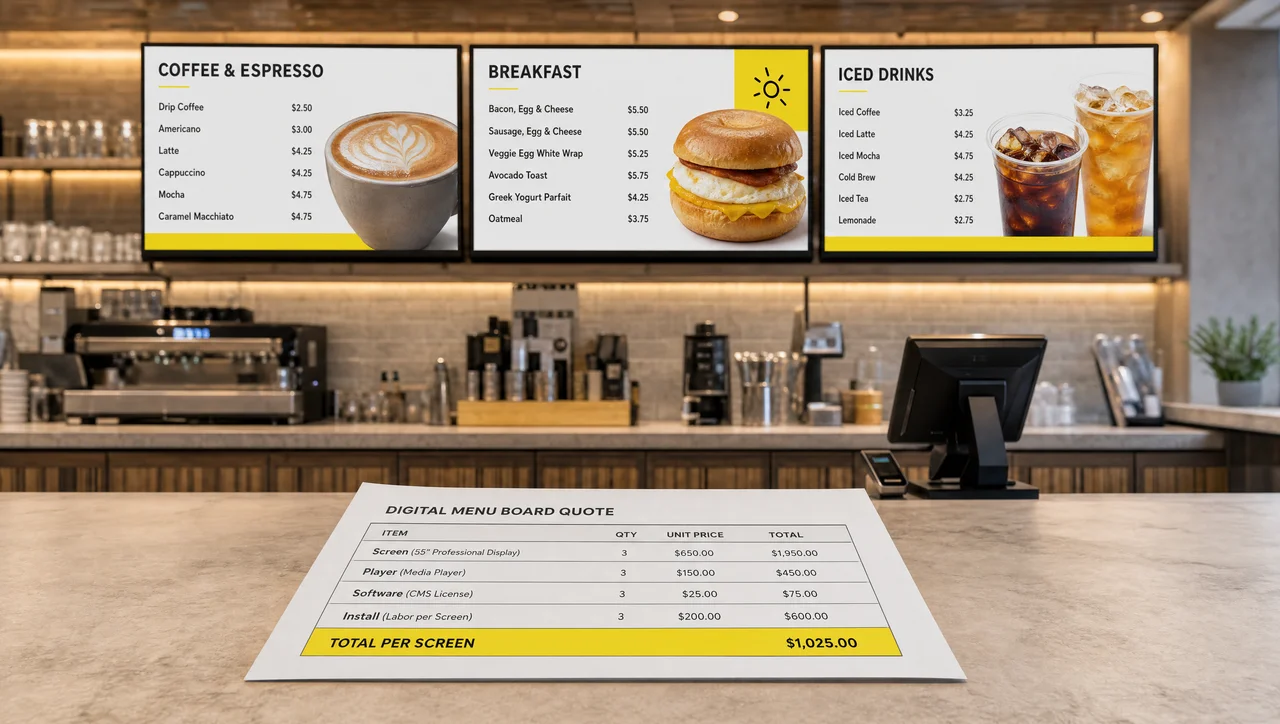
So how much do digital menu boards cost for your venue? The total comes from six line items: the screen, the media player, the software, installation, content, and running costs. The sections below price each one, show what cafés, QSRs, and chains actually pay, and list the costs most vendor quotes leave out.
Digital Menu Board Cost at a Glance
Digital menu board cost splits into one-time hardware and setup, which lands between $600 and $2,500 per screen, and recurring software and running costs of roughly $10 to $170 per screen per month. Hardware is paid once. Software is the only line item you keep paying for as long as the boards stay on.
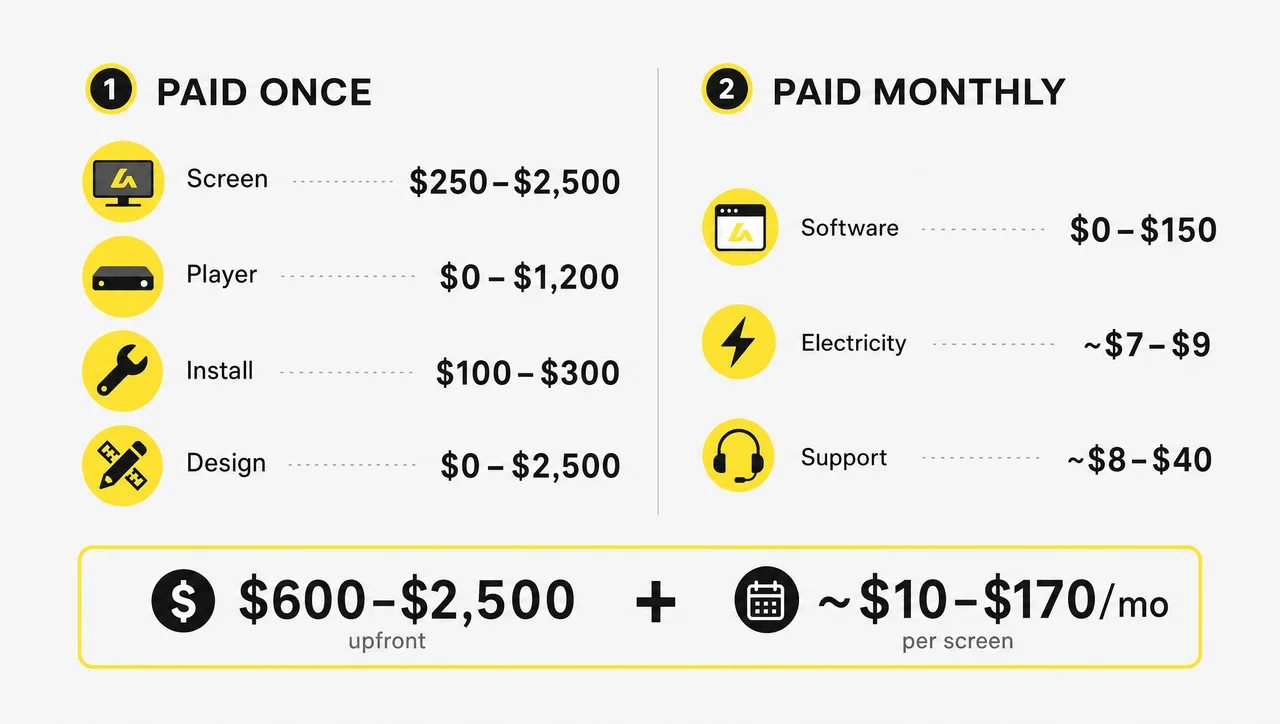
| Line item | Typical 2026 range | Paid |
|---|---|---|
| Screen (indoor, 32–75″) | $250–$2,500 | once |
| Media player | $0–$1,200 | once |
| Software subscription | $0–$150 per screen per month | monthly |
| Mounting and installation | $100–$300 per screen; $400–$1,200 for a 3–6 screen cluster | once |
| Content and menu design | $0 with templates, $500–$2,500 custom; $200–$800 a month if outsourced | once or monthly |
| Electricity | about $7–$9 per screen per month | monthly |
| Support plan | $100–$500 per location per year | yearly |
| Network drop, if the wall has no Ethernet | $300–$1,500 per screen | once |
| POS integration, when sold as an add-on | $500–$3,000 setup plus $20–$50 per screen per month | once and monthly |
The first five rows appear in almost every vendor quote. The last four are the ones that make budgets run over, and they get their own section below. Menu screens are only one part of a venue’s display budget, so if you also plan promo walls or lobby screens, compare these figures with our guide to digital signage pricing beyond menu boards.
DIY Menu Board: $200–$400 per Screen
A DIY board is a consumer TV plus a USB stick or a cheap streaming stick that shows a static image of your menu. It works on day one, but it has three limits that show up fast in a restaurant:
- No remote updates. Every price change means walking to the screen, pulling the USB drive, and swapping the file.
- No scheduling. Breakfast, lunch, and limited-time offers have to be switched by hand.
- No 24/7 rating. A consumer TV is built for 6–8 hours of viewing a day, and most TV warranties exclude business use.
DIY fits a pop-up, a single counter, or a menu that changes once or twice a year.
Managed System: $600–$2,500 per Screen Plus Software
A managed system pairs a commercial display with a dedicated media player and cloud software. Entry plans list at $7–$20 per screen per month, and plans with support run about $50 a month for a small setup. In return, you can change a price across every screen in seconds, schedule breakfast to switch to lunch automatically, and push a limited-time offer without touching the hardware. A two-screen managed setup starts at around $1,600 in hardware.
What Goes Into Digital Menu Board Pricing
Digital menu board pricing is built from six line items, and each one has a budget path and a premium path that can differ by a factor of five. The screen is the biggest upfront cost but the least visible to guests. Customers notice the content, the layout, and whether prices are current, not the panel brand.
Screens: Consumer TV vs. Commercial Display
A 43–55″ consumer TV costs $250–$600, while a commercial display of the same size costs $700–$1,400. The difference is not picture quality. It comes down to duty cycle, brightness, and warranty.
| Factor | Consumer TV | Commercial display |
|---|---|---|
| Price, 43–55″ | $250–$600 | $700–$1,400 |
| Brightness | 250–350 nits | 450–700+ nits |
| Rated use | 6–8 hours a day | 16–24 hours a day |
| Warranty | often excludes business use | commercial, usually 3 years |
| Portrait mounting | often not supported | supported on most models |
| Best fit | one screen, short hours, no direct sun | bright rooms, open-to-close use, several screens |
For an indoor menu, 350–450 nits is usually enough. A counter near a window or a glass storefront needs 700 nits or more. A consumer TV is a fair choice for one screen in a café that runs 8 hours a day away from the sun, and you can use a TV you already own as long as the software supports it. Long hours are what kill consumer panels: in QSR duty, installers commonly see consumer TVs fail within about 18 months, and the repair falls outside the warranty.
Samsung and LG make most of the commercial displays sold in the US for menus, in 43″, 49″, 55″, and 65″ sizes.
Media Player: $0 to $1,200
A media player connects the screen to the menu software and plays the content. There are four price levels:
- Built-in player, $0. The system-on-chip inside a commercial display or smart TV runs a web or app player. It works for one or two boards, but it gets harder to manage as you add screens.
- Streaming stick, under $50. A cheap route for a single screen, but some stick operating systems block apps from starting automatically after a reboot.
- Single-board computer kit, $80–$100. A do-it-yourself build that needs someone to maintain it.
- Dedicated signage player, $200–$1,200. Most restaurant setups land at $300–$500 per player.
The feature that matters most is a local cache. If the player stores the current menu on the device, the board keeps showing prices when the internet drops during lunch rush. Decker Player works this way. It connects to any screen over HDMI, receives updates over Wi-Fi or Ethernet, and keeps playing from its offline cache.
Working offline has a limit. A cached menu keeps playing without internet, but new prices and promos wait on the player until the connection comes back.
Software Subscription: $0 to $150 per Screen per Month
Signage software is billed per screen, and the plans fall into three tiers:
- Free: $0. Usually one screen, without scheduling or remote management.
- Mid-tier: $20–$60 per screen per month. Templates, scheduling, and basic POS integration.
- Operator-grade: $60–$150 per screen per month. User roles, uptime monitoring, deep POS integration, and dynamic pricing.
A few vendors sell a one-time license for a few hundred dollars instead of a subscription, usually with fewer updates and less support. Small monthly gaps add up. A $30 difference per screen costs $1,080 over three years on one screen and $10,800 on ten.
Whatever the tier, the price should buy these seven things:
- remote updates from any device
- daypart scheduling for breakfast, lunch, and dinner
- ready-made templates
- offline playback
- all locations in one account
- price sync with your POS
- alerts when a screen goes offline
Software without daypart scheduling is a slideshow tool, not a menu board system.
“$20 a month” is rarely the monthly bill. The advertised plan covers software for one screen. POS integration add-ons ($20–$50 per screen), outsourced content ($200–$800), and power (about $7 per screen) come on top.
“No monthly fees” usually means no live updates. One-time menu packages deliver a static design file. Every later price change is a new paid edit or a manual file swap.
Mounting and Installation: $100–$300 per Screen
Professional mounting for one indoor board costs $100–$300. A cluster of three to six screens above the counter costs $400–$1,200, including brackets, cable runs, and a network drop. Commercial-grade mounts start around $200. A single screen next to an outlet at counter height is a one-afternoon DIY job with a $30 mount.
| Setup | Wall mounts | Ceiling mounts |
|---|---|---|
| 2 screens | about $400 | about $350 |
| 4 screens | about $1,100 | about $850 |
Ceiling mounts work well in narrow service areas where wall space runs out. For complex installs, a site survey costs $450–$600 and checks power, cable routes, and wall structure before anything goes up. Plan on a few hours for three screens and one to two days for a large cluster.
Content and Menu Design: $0 to $2,500
Content is the line item most budgets forget:
- Agencies: $100–$120 per hour, and a first menu design takes 10 hours or more.
- Custom branded layouts: $500–$2,500 one-time, or $100–$500 per menu.
- Outsourced updates: $200–$800 a month.
| Approach | Upfront | Ongoing |
|---|---|---|
| Agency designs and updates everything | $1,000–$2,000+ | $100+ per hour |
| Templates, managed in-house | $0–$200 | almost none |
| Agency setup, then in-house | $500–$1,000 | almost none |
Check the license on any stock photos. Menu photos from free sites sometimes carry commercial-use limits. The hidden cost is the loop behind every price change: someone edits the layout, exports an image, and uploads it again. Software that links prices to your POS removes that loop.
Running Costs: Electricity, Network, and Support
A 55″ commercial display draws about 130 watts. Over 14 hours a day, that adds up to 54.6 kWh a month. At the April 2026 US average commercial rate of 13.51 cents per kWh from the Energy Information Administration, one screen costs about $7.40 a month to run. Scheduling screens to turn off overnight cuts that by roughly 40%.
Two more running costs are worth planning:
- Network. Most walls have power where the screen goes, but few have Ethernet. Adding a drop costs $300–$1,500 per screen. Wi-Fi or a cellular modem is often cheaper.
- Support plans. These cost $150–$500 per location per year and cover monitoring, remote troubleshooting, and hardware replacement.
Prices by Screen Size and Placement
Digital menu board prices climb with screen size and brightness: indoor screens cost $250–$2,500, while sealed outdoor and drive-thru displays cost $3,500–$8,000 each before installation. Where the screen hangs matters as much as how big it is.
Indoor Menu Boards (32″–75″)
| Size | Screen price | Where it fits |
|---|---|---|
| 10–24″ all-in-one | $60–$300 | counter tops, small kiosks, food truck windows |
| 32–43″ | $250–$700 | cafés, small QSR counters |
| 50–55″ | $700–$1,400 | the most common menu board size |
| 65–75″ | $1,400–$2,500 | multi-column menus and high walls |
Small all-in-one boards with a built-in player sell on marketplaces for under $300. They suit a single price list. Most models lack a commercial warranty and central management across several screens.
Window-Facing and High-Brightness Screens
A screen facing a storefront window competes with direct sun. It needs 700–2,500 nits, and the price rises accordingly. Outdoor-rated 55″ panels start above $3,000. If the menu has to be read from the sidewalk, budget for a high-brightness model rather than a standard indoor panel.
Outdoor and Drive-Thru Screens
A drive-thru screen costs $3,500–$8,000 before installation, and most of the premium goes to the enclosure, not the panel. The screen needs a sealed, weatherproof housing, 2,500–4,000 nits for sunlight, and heating or cooling. Installation adds $1,500–$5,000 per lane for the pole or structural mount, weatherproof electrical work, and often a permit.
A first-year budget for two outdoor menu screens plus an order confirmation screen typically falls between $13,000 and $32,000. Chains usually convert drive-thrus one lane at a time.
Digital Menu Boards Price by Business Type
The digital menu boards price for a venue depends mostly on screen count: a one-screen café can start for under $100, a three-screen QSR spends $2,700–$13,000 in the first year, and a 10-location chain spends $35,000–$95,000.
| Venue | Screens | Upfront | Monthly | First-year total |
|---|---|---|---|---|
| Café, existing TV | 1 | under $100 | $0–$15 | under $300 |
| Café, commercial screen | 1 | $1,300–$1,500 | about $15 | $1,500–$1,700 |
| QSR counter | 3 | $2,700–$6,000 | $75–$200 | $2,900–$13,000 |
| Chain, 10 locations | 30 | custom | custom | $35,000–$95,000 |
Coffee Shops and Cafés
A café can reuse a TV it already has, add a free web player and a free software plan, and build the menu from a template. Its first-year cost stays under a few hundred dollars. A proper single-screen setup with a 43″ commercial display, player, wall mount, and software costs $1,300–$1,500 upfront and about $180 a year for the license. Two screens start at about $3,000.
QSR and Fast Casual
A typical three-screen counter uses three 43″ commercial displays at about $700 each, $600 for installation, and free templates. That comes to about $2,700 upfront plus about $75 a month for software. With 55″ panels, dedicated players, and custom design, the same three screens can reach $4,600–$13,200 in the first year. On average, QSR operators budget about $1,500 per installed board. The operating side of digital menu boards for restaurants, such as dayparts, combos, and sold-out items, is where most of that budget pays back.
Food Trucks
A food truck usually needs one or two bright, compact screens facing the service window. An all-in-one board with a built-in player saves space and wiring. What you pay beyond the screen comes from the setting: the screen has to handle vibration, heat, and generator power, so a high-brightness commercial panel and a player with offline cache are worth more here than in a dining room.
Multi-Location Chains and Franchises
Ten screens across three sites cost $10,000–$20,000 in the first year. Ten locations with 30 screens cost $35,000–$95,000, with hardware and software 15–25% cheaper per screen than a single-store purchase. At 200 screens and more, hardware discounts reach 30–40%. Installation logistics and content production do not get cheaper per site, and neither do technician visits to screens that went dark.
How Much Does a Digital Menu Board Cost Over 3 Years?
Over three years, a three-screen digital menu board setup costs about $4,500 on consumer TVs with a low-cost plan and about $11,500 on commercial displays with a managed platform, or roughly $42–$107 per screen per month. The purchase price is less than half of that total.
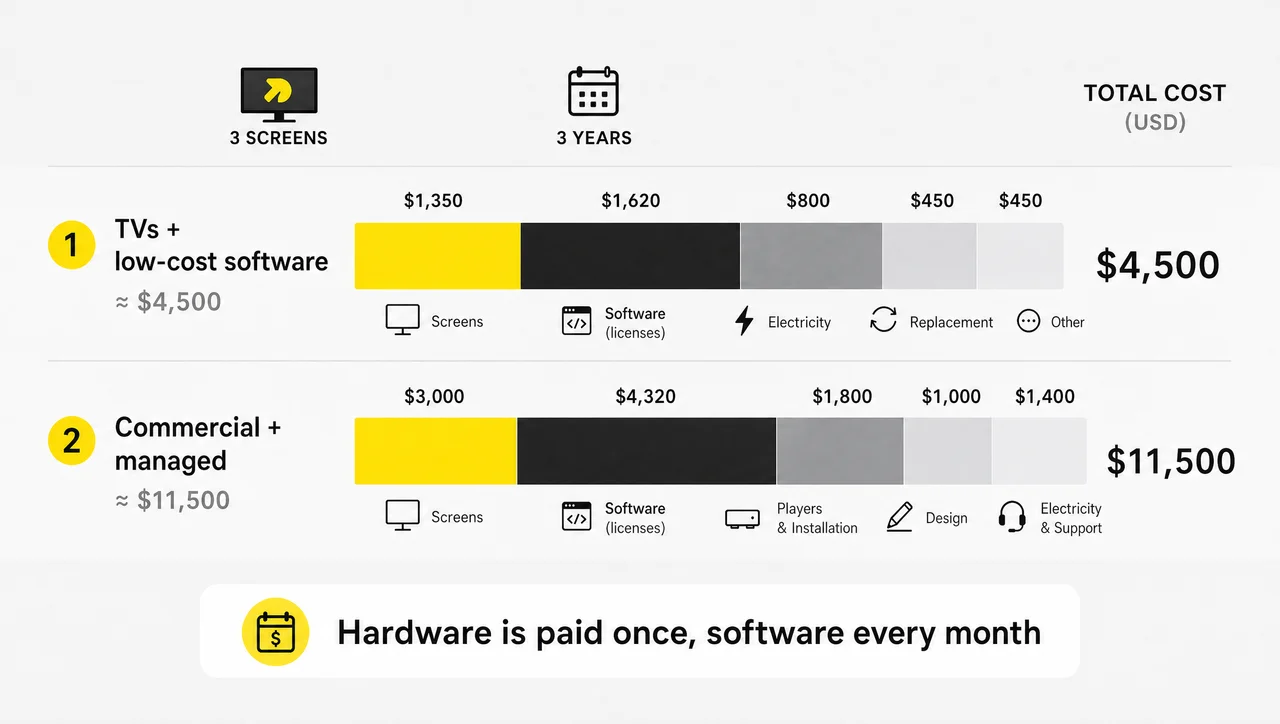
| 3 screens, 3 years | TVs + low-cost software | Commercial displays + managed software |
|---|---|---|
| Screens | $1,350 | $3,000 |
| Players | $150 | $900 |
| Mounting and installation | $150 (DIY) | $900 |
| Menu design | $0 (templates) | $1,000 |
| Software, 36 months | $1,620 ($15 per screen per month) | $4,320 ($40 per screen per month) |
| Electricity, 36 months | about $800 | about $800 |
| Support plan | none | $600 |
| Replacing one failed screen | $450 | covered by warranty |
| 3-year total | about $4,500 | about $11,500 |
These figures use the mid-range prices from the sections above. Your quotes will differ, but the structure holds: software and running costs grow every month, and hardware is paid once.
How Long Digital Menu Boards Last
A commercial display lasts 5–7 years in menu board duty, and a consumer TV lasts 3–5. Many commercial panels are rated for about 50,000 hours, which is close to ten years at 14 hours a day. Media players usually become outdated around year four or five. A commercial display that costs 60% more than a TV but lasts 60% longer costs the same per year, with fewer failures mid-shift.
Hidden Costs Most Quotes Leave Out
- The network drop. It is discovered on install day and adds $300–$1,500 per screen.
- POS integration as an add-on. Some platforms charge $500–$3,000 to set up and $20–$50 per screen per month on top of the base plan.
- The content retainer. Outsourced updates at $200–$800 a month can cost more than the software.
- Electricity. It adds about $90 per screen per year and never appears on a quote.
- Downtime nobody notices. A screen that freezes, loses its connection, or comes back on the wrong HDMI input after a power flicker can stay dark for hours. The cost equals the hours without a menu times your orders per hour times the average ticket, plus a technician visit for every such incident.
- Manual price changes. With a design-export-upload workflow, each price change takes one to two days of designer and manager time. When the menu pulls prices from the POS, that time drops to seconds.
The last two costs grow with every location you add, which is why monitoring matters more to a chain than a few dollars per screen on the software plan.
When a Managed Menu Board Isn’t Worth It
- Your menu changes fewer than twice a year. A printed or magnetic board at $400–$2,000 costs less over three years than any subscription.
- The screen runs under 6 hours a day, indoors, away from windows. A consumer TV stays within its rating, so a commercial panel is overkill.
- You run one screen for a pilot of a few weeks. Use a TV you already own with a free plan and track every failure before you buy hardware.
- You have no one to update the content. Screens with a stale menu cost money without bringing any in. Budget for templates or an update retainer first.
Digital Menu Boards Cost vs. Printed Menu Board Cost
Digital menu boards cost more upfront than printed ones, but a printed menu board cost repeats with every price change: new panels for a 4–6 panel board run about $320–$650 per update. At four updates a year, reprinting costs about $1,300–$2,600 per location. Before comparing, here is what each type costs up front:
| Board type | Upfront | Cost of each menu change | Best for |
|---|---|---|---|
| Letter or chalk board | $80–$300 | staff time | cafés with daily specials |
| Magnetic menu board | $400–$2,000 | reprinted panels | menus that rarely change |
| LED backlit light box | from $700 per panel; 4–6 panels from $2,800 | reprinted panels | QSRs with a stable menu |
| Hybrid: LED panels + 1 digital screen | $3,000–$8,000 | panels for the menu, $0 for promos | a permanent menu with rotating offers |
| Digital, 1 screen | $1,200–$1,800 | about $0 | frequent price and promo changes |
| Digital, 2–6 screens | $2,500–$6,000+ | about $0 | QSRs and multi-location operators |
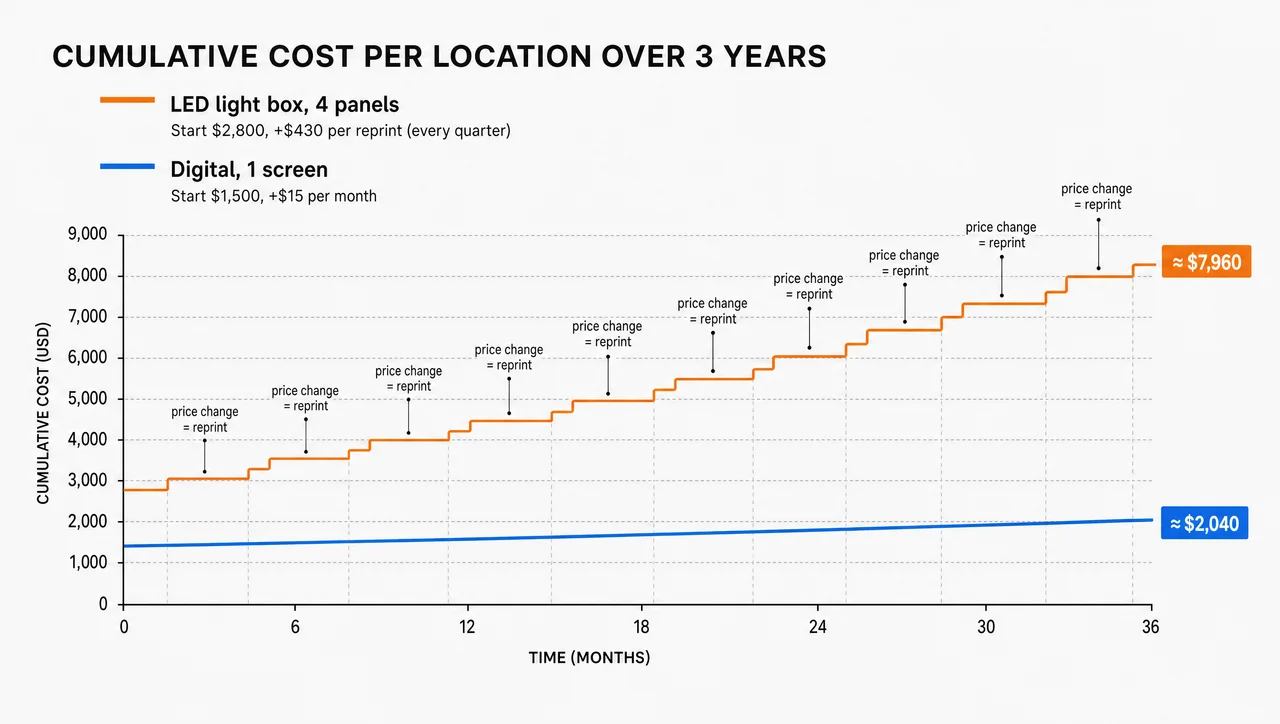
Use a static board if the menu rarely changes. Choose digital or hybrid if prices and promos change monthly, and a managed digital system if you run several locations. Switching from print to digital menu boards makes most sense when price changes, seasonal items, and limited-time offers are routine rather than rare.
Compliance adds weight for larger brands. The FDA requires restaurants that are part of a chain with 20 or more locations to show calories for standard items on menus and menu boards, along with the statement that 2,000 calories a day is used for general nutrition advice. On print, every calorie or price correction means new panels at every location. On a digital board, one edit updates every store.
Are Digital Menu Boards Worth the Cost?
The cost of digital menu boards pays back through three things: no reprints, higher average tickets from promoted items, and less staff time spent on updates. How fast depends on how often your menu changes and how many orders go through the counter.
- No reprints. A location that changes prices four times a year saves $1,300–$2,600 a year in panels alone.
- Higher tickets. Combos, high-margin items, and limited-time offers sit in front of the guest at the moment of choice, and dayparts show the right items at the right hour.
- Faster service. Current prices and hidden sold-out items mean fewer questions at the register and fewer corrected orders.
Here is a worked example. A QSR handles 400 orders a day at an $11 average ticket. If the boards lift the average ticket by 2%, sales grow by about $88 a day, or roughly $62 of gross profit at a 70% margin. At that rate, a $3,000 three-screen install pays for itself in about seven weeks, before counting print savings. These inputs are assumptions. Plug in your own orders, ticket size, and margin.
How to Lower Your Menu Board Budget
Digital menu boards prices drop fastest when you reuse screens, start on a free or low-cost plan, and design with templates before you hire anyone. These are the seven cost levers, in order of impact:
- Reuse screens you own where they run 8–12 hours a day away from direct sun.
- Start on a free plan or a trial. Many platforms, Decker included, keep one screen free and offer a trial on paid plans, so you can prove the menu works on a few screens before you pay for the rest.
- Match the player to the job. A built-in player covers one or two boards. A dedicated player is worth it for chains.
- Use templates first. Hire a designer when revenue justifies it.
- Turn screens off overnight on a schedule to cut the power bill by about 40%.
- Roll out in phases. Start with one location or one drive-thru lane, then copy the setup to the next.
- Check Ethernet and POS integration before install day so neither turns into a surprise charge.
Together, the first four give you a working board for close to $0: an existing TV, a web player, a free single-screen plan, and a template. Its limits are the DIY limits described above.
A “free digital menu board” is not free. Free software plans usually cover one screen without scheduling or remote management, and the screen, player, mount, and electricity still cost money.
What a Decker Menu Board Setup Includes
A Decker digital menu board price covers the screen connection, menu publishing, POS price sync, and hardware that confirms each screen is actually showing the menu. That last part targets the two hidden costs from the three-year section: dark screens and manual price changes.
- Decker Player. An Android media player that connects to a consumer TV or a commercial display over HDMI. It gets only the changed parts of the menu, so a new price appears on screen in 1–5 seconds without flicker, and the offline cache keeps the menu up when the network drops.
- POS-driven menus. Decker connects to POS systems such as Toast, Square, and Clover. When a manager changes a price in the POS, Decker rebuilds the menu image by itself, with no designer involved. Items marked unavailable in the POS disappear from the screen.
- Schedules by daypart and location. Breakfast, lunch, happy hour, and regional prices switch on rules set once, from one account for every store.
- Decker Verifier. A separate device that works independently of the player. It monitors both the player and the display, restarts either one remotely, switches the HDMI source back, and logs uptime for every screen, so a chain sees real hours on screen instead of guessing.
In the Burger Shop case in Downtown Los Angeles, four menu screens were tied to the POS, and menu updates went from days or weeks to minutes. Across Decker customers, the price-change cycle went from one to two days (designer, email, USB) to seconds, because the change now happens in the POS as part of normal work.
Decker bills per screen, and the total depends on screen count, the hardware you already have, and which POS you use. One screen stays free on the starter plan, and paid plans come with a free trial and no credit card, so a café or a single QSR counter can test the full setup before paying.
Questions and Answers
1 How much does a digital menu board cost for a small restaurant?
A single-screen digital menu board for a small restaurant costs about $1,300–$1,500 upfront with a 43″ commercial display, player, and wall mount, plus about $180 a year for software. Two screens start at about $3,000. With a TV you already own and a free plan, the first year can stay under $300.
2 Is there a monthly fee for the software?
Most do. Software costs $0–$150 per screen per month, and most restaurants pay $15–$60. Electricity adds about $7–$9 per screen per month. A few vendors sell one-time licenses, but updates and support then cost extra.
3 How much does it cost to create a digital menu?
Creating the menu itself costs $0 with the templates included in most signage platforms, $100–$500 per menu from a freelancer, and $500–$2,500 for a custom branded layout from an agency. Outsourced monthly updates run $200–$800.
4 Can I use my existing TV for the menu?
Yes, if you connect it to a media player or it runs a signage app. It works best for one screen used under 8–12 hours a day away from direct sun. Consumer TVs are dimmer than commercial displays, often lose their warranty in business use, and wear out faster when they run open to close.
5 How long does installation take?
One to three indoor screens take a few hours. A cluster above the counter with hidden cabling takes one to two days. Drive-thru screens take longer because of the pole or structural mount, the weatherproof electrical work, and permits.