What Is Smart Digital Signage, and How to Create Dynamic Menu Boards for Your Cafe


What smart digital signage is, how POS data, rules and sensors change the screen on their own, and how to create dynamic menu boards for your cafe in 7 steps.
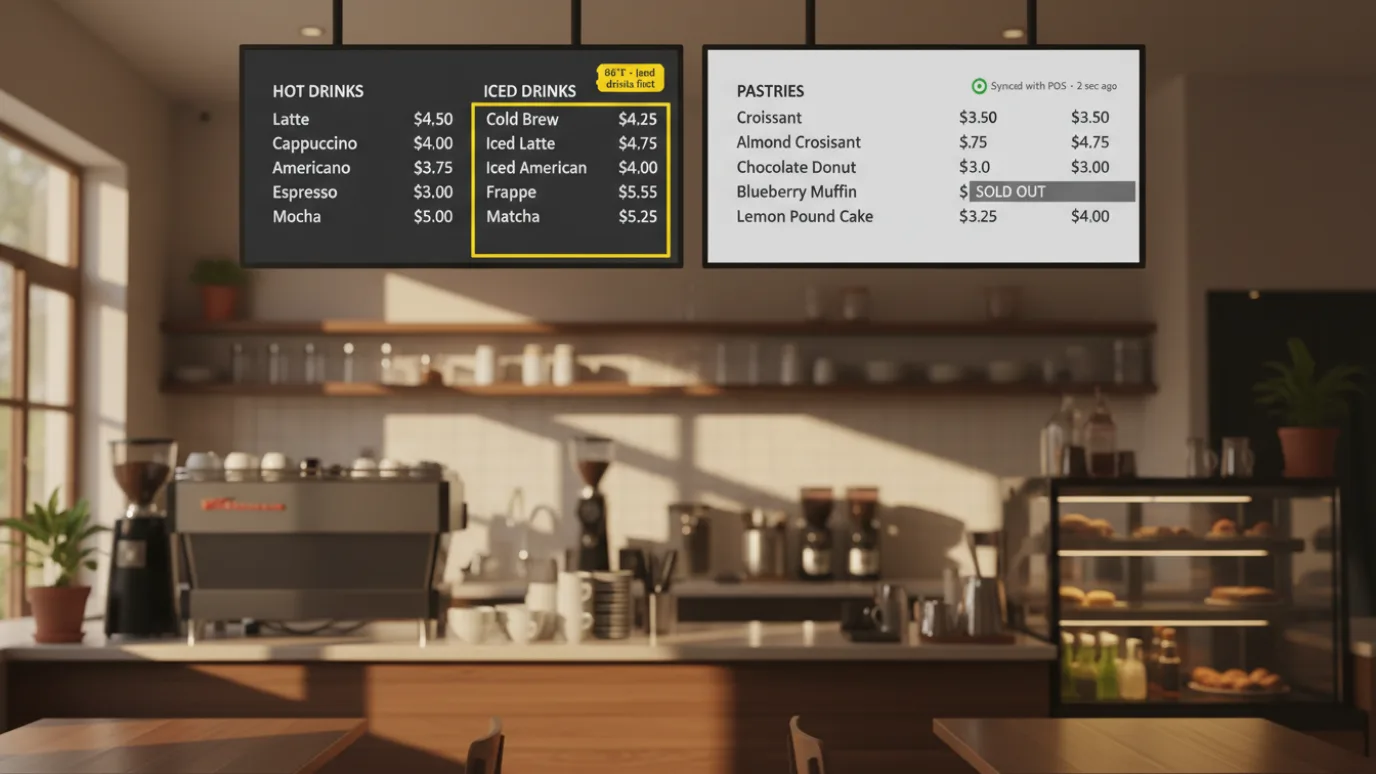
Smart digital signage is a screen network that changes its content on its own from live data: the clock, POS prices and stock, the weather or a sensor. In a cafe, that means a dynamic menu board, where dayparts switch, sold-out pastries disappear and iced drinks move up on hot days without anyone editing the screen.
Make your cafe menu run itself. Connect your POS and set dayparts; as a result, sold-out items leave the board on their own. 14 days free on up to five screens, no card. Start free
What Is Smart Digital Signage?
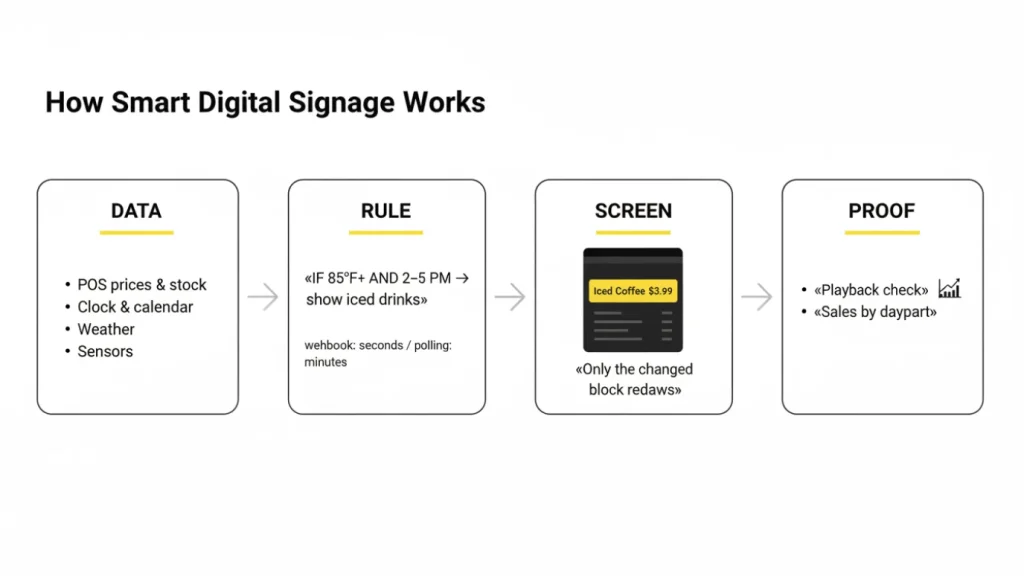
Smart digital signage is a screen network that decides what to show from live data instead of waiting for someone to edit it. Every smart screen runs the same three-link chain:
- Data source. The POS catalog and stock, the clock and calendar, a weather feed or a sensor.
- Rule. An if-then condition or a schedule that a person sets once.
- Screen. The player redraws only what the rule changed: a price, a block or a whole layout.
Traditional screens show whatever was uploaded last, so every change needs a person. Smart digital signage moves that work into rules, and intelligent digital signage is simply another name for the same idea. A dynamic menu board in a cafe shows how it works. At 10:30 the breakfast items leave the board. When the register marks the last almond croissant sold out, the croissant disappears. Above 85°F, iced drinks move to the top of the list.
The price link matters most, because cafe prices now change more often. In Toast’s 2025 Voice of the Restaurant Industry survey of 712 operators, 48% said they plan to raise menu prices if costs keep climbing. A screen edited by hand falls behind the register; with digital menu board POS integration, the new price reaches the board in seconds. Smart digital signage solutions all start with that link, then add rules on top. Next, the word “smart” itself needs a closer look, because hardware makers use it differently.
Smart Signage Means Two Things: Smart Displays and Smart Software
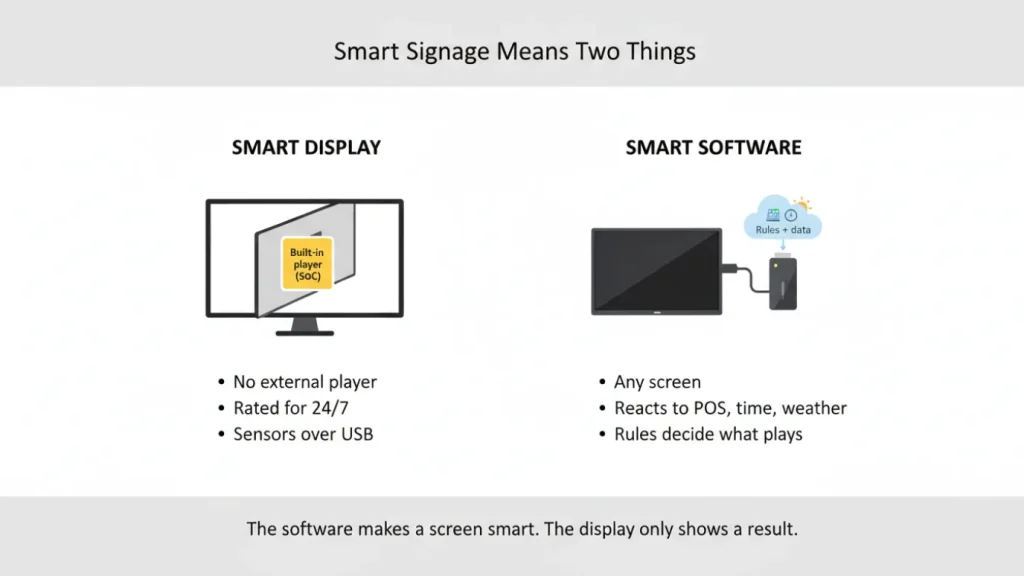
When Samsung or LG say “smart signage,” they mean a display with a built-in player; when software vendors say it, they mean content that reacts to data. Both meanings show up in search results, so it helps to know which one a quote covers.
Smart Displays: A Media Player Built Into the Screen
The Samsung Smart Signage Platform (SSSP) runs on Tizen and lives inside Samsung’s professional displays. The screen then runs content by itself: a system on a chip (SoC) replaces the external media player. Samsung launched its first Tizen-based SSSP displays in October 2016: the PHF series at 700 nits and the PMF series at 500 nits. From Tizen 6.5 on, Samsung stopped adding features to SSSP and moved new functions to Tizen APIs.
LG’s smart signage platform is webOS Signage. Its displays run content without an external player, are rated for 24/7 operation, and accept sensors over USB: GPIO buttons, NFC and RFID readers, and temperature sensors.
Smart Software: Content That Reacts to Data
The second meaning is about software. Any screen runs smart content once the right software drives it: a SoC display, an Android-based player or an ordinary TV with a player over HDMI. A smart signage platform in the software sense stores the rules, reads the data and tells each screen what to draw. Smart signage software is the part that decides; the display only shows the result.
Is a Smart TV the Same as Smart Signage?
No. A consumer smart TV with webOS TV or a similar system has no commercial signage OS, so signage apps that need one will not install on it. Commercial displays carry 16/7 or 24/7 duty ratings, brightness sensors and remote power control. A home TV can still run a cafe menu with an external player, but it was built for evenings, not 14-hour shifts. Next, the line between static, dynamic and smart screens.
Smart vs Static and Dynamic Digital Signage
Static signage is a fixed file, dynamic digital signage is a playlist that follows a schedule, and smart signage is a system that decides from data and rules. The three terms overlap in vendor copy, so this table separates them by behavior:
| Static | Dynamic | Smart | |
|---|---|---|---|
| Content source | A file on a USB stick or an upload | A playlist and a schedule | Data feeds: POS, stock, weather, sensors |
| Who changes it | Staff, by hand | The schedule | The rule engine |
| A price changes | Reprint or re-upload | Edit in the CMS | Synced from the POS in seconds |
| An item sells out | Stays on screen | Removed by hand | Hidden on its own |
| Weather or traffic | Ignored | Ignored | Switches content at a threshold |
| Several stores | Each screen separately | Central playlists | Per-store data and rules |
| Evidence it worked | None | Playback logs | Playback logs plus sales by daypart |
Dynamic digital signage content is the middle step most businesses already run: a breakfast playlist at 7 a.m. and a lunch playlist at 11. Data-driven digital signage goes one level further, because the content depends on numbers rather than the clock alone. Digital dynamic signage, a less common word order, means the same thing.
In practice, automation grows in five levels:
- Schedules: dayparts, weekdays and opening hours.
- Data-bound content: prices, names, calories and stock flow into fixed slots.
- Conditional rules: weather, time and stock combine.
- Network logic: content differs by store, region and screen zone.
- Custom integrations: ERP and in-house systems connect through an API.
A single cafe gets most of the value from levels 1–3. Levels 4 and 5 matter once a brand runs several stores. Next, the four building blocks behind every level.
What Makes Digital Signage Smart: 4 Building Blocks
Smart digital signage is a stack of four parts: a data source, a trigger, a rule that runs on its own and a check of what played. Remove any of the four, and the screen falls back to a playlist.
Data Sources for Smart Signage: POS, Stock, Time and Weather
- POS catalog and stock. Square’s Catalog API sends a catalog.version.updated webhook when anything in the catalog changes; the signage platform then fetches only the changed items. Toast sends stock events when an item runs out or runs low. Clover shares items and availability through its inventory API.
- Webhooks vs polling. With a webhook, screens update within seconds of each POS change. With polling, the platform asks the POS on a timer, so the delay equals the interval.
- Clock and calendar. Dayparts, weekdays, holidays and seasonal items with start and end dates.
- Weather. The National Weather Service publishes a free public weather API, and commercial providers add forecasts by ZIP code.
- Spreadsheets. A shared sheet fills the gap for a register without an open API.
Sensors and Triggers in Smart Signage
Sensors turn the room itself into a data source. Presence sensors wake a screen when someone walks up, light sensors adjust brightness, and NFC tags or buttons let a guest switch content. Touch screens make the guest the trigger.
Cameras need the most care. Anonymous video analytics (AVA) counts how many people had an opportunity to see a screen and estimates age range and gender, while processing video on the device and storing no images. Facial recognition is different. Illinois’s Biometric Information Privacy Act (BIPA) treats a scan of face geometry as biometric data and allows $1,000 per negligent violation and $5,000 per intentional or reckless one. An amendment in force since August 2, 2024 limits recovery to once per person, not once per scan. Anonymous counting is not facial recognition, but a lawyer should review any camera before it goes up.
Rules and Automation: The If-Then Layer
A rule reads like a sentence: if a condition holds during a time window, show, hide or move a block; otherwise show the default layout. Rules can stack. Between 2 p.m. and 5 p.m., when it is above 85°F and the POS shows more than ten cold brews in stock, the cold brew promo runs; otherwise the standard layout stays.
Two habits keep rules stable:
- Add a buffer to every threshold. Switch to iced drinks above 85°F, but switch back only below 80°F. Without that gap, a day at 84–86°F flips the board back and forth all afternoon.
- Set a priority order. A sold-out item beats a seasonal promo, a seasonal promo beats weather, weather beats the daypart, and the daypart beats the default layout.
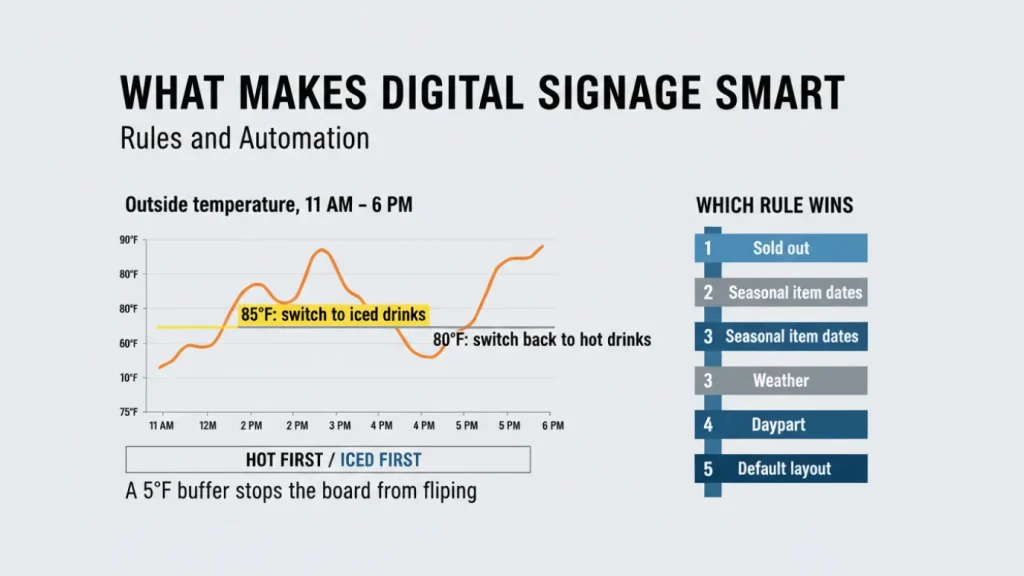
Common thresholds in US signage practice are above 85°F for cold drinks and below 50°F for hot ones; set your own after a few weeks of sales.
Digital Signage Analytics: Proving What the Smart Screen Did
Digital signage analytics answers two questions: did the screen show the right thing, and did it change what guests bought? The first comes from proof of play and a check of the panel itself, because a player can report success while the TV sits on the wrong input. The second comes from POS sales by daypart. Track five numbers:
- price sync delay, in seconds;
- time from sold out at the register to gone from the screen;
- screen uptime;
- attach rate of the promoted item;
- sales of that item by daypart, before and after the rule.
Next, AI adds a layer on top of these four blocks.
AI Digital Signage: What AI Adds to Smart Screens
AI in digital signage is a layer that drafts content, picks what to show and counts who is watching. The data and rules still have to exist first, because AI has nothing to work with on an empty catalog.
- Generative content. AI-powered digital signage tools draft a layout, a headline or a promo image from a text prompt.
- Decision logic. AI-driven digital signage picks items for each moment. McDonald’s showed the model at scale: on March 25, 2019 it agreed to buy Dynamic Yield, a decision-logic company, in a deal reported at about $300 million. Its drive-thru boards changed what they featured by time of day, weather, restaurant traffic and trending items, and by the first quarter of 2019 the technology ran in 700 US drive-thrus. During rushes, the board suggested items that were faster to make. Dynamic Yield is now part of Mastercard.
- Computer vision. AVA cameras measure attention and dwell time without identifying anyone.
Restaurants already use AI elsewhere. In the same Toast survey, operators reported using it for marketing automation (28%), real-time insights (27%) and menu optimization (26%). The quiet win is unglamorous: matching names. AI matching links “DBL CHZBGR” in the register to “Double Cheeseburger” on the board, so a renamed item still lands in the right slot.
AI does not replace clean POS data. No independent study yet shows how much AI suggestions on a board lift sales, so treat vendor percentages as marketing until you measure your own.
See your menu follow the register. Change a price in Toast, Square or Clover; as a result, the board updates in 1–5 seconds. 30 days free on up to five screens. Try Decker
Smart Digital Signage Use Cases in Restaurants, Cafes and Hotels
Smart digital signage in a restaurant is a set of rules that react to what changes during the shift, not once a season. Intelligent restaurant digital signage pays off at the counter, the drive-thru and the hotel lobby. Each use case below follows the same pattern: data, rule, and what the guest sees.
- Prices across stores. A price edited in the POS reaches every connected board within seconds, so the screen matches the receipt.
- Sold out. A dynamic menu board hides the item, or shows a sold-out label, when stock hits zero; when stock runs low, it can say “last few.”
- Dayparts. Breakfast until 10:30, lunch until 3 p.m., then the afternoon menu, with no one touching the screen.
- Weather. Above 85°F, iced drinks lead; below 50°F, hot drinks do. McDonald’s described the same move: more coffee on cold days, more frozen desserts on hot ones.
- Drive-thru by traffic. In a rush, the board features items the kitchen can make fastest.
- Hotels. Smart signage in hospitality runs the lobby screen on a schedule: breakfast hours in the morning, the bar menu at night, the day’s events from the booking calendar.
A Dynamic Menu Board Is Not Dynamic Pricing
In February 2024, Wendy’s said it would spend about $20 million to put new on-screen menus in all its company-operated US restaurants by the end of 2025, and test dynamic pricing on them. The backlash over “surge pricing” was immediate. Wendy’s clarified that it would not raise prices at peak times and would use the screens to offer discounts in slower hours. For a cafe, the lesson is simple. Dynamic menu boards change what to show and when; changing a price by demand is a separate decision that guests notice.
Retail runs the same playbook on shelves. Walmart put digital price labels in about 2,300 US stores; a price change that took an associate two days now takes minutes, and changes go out through a central system, mostly outside shopping hours. Dynamic menu boards should publish planned price changes the same way: before opening, not mid-rush.
All of these screens fit into one system. For the menu itself, Decker’s digital menu boards cover layouts, dayparts and sold-out items. Promo screens, pickup boards and the rest of the room belong to restaurant digital signage on the same account. Next, the seven steps turn these use cases into a working cafe board.
How to Create Dynamic Menu Boards for Your Cafe in 7 Steps
To create dynamic menu boards for your cafe, connect the menu to its data first and design the screen second. Most cafes reverse the order and end up with a nice-looking board that still needs editing by hand.
What a Dynamic Menu Board Is
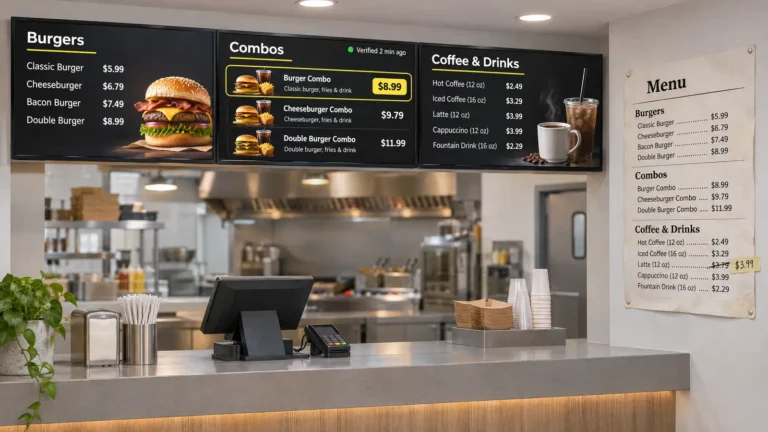
A dynamic menu board is a menu on screen whose prices, dayparts and sold-out items change from data and rules instead of manual edits. A dynamic menu board updates itself, while any other board on a TV waits for a manual edit. Dynamic menu boards read the POS catalog and stock, a schedule swaps the dayparts, and a rule hides what the kitchen has run out of.
Step 1. Map What Changes and How Often
Start on paper, not on the screen. List every part of the menu that moves, then give each one a data source and a rule:
| What changes | How often | Data source | Rule |
|---|---|---|---|
| Prices | Monthly or more | POS | Sync on every change |
| Pastries sold out | Daily | POS stock | Hide at zero |
| Breakfast and lunch | Daily | Clock | Switch at a set time |
| Seasonal drink | Each season | Calendar | Start and end dates |
| Iced vs hot drinks | Hourly | Weather feed | Threshold with a buffer |
Step 2. Pick One Source of Truth
A dynamic menu board syncs from one place: the POS (Toast, Square or Clover) or a single spreadsheet. Never edit prices in two places. In Square, sizes are item variations and add-ons are modifiers, so a 12, 16 and 20 oz latte is one item with three prices.
Step 3. Choose Screens and a Player
Use a SoC display or any TV with a player over HDMI, connected by Wi-Fi or Ethernet. A dynamic menu board needs a player with an offline cache, so it keeps running when the internet drops. Hang the main board above or behind the ordering counter, where the line reads it before reaching the register; a weather-driven promo screen works best near the door.
Step 4. Build the Template With Data Fields, Not Typed Prices
A dynamic menu board maps each price to a field, so build the template this way:
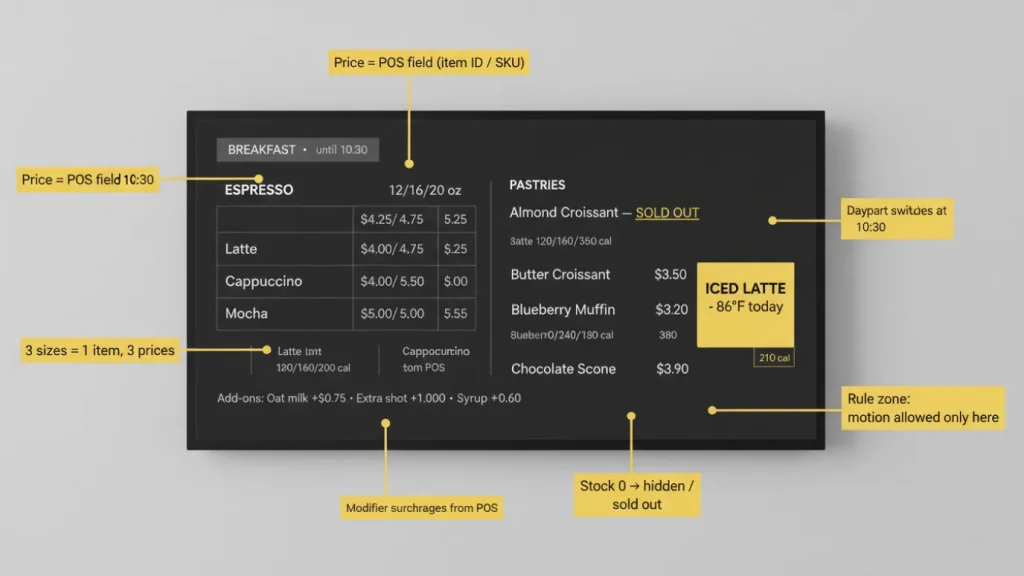
- Tie every price on the layout to an item ID, a SKU or a tag such as latte_price.
- Show the 12, 16 and 20 oz sizes as three fields of one item.
- Pull modifier surcharges (oat milk, an extra shot, syrup) from the POS.
- Add a calorie field next to each name if your brand has 20 or more locations.
- Design for the screen: 1920×1080 or 3840×2160, landscape or portrait.
- Split the layout into a data zone and a rule zone. Names, prices and sizes stay still; motion belongs only in the promo and weather blocks.
Step 5. Set the Rules
A dynamic menu board runs on a short list of rules:
- 6:00–10:30 breakfast, 10:30–15:00 lunch, afternoon menu after 3 p.m.
- Stock at zero: hide the item. Stock running low: show “last few.”
- Seasonal drink: a start date and an end date.
- Above 85°F: iced drinks first; back to hot drinks below 80°F.
- Priority: sold out, then seasonal, then weather, then daypart, then the default.
Step 6. Test the Dynamic Menu Board on One Screen
Check one dynamic menu board before you add more screens. Before switching the rules on, record two weeks of sales for the items you plan to promote, so you have a baseline. Then run four checks before the morning rush:
- Change a price in the POS and time how many seconds it takes to reach the board.
- Mark an item sold out and confirm it disappears from the board, the kiosk and the online menu.
- Unplug the internet and confirm the board keeps playing the last version, then catches up when the connection returns.
- Read the board from the back of the line.
Step 7. Measure and Adjust
Give the rules time to work. A dynamic menu board needs two to four weeks to show results; then check the promoted items’ sales by daypart against the baseline, along with attach rate, sync delay and uptime. Remove any rule that does not move sales. For a ready-made setup built for espresso bars, Decker’s coffee shop menu boards come with size grids, modifiers and dayparts already mapped. Next, the checklist for the whole system.
What You Need to Run a Smart Digital Signage System
Smart digital signage software is the part that makes a screen smart; the display and player only have to stay on, online and visible. A complete smart digital signage system has six parts:
- Screen. A commercial display rated for 16/7 or 24/7, or a TV for light duty. Drive-thru lanes and sunny windows need high-brightness panels.
- Player. A SoC built into the display or an external player.
- Network. Stable Wi-Fi or Ethernet, an offline cache, and an LTE backup for drive-thrus and stores with weak Wi-Fi.
- Software. A CMS with rules and integrations.
- Data. The POS, a spreadsheet or a weather feed, with one source of truth.
- Owner. One person responsible for the data, because the screen repeats every POS mistake.
What to Look For in Smart Digital Signage Software
- Direct connections to your POS, by name, not “integrations available.”
- Webhooks for speed, with polling as a fallback.
- Prices bound to template fields, not fixed menu widgets.
- Rules with conditions and a priority order.
- Dayparts plus start and end dates for seasonal items.
- Screen groups, so a rule can target one store, a region or a zone.
- Delivery status for every update and a check of what the panel actually shows.
- Menu versions with a one-click rollback.
- Roles: head office owns templates and brand promos, each store manages its sold-out items and local deals inside approved layouts.
- Offline playback and an API for in-house systems.
Next, here is how Decker covers that list.
How Decker Runs Dynamic Menu Boards
Decker is a smart digital signage platform that ties every price on the screen to the POS, so prices, dayparts and sold-out items change without anyone touching the board.
- POS sync. Toast, Square and Clover connect directly; any other register works through Excel. A price edited at the register reaches every connected screen in 1–5 seconds, and only the changed element redraws.
- Name matching. AI matching and past matches link register names to layout slots, so abbreviations and typos still land on the right price.
- Rules. Decker’s dynamic menu boards switch dayparts and hide sold-out items on rules that combine time, stock and weather.
- Offline. Decker Player keeps playing from its cache for up to 72 hours, and price edits made during an outage reach the screen once the store reconnects.
- Panel check. Decker Verifier, a separate device, flags a black screen, a frozen player, a wrong price or a sold-out item that is still showing, switches the HDMI input back and restarts the screen remotely.
- Plans. POS and data sync start on Professional; API access comes with Premium.
At Burger Shop in Downtown Los Angeles, four counter screens were connected to the POS, and menu updates went from days or weeks to minutes. A 14-day trial covers up to five screens with no card. Next, the limits that every smart setup shares, Decker included.
Smart Signage Limits: Common Failures and When You Don’t Need It
Smart signage fails in predictable ways, and each one has a fix that costs less than a dark screen at noon.
Common Smart Signage Failures and How to Prevent Them
- Wrong data, wrong screen. Dynamic menu boards show every POS typo on every screen at once. Give the data one owner and check the board after each menu edit.
- A stale screen during an outage. Wi-Fi drops mid-rush. Screens with an offline cache keep running the last version, and an LTE backup keeps updates flowing.
- A silent integration break. After a POS update or a router swap, sync can stop without an error. Retest with one sold-out item after every change.
- Rules that fight. A weather rule and a daypart claim the same block. Set a priority order and a buffer on every threshold.
- Motion overload. Animation in the price zone slows decisions. Keep movement in the promo block.
- Pricing backlash. Guests read any price change by time of day as surge pricing. Change what you feature, not what you charge.
When You Don’t Need Smart Digital Signage
A cafe with one board, fewer than 10 priced items and fewer than four price changes a year can update by hand. If there is no POS and no one will keep a spreadsheet current, rules have nothing to read. A wall with no power outlet or a stable network connection cannot run a synced screen reliably. A board hand-lettered every morning as part of the brand loses its point on a screen, and a lit light box serves a menu that never changes better than any software. Overall, smart signage earns its cost only where the menu moves during the day.
Questions and Answers
1 What is smart signage?
Smart signage is a screen that changes its content on its own from data such as time, POS prices and stock, or weather. The term also describes displays with a built-in player, such as Samsung’s SSSP and LG’s webOS Signage, which need no external media player.
2 How do I create dynamic menu boards for my cafe?
A dynamic menu board reads one source of truth, so first map what changes on your menu, pick the POS or a sheet, and connect a screen with a player. Build the template from data fields instead of typed prices, set rules for dayparts, sold-out items and weather, test on one screen, then measure sales against a baseline.
3 What is digital signage AI?
Digital signage AI is software that drafts screen content, picks what to show from data such as time, weather and traffic, or measures attention with anonymous camera analytics. It depends on clean POS data and rules; without them, it has nothing to recommend.
4 Is a smart TV the same as smart signage?
No. A consumer smart TV lacks a commercial signage OS and is not built for 14-hour days. Smart signage runs on commercial displays with a built-in player, or on any screen driven by smart software through an external player.
5 Do dynamic menu boards mean dynamic pricing?
No. Dynamic menu boards change what they show and when: dayparts, sold-out items and weather-based promos. Raising prices by demand is a separate choice; when Wendy’s discussed it in 2024, the backlash led the chain to rule out higher prices at peak times.
6 Do smart menu boards need to show calories?
Yes, for chains with 20 or more locations. FDA rules require calories next to each standard item on menus and menu boards, including on-screen and drive-thru boards, plus a 2,000-calorie daily intake statement. Daily specials and temporary items are exempt.
7 Does smart digital signage work without internet?
Yes, if the player keeps an offline cache. Screens keep running their last version, and new prices, rules and sold-out items arrive once the connection returns. Without a cache, an outage leaves the screen blank or frozen.
8 How do dynamic menu boards connect to a POS?
Dynamic menu boards connect through the POS vendor’s API. A webhook delivers each change within seconds, while polling checks on a timer. Each price on the layout is tied to an item ID or SKU, and stock data drives sold-out rules. A register without an API can feed the board through a spreadsheet.
Sources
- McDonald's: McDonald's to Acquire Dynamic Yield (March 25, 2019)
- Skift: McDonald's deploys personalized menus at 700 locations
- ABC News: Wendy's addresses 'dynamic pricing' comments
- Walmart: Digital Shelf Labels Are a Win for Customers and Associates
- Samsung Developers: Migrating SSSP to Tizen
- Samsung Newsroom: World's First Tizen-Powered Premium Displays
- LG: What is webOS?
- FDA: Menu Labeling Requirements
- King & Spalding: Illinois BIPA Reform Takes Effect
- Toast: 2025 Voice of the Restaurant Industry Survey
- Square Developer: Synchronize a Catalog with an External Platform