Digital Signage Pros and Cons in 2026: Is It Worth It for Your Business?


Digital signage pros and cons come down to one trade: a screen changes prices and offers in seconds, but it costs more upfront than print and needs power, internet, and someone who owns the content. It pays off when your menu or offers change at least monthly. For a sign that never changes, print still wins.
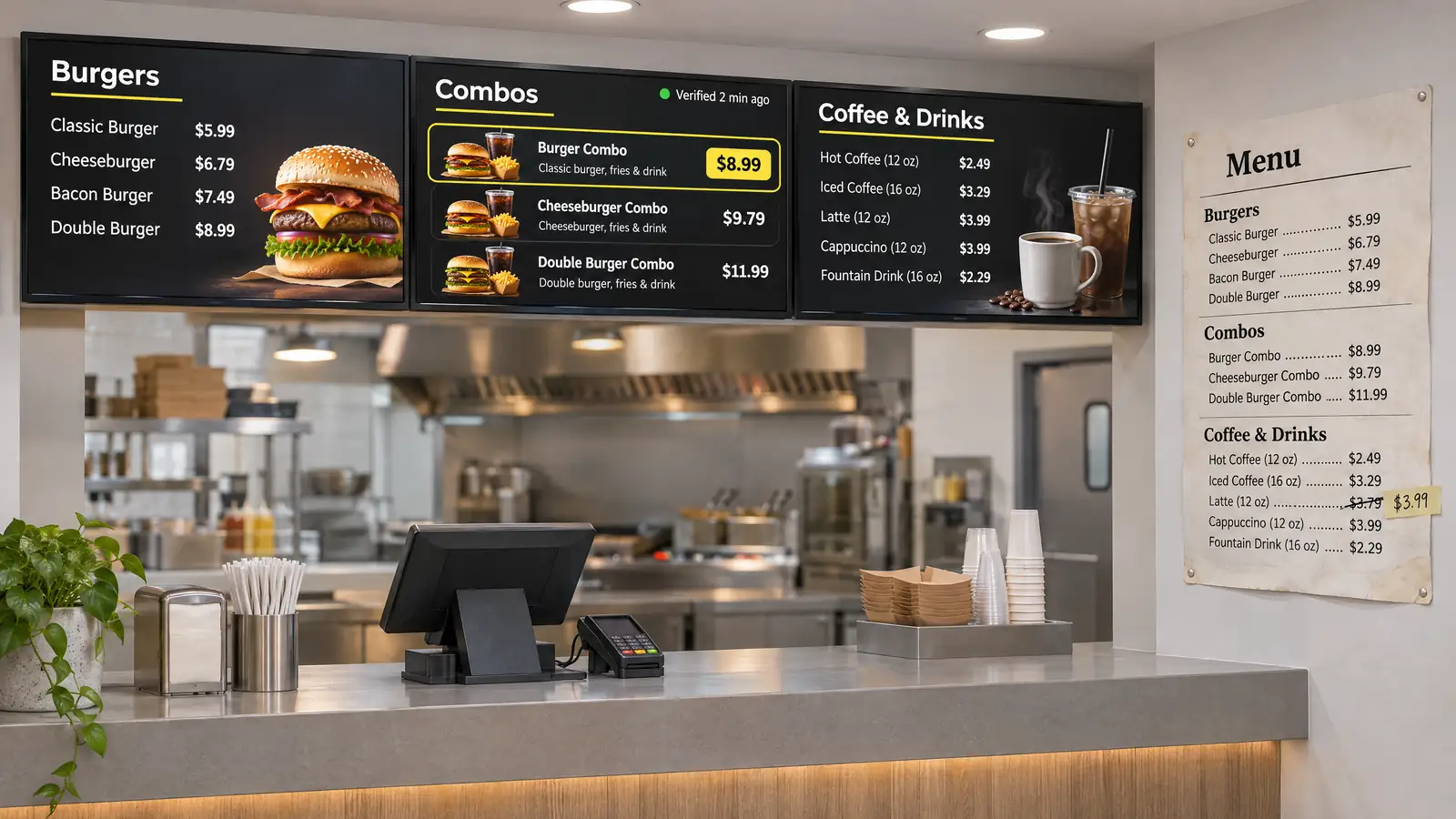
We measure every item in these digital signage pros and cons against what the screen replaces. Next to a printed board updated two times a year, a screen adds little. Next to a chalkboard rewritten every morning, or ten locations waiting for new posters in the mail, it changes how the operation runs, which is why digital signage for restaurants usually starts at the menu board. We checked the research figures against the published Journal of Marketing study in 2026. Next, the short version in one table.
Digital Signage Advantages and Disadvantages: The Short Answer
The pros and cons of digital signage are speed and control versus cost and upkeep; screens pay off when menus change monthly. Each row pairs a pro with the con that comes with it, and the last column shows when that row decides the purchase.
| ✅ Pros | ❌ Cons | Decides it when |
|---|---|---|
| ✅ A price change reaches every screen in seconds | ❌ Someone still makes every change | prices move monthly or faster |
| ✅ A schedule switches breakfast to lunch on its own | ❌ Each schedule needs one setup | you run two or more dayparts |
| ✅ POS sync removes sold-out items from the board | ❌ Sync needs a supported POS and a paid plan | items sell out during a shift |
| ✅ One account updates every location at once | ❌ One failure can reach many screens | you run two or more locations |
| ✅ Featured items are 8.1% more likely to sell in a field study | ❌ Too much motion gets ignored | guests wait in line facing the screen |
| ✅ Reprint bills disappear | ❌ Power and software cost money every month | you reprint menus three or more times a year |
| ✅ Play logs prove what ran and when | ❌ Proof needs a monitoring device | a beverage brand co-pays for screen time |
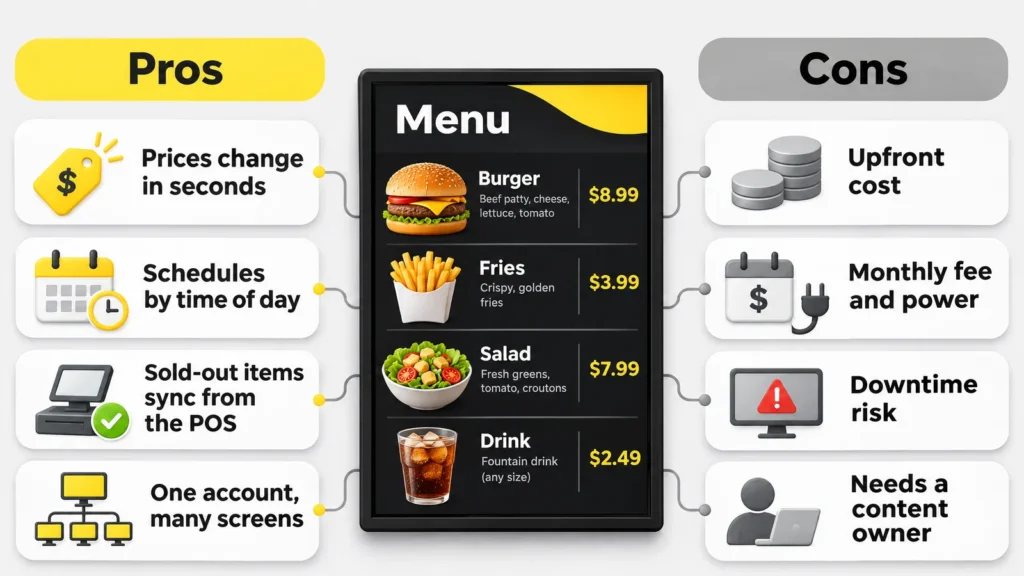
A screen likely pays off if two or more rows in the last column describe your business; if none do, print still wins. Screens pay back fastest where those rows stack up: several dayparts, several locations, and frequent price changes. The digital signage advantages grow with every row that matches, and the ROI math later in this article puts them in dollars.
👉 Next step: test these pros on one screen. Connect a TV you already own and run your real menu with every paid feature for 14 days, no card needed. Start free with Decker
The Pros: What Screens Do Better Than Print
The main pros of digital signage are speed, scheduling, live POS data, and one account for every screen. Each of them pays only when your content actually changes. The benefits of digital signage below are written for food and beverage operators, but the logic holds for any counter where people decide what to buy.
Update Prices and Offers in Seconds, Not Reprints
A combo goes up 50 cents. With a printed board, that means a new design file, a print order, and someone on a ladder. With digital signage, one edit does it. The screen shows the new price wherever that menu runs. Typos, holiday hours, and closure notices work the same way and can reach every location at once.
Switch Content by Time of Day
Print looks identical at breakfast and at dinner. The screen switches from breakfast to lunch at 10:30 and to a happy hour panel at 4, without anyone touching it. Set once, the schedule repeats every day, and that alone counts among the most practical advantages of digital signage for a café or QSR.
Prices and Sold-Out Items Update Themselves
When a menu screen reads from the register, a price change in the POS reaches the screen without a designer, and a sold-out item disappears instead of being ordered and refunded. A menu board linked to the POS also removes a common quick-service error: one price on the wall, another at the register.
Run Many Screens From One Place
With ten locations, one cloud dashboard sends a promotion to every store in a single step, while each location keeps its own local items. Screens in every store show the update at the same time. Access roles decide who can publish and who can only view, so a store manager can change the local special without touching the brand menu.
Get Noticed, if Motion Is Used Sparingly
A lit screen with one moving element draws the eye in a way a printed sheet does not. Keep one animated item per screen, large prices, and a loop a guest can see in full before reaching the register. Guests tune out a board that flashes everywhere within a week. A QR code on the same screen turns a glance into an online order, a loyalty sign-up, or a review, and every scan counts as a measurable response.
Spend Less on Printing Over Time
A restaurant that reprints its menu board six times a year at $150 per round spends $900 a year on paper and design. A screen swaps that bill for a running cost in software and electricity. The saving shows up only if the reprints were real.
Prove What Actually Played
Paper leaves no record of whether it was on the wall. A monitored screen logs what played, when, and whether the display was on. That matters when a beverage brand co-pays for a promotion or a franchisor asks for proof. Monitoring devices that sit next to the display check the screen itself, not only the player. In other words, every pro above has a cost attached, and the next section prices those costs.
🚀 Turn two of the cons below into someone else’s job. Decker pulls prices from your POS and alerts you when a screen goes dark. In addition, one screen stays free forever. Create a free Decker account
The Cons: Cost, Maintenance and Power
The disadvantages of digital signage are an upfront bill, a monthly cost per screen, and failure points that print never has. Power, network, and stale content top that list. Each one has a practical fix.
Upfront and Running Costs
You pay for a printed sign once. Digital signage needs a display, a player, a mount, installation, and a software plan that bills every month. The display breaks most budgets: a consumer TV is rated for 6–8 hours a day and running it open to close can void its warranty, while a commercial display is rated for 16–24 hours, costs several times more, and typically lasts 5–7 years in signage use against 3–5 for a consumer TV. Our guide to how much digital signage costs prices every line.
How to reduce it: start with one screen where guests order, reuse a TV for short hours, and buy commercial panels only for screens that run all day.
Digital Signage Maintenance and Downtime
Digital signage maintenance covers mostly small work: wiping screens, installing firmware updates, and checking that each display comes back on the right input after a power flicker. The real cost comes from downtime nobody sees. A player freezes or a TV wakes up on the wrong HDMI source, and the board stays dark until a guest mentions it. A 10-minute fix before the lunch rush goes unnoticed. A screen that stays dark through Friday dinner loses sales.
How to reduce it: decide before launch who gets the alert, where you keep the spare player, and how fast your vendor answers a ticket. Remote monitoring turns most incidents into a fix from a laptop.
Digital Signage Power Consumption
A 55-inch commercial display draws roughly 120–150 watts. At 12 hours a day, that adds up to 43–54 kWh a month, or about $6–$7.50 per screen at the US commercial average of about 14 cents per kWh. We checked that rate in 2026 against the EIA’s 12-month commercial average. The same screen costs about $12–$15 a month when left on around the clock, and it adds heat above a kitchen pass or in a small kiosk. Screens left on all night also run hotter and age faster.
How to reduce it: schedule screens to switch off after closing. Twelve dark hours a night save about $73–$91 a year per screen, or $730–$910 across ten screens.
Content Ownership and Screen Fatigue
This con decides all the others. A screen that shows last month’s promotion looks worse than a printed poster, and regulars stop looking at a loop that has not changed since spring. Background music and stock photos on screens also need commercial rights: a personal streaming account does not cover a dining room.
How to reduce it: name one person who owns the screens, budget 20–30 minutes a week, give every promotion an end date, and refresh evergreen slides every two to three months.
Internet Dependence and Security
Cloud-managed digital signage needs a network to receive changes. The screen keeps playing the last content from the player’s local cache when Wi-Fi drops, so the board does not go blank. Connected screens also add an entry point to your network, and shared passwords or former employees with access are the usual weak spots.
📶 “Works offline” does not mean “updates offline.” Offline playback keeps the last menu on screen. A price change made during the outage reaches the screen only after the connection returns.
How to reduce it: give every user a personal login with a role, remove access on an employee’s last day, and keep screens off the payment network. Overall, none of these cons rules screens out; each one calls for an honest comparison with print, which comes next.
Digital vs Static Signage: Side-by-Side Comparison
Digital vs static signage is a trade: print costs less and never crashes, while a screen wins when messages change often.
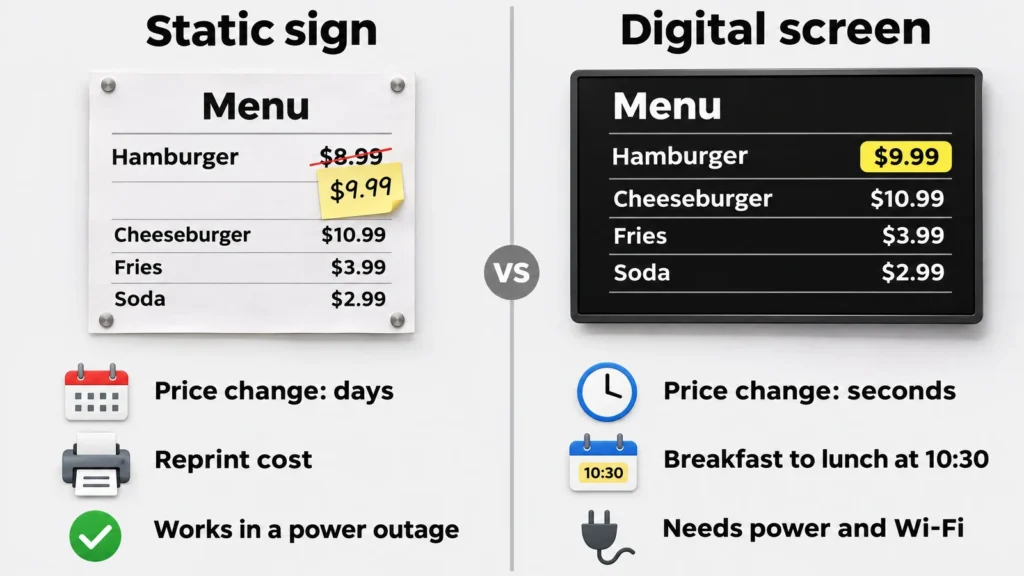
The table compares both on the factors that decide the purchase.
| Factor | Printed or static sign | Screen |
|---|---|---|
| Upfront cost | low | a screen, player, and install per spot |
| Cost of each change | reprint and rehang | staff time only |
| Time to change a price | days | seconds to minutes |
| Content by time of day | swapped by hand | runs on a schedule |
| Several locations | print and ship to each | one edit for all |
| Live prices and sold-out items | not possible | from the POS on supported systems |
| Works in a power outage | yes | no |
| Needs an owner to update it | yes | yes |
Note the bottom row: both options need an owner. Screens switch content on a schedule, but they never write it. A screen keeps the job of getting information right; it only makes that job faster and lets you do it from anywhere. In the digital signage vs static signage choice, most food businesses use both: vinyl lettering for opening hours, screens for the menu and anything with a price. Digital signage vs traditional signage rarely comes down to all or nothing. However, flexibility alone does not prove that screens sell, and the research below tests exactly that.
How Effective Is Digital Signage, and Why Use It at the Counter?
Digital signage is effective at the point of decision: featured products were 8.1% more likely to be bought. That figure comes from a field study of 237 campaigns and about 30 million shoppers by Herhausen, de Jong, and Grewal. It appeared in the Journal of Marketing in 2025 and used shopping cart data from real grocery stores, not surveys.
Three findings matter for restaurants and cafés. The effect was stronger for low-priced, novel, and indulgent products, which describes desserts, drinks, and add-ons. Screens placed next to the product showed the strongest lift. And unlike a price promotion, the screen did not lower what buyers spent per item. That explains why digital signage works best on the menu board at the point of order. So why is digital signage important for counter-service food in particular? Because the screen sits exactly where the guest chooses.
Digital signage effectiveness drops when that condition breaks: a screen in a hallway, a loop that never changes, or a board with 40 items in small type. The digital signage benefits that hold up in research come from placement and content, not from the screen itself.
📊 “400% more views” is not a study result. Many digital signage benefits statistics online, including “400% more views than static signs” and “80% of shoppers entered a store because of a sign,” circulate between vendor blogs without a named study behind them. The 8.1% figure comes from a peer-reviewed field experiment, which is why it is smaller and more useful.
If you are still asking why use digital signage at all, the next step puts a price on that effect for your own counter. As a result, the ROI section below swaps research averages for your own numbers.
Digital Signage ROI: Is It Worth It for a Small Business?
Digital signage ROI is the extra margin and print savings that a screen brings, minus its cost, divided by that cost. For one counter screen, the result depends almost entirely on how often the menu changes.
ROI = (gain − cost) ÷ cost
Here the digital signage pros and cons turn into dollars.
The table compares one counter screen in two cafés. Assumptions: a $1,200 commercial 55-inch display, $200 for a player, $300 for mount and installation, software at $12 per screen a month, electricity at $7.40 a month, and $100 a year for maintenance. Replace them with your own quotes.
| One counter screen | Menu changes monthly, one promoted add-on | Menu changes twice a year, no promotions |
|---|---|---|
| Upfront cost | $1,700 | $1,700 |
| Running cost per year | about $333 | about $333 |
| Print savings per year | $900 (6 reprints × $150) | $300 (2 reprints × $150) |
| Extra margin per year | $2,160 (3 more add-ons a day × $2) | $0 |
| ROI after year one | about +50% | about −85% |
| ROI after three years | about +240% | about −67% |
| Payback | about 7.5 months | never |
Same screen, same price, opposite result. The first café pays the screen back in under a year because it changes the menu and uses the screen to sell. The second would be better off with a well-made printed board. On print savings alone, the screen needs about six reprints a year to cover its own cost over three years; below that, it has to sell. As a reference for the add-on line, an 8.1% lift on an item that sells 40 times a day comes to about 3 more sales, which is the figure used in the first scenario. So is digital signage worth it for a small business? It pays when the menu changes and someone uses the screen to sell, which is why digital signage is important to test on one screen before you buy ten.
To check ROI, digital signage needs a before-and-after test: promote one item for two weeks, compare POS data with the two weeks before, and count QR scans if the screen shows one. The checklist below makes the first call.
| Factor | Favors digital | Favors static |
|---|---|---|
| Price or offer changes | monthly or more | twice a year or less |
| Locations | two or more | one |
| Dayparts | breakfast, lunch, or happy hour | one menu all day |
| Reprints | several a year | rare |
| Who updates content | a named person with weekly time | nobody |
A practical rule: a screen is likely worth it if you answer “yes” to at least two of three questions. Do prices or offers change at least once a month? Do you run more than one daypart or location? Do you reprint menus or posters more than three times a year? In contrast, a business that answers “no” to all three likely fits one of the situations below.
When Print Still Beats a Screen
Digital signage pros and cons tilt toward print in four situations that are easy to check.
- The content changes less than once a quarter. Opening hours or a fixed price list belong in vinyl. A screen costs $6–$15 a month in electricity alone to show the same thing.
- Guests spend under 5 seconds in front of the spot. A screen on a walkway draws no attention from people who pass without stopping.
- Nobody can give the screens 20 minutes a week. Without an owner, the board shows expired offers within a month, and an outdated price hurts more than none.
- The wall has no outlet or network within reach. If running power and a cable costs more than the display, a printed board with a small changeable panel costs less. Beyond these four cases, the downsides can be managed, and the last section shows how.
Start Small: How Decker Reduces the Downsides
Decker reduces these downsides with one HDMI player per TV, POS price sync, and checks that each screen shows the right content. Decker serves restaurants, cafés, bars, and other food and beverage operators, and more than 13,700 screens run on the platform.
Here is how the benefits of digital signage software in Decker map to the cons above:
- Upfront cost. Decker Player connects to a TV you already own or to a commercial display over HDMI, on Wi-Fi or Ethernet.
- Content work. On the Professional plan, prices and sold-out items sync from Toast, Square, or Clover, or from Excel for other registers. A price change reaches the screen in 1–5 seconds.
- Internet drops. The player keeps the current menu in an offline cache.
- Downtime. Decker Verifier, an add-on for any paid plan, works independently of the player, so screens send an alert even when the player freezes. It catches black screens, frozen players, outdated content, and wrong prices, restarts the screen or player remotely, switches the HDMI input back, and logs each event with a photo.
- Security. The Premium plan adds custom roles, SAML single sign-on, and audit logs.
Decker is a product of Alpha Intec, Inc., a Delaware corporation based in Los Angeles. On the Premium plan, audit logs record who changed which screen and when. In the Burger Shop case in Downtown Los Angeles, four menu screens were linked to the POS, and menu updates went from days or weeks to minutes. Across its customers, Decker reports up to 80% less time on content updates and 60% less screen downtime.
We checked these plan details against the Decker pricing page in 2026; plans and features can change, so the pricing page has the current terms.
Next, if your first screen will be a TV already on the wall, see what it takes to turn a TV into digital signage.
Questions and Answers
1 What are the main digital signage pros and cons?
The pros are instant price changes, time-of-day scheduling, live prices from the POS, control over many screens, and proof of what played. The cons are a higher upfront cost than print, a monthly fee per screen, electricity, downtime risk, and the need for one person to keep content current.
2 What are the disadvantages of digital signage?
The main ones are the upfront cost of a display, player, and installation, plus software and power every month. Screens can freeze or wake up on the wrong input after a power cut, and they look worse than print when nobody updates them. Monitoring and a named content owner fix most of it.
3 Do screens increase sales?
A screen sells more when it sits where the decision happens. A 2025 Journal of Marketing field study of 237 campaigns found an 8.1% higher chance of buying a featured product, with stronger effects for low-priced and indulgent items. For your own store, promote one item for two weeks and compare POS data with the two weeks before.
4 Is one screen worth it for a single location?
Usually yes if prices or offers change at least monthly or you run more than one daypart. Usually no if the content changes twice a year or less and nobody can spend 20 minutes a week on it. Starting with a TV you already own keeps the risk low.
5 How much power does a signage screen use?
A 55-inch commercial display uses about 120–150 watts. At 12 hours a day, that adds up to 43–54 kWh a month, or about $6–$7.50 at the US commercial average of about 14 cents per kWh. Running it 24 hours doubles the cost, so switching screens off after closing gives the simplest saving.
6 How much upkeep do screens need?
Plan a few minutes per content change, a once-a-week walk past each screen at guest eye level, cleaning, and firmware updates. Most downtime comes from frozen players and wrong HDMI inputs after power flickers, which remote monitoring fixes without a site visit.