Chrome Sign Builder Is Gone: 7 Ways to Keep Chromebox Menus and Signs Running


A Chrome Sign Builder alternative now has to run as a web app or a ChromeOS signage app, because Google ended Chrome apps in kiosk mode after ChromeOS 150 in July 2026. Devices on the long-term support channel keep the old app until April 2027. For restaurant menus, Decker plays in the browser and takes prices from Toast, Square or Clover.
Disclosure: we build Decker. All release dates below come from Google’s Chrome Enterprise help pages and its deprecation notice; beyond those, prices come from each vendor’s public plan page.
What Are the Best Chrome Sign Builder Alternatives?
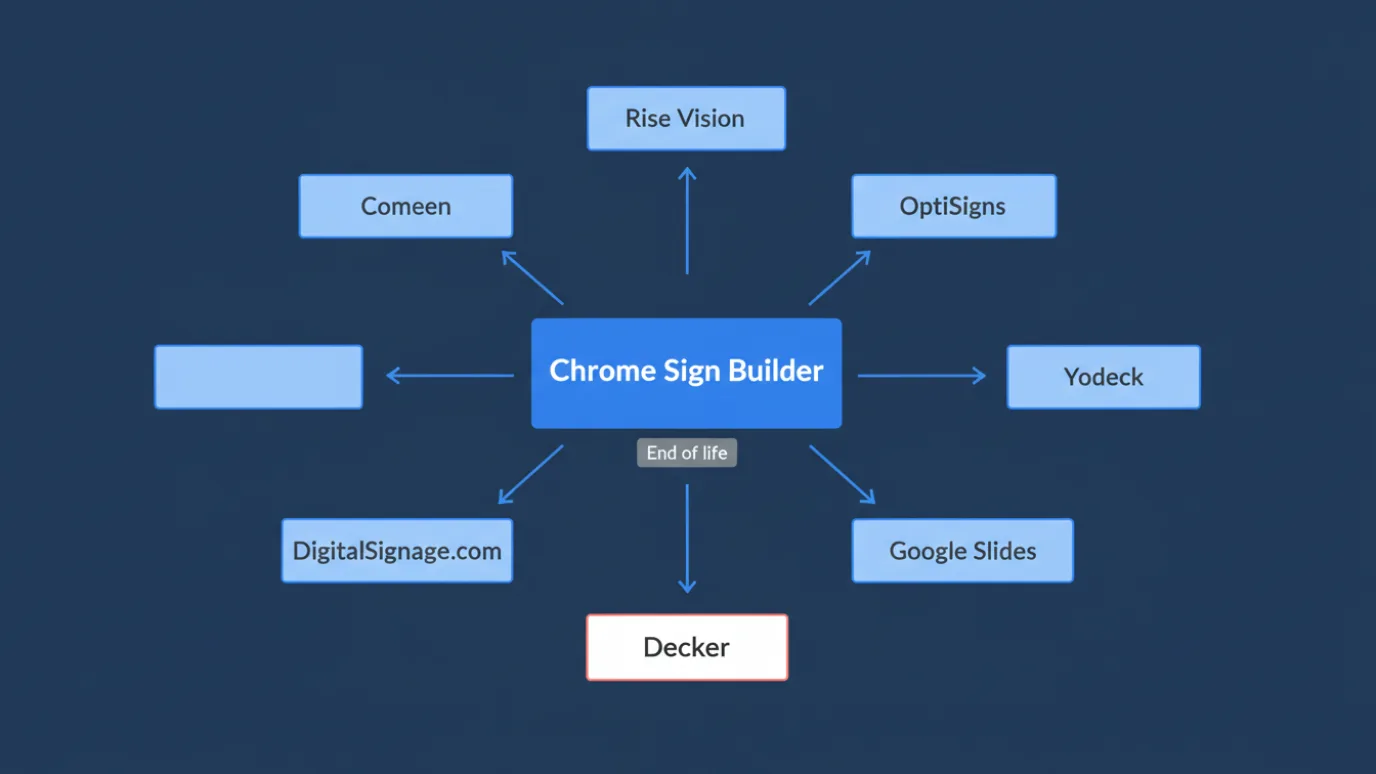
Seven Chrome Sign Builder alternatives that run on Chromeboxes are Decker, Rise Vision, Comeen, OptiSigns, Yodeck, DigitalSignage.com and a Slides URL.
- Decker — the Chrome Sign Builder alternative for restaurant menus: it plays in a web browser, so a Chromebox or a smart TV opens it without a separate app, and the $12 Professional plan pulls each price from Toast, Square or Clover.
- Rise Vision — the Chromebox-first route for schools: its player runs as a kiosk web app on ChromeOS 88 or later, from $11 per display a month for education.
- Comeen — the replacement Google itself names: a Chrome Enterprise Recommended partner with a web app for kiosks, priced by quote.
- OptiSigns — a ChromeOS app with 140+ integrations from $10 per screen; its own guide says the free plan does not run on ChromeOS.
- Yodeck — one screen free with no time limit, then $8 per screen, with a web player for ChromeOS and a free Raspberry Pi on yearly plans.
- DigitalSignage.com — SignPlayer for Chrome OS, three screens free, then $3 per screen a month.
- Google Slides in kiosk mode — the free Chrome Sign Builder replacement: a published deck added as a kiosk URL, with no scheduling.
Every option on this list still runs on a Chromebox, so the hardware rarely decides the choice. Three other facts do. Google’s own fallback, a web page added by URL in the Admin console, shows one URL and cannot schedule it, so the calendar that made Sign Builder useful disappears. A Chromebox in kiosk mode still needs Google’s kiosk license, which comparison guides put at about $25 per device a year. And many screens that ran Sign Builder showed menus: Google’s help page still lists restaurant menus as its first example.
As a Chrome Sign Builder alternative where those menus change with the register, menu boards that Decker builds for restaurant counters run in the TV’s browser with prices from the POS. Next come the dates, because most pages in search still quote the wrong one.
Chrome Sign Builder End of Life: The Dates That Actually Apply
Chrome Sign Builder end of life came in stages that ran from ChromeOS 138 in July 2025 to LTS in April 2027. Kiosk Chrome apps turned off by default in July 2025 and stopped on the Stable channel after ChromeOS 150 in July 2026.
| Date | ChromeOS release | What changed |
|---|---|---|
| March 11, 2015 | — | Google announces Chrome Sign Builder, with restaurant menus across time zones as the example |
| October 2021 | — | Google extends Chrome app support to at least January 2025 |
| July 2025 | 138 | Admin-installed kiosk Chrome apps turn off by default; a policy can switch them back on |
| July 17, 2025 | — | Google posts the deprecation notice and names Comeen and a kiosk web app as replacements |
| July 2026 | 150 | Last release that runs Chrome apps in kiosk mode; Sign Builder leaves the Chrome Web Store at the end of this release |
| August 2026 | 151 | Kiosk Chrome apps stop even with the policy on, and screens show a message to contact IT |
| April 2027 | LTS 150 | Last date for devices on the long-term support channel |
| January 2028 | 184 | Last release with any Chrome app support |
| October 2028 | LTS | End of life for all Chrome apps; Google says no exceptions |
Sources: Google’s “End of support for Chrome apps” page and its July 17, 2025 notice; the ChromeOS 151 detail and the 2021 extension come from Rise Vision’s migration guide.
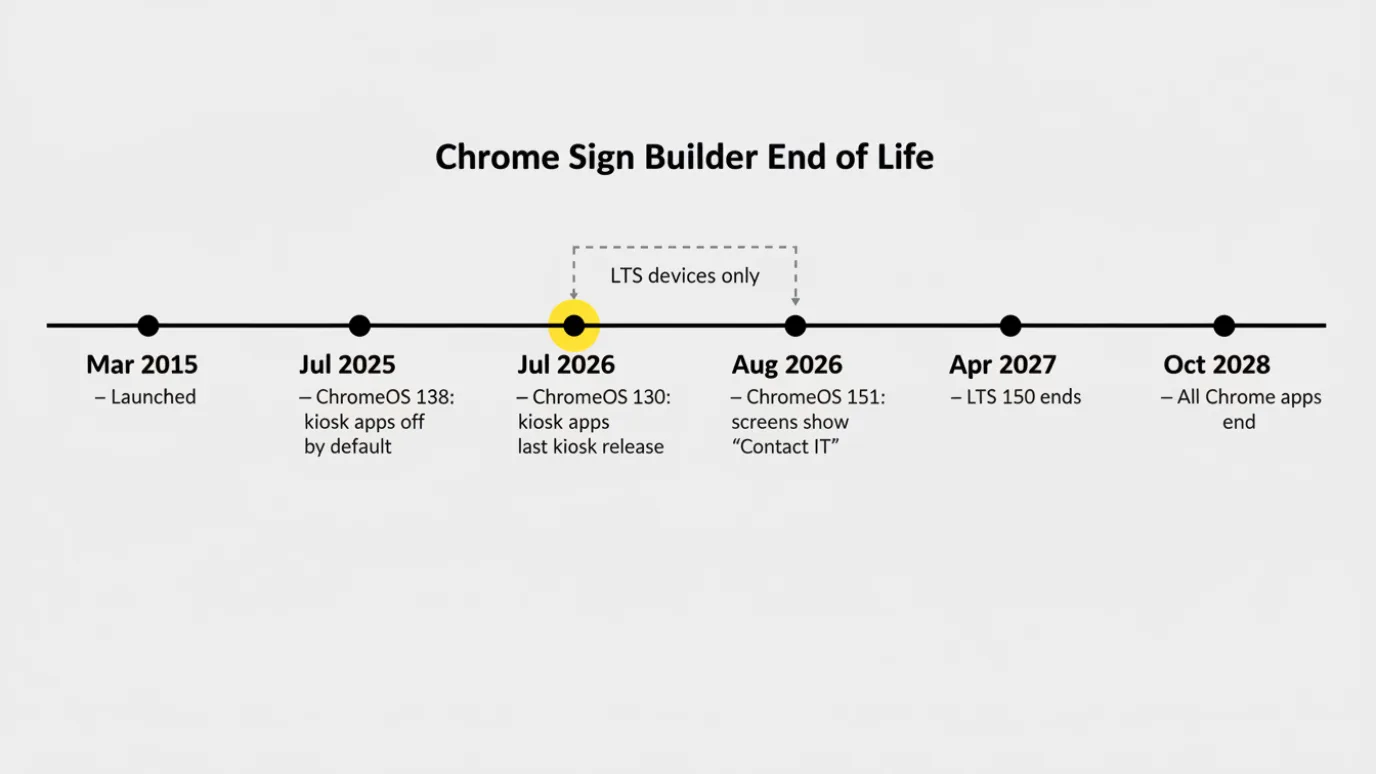
Chrome Sign Builder’s dates, put together, tell a simple story. On the Stable channel, it ran for 11 years and 4 months, and Google gave fleets about 12 months between its notice and the last kiosk release. ScreenCloud, Yodeck and OptiSigns still date the shutdown to January 2025 on their comparison pages; that date came from the 2021 extension, which Google later pushed back. As a result, a Chromebox on the Stable channel no longer runs Sign Builder, and one pinned to LTS 150 runs it only until April 2027.
Chrome Sign Builder vs Decker: A Chrome Sign Builder Alternative Wired to the Register
Chrome Sign Builder scheduled free URLs; Decker builds the menu from the POS at $12 a screen and checks the TV. Unlike Comeen, Decker prices every tier openly: Starter covers one screen free; the paid tiers run $8 (Essential), $12 (Professional) and $16 (Premium) per screen each month, and paying for a year cuts 15%, as Decker’s per-screen plans show.
| Chrome Sign Builder | Decker | |
|---|---|---|
| Status after ChromeOS 150 | Off on the Stable channel; LTS until April 2027 | Active; the trial runs 14 days across as many as 5 screens |
| Price | ✅ Free; kiosk license about $25 a year per device | Starter free for one screen; $8–$16 per screen a month |
| What the screen runs | A Chrome app in ChromeOS kiosk mode | ✅ A web browser: a smart TV, a Chromebox or any other browser |
| Content | URLs, images, YouTube, published Google Slides | ✅ Menu layouts built from POS data, plus images, video and promos |
| Scheduling | ✅ Time slots, repeats and a default URL | Daypart rules on Professional |
| Menu prices | Typed into the page behind the URL | ✅ Toast, Square and Clover directly; only changed values redraw in 1–5 seconds |
| Sold-out items | Edited by hand | ✅ Vanish from the board once the POS flags them unavailable |
| Publishing | Export a file, upload it in the Admin console | Publish from the browser to one screen or a group |
| Checking the screen | None | ✅ Decker Verifier catches a frozen frame, a blank panel or the wrong HDMI source |
| Offline | Not documented by Google | Browser cache; Decker Player or the Android TV app for daily outages |
The register writes the board. Sign Builder showed whatever page sat behind a URL, so a price changed at the counter waited for someone to edit that page as well. With Decker, Toast, Square or Clover pushes the new price to its own line on the board, and an item marked sold out drops off the screen. Each register’s setup is laid out on the page for POS-connected menu boards for Toast, Square and Clover.
Decker notices a dark kiosk. After ChromeOS 151, a Sign Builder screen shows a message to contact IT where the lunch menu used to be, and the Admin console still lists the device as healthy. A screen check by Decker Verifier reads the panel, and when the picture is wrong it restarts the player or the TV or puts the TV back on the right HDMI input; it adds $7 per screen a month to any paid plan.
Sign Builder kept two strengths that Decker does not copy: it cost nothing, and it lived inside the Google Admin console that school and office IT teams already run. A district with 200 Chromebox signs and no menus would weigh those two first when it picks a Chrome Sign Builder alternative.
🍔 Swap one Chromebox before the next ChromeOS update. Open Decker in its browser, connect the register and change a price at the counter. Two weeks free on up to five screens. Try it on one screen
For everyone else, the real split lies between keeping the Chromebox as it is and moving the content somewhere else.
Chrome Sign Builder Replacement Options Compared: Which Keep the Chromebox
A Chrome Sign Builder replacement is a kiosk app that keeps the Chromebox, or a TV player that retires it. The second group runs on a smart TV, an Android box or a Raspberry Pi. DigitalSignage.com’s September 2026 matrix counts a ChromeOS app on 8 of 14 signage vendors, and Google adds its own web-app route.
| Option | Keeps the Chromebox | Other devices | Entry price, per screen monthly | Reads a register | Gained over Sign Builder |
|---|---|---|---|---|---|
| Sign Builder (reference) | Yes, until LTS ends in April 2027 | — | Free; kiosk license about $25 a year | None | — |
| Decker | Yes, in the browser | Smart TV browser, Android TV app, Decker Player | $8 Essential; $12 with the register feed | Toast, Square and Clover, natively | Register prices, daypart rules, panel check |
| Rise Vision | Yes, kiosk web app on ChromeOS 88+ | Windows, Android, Raspberry Pi, Apple TV, BrightSign | $11 for education, $12 for business | None | 750+ templates, central scheduling, SOC 2 Type 2 |
| Comeen | Yes, ChromeOS 98+ | Web app | Quote only | None | Google-named partner; 30-day trial |
| OptiSigns | Yes, paid plans | Windows, Roku, Apple TV, Fire TV, Android | $10 | Toast only, via OptiSync (Pro Plus) | Slides sync, 140+ apps; free plan not on ChromeOS |
| Yodeck | Yes, web player | Raspberry Pi, Tizen, webOS, Fire TV | $8; one screen free | None | Free Pi player on yearly plans |
| DigitalSignage.com | Yes, SignPlayer | Windows, Mac, Android TV, Raspberry Pi, iPad | $3 after 3 free screens | None | Native app with local cache and screenshots |
| Google Slides kiosk URL | Yes | — | Free | None | One deck, no schedule, edits after a reboot |
Prices are the vendors’ public entry rates; Google does not publish the kiosk license price, so that figure comes from comparison guides.
Read across the rows, a Chrome Sign Builder alternative that keeps the Chromebox starts at $3 to $12 per screen a month, with Comeen by quote. Decker’s row is the only one that reads a register directly, and OptiSigns reaches Toast through a separate tool, so on the other five a menu lives as an image or a page that someone keeps current by hand.
Rise Vision
School IT teams lean toward Rise Vision because its player runs as a kiosk web app on the Chromeboxes they already manage. Basic costs $11 per display a month for education and $12 for business, and the company lists 750+ templates, 35+ integrations and SOC 2 Type 2. One district on r/k12sysadmin reported a site license at $1,000 a year for unlimited displays at a single site.
Comeen
Comeen is the partner Google names in its own deprecation notice, described as a Chrome Enterprise Recommended partner with a web app that directly replaces Sign Builder. Comeen Play, part of LumApps, needs ChromeOS 98 or later and offers a 30-day trial, but publishes no price.
OptiSigns
OptiSigns installs a ChromeOS app on paid plans from $10 per screen and syncs Google Slides automatically. Its own migration guide admits the free plan stops short of ChromeOS, so a Chromebox fleet starts on a paid tier, and a Toast menu needs OptiSync on Pro Plus plus Toast’s API fee.
Yodeck
On ChromeOS, Yodeck runs as a web player in kiosk mode with a companion Chrome extension. One screen stays free with no time limit, the paid tiers cost $8, $12 and $16 per screen, and an annual plan includes a Raspberry Pi player for free, which suits screens that leave the Chromebox behind. No register feeds it, so a menu change still means an edit in its menu app.
DigitalSignage.com
DigitalSignage.com sells SignPlayer for Chrome OS as a direct replacement: a native app that caches content, reports screenshots and keeps three screens free, then $3 per screen a month. Without the kiosk license it still runs as a normal app, though without the locked-down kiosk session.
Beyond these five, search results also surface a longer tail. Displayer runs as a ChromeOS web app from $9 to $19 a month with proof-of-play exports, CastWize costs $5 per screen but has no ChromeOS player, Carousel starts at $25 per player with a 10-player minimum, and Xibo sells a ChromeOS player for $49 once on a self-hosted server. TelemetryTV has deprecated its ChromeOS app, so a fleet moving there changes hardware too.
What the Chrome Sign Builder App Did, and What It Never Did
The Chrome Sign Builder app was a free scheduler that put web pages on ChromeOS kiosks by time slot. Google launched it on March 11, 2015, and its help page still describes “restaurant menus, images, and YouTube videos or playlists” plus published Google Slides as typical content. Reviewers on TrustRadius rate it 7.6 out of 10.
Chrome Sign Builder covered three jobs well:
- Scheduling by time. Specific slots within a day, all-day content until a set date, or content shown indefinitely.
- A safety net. A default URL filled any gap in the schedule, so the screen never went blank between slots.
- Central deployment. IT added the app, uploaded the schedule file and set it to auto-launch on a group of devices.
What Sign Builder never had matters more for choosing a replacement. It had no media library or layouts, no screenshots or health reports, and no documented offline behavior. A change to the schedule meant a new export and a new upload. In addition, a menu price lived inside whatever page the URL pointed to, so the register and the screen were two separate places to edit.
Free Chrome Sign Builder Alternatives, Including iOS
Free Chrome Sign Builder alternatives come in three forms: a Slides kiosk URL, a free ChromeOS plan or an iPad browser. Each one gives up something that the old app had, and a Chrome Sign Builder alternative free of license fees does not exist on a Chromebox, since kiosk mode needs Google’s license.
Google Slides as a Kiosk Web App
The most-upvoted answer in the r/k12sysadmin thread on Chrome Sign Builder alternatives is the same one Google suggests: publish a Slides deck to the web, add its URL as a kiosk web app and set it to auto-launch. Google charges nothing for it beyond the kiosk license. Google’s Admin console, however, cannot schedule URLs, and Slides edits appear only after a reboot, so admins schedule a nightly restart. One developer built a free replacement page for published Slides with Gemini 3 Pro in about an hour: 8 seconds per slide, a refresh every 5 minutes and a reload every 24 hours.
For a café, those two limits combine into one problem: on the free route, a breakfast menu cannot hand over to lunch at, say, 10:30. The kiosk shows one deck all day, so dayparts end up as slides in the same loop, and a mid-morning price change waits for the nightly reboot.
Free Plans With a ChromeOS Player
DigitalSignage.com keeps three screens free on SignPlayer, Yodeck keeps one screen free, and the hosted Pi Signage plan allows two devices free. Decker Starter keeps one screen free in a browser, though POS sync starts on Professional. OptiSigns’ free plan, by its own guide, does not run on ChromeOS. A plain web page in a kiosk tab also behaves differently from a player app: the page has no cache of its own, while SignPlayer, Rise Vision and Decker keep the last content on screen through a short outage.
On an iPad or Apple TV
No free iOS app replaces Sign Builder one for one, and almost no comparison page covers it. An iPad can open a browser-based player in Safari, which suits a counter tablet or a small specials sign. DigitalSignage.com lists iPad support for SignPlayer, and Rise Vision lists Apple TV, but Apple TV needs a native tvOS app, which Decker does not offer.
In other words, a free route works for one deck or one screen, and the cost shows up once a schedule, a second location or a changing price enters the picture.
What a Chromebox Costs to Keep After Chrome Sign Builder
Keeping a Chromebox costs about $25 a year for its kiosk license plus software, while a smart TV browser needs no license. Divided across 12 months, that license adds about $2 per screen a month to every option that keeps the Chromebox. Chromebox prices run $300–$700 in comparison guides, against $30–$60 for an Android TV stick and $200–$600 for a commercial Android player. ChromeOS Flex needs the same license, plus a 64-bit x86 device with 4 GB of RAM and 16 GB of storage.
| Year-one cost per screen, existing hardware | Chromebox kept | Smart TV or streaming stick |
|---|---|---|
| Google kiosk license | about $25 | $0 |
| DigitalSignage.com after 3 free screens | $36 | $36 (Tizen, webOS, Fire OS apps) |
| Yodeck Basic | $96 | $96 |
| OptiSigns Standard | $120 | $120 |
| Rise Vision, business | $144 | $144 (Android or Apple TV player) |
| Decker Professional with POS, yearly billing | $122 | $122 |
Subscription fees only, before taxes; the Decker row leaves out any fee the POS company charges for its own API.
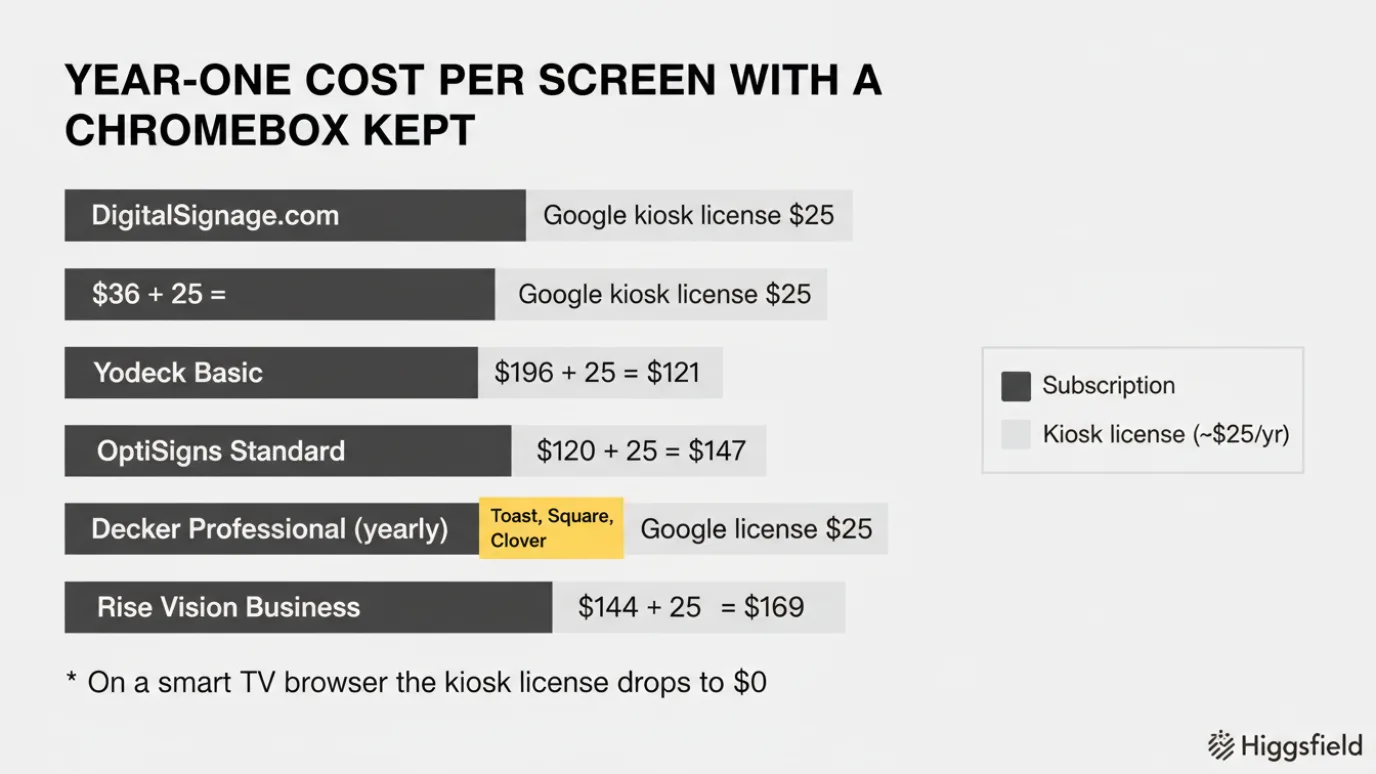
For example, at the guides’ figure of about $25, ten Chromeboxes kept for three years add about $750 in kiosk licenses on top of any replacement, and moving the same menus to the TVs’ browsers removes that line. At 50 screens, DigitalSignage.com estimates $15,000–$35,000 for Chromeboxes against $1,500–$3,000 for Android sticks. Compared to Rise Vision’s business plan, Decker Professional on yearly billing costs about $22 less per screen a year in this example while adding the POS feed. Panels, mounts and labor change the total far more than any of these subscriptions, as the guide to what a digital screen costs, from the panel to the mount shows.
How to Replace Chrome Sign Builder in the Google Admin Console
Replacing Chrome Sign Builder takes five steps in the Google Admin console, plus a pilot of 7 days on one screen. Google’s notice lists the same core route: delete the app, add a web app by URL and set it to auto-launch.
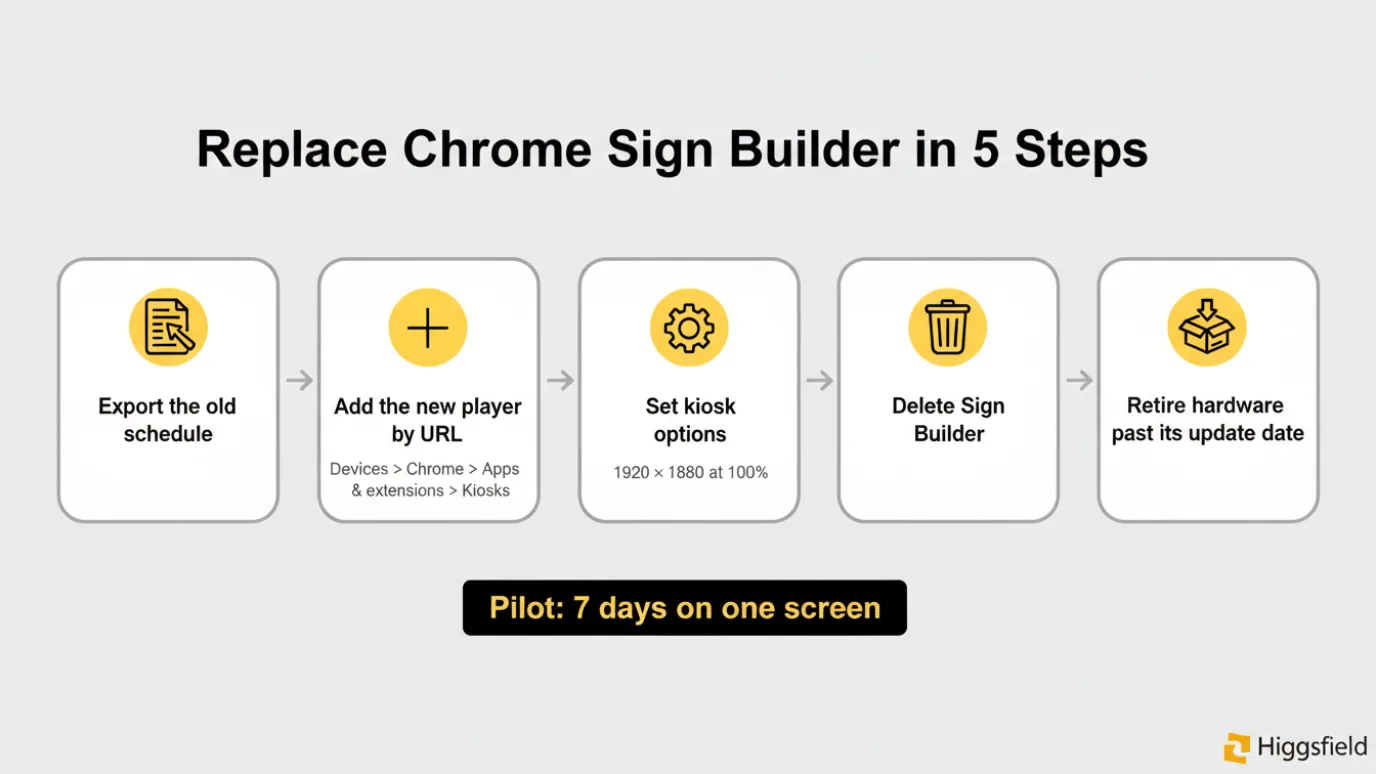
- List what each screen showed. Export the old schedule file and note every URL, time slot and default page, since the new tool rebuilds them.
- Add the new player. In Devices > Chrome > Apps & extensions > Kiosks, add the replacement by URL or install its ChromeOS app, set it to auto-launch for the kiosk organizational unit, then pair each screen with the code the player shows.
- Set the kiosk options. Turn on “Web app can run offline” where the player supports it, keep the screen from sleeping, fix the rotation and run the display at 1920 × 1080 at 100% scaling.
- Delete the old app. Remove Sign Builder under Apps & extensions; its data is wiped when the device restarts.
- Retire hardware past its update date. ChromeOS devices released since 2021 get 10 years of updates. The ASUS Chromebit CS10 stopped receiving them in June 2020 and has gone more than six years without a patch, while the ASUS Chromebox 6a is covered through June 2034.
Overall, a single screen moves in under ten minutes by vendor estimates, and a school or restaurant group should budget half a day per location, including a pilot through one full menu change.
When a Chromebox and a Free Tool Are Enough
A paid Chrome Sign Builder alternative earns little where one screen shows one deck that changes less than once a week. A school lobby with a single Slides deck and an IT team already in the Admin console can run the kiosk URL route and schedule a nightly reboot. A site that never shows prices, such as a library or an office reception, gains nothing from a POS link. Chromeboxes on LTS 150 with no menus can wait until early 2027 to switch, as long as the cutover lands before April; holding them on an old release past that point leaves them without security patches. A restaurant menu wall with daily price changes, however, needs a replacement that reads the register.
⏰ Before your Chromeboxes show “Contact IT”. Next, run Decker in a Chromebox or smart TV browser, connect Toast, Square or Clover and mark one item sold out to see it leave the board. No charge for the first 14 days, for as many as 5 screens. Start with one screen
Questions and Answers
1 What was Google Sign Builder?
Google Sign Builder, officially the Chrome Sign Builder, was a free Chrome app from Google that scheduled web pages, images, YouTube videos and Google Slides on managed ChromeOS devices in kiosk mode. Google announced it on March 11, 2015, and the Google Chrome Sign Builder ran inside the Admin console that school and office IT teams already used.
2 Is Chrome Sign Builder discontinued?
Yes. ChromeOS 138 turned kiosk Chrome apps off by default in July 2025, ChromeOS 150 in July 2026 was the last Stable release to run them, and the app leaves the Chrome Web Store at the end of that release. Devices on the long-term support channel keep it until April 2027.
3 Does the Chrome Sign Builder app still work?
Only on devices pinned to LTS 150, and only until April 2027. On the Stable channel, ChromeOS 151 and later show a message to contact IT instead of the content, even with the kiosk policy turned on.
4 Is there a free Chrome Sign Builder alternative for iOS?
No app replaces it one for one on iOS. An iPad can open a browser-based player in Safari, DigitalSignage.com lists iPad support for SignPlayer, and Apple TV needs a native tvOS app from vendors such as Rise Vision.
5 Can I keep my Chromeboxes after Chrome Sign Builder?
Yes, if they still receive updates and the replacement runs as a kiosk web app or a ChromeOS app. The kiosk license stays, at about $25 per device a year, and devices such as the ASUS Chromebit CS10 that stopped updating in 2020 should be replaced.
6 Which Chrome Sign Builder alternative can pull menu prices from the register?
For a kitchen on Toast, Square or Clover, Decker takes prices straight from the register once a location is on the $12 Professional plan, and the board opens in a Chromebox or smart TV browser. OptiSigns can pull a Toast menu only with its OptiSync add-on on the Pro Plus tier. In contrast, Rise Vision, Comeen, Yodeck and DigitalSignage.com have no register link at all, so their menus stay manual.