Toast Menus Without a Spreadsheet: NoviSign Alternatives for Restaurant Counters


The best NoviSign alternative for a restaurant is Decker: Toast, Square and Clover feed the menu directly on Professional at $12 per screen, while NoviSign routes a Toast menu through Google Sheets on Business Plus at $17. Yodeck and Play Digital Signage charge $6 less per screen than Business; OptiSigns is where most former users went. Next: 7 options.
What Are the Best NoviSign Alternatives?
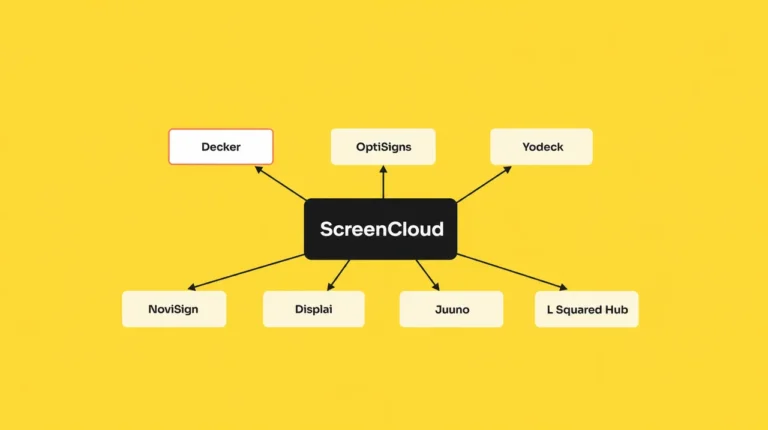
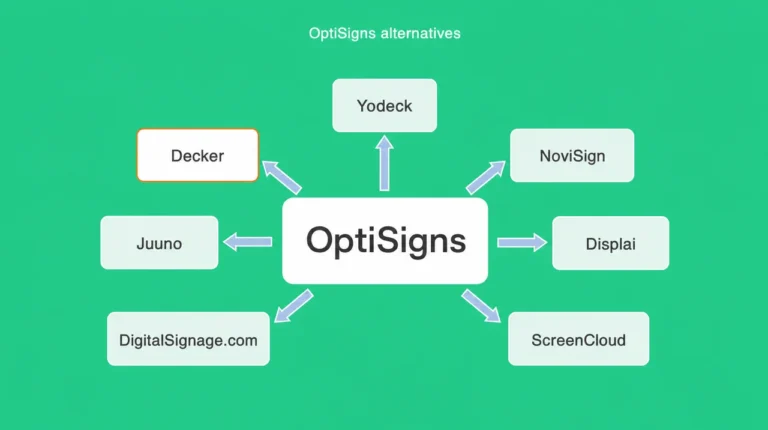
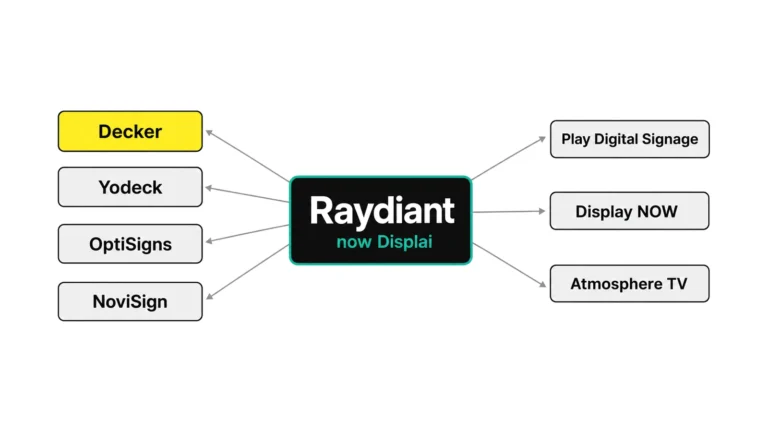
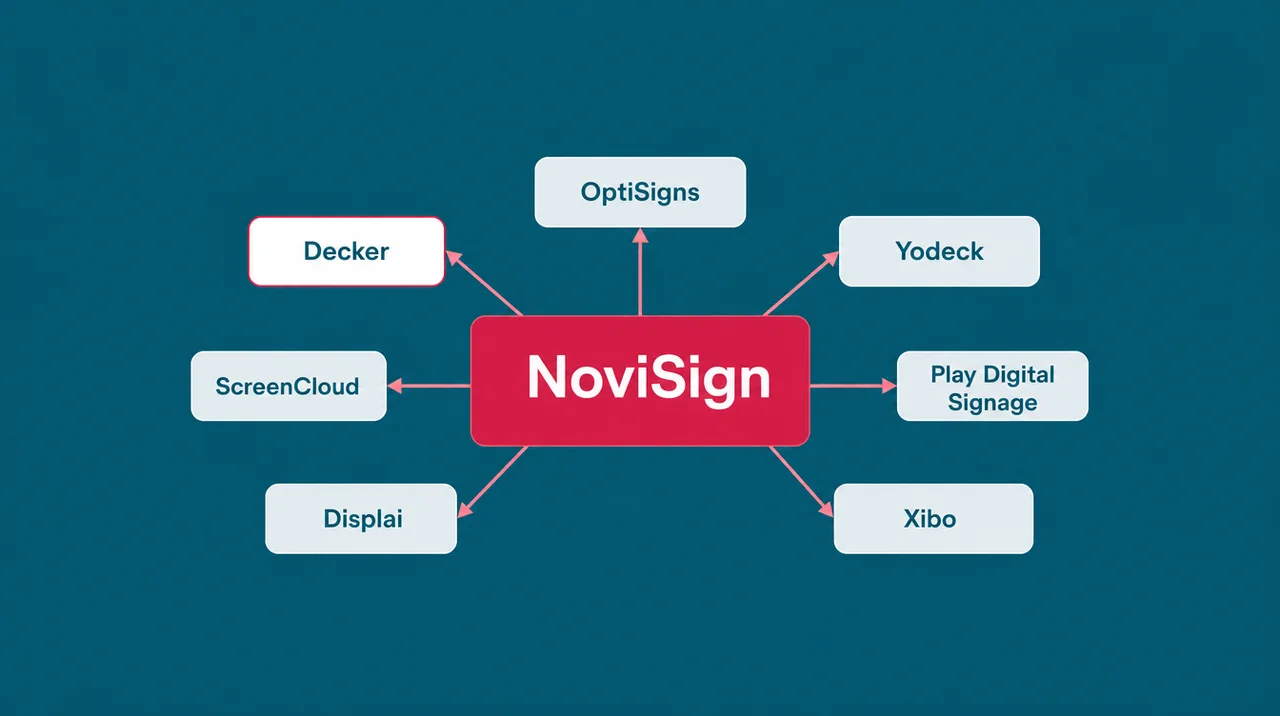
The best NoviSign alternatives are Decker, OptiSigns, Yodeck, ScreenCloud, Play Digital Signage, Displai and Xibo, each removing a different NoviSign limit.
- Decker — the NoviSign alternative for counters on Toast, Square or Clover: the register feeds the menu on Professional at $12 per screen, with no spreadsheet in the middle.
- OptiSigns — the NoviSign alternative former users pick most, 9 of 15 Capterra switchers: $10 on Standard, three free screens with its logo, and apps for Apple TV and Roku.
- Yodeck — the budget NoviSign alternative: $8 a screen, one free screen, and a free Raspberry Pi player on yearly plans.
- ScreenCloud — G2’s top NoviSign alternative, built around Power BI and Teams dashboards, from $20 on annual billing.
- Play Digital Signage — $8, $12 and $16 tiers billed month to month, plus one screen kept free after a review.
- Displai (formerly Raydiant) — the NoviSign alternative for chains on PAR or NCR Aloha, with Toast and Square too, priced by quote.
- Xibo — the self-hosted NoviSign alternative: an open-source CMS with no license fee.
The plan ladder is the first reason to compare NoviSign alternatives. Business costs $14 per screen a month on yearly billing and allows one user. Toast, Power BI, Canva and Zapier start on Business Plus at $17, while SSO, the open API, approval workflows and audit logs wait on Premium at $25. A NoviSign alternative earns a place on this list only by removing one of those steps.
The second reason sits in the menu path. NoviSign names Toast as its only register, and its pricing page describes the link as a Toast menu synced into Google Sheets and then shown on screens. A counter on Square or Clover gets no register link at all, and that gap shapes this list of NoviSign alternatives more than any feature count.
For a counter on Toast, Square or Clover, Decker menu boards built for restaurant counters read the register with no sheet in between. Both plan lists come next, row by row, followed by the NoviSign competitors that former users actually chose.
The NoviSign Alternative for Toast Menus: NoviSign vs Decker
NoviSign and Decker read Toast, yet NoviSign routes it through Google Sheets on Business Plus and Decker reads the register on Professional. Priced as a NoviSign alternative, each Decker step sits below NoviSign’s: Essential $8, Professional $12 and Premium $16 per screen a month against $14, $17 and $25, and a yearly plan takes 15% off, as the published Decker plans show.
| NoviSign | Decker | |
|---|---|---|
| Free plan | 30-day trial only | ✅ Starter: one screen free with no time limit |
| Billing | $14, $17 and $25 per screen a month on annual terms; monthly drops the 10% discount | ✅ $8, $12 and $16 per screen a month; monthly, or 15% off annual |
| Registers | Toast only | ✅ Toast, Square and Clover; Excel import for any other register |
| How the menu arrives | Toast → Google Sheets → screens | ✅ Straight from the POS, no spreadsheet in between |
| POS sync starts on | Business Plus, $17 | ✅ Professional, $12 |
| An item sells out | Availability follows Toast since the April 2026 release | It leaves the screen when marked unavailable in the POS |
| What gets watched | Player status, last download, playback reports | ✅ The panel: black screen, wrong HDMI input, frozen frame, stale prices |
| Fixing a dark screen | Remote device management on Business Plus | ✅ Verifier restarts the player and the TV and switches the input back |
| Players | ✅ Android, ChromeOS, Windows, Tizen, webOS, BrightSign, Amazon Signage Stick, Raspberry Pi | The TV’s own web browser, no device needed; Decker Player or Android TV app for shaky internet |
| Kiosks and touch | ✅ Touch widget and interactive kiosks from Business | — |
| Video walls and IoT | ✅ Videowall editor and IoT/RFID triggers on Business Plus | — |
| Help desk | ✅ Weekday phone line and email tickets seven days a week on every plan | Email Monday to Friday, 9 a.m. to 6 p.m.; 1-hour SLA and phone on Enterprise |
No spreadsheet between the register and the board. NoviSign’s April 2026 release added a Toast data source that updates items, prices and availability, yet the plan card still describes the path as Toast to Google Sheets to the screens. Decker reads Toast, Square and Clover directly: a price changed at the register rebuilds the layout, and the changed lines redraw in 1–5 seconds. The steps for each register are on the page about direct Toast, Square and Clover menu sync.
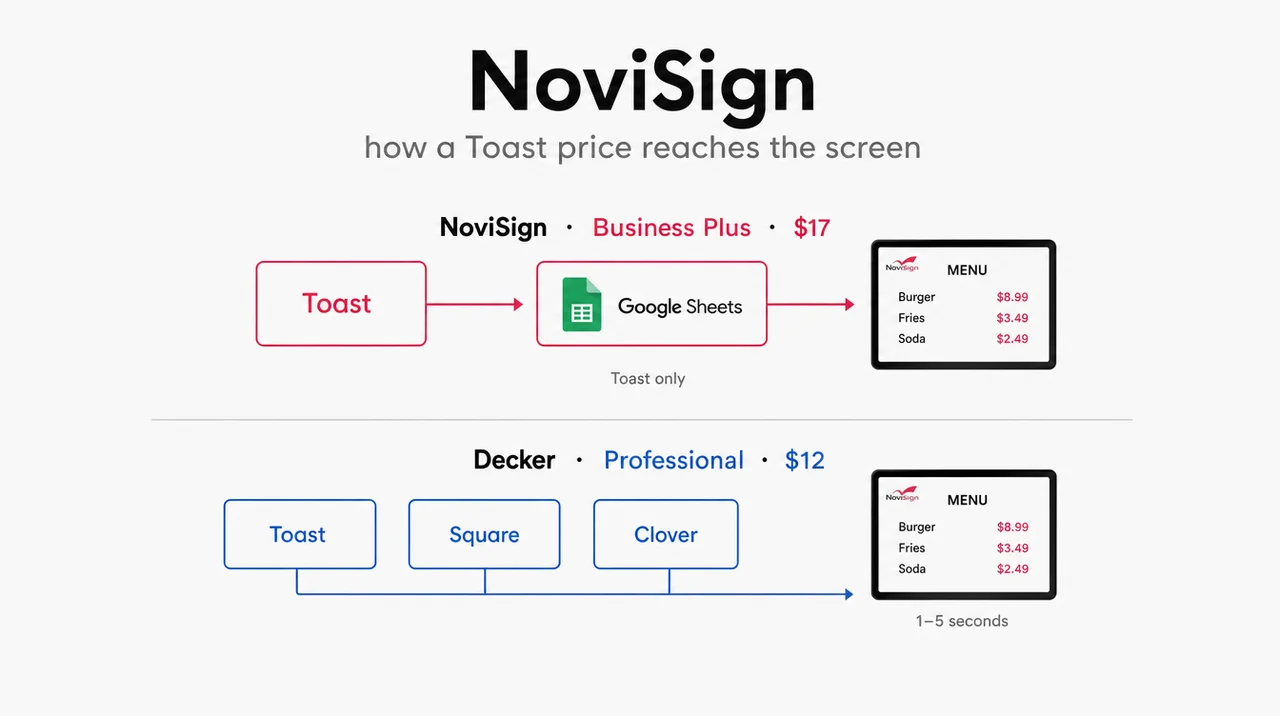
POS sync $5 cheaper, month to month. On NoviSign, a Toast menu starts at Business Plus, $17 per screen billed yearly. On Decker, Toast, Square and Clover connect on Professional at $12 paid monthly, or $10.20 with the yearly discount. For a NoviSign alternative chosen for the menu, that $5 gap repeats on every screen each month, so a pizza shop with four boards keeps $240 a year. A burger counter in Downtown Los Angeles runs four boards off its POS this way, and a price edit that once took days now lands on all four within minutes.
A check on the TV itself. NoviSign’s dashboard knows when a player last downloaded content, and Business Plus adds remote device commands, yet neither sees the picture on the panel. Decker Verifier reads what the screen actually shows, so a blank panel, a frozen frame or an old price triggers a restart of the player or the TV, and a TV stuck on the wrong input is switched back. Both platforms cache content for outages: Decker’s browser rides out a short lunch-rush dropout, and a Decker Player keeps the menu up where the internet fails daily.
NoviSign keeps the lead on six fronts: touch kiosks, a videowall editor, IoT and RFID triggers, a white-label Partners program, a phone line on every plan and a near-perfect G2 score. A retail team that runs interactive screens would give all six up for a menu-first NoviSign alternative.
🔄 Skip the Google Sheet with a NoviSign alternative that reads the register: link Toast, Square or Clover to one Decker board, change a price at the POS and time how fast the screen follows. Free for 14 days, no card needed. Start free
Meanwhile, former NoviSign customers on Capterra left a clear trail, and the NoviSign competitors they chose split by price, players and register reach.
NoviSign Competitors Compared: Where Switchers Go and What They Pay
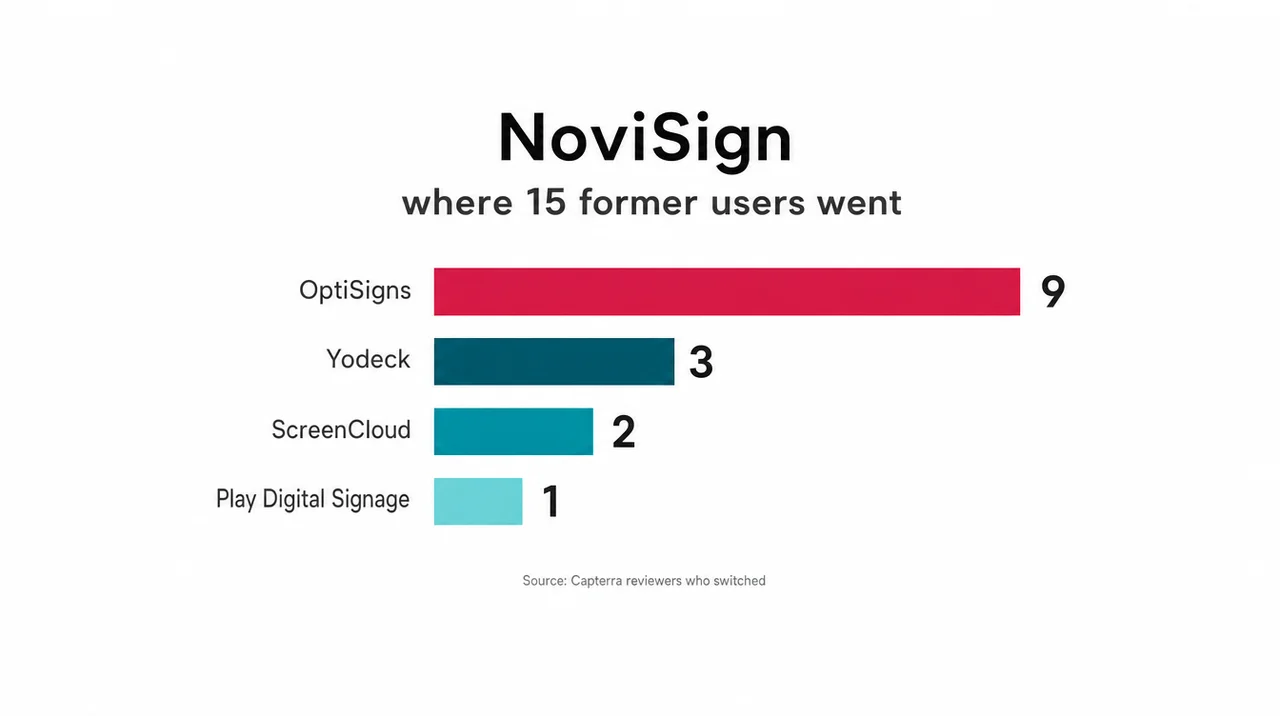
NoviSign competitors that former users actually pick are OptiSigns, Yodeck, ScreenCloud and Play Digital Signage, according to 15 Capterra reviewers who switched. Of those 15, nine moved to OptiSigns, three to Yodeck, two to ScreenCloud and one to Play. One reviewer who chose OptiSigns summed it up as “Better support and UX. Comparable in price.” G2 ranks ScreenCloud as the best overall NoviSign alternative, and Gartner Peer Insights lists 22 NoviSign competitors led by Rise Vision, OptiSigns, L Squared Hub, ScreenCloud and Yodeck, mostly office and school tools.
| Platform | Capterra rating | From, per screen a month | POS menu sync | What changes for a NoviSign user |
|---|---|---|---|---|
| NoviSign (reference) | 4.9 (121) | $14, annual | Toast through Google Sheets on Business Plus | — |
| Decker | not listed | $8; POS sync on Professional at $12 | Toast, Square, Clover direct; Excel | Square and Clover join Toast; POS tier $5 below Business Plus; monthly billing; panel check |
| OptiSigns | 4.8 (4,593) | $10 | Toast through API and OptiSync on Pro Plus | $4 below Business; 3 free screens; Apple TV and Roku; Toast via Pro Plus and an API fee |
| Yodeck | 4.8 (4,929) | $8 | None; prices typed in DSMenu | $6 below Business; one free screen; Pi player on annual plans; Toast feed lost |
| ScreenCloud | 4.8 (289) | $20, annual | None | $6 above Business; dashboards stay; Toast feed lost |
| Play Digital Signage | 4.8 (950) | $8 | None | $6 below Business, month to month; a free screen after a review; Toast feed lost |
| Displai (formerly Raydiant) | 4.7 (318) | Quote only | Toast, Square, PAR, NCR Aloha | Four registers instead of one; prices by quote; own players |
| Xibo | 4.6 (239) | $0 self-hosted | None | No license fee; server upkeep added; Toast feed lost |
Capterra scores and list prices checked in 2026; Displai publishes no price.
Displai reads Toast and Square, OptiSigns reaches Toast through its API tool, and Decker is the one row that reads Toast, Square and Clover. Review sites also list Rise Vision, Pickcel, AIScreen and Mvix, none of them a NoviSign alternative built around a restaurant counter. NoviSign’s own list of 21 rivals leans enterprise: Spectrio, Navori, Scala, Samsung VXT, Poppulo, Uniguest and Korbyt mostly sell by quote to networks of hundreds of screens.
OptiSigns
OptiSigns became the NoviSign alternative for 9 of the 15 Capterra switchers, and price explains part of it: Standard costs $4 less per screen than NoviSign Business, and three screens stay free with an OptiSigns logo. A Toast menu runs through OptiSync on Pro Plus at $15, and Toast bills separately for API access. The roundup of OptiSigns alternatives tracks that Toast fee in detail.
Yodeck
Yodeck cuts the NoviSign bill by $6 a screen: its entry plan costs $8 against Business at $14, billed month to month, and a single-screen account pays nothing. Yearly plans ship a Raspberry Pi player at no cost. As a NoviSign alternative, Yodeck drops the Toast menu, because it does not connect a register and prices go into its DSMenu app by hand. The list of Yodeck alternatives explains who outgrows it.
ScreenCloud
ScreenCloud took two of the 15 switchers and holds 4.7 on G2 from about 455 reviews. It wins on office tools: Power BI and Teams dashboards, SOC 2 Type 2 reports and live weekday agents. Core costs $6 more per screen than NoviSign Business, $20 against $14 on yearly terms, and ScreenCloud reads no POS, so a Toast counter loses its menu feed and Raspberry Pi players stay unsupported. The breakdown of ScreenCloud alternatives walks through Gartner’s 22 rivals one by one.
Play Digital Signage
Play Digital Signage drew one of the 15 switchers and sits below NoviSign at every step: Essential $8, Pro $12 and Ultimate $16 per screen against $14, $17 and $25, billed monthly, with 10% off annual terms. One screen runs every Pro feature for 30 days and stays free once the owner posts a review. As a NoviSign alternative, Play lists no register link, so a counter keeps typing prices.
Displai (Formerly Raydiant)
Displai took over the Raydiant platform in 2025 and kept the restaurant focus that makes it a NoviSign alternative for chains. Where NoviSign names one register, Displai’s marketplace names four, Toast, Square Digital Menus, PAR and NCR Aloha, and adds a 7shifts app for staff schedules. Displai publishes no prices and sells its own players. The guide to Raydiant alternatives compares it with Decker row by row.
Xibo
Xibo serves as the NoviSign alternative for a team with IT staff and a spare server. The CMS ships as open source under AGPLv3 and costs nothing to host, and so do the Windows and Linux players; the other players carry a license fee. Xibo Cloud removes the hosting, with no fixed price on Xibo’s site. Xibo reads no POS, so a menu needs manual updates or a custom data feed.
Overall, price separates these NoviSign competitors more than features do. Next, the plan ladder shows what each NoviSign tier unlocks and what a year costs at 3, 10 and 25 screens.
How NoviSign Pricing Climbs From $14 to $25 per Screen in 2026
NoviSign pricing runs $14 per screen a month on Business, $17 on Business Plus and $25 on Premium, billed annually. A Partners plan for resellers goes by quote. Monthly billing costs more, because the yearly toggle on NoviSign’s page saves 10%. NoviSign digital signage pricing follows one license per display, so the NoviSign cost depends less on the base rate than on which tier holds the feature a business needs. For buyers weighing NoviSign alternatives, that tier decides the real bill.
| Plan | Per screen a month, annual | Users | What it unlocks |
|---|---|---|---|
| Business | $14 | 1 | Studio with 500+ templates and 50+ widgets, touch interactivity, scheduling, offline playback, reports, two-factor sign-in |
| Business Plus | $17 | 5 | Toast POS, Power BI and Tableau, Canva, Zapier, Studio AI, device management, IoT/RFID, videowall editor |
| Premium | $25 | Unlimited | SSO/SAML, open API, MCP connector, user permissions, approval workflows, audit logs, premium help |
| Partners | Quote | Unlimited | White label, wholesale rates, SLA |
The ladder hides five catches that push buyers toward NoviSign alternatives:
- Yearly by default. Listed rates assume annual payment; month to month removes the 10% discount.
- One seat on Business. A second manager means Business Plus.
- Toast and dashboards on Business Plus. A Toast-fed menu costs $17 per screen at minimum.
- SSO, API and approvals on Premium. A franchise group with central sign-in pays $25 per screen.
- Tight trial storage. The 30-day trial caps storage at 80 MB and each file at 16 MB; paid plans hold 500 MB per license.
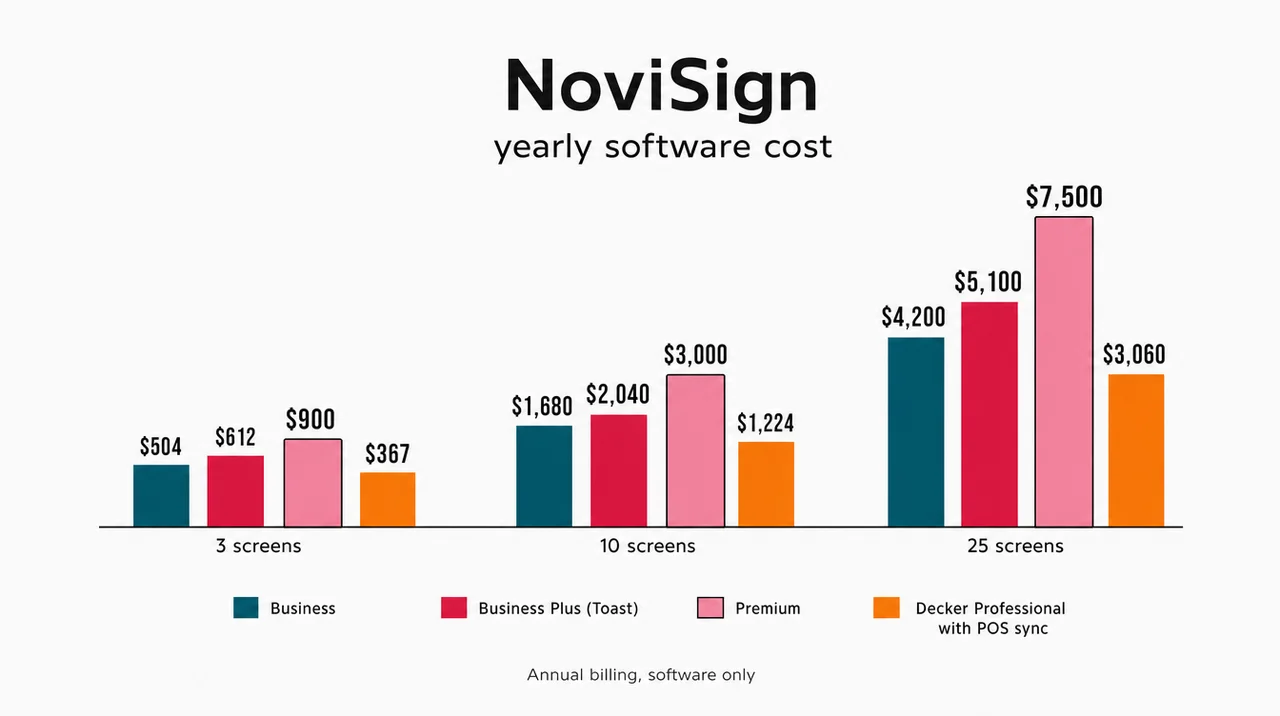
| Screens | NoviSign Business | NoviSign Business Plus (Toast) | NoviSign Premium | Decker Professional (POS), annual |
|---|---|---|---|---|
| 3 | $504 | $612 | $900 | $367 |
| 10 | $1,680 | $2,040 | $3,000 | $1,224 |
| 25 | $4,200 | $5,100 | $7,500 | $3,060 |
Software only, yearly billing; POS vendors’ own fees are not included in the Decker column.
A 10-screen Toast menu costs $2,040 a year on NoviSign Business Plus and $1,224 on Decker Professional, an $816 gap that also buys Square and Clover support. Among NoviSign alternatives that read Toast, Decker charges the least for the POS tier with a published price, since OptiSigns needs Pro Plus at $15 plus Toast’s API fee and Displai sells by quote. TVs, players and mounts add to both totals, and the full cost of a screen, from panel to mount is broken out separately.
⚖️ Several comparison pages still quote NoviSign at “$20 per screen” or “from $20 per month”. That figure comes from an older NoviSign pre-sale FAQ, and the current pricing page lists $14 on Business. Others claim a 20-screen minimum, yet the page asks only for one license per display and mentions 20 licenses as the point where a Management Console appears. Compare NoviSign alternatives against $14, not $20.
Beyond price, reviews show where NoviSign earns its score and where users push back.
What 47 G2 Reviews Say: NoviSign Pros and Cons
NoviSign reviews average 5.0 on G2 from 47 ratings, 4.9 on Capterra from 121 and 4.1 on Gartner from 6. Most praise lands on ease of use and the help desk. On G2, NoviSign scores 9.9 for ease of admin and for ease of doing business, and 9.5 for support, usability and setup; its lowest mark, 9.1, goes to meeting requirements.
The sample stays small, though: with 47 G2 reviews, one unhappy account would move NoviSign’s score noticeably. That small base matters when NoviSign alternatives with thousands of reviews sit next to it in a comparison.
NoviSign customer reviews and ratings land lower on other sites. Trustpilot shows 4.0 from 9 reviews, the Android player app holds 4.1 on Google Play, and TechRadar’s NoviSign digital signage review scored it 3.5 while still naming it a pick for enterprises. One Gartner reviewer headlined a review “Intuitive digital signage with user-friendly studio, but integrations lacking”.
| Pros | Cons |
|---|---|
| ➕ Ease of admin scored 9.9 on G2 | ➖ Listed rates assume yearly billing |
| ➕ Weekday phone line and email tickets seven days a week on every plan | ➖ Toast menu only on Business Plus and only through Google Sheets |
| ➕ Touch widgets and kiosk tools from Business | ➖ One user on Business |
| ➕ Players from Android boxes to BrightSign, plus Raspberry Pi since June 2026 | ➖ “Novisign had a lot of problem with running multiple videos” (Capterra, a user who moved to ScreenCloud) |
| ➕ 500+ templates and 50+ widgets | ➖ SSO, API and audit logs only on Premium |
Across the NoviSign pros and cons, the cons share one thread: each one costs a higher tier rather than failing outright, which is why most NoviSign alternatives compete on price and plan limits. Next, the Toast link deserves a closer look, since it matters most to a restaurant weighing a NoviSign alternative.
How the NoviSign Toast POS Integration Works
The NoviSign Toast POS integration copies the Toast menu into Google Sheets for the screens to read, on Business Plus and above. NoviSign shipped the link in Studio Release 27 on April 20, 2026. The release note promises that menu items, prices and availability update across the boards in real time. The setup lives under Data Sources in Studio, and one source can feed many layouts. On the pricing page, the Business Plus card puts it as “Sync your Toast POS menu to Google Sheets and display updates automatically on your screens.”
Other NoviSign integrations cover Power BI, Tableau, Canva, Zapier, Office 365 calendars, CSV and XML feeds and a REST API, but no second register. We found no Square, Clover or Lightspeed connector on NoviSign’s site, so the Toast menu integration helps Toast counters only. Among NoviSign alternatives, Decker, Displai, OptiSigns and Mvix also name Toast, and Decker and Displai add Square. A Toast owner on Reddit, shopping for screens, summed up the market: “there are very few options at the moment”.
Before relying on the sheet or moving to one of the NoviSign alternatives, a Toast counter should check four things:
- How often the sheet refreshes, and whether a lunch price change reaches the screen before the rush.
- Whether an 86’d item drops off the board or only changes in the sheet.
- Who may edit the sheet, since a manual cell edit can overwrite the POS value.
- Which tier each location pays for, since a store left on Business loses the Toast feed.
A Decker board skips the sheet: Toast, Square and Clover write to the screen directly, sold-out flags included. Counters on any other register fill the menu by Excel import in Decker’s menu editor. In addition, NoviSign sells tools far beyond menus, and those tools explain who should stay.
NoviSign Features Beyond Menus: Kiosks, Video Walls and IoT
NoviSign features reach past menus into touch kiosks, video walls, IoT and RFID triggers, and layouts built by AI. Retail and corporate fleets pick it for exactly that mix. Studio, the browser editor, ships 500+ templates and 50+ widgets. The Touch widget turns a screen into a kiosk that keeps running without a constant connection. Business Plus adds the videowall editor, IoT and RFID events, and Studio AI, a beta since the September 2026 release, which builds a screen from a typed prompt. Few NoviSign alternatives match that kiosk and videowall toolkit at $17 per screen.
NoviSign’s pricing page lists no electronic shelf labels, so a store searching for NoviSign electronic shelf labels should ask sales before planning around them. Retailers that need shelf tags and screens under one login usually buy the labels from a separate vendor and run NoviSign alternatives or NoviSign itself for the screens.
The NoviSign app runs as a player on Android, ChromeOS, Windows, Samsung Tizen, LG webOS, BrightSign and the Amazon Signage Stick, and Raspberry Pi joined the list in June 2026. NoviSign’s own guide prices Android players at $35–500, ChromeOS players at $85–450 and Windows players at $300–1,000. Content caches on the NoviSign player, so a screen keeps playing through an outage. Most NoviSign alternatives run on the same Android and Windows boxes, which keeps the hardware side of a switch cheap.
Overall, these tools fit a mall kiosk or a corporate lobby. A restaurant with one register and 3–10 menu screens uses few of them, yet it pays for them inside Business Plus. For that counter, NoviSign alternatives built around the POS cost less for the part it actually uses.
Timing a Move Off NoviSign Around the Annual License
A move off NoviSign starts with the annual license date, then the players, then the Google Sheet feeding the menu.
- Find the renewal date. Yearly licenses run to term, so plan the switch for the final month and avoid paying twice.
- Export media. Images and videos move to NoviSign alternatives as plain files; Studio layouts, widgets and kiosk flows need rebuilding in the new editor.
- Check which players carry over. Android boxes, Windows PCs, Signage Sticks and Raspberry Pi units bought for NoviSign often run the apps of NoviSign alternatives; a Decker screen needs only the TV’s web browser.
- Retire the sheet. Connect the POS directly, then delete the Google Sheet so nobody edits a copy that no longer drives the screen.
- Run one Toast counter for 7 days. Change a lunch price at the register, 86 one item and confirm both reach the board before the next store moves.
With 9 boards across three cafés, the pilot and the cutover to a NoviSign alternative fit inside the last month of the license, so no store pays two vendors at once. However, some setups lose more than they gain by leaving.
Who Should Keep NoviSign
Five kinds of buyers gain little from NoviSign alternatives: kiosk retailers, video-wall venues, resellers, phone-first teams and small prepaid fleets. A retailer whose main screens are touch kiosks or wayfinding totems already uses NoviSign’s strongest tool. A venue running video walls or RFID-triggered content would rebuild those flows from scratch in any NoviSign alternative. A reseller earning margin on the Partners white label would lose its business model by leaving.
A team that calls the help desk every week keeps a phone line on every NoviSign plan, which Decker reserves for Enterprise. An account of 1–5 screens halfway through a prepaid year should wait for the renewal month rather than pay twice. For these five buyers, even the strongest NoviSign alternative solves a problem they do not have.
Questions and Answers
1 What is the best NoviSign alternative for a restaurant?
For a counter on Toast, Square or Clover, the best NoviSign alternative is Decker: the register feeds the menu on Professional at $12 per screen, with monthly billing and no sheet in between. Displai links Toast, Square, PAR and NCR Aloha by quote. OptiSigns reaches Toast through OptiSync on Pro Plus. For a static board on a budget, Yodeck and Play start at $8.
2 What is NoviSign?
NoviSign is a cloud signage company founded in 2011 and led by CEO Gil Matzliah, with offices in the US and Israel. NoviSign digital signage built its name on an Android player and now runs on most player types, managed from the Studio editor in a browser. The company counts 70,000+ active screens and 250+ partners. As for who uses NoviSign, its client list mixes global brands such as Disney, IKEA and Coca-Cola with single-site restaurants, hotels and schools. NoviSign announced SOC 2 certification in 2023.
3 Is NoviSign free?
No plan stays free. The 30-day trial unlocks every widget without a card but caps storage at 80 MB and each file at 16 MB, and the first paid step is Business at $14 per screen a month, billed yearly. A NoviSign alternative with a lasting free tier, such as Decker Starter, keeps one screen running after the trial window closes.
4 How much does NoviSign cost per screen?
NoviSign pricing per screen per month is $14 on Business, $17 on Business Plus and $25 on Premium on annual billing, and paying monthly removes the 10% discount. Ten screens on Business Plus, the first tier with Toast, cost $2,040 a year. The same ten screens on Decker Professional, a NoviSign alternative with three registers, cost $1,224 a year.
5 Does NoviSign integrate with Toast?
Yes, on Business Plus and above. The Toast menu syncs into Google Sheets and then onto the screens, and the April 2026 release added availability updates. NoviSign names no other register, so Square and Clover counters need a NoviSign alternative such as Decker for a menu fed by the POS.
6 Does NoviSign work with Raspberry Pi?
Yes, since June 2026. NoviSign also runs on Android, ChromeOS, Windows, Samsung Tizen, LG webOS, BrightSign and the Amazon Signage Stick, with one player license per display. Existing NoviSign players can often run the apps of NoviSign alternatives too, such as Yodeck on Raspberry Pi or OptiSigns on Android.
7 What support does NoviSign offer?
NoviSign support on every plan covers email tickets seven days a week and a US phone line, which the pricing page lists as Monday to Friday, 8 a.m. to 5 p.m., while the contact page shows Sunday to Friday. Premium adds premium help, and Partners get an SLA. Among NoviSign alternatives, Decker answers email Monday to Friday, 9 a.m. to 6 p.m., with a 1-hour SLA and phone on Enterprise.
8 Is there a free alternative to NoviSign?
Yes, though the free tiers come with no POS link. Decker Starter and Yodeck keep one screen free each, OptiSigns three with its logo and Play one once the owner posts a review, while Xibo costs nothing on a self-hosted server. Therefore, a free screen works best as a test bed before a paid NoviSign alternative goes live at the counter, and the roundup of free and paid signage tools compares the free tiers in depth.
Sources
- Official websites of the brands reviewed in this article: plans, prices per screen, free plans, supported players and POS integrations.
- NoviSign alternatives on Capterra
- NoviSign alternatives on G2
- NoviSign alternatives on Gartner Peer Insights
- NoviSign reviews on Trustpilot
- NoviSign review on TechRadar