ScreenCloud Alternatives for Restaurant Menus Instead of Office Screens


The best ScreenCloud alternative for a restaurant is Decker: menu prices and 86'd items follow Toast, Square or Clover on Professional at $12 per screen, while ScreenCloud's menu app is typed by hand from $20. For a smaller bill, look at Juuno or Yodeck; for Apple TV or Raspberry Pi screens, Kitcast or PiSignage. Next: 24 options.
What Are the Best ScreenCloud Alternatives?
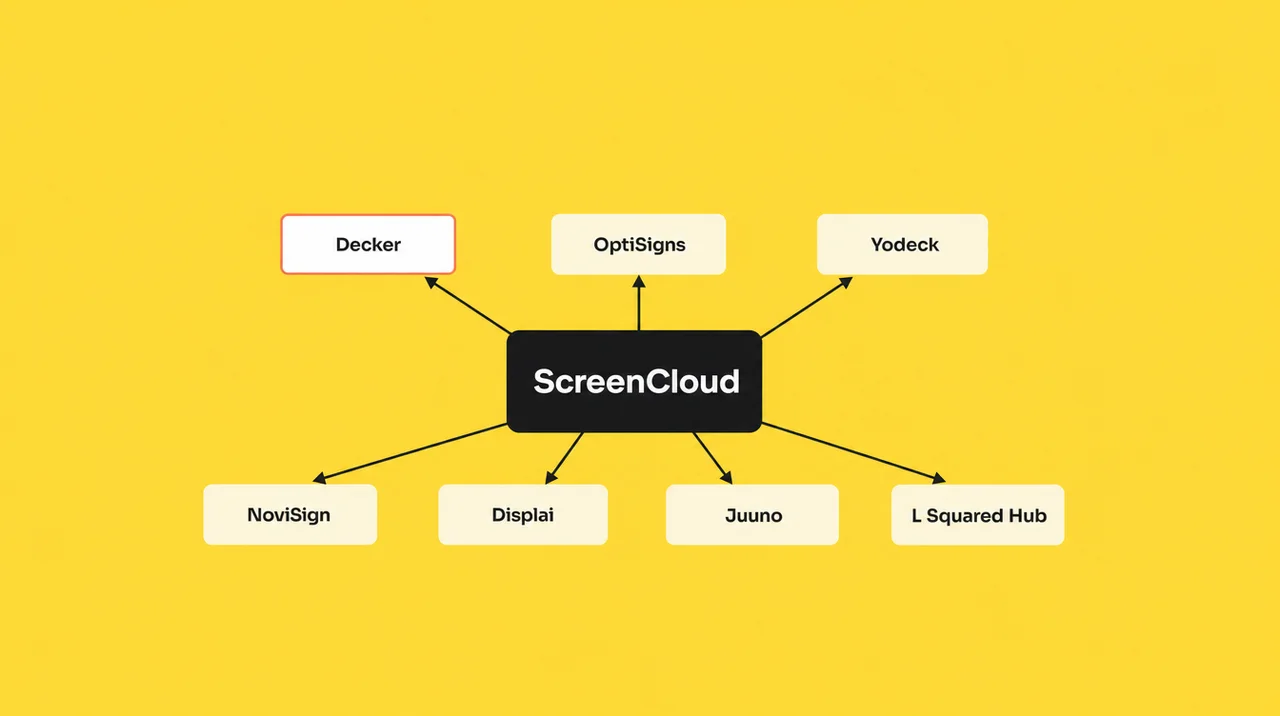
The best ScreenCloud alternatives are Decker, OptiSigns, Yodeck, NoviSign, Displai, Juuno and L Squared Hub, each closing one ScreenCloud gap.
- Decker — the ScreenCloud alternative for restaurant counters: Toast, Square and Clover feed the menu on Professional at $12 per screen, $8 below Core; sold-out items leave the screen, and a sensor checks the panel.
- OptiSigns — the ScreenCloud alternative at half of Core, $10 per screen, with three logo-branded free screens and apps for Apple TV and Roku.
- Yodeck — $8 against $20, one free screen and a free Raspberry Pi player on annual plans.
- NoviSign — $14 to $25 on annual billing, with a Toast menu synced through Google Sheets on Business Plus.
- Displai (formerly Raydiant) — Toast, Square, PAR and NCR Aloha integrations with its own player hardware.
- Juuno — the cheapest ScreenCloud alternative on Gartner’s list, $5 per screen in the TV’s own browser.
- L Squared Hub — the closest office-communications swap, rated 4.6 from 40 Gartner reviews.
People rarely start looking for a ScreenCloud alternative because ScreenCloud breaks. It holds 4.7 on G2 from 455 reviews and 4.8 on Capterra from 289. They leave because the bill and the feature set were built for an office. Core costs $20 per screen a month and Pro $30, both on annual billing; paid monthly, the same plans cost $24 and $36. ScreenCloud keeps no free plan, only a 14-day trial, and Enterprise starts at 25 screens with a sales quote.
The second reason is fit, and it decides which ScreenCloud alternatives make the list. ScreenCloud builds its strengths around approvals, dashboards from Power BI and Teams, and sign-in control for large staff, which a counter rarely needs. Reviewers on Capterra also flag that “the per-screen pricing can become quite a significant investment as the number of displays grows”. The third reason sits in hardware: ScreenCloud does not run on Raspberry Pi, Apple TV or Roku, and it dropped the first two generations of the Fire TV Stick.
Among screen cloud alternatives, the gap that matters most at a counter sits in the link between the register and the board, which Decker digital menu boards for restaurants close. The line-by-line comparison of ScreenCloud and Decker comes next, then the full list of ScreenCloud competitors.
The ScreenCloud Alternative for Restaurant Counters: ScreenCloud vs Decker
ScreenCloud and Decker both manage screens from the cloud, but ScreenCloud is built for office messages and Decker for menus driven by the POS. Anyone weighing a ScreenCloud alternative can compare the price steps directly: Decker charges $8 on Essential, $12 on Professional and $16 on Premium per screen a month, with 15% off annual billing, as the Decker pricing page shows. The bigger difference shows up after a price changes at the register.
| ScreenCloud | Decker | |
|---|---|---|
| Free plan | No free plan | ✅ Starter: one screen free with no time limit |
| Trial | 14 days, no card | 14 days on paid plans, no card |
| Paid plans | $20 Core and $30 Pro on annual billing; $24 and $36 monthly; Enterprise from 25 screens | ✅ $8, $12 and $16 per screen a month; 15% off annual |
| Players | ✅ Pixi, Station P1 Pro, Android TV, Fire TV, Samsung Tizen, LG webOS, Windows, macOS, ChromeOS, BrightSign | A smart TV’s built-in browser or any web browser; Decker Player or the Android TV app if the internet fails often |
| Menu prices | Items and prices typed into the menu app in a browser | ✅ Toast, Square and Clover connect directly; Excel covers any other register |
| A price changes | Someone edits the item and republishes | ✅ The layout rebuilds itself; changed lines redraw in 1–5 seconds |
| An item sells out | Someone removes it by hand | ✅ It leaves the screen when marked unavailable in the POS |
| Dashboards | ✅ Power BI, Tableau and other dashboards on Pro; a Microsoft Teams app | — |
| Content approvals | ✅ Lockable templates, roles and permissions | — |
| What gets watched | Player status and remote device management | ✅ The panel: black screen, wrong HDMI input, frozen player, wrong prices |
| Fixing a dark screen | Remote device commands | ✅ Verifier restarts the player and the TV and switches the input back |
| Locations | No restaurant location tools named; Enterprise from 25 screens | ✅ Location management on Professional; franchise module on Premium |
| Security reports | ✅ SOC 2 Type 2, SOC 3, Cyber Essentials | — |
| Support | ✅ Live agents 24/5 by email, WhatsApp and chat; urgent tickets answered within 1 hour | Email Monday to Friday, 9 a.m. to 6 p.m.; 1-hour SLA and phone on Enterprise |
A menu that reads the register. ScreenCloud’s menu app takes everything by hand: items, photos, calories and prices go in through a browser or a phone. Decker pulls the same data from Toast, Square or Clover, so a price changed at the register reaches every board with no second edit. An item marked unavailable in the POS drops off the screen, and the layout closes the gap by itself. Burger Shop in Downtown Los Angeles tied four counter screens to its POS and now updates its menu in minutes instead of days or weeks.
The setup by register is on the page about menu boards that sync with your POS. For a restaurant choosing a ScreenCloud alternative, this link counts most, and a dashboard tool cannot add it with an app.
A check on the screen, not only on the player. ScreenCloud reports whether a player is online and lets an admin send device commands. A TV that woke on the wrong HDMI input still looks healthy in that view. Decker Verifier watches the panel itself, catches a black screen, a frozen player or a stale price, and restarts the player or the TV. The browser keeps the last menu up from its cache when the connection blinks, and a Decker Player takes over at sites that lose the internet daily.
Locations without a 25-screen floor. ScreenCloud keeps its account-management extras for Enterprise, which starts at 25 screens and sells by quote. Decker manages locations from Professional at $12, and Premium adds a franchise module and menu-to-sales attribution, so a five-store chain does not need an enterprise contract.
Where ScreenCloud stays ahead: dashboards from Power BI and Teams, content approvals, SOC 2 Type 2 and SOC 3 reports, a wider list of native player apps and live agents five days a week. An office lobby with no POS gets all of that, and a ScreenCloud alternative built for menus would add nothing there.
🧾 A ScreenCloud alternative built for the counter. Connect Toast, Square or Clover and watch a price change reach the menu in seconds. 14 days free, no card. Start free
Beyond Decker, Gartner lists 22 more products that ScreenCloud buyers weigh, and the table below adds their prices and POS links.
ScreenCloud Competitors Compared: Gartner’s 22 Plus Decker and Displai
ScreenCloud competitors on Gartner Peer Insights number 22, and most of them serve office communications rather than restaurant menus. ScreenCloud itself rates 4.5 there from 13 reviews. Gartner marks where ScreenCloud scored higher, and for 10 of the 22 ScreenCloud competitors that badge reads “easier to integrate and deploy”. Thirteen of these ScreenCloud alternatives have three ratings or fewer, so anyone picking a ScreenCloud alternative should treat the stars as a hint, not a verdict.
| Platform | Gartner rating | From, per screen a month | POS menu sync | What changes vs ScreenCloud |
|---|---|---|---|---|
| ScreenCloud (reference) | 4.5 (13) | $20 Core, $30 Pro, annual | None; menu typed by hand | — |
| Decker | not listed | $8; POS sync on Professional at $12 | Toast, Square, Clover direct; Excel | Menu from the POS, sold-out items leave, panel check |
| Displai (formerly Raydiant) | not listed | Quote only | Toast, Square, PAR, NCR Aloha | Restaurant-first, own hardware and kiosks |
| Yodeck | 4.4 (12) | $8 | None; menus typed in DSMenu | Free screen, Raspberry Pi player, ISO 27001 |
| OptiSigns | 4.8 (57) | $10 | Toast through API and OptiSync on Pro Plus | 3 free screens with logo, Apple TV and Roku |
| Poppulo | 4.0 (3) | Quote only | None named | Enterprise employee communications |
| NoviSign | 4.1 (6) | $14, annual | Toast through Google Sheets | Kiosks, 30-day trial |
| Signagelive | 2.0 (1) | Not published | None | Now part of Navori Labs |
| Skykit Beam | 4.9 (2) | $16.50 | None | Skykit players, workplace screens |
| Mvix | 4.0 (2) | One-time player with CMS from $450 | Square and Toast named | No monthly subscription |
| EverPass | 4.0 (1) | Quote only | None | Live sports streaming for bars |
| Appspace | 3.7 (3) | Not published; free tier for 1 device | None | Workplace communications |
| L Squared Hub | 4.6 (40) | $15 a month listed, unit not stated | General POS claim | Internal communications, Pi 5 player |
| DotSignage | 4.7 (3) | $10, annual | None | Menus on Signage Stick and Google TV |
| Kitcast | 4.0 (1) | $7, annual | POS logos claimed, not in app list | Apple TV app |
| Rise Vision | 4.7 (84) | $12; $11 for K-12 | None | Schools, Apple TV and Raspberry Pi |
| Juuno | 4.8 (11) | $5 | None | Runs in the TV browser |
| Mood Digital Signage | 5.0 (4) | Quote only | Lightspeed | Managed hardware and content |
| Pixage | 5.0 (4) | Quote only | None | Enterprise screens, Turkey-based |
| Look Digital Signage | 4.5 (2) | $15 monthly | None; Zapier | Cloud or on-premise |
| Pickcel | 4.0 (1) | $13.50, annual | Square, Clover, Shopify on Business | 14-day trial |
| Zeetaminds | 5.0 (1) | $10 | None | Perpetual on-premise license |
| Navori | 3.0 (1) | Quote only | General API | Enterprise networks |
| Voome | 3.0 (1) | Quote only | None | On-premise option |
| AIScreen | 5.0 (1) | $10 per player | Square app | 14-day trial |
Ratings from Gartner Peer Insights; list prices from each vendor’s site, 2026. Quote only means the vendor publishes no price.
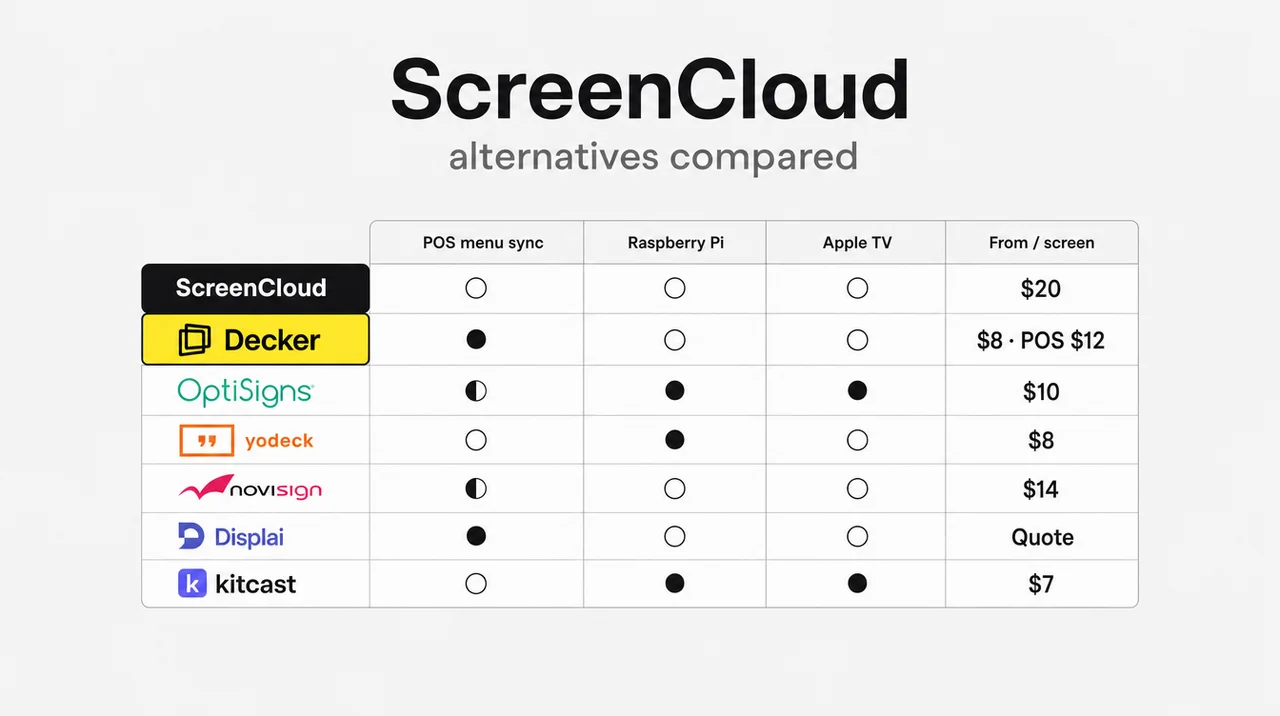
Only eight of these ScreenCloud alternatives confirm a named register, and only Decker connects Toast, Square and Clover together. Next, six profiles cover the ScreenCloud alternatives a restaurant or an office team shortlists most often.
OptiSigns
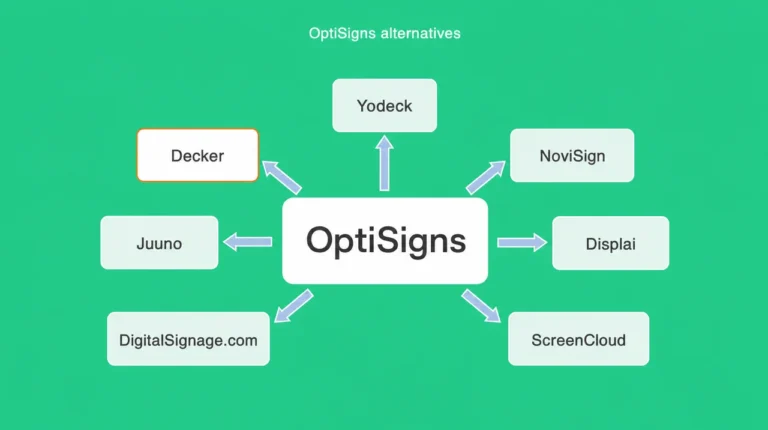
As a ScreenCloud alternative, OptiSigns starts at $10 per screen, half of Core, and keeps three screens free with its logo on them. It adds Apple TV and Roku apps, the two players ScreenCloud skips. For a menu, OptiSigns reads Toast only through OptiSync on Pro Plus at $15, and Toast adds its own fee for API access. Among ScreenCloud alternatives, it suits mixed screen fleets. The page on OptiSigns alternatives sets it against Decker on the POS question.
Yodeck
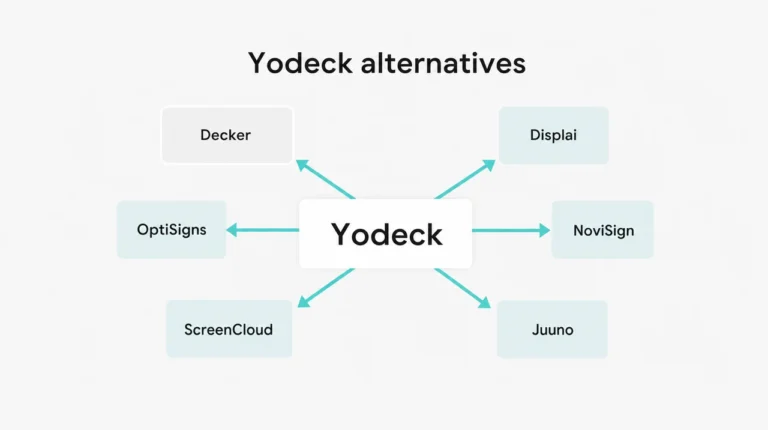
As a ScreenCloud alternative, Yodeck charges $8, $12 or $16 per screen and keeps one screen free while the account has exactly one. Annual plans include a Raspberry Pi player, the hardware ScreenCloud cannot run. Gartner reviewers rate ScreenCloud easier to integrate and deploy, and Yodeck has no POS app: menus go through DSMenu by hand. The roundup of Yodeck alternatives covers who leaves it and why.
NoviSign
NoviSign bills annually at $14 on Business, $17 on Business Plus and $25 on Premium, with a 30-day trial. Business Plus syncs a Toast menu into Google Sheets and on to the screens, and adds Power BI, Tableau and Zapier. NoviSign names Toast as its only register. Among ScreenCloud alternatives, it keeps the dashboard apps and adds a menu path. The page on NoviSign alternatives compares that path with Decker’s.
Displai (Formerly Raydiant)
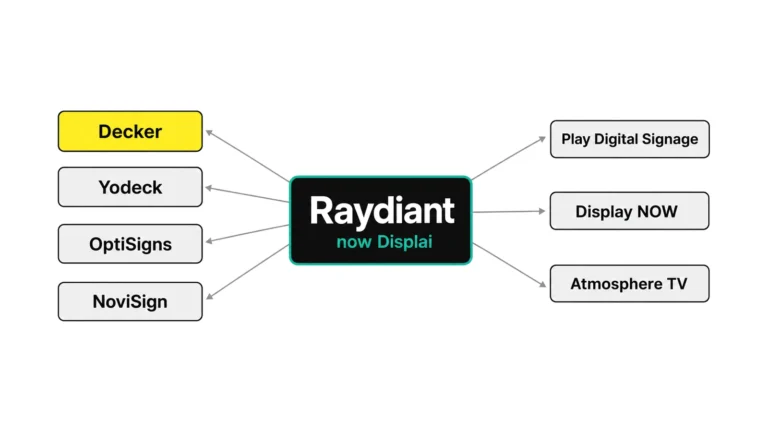
Raydiant’s product has carried the Displai name since a 2025 asset sale. As a ScreenCloud alternative, it puts restaurants first: its marketplace lists Toast, Square Digital Menus, PAR and NCR Aloha, and its 7shifts app shows staff schedules on screens. Prices go by quote, with its own player hardware. The comparison of Raydiant alternatives sets it against Decker line by line.
Juuno
Juuno costs $5 per screen on Business and $9 on Growth, which adds playback reports and an API, still under a third of ScreenCloud Pro at $30. Juuno plays in a smart TV’s browser or on a Signage Stick, with a 7-day trial, and names no POS, so staff edit prices by hand.
L Squared Hub
L Squared Hub is the ScreenCloud alternative for teams that like ScreenCloud’s office role but not its bill. It has 40 Gartner ratings at 4.6, the third most after Rise Vision and OptiSigns, and its Professional plan lists $15 a month on annual billing. L Squared claims links to “major POS systems” without naming one, so ask for a demo with your own register.
Next, before the free and turnkey ScreenCloud alternatives outside Gartner’s list, the price check shows what ScreenCloud actually costs per screen and per year.
ScreenCloud Pricing 2026: Core, Pro and the 25-Screen Enterprise Floor
ScreenCloud pricing is $20 per screen a month on Core and $30 on Pro, billed annually, with Enterprise quoted from 25 screens. Monthly billing raises the two plans to $24 and $36, since annual payment saves up to 16%. Most ScreenCloud alternatives in this article publish a lower entry rate; truDigital and Arreya cost more, and CrownTV, Fugo, Screenfluence and XOGO match $20. Published prices for ScreenCloud alternatives start at $3 per screen.
| Plan | Per screen a month | What it adds | Catch |
|---|---|---|---|
| Core | $20 annual, $24 monthly | 80+ apps, unlimited users and storage, scheduling | No dashboards |
| Pro | $30 annual, $36 monthly | Premium apps such as Power BI and Tableau dashboards | Same per-screen meter |
| Enterprise | Quote | SSO, enhanced audit logs, Customer Success Manager, onboarding, priority service | 25-screen minimum, annual only |
Four rules shape the ScreenCloud cost, and each ScreenCloud alternative should be priced against them:
- The trial lasts 14 days without a card, and no plan stays free afterward.
- A free device comes only with annual billing; monthly plans exclude it.
- Dashboards from Power BI and similar tools need Pro.
- Enterprise is annual only and opens at 25 screens, so a chain of five stores with five screens each qualifies for SSO and a Customer Success Manager only by moving to a quote.
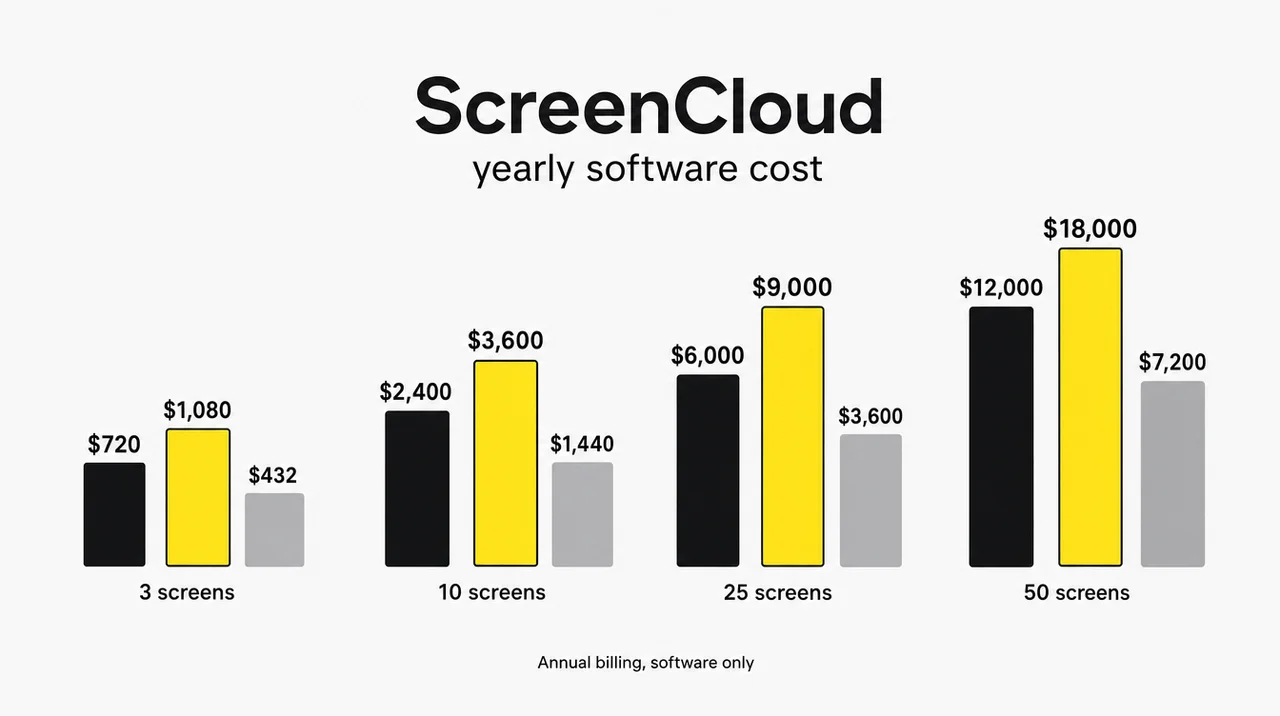
| Screens | ScreenCloud Core | ScreenCloud Pro | Decker Professional, POS sync | Decker Professional, annual |
|---|---|---|---|---|
| 3 | $720 | $1,080 | $432 | $367 |
| 10 | $2,400 | $3,600 | $1,440 | $1,224 |
| 25 | $6,000 | $9,000 | $3,600 | $3,060 |
| 50 | $12,000 | $18,000 | $7,200 | $6,120 |
Yearly software cost; ScreenCloud on annual billing. Decker figures exclude any fee a POS vendor charges.
At ten screens, Decker Professional with POS sync costs $1,440 a year against $2,400 on ScreenCloud Core without it. That gap holds at every screen count: at 50 screens, Core costs $12,000 a year and Decker Professional $7,200.
🔎 Some comparisons price ScreenCloud hardware at $299–$549 per player. ScreenCloud’s own Pixi player costs $95 and the Station P1 Pro $199, so check the hardware line before you compare totals across ScreenCloud alternatives.
The full cost of a screen also includes the panel, the mount and the network run, which the guide to what digital signage costs per screen totals line by line. Next, reviews explain why that price feels high to some teams and fair to others.
ScreenCloud Reviews: Pros and Cons Behind the 4.50 Value Score
ScreenCloud reviews give it 4.7 on G2 from 455 reviews, 4.8 on Capterra from 289 and 4.5 on Gartner, with value for money as its lowest score. On Software Advice, ScreenCloud scores 4.80 for ease of use, 4.67 for customer support, 4.61 for functionality and 4.50 for value. For comparison, Yodeck scores 4.77 and OptiSigns 4.71 on value, the score most ScreenCloud alternatives compete on.
| Pros | Cons |
|---|---|
| ➕ Drag-and-drop editor, lockable templates and custom fonts | ➖ Value for money 4.50, the lowest of its four scores |
| ➕ 80+ apps, including Power BI and Teams on Pro | ➖ “The per-screen pricing can become quite a significant investment” (Capterra) |
| ➕ Unlimited users and file storage on every plan | ➖ “Occasional lag when updating content” (Capterra) |
| ➕ SOC 2 Type 2 and SOC 3 reports | ➖ “Some tickets getting lost” (Gartner) |
| ➕ Touch screens and layout zones | ➖ Screens offline for long periods “with no notice” (Gartner) |
Reviewers on Gartner call the editor “intuitive, flexible, and quick to use”, and Capterra users praise how fast a new screen goes live. Most low ScreenCloud reviews point to cost per screen, lag after an update or support follow-up. A ScreenCloud alternative wins those buyers on price or on a tighter link between data and screen, not on ease of use. Next, two of those complaints lead back to hardware, so the device list follows.
ScreenCloud Hardware: Pixi, ScreenCloud OS and the Devices It Skips
ScreenCloud plays on its $95 Pixi player, the $199 Station P1 Pro with ScreenCloud OS, or apps for Android, Fire TV, Tizen, webOS, Windows, macOS and ChromeOS. Several ScreenCloud competitors cover exactly the devices ScreenCloud skips. Pixi outputs 4K at 60 Hz, renders at 1080p and carries 64 GB of storage with Wi-Fi and Ethernet. ScreenCloud launched it at $65 in 2025. Station P1 Pro runs ScreenCloud OS, the company’s own operating system for screens, and suits multi-zone layouts.
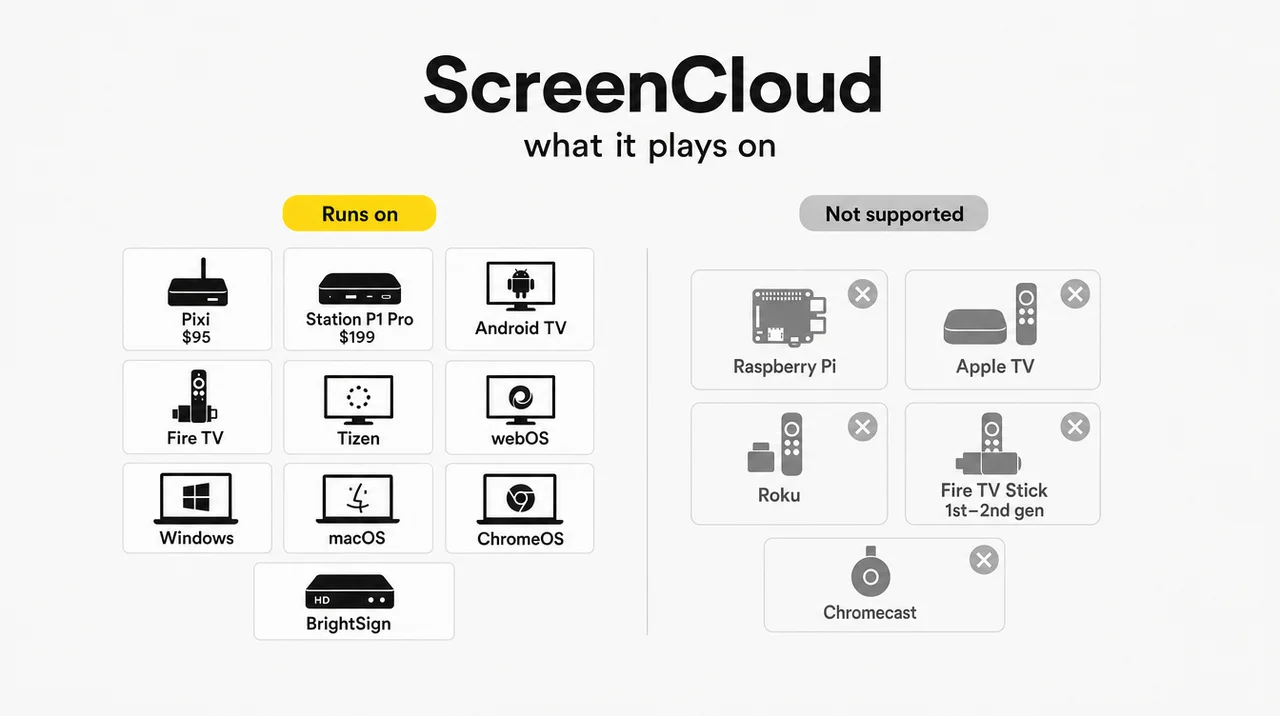
| Device | ScreenCloud | What to use instead |
|---|---|---|
| Raspberry Pi | Not supported | PiSignage, Yodeck, Rise Vision, Juuno |
| Apple TV | Not supported | Kitcast, OptiSigns, Rise Vision |
| Roku | Not supported | OptiSigns |
| Fire TV Stick, 1st and 2nd gen | Not supported; standard sticks not recommended | Amazon Signage Stick |
| Chromecast Gen 1–3 and Ultra | Not supported | Google TV device or HDMI player |
| Pixi and Station P1 Pro | Supported | Reuse for other software not published |
The ScreenCloud app runs on Android TV, Google TV, Fire TV, Samsung Tizen and LG webOS displays, plus Windows and macOS computers, ChromeOS, BrightSign and the Amazon Signage Stick. Older Tizen and webOS models may lack some features. Teams moving to ScreenCloud alternatives keep the PCs, Android boxes and Signage Sticks, while ScreenCloud’s own player hardware has no published path to other software.
For Decker, the menu runs in each TV’s built-in web browser, so a menu wall of mixed TV brands needs no app store listing. However, a player only shows what the menu app sends it, and that is where a restaurant judges ScreenCloud alternatives.
Can ScreenCloud Handle Menu Prices and Sold-Out Items?
ScreenCloud can show a menu with prices and specials, but staff type every item and price in by hand, because no POS connects to it. Its menu app, included in all plans, takes item names, descriptions, photos, categories, calories and prices in a browser. Staff can edit from a phone, and the scheduling tool switches menus by time of day.
Among ScreenCloud competitors on Gartner’s list, OptiSigns, NoviSign, Mvix, Mood, Pickcel and AIScreen name a register, and none of them connects Toast, Square and Clover all at once. ScreenCloud integrations for restaurant chains list RSS, weather, news, YouTube, Canva, dashboards, Teams, Instagram, Facebook and Google Reviews. None of them reads a register. The content generator can draft a menu layout in brand colors, but it still needs the numbers typed in. For a counter weighing a ScreenCloud alternative, that leaves three gaps:
- A price changed in the POS stays wrong on the screen until someone edits the menu app.
- An 86’d item stays on the board until someone removes it.
- Two systems hold the same price, and the screen is the one guests trust.
As a ScreenCloud alternative, Decker closes all three by reading the POS, so the price and the stock status on the screen come from the same record as the receipt. The page on digital menu board software lists what a restaurant editor needs beyond that link. Beyond Gartner’s list, free and turnkey ScreenCloud alternatives handle the same gap in other ways.
Free, Self-Hosted and Turnkey Options Beyond Gartner’s List
Free options cut the $20 ScreenCloud meter to zero on one to ten screens, while turnkey vendors trade the subscription for hardware and installation. Free ScreenCloud alternatives each draw their line in a different place, from a logo on screen to a slide that interrupts the loop, so the catch matters more than the screen count.
| Platform | Type | From | Free option or catch |
|---|---|---|---|
| DigitalSignage.com | Free tier | $3 per screen | 3 screens free, 1 GB storage |
| PiSignage | Free tier | $35 per player in year one, then $20 a year | 2 players free, Raspberry Pi first |
| ChannelOS | Free tier | $5 yearly, $6 monthly | 1 screen with a banner and a ChannelOS slide |
| Play Digital Signage | Free screen | $8 | 1 screen, kept free after a review |
| XOGO | Free tier | $20 per player | 1 player, 15 items, 60-second videos |
| PosterBooking | Free tier | $52 a month for 10 screens | 10 screens, watermark after a 3-month trial |
| Fugo | Free test screen | $20 annual, $24 monthly | 1 watermarked test screen |
| Xibo | Self-hosted | CMS and Windows player free | Other players need paid licenses |
| Anthias | Self-hosted | $0 | One device at a time |
| TelemetryOS | Free platform tier | $99 a year per device from year two | Its own player at $299 |
| CrownTV | Turnkey | $20 software; $2,950–$9,950 per installed screen | Hardware, install and software in one contract |
| Spectrio | Turnkey | Quote only | Managed content and installation |
| Samsung MagicINFO | Samsung displays | Quote only in the US | Samsung panels only |
| BrightSign | Hardware first | Players bought once | Basic cloud control free with the player |
| QuickESign | Paid | $6 | No free plan |
| SmartSign2go | Paid | $19 | Players $149 and $279 |
| Screenfluence | Paid | $20, $18 annual | Demo only |
| Arreya | Paid | $29.95, 3-device minimum | 14-day trial |
| truDigital | Paid | $31–$44 | Player $249 |
| Viewneo | Paid | $21 | 30-day trial |
| DigitalMenu.TV | Turnkey menus | Quote only | Design service for restaurants |
| Scala, Userful, SnapComms | Enterprise | Quote only | Video walls and employee communications |
PosterMyWall appears in some roundups as a ScreenCloud competitor, but it works as a design tool that sends finished designs to players such as PosterBooking, ScreenCloud and Yodeck. A ScreenCloud free alternative covers a static lobby screen; none of the free plans above syncs menu prices from a POS. The roundup of best free digital signage software covers the free field in more depth. However, ScreenCloud leads all of them on the office side: security and sign-in.
How Secure Is ScreenCloud? SSO, SOC 3 and Support Hours
ScreenCloud is audited for SOC 2 Type 2 every year, holds Cyber Essentials, and staffs live agents 24 hours a day, five days a week. It publishes a 2024 SOC 3 report, encrypts data at rest and in transit with TLS, and its data processing terms cover GDPR and CCPA. ISO 27001 does not appear on its security page. Among ScreenCloud competitors, OptiSigns and NoviSign also hold SOC 2 Type II reports.
Single sign-on, enhanced audit logs and a Customer Success Manager come with Enterprise. The standard service runs through email, WhatsApp and live chat, with a 1-hour first response on urgent tickets and 6 hours on high-priority ones; the premium tier adds phone and cuts high-priority tickets to 2 hours. ScreenCloud commits to 99.99% monthly availability with service credits.
As a ScreenCloud alternative, Decker answers email Monday to Friday, 9 a.m. to 6 p.m., with a 1-hour SLA and a phone line on Enterprise, and SSO comes on Premium. For a team that scores vendors on security paperwork, ScreenCloud holds the stronger file; in contrast, a counter that needs the price right at noon gets more from ScreenCloud alternatives with a POS link. Either way, leaving takes planning.
Leaving ScreenCloud: Contract Dates, SSO and the Player Swap
Leaving ScreenCloud takes three steps that a smaller platform skips: waiting out the annual term, rebuilding sign-in and replacing ScreenCloud players. The full order works for all ScreenCloud alternatives:
- Check the renewal date. Core and Pro bill annually at the listed rate, and Enterprise bills annually only, so time the move to the end of the term.
- Export what moves. Images, videos and Canva designs carry over to ScreenCloud alternatives; ScreenCloud apps, dashboards and Teams tiles need rebuilding on the new platform.
- Rebuild single sign-on. If staff signed in through Okta or Azure AD, set the same rules on the new account before launch day.
- Sort the hardware. PCs, Android boxes and Signage Sticks can run the new app; Pixi and Station P1 Pro have no published path to other software. For Decker, open the menu in the TV’s web browser and add a Decker Player only where the internet drops often.
- Pilot one screen for 7 days. Check landscape and portrait layouts, read the board from the back of the line, then roll out store by store.
A five-store chain with 3 screens per store can move to a ScreenCloud alternative store by store over a week once the pilot runs clean. However, some teams gain nothing from the move.
When Staying on ScreenCloud Makes Sense
ScreenCloud stays the better choice in five cases, each with a clear marker. Office or lobby screens with no POS, fed by Power BI or Teams, get everything they need from Pro. An Enterprise account with single sign-on for hundreds of staff would spend weeks rebuilding access elsewhere. A marketing team whose approval workflow lives in ScreenCloud’s editor loses speed by moving.
A buyer who needs a London-founded vendor with SOC 2 Type 2 and SOC 3 reports fits ScreenCloud well. A fleet of 1–4 screens already prepaid for the year saves little before renewal. Overall, in those cases a ScreenCloud alternative adds migration work without removing a real problem.
Questions and Answers
1 What is the best ScreenCloud alternative for a restaurant?
For a restaurant that prices in Toast, Square or Clover, the best ScreenCloud alternative is Decker, because the menu reads the POS directly from $12 per screen and sold-out items leave the screen. Displai also connects Toast and Square, by quote. NoviSign syncs a Toast menu through Google Sheets. For a cheaper static board, Juuno at $5 and Yodeck at $8 cost less than Core.
2 What is ScreenCloud?
ScreenCloud is a cloud service for running screens in workplaces, retail and venues, launched in London in 2015 by David Hart, Luke Hubbard and Mark McDermott. ScreenCloud digital signage runs on apps for common TVs and players, on its own Pixi player and on Station P1 Pro with ScreenCloud OS. The company says over 10,000 companies use it, and restaurants usually compare it with ScreenCloud alternatives that read a POS.
3 Is ScreenCloud free?
No. ScreenCloud runs a 14-day trial with no card, then Core costs $20 per screen a month on annual billing. No plan stays free after the trial, which is why many teams test ScreenCloud alternatives first. Decker Starter keeps one screen free with no time limit, and DigitalSignage.com keeps three.
4 How much does ScreenCloud cost per month?
ScreenCloud costs $20 per screen a month on Core and $30 on Pro with annual billing, or $24 and $36 paid monthly. Enterprise starts from 25 screens by quote and bills annually. Ten screens on Pro cost $3,600 a year, against $1,440 on Decker Professional with POS sync, the ScreenCloud alternative that reads the register.
5 Is there a free alternative to ScreenCloud?
Yes. As a ScreenCloud free alternative, DigitalSignage.com keeps three screens free, OptiSigns three with its logo, PiSignage two players, ChannelOS one with a banner, and Decker Starter one with no time limit. Xibo and Anthias cost nothing to self-host. None of the free plans syncs menu prices from a POS.
6 Does ScreenCloud work with Raspberry Pi, Apple TV or Roku?
No. ScreenCloud’s help center lists Raspberry Pi, Apple TV and Roku as not supported, along with the first two generations of the Fire TV Stick. For Raspberry Pi, the ScreenCloud alternatives are PiSignage or Yodeck; for Apple TV, Kitcast; for Roku, OptiSigns.
7 Can I keep my ScreenCloud players after switching?
Partly. Windows and macOS computers, Android boxes and Amazon Signage Sticks can run the apps of most ScreenCloud alternatives. ScreenCloud’s Pixi ($95) and Station P1 Pro ($199) have no published path to other software, so budget for a new player on each of those screens.
8 Does ScreenCloud connect to Toast, Square or Clover?
No. ScreenCloud’s menu app takes items and prices typed in by hand, and its integration list names no register. Decker connects Toast, Square and Clover directly, Displai connects Toast and Square, NoviSign reads Toast through Google Sheets, and Pickcel and AIScreen connect Square. Overall, the POS link narrows a restaurant shortlist to a handful of names, with Decker first.
Sources
- Official websites of the brands reviewed in this article
- ScreenCloud alternatives on Gartner Peer Insights
- ScreenCloud reviews on Capterra
- ScreenCloud on Software Advice
- ScreenCloud on G2