Best Yodeck Alternative by Reason: POS Menus, Free Screens, Self-Hosting


The best Yodeck alternative for a restaurant is Decker, which takes menu prices and 86'd items straight from Toast, Square or Clover. For more free screens, choose DigitalSignage.com or OptiSigns; for schools, Rise Vision; for self-hosting, Xibo or Anthias. Next: 12 options by price, players and POS sync.
What Are the Best Yodeck Alternatives? The Short Answer by Reason
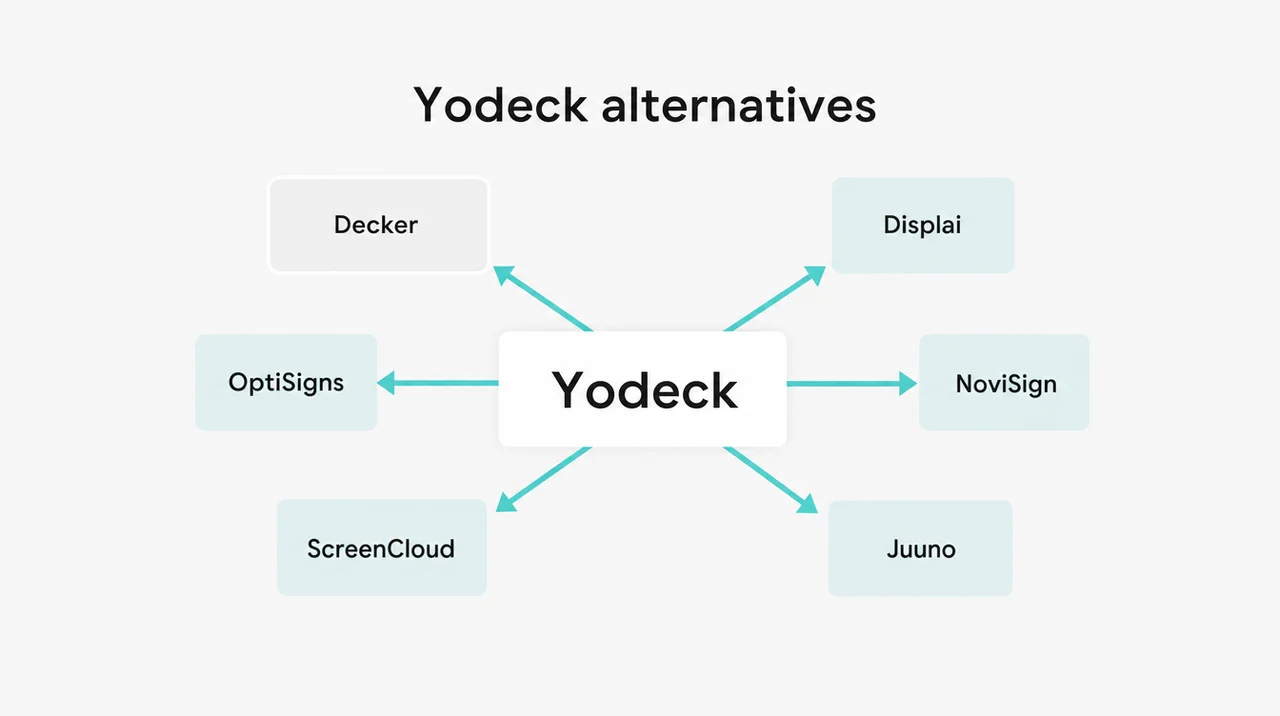
Pick the Yodeck alternative that fixes your reason for leaving: POS-driven menus, a dark-screen alert, more free screens, lower price or self-hosting. Owners rarely look for a Yodeck alternative because Yodeck stops working. They leave because the next job, such as a POS-driven menu, a second free screen or a Pi-free setup, sits outside what Yodeck does. The table pairs each reason with the Yodeck alternative built for it.
| Your reason for leaving | Pick | Price per screen a month | Why it fixes the reason |
|---|---|---|---|
| Menu prices and 86’d items must come from Toast, Square or Clover | Decker | Professional plan | A price change in the POS rebuilds the menu layout, and a sold-out item leaves the screen |
| One vendor for POS-driven menus and kiosks at a chain | Displai (formerly Raydiant) | $49 on its G2 listing, 1-year prepay | Native Toast and Square apps update 86’d items |
| You need to know a menu went dark before guests do | Decker with Verifier | Per-screen add-on | A sensor watches the panel itself and restarts the player and the TV |
| Free on two or three screens | DigitalSignage.com or OptiSigns | $0 | Three free screens: no watermark at DigitalSignage.com, a logo at OptiSigns |
| The lowest paid price | DigitalSignage.com, Juuno or ChannelOS | $3, $5, $5 | All three sit below Yodeck Basic at $8 |
| Done with the Raspberry Pi | Juuno or OptiSigns | $5 or $10 | A TV browser, a streaming stick or an app on the TV |
| A Pi fleet you want to keep | PiSignage | $35 per player in year one, then $20 a year | Images for Pi 3, 4, 5 and Zero 2 W |
| Schools on Apple TV or ChromeOS | Rise Vision | $11 per display on K-12 Basic | Emergency alerts, support answered within one business hour |
| Office communications with approvals | ScreenCloud | $20, billed annually | Content governance, SOC 2 Type 2, 24/5 support |
| No cloud allowed | Xibo or Anthias | $0 self-hosted | Runs on your own server or on each player |
| Screens and installation done for you | CrownTV | From $2,950 per installed 32″ screen | Hardware, installation in all 50 states and software in one contract |
List prices from each vendor’s site. Displai publishes no prices, so its figure comes from its G2 listing.
For a restaurant, the first three rows decide most of the choice, and two of them point to Decker digital menu boards for restaurants. Next come the details: what Yodeck does well, where it stops, what it really costs per screen, and how Decker and the other Yodeck alternatives compare line by line.
Yodeck Pros and Cons: What 2026 Reviews Say
Yodeck is a stable platform on its Pi player, but the free plan ends at one screen and menus skip the POS. Owners also start looking for a Yodeck alternative when the features they need sit on the $12 and $16 tiers. Yodeck holds 4.7 on G2 from 3,251 reviews, 4.8 on Capterra from 4,920 reviews and 4.4 on Gartner Peer Insights from 12 ratings. Yodeck reports 65,000+ accounts and 350,000+ screens in 135+ countries.
| Pros | Cons |
|---|---|
| ➕ One free screen with Basic features | ➖ The free screen stays free only while the account has exactly one screen |
| ➕ 800+ templates and 160+ apps, including Canva | ➖ Playback reports, the API and tag-based playlists start on Premium |
| ➕ A Raspberry Pi 4 player free with annual plans | ➖ SSO, audit logs and workspaces start on Enterprise |
| ➕ Plays for at least 30 days without internet | ➖No POS app in the gallery: menu prices live in DSMenu, a separate account |
| ➕ Chat, email and phone support on every plan, including Free | ➖ Live support runs 24/5; Basic and Premium carry a response target under 72 hours |
| ➕ Interactive Kiosk app from the Basic plan | ➖ No player app for Apple TV, Roku, iOS or macOS |
Yodeck reviews on G2 and Capterra praise the same thing again and again: a non-technical manager gets a screen live in minutes. Reddit threads show the other side. One tester in r/digitalsignage summed it up: “Yodeck is a good software, but it’s a generic solution”. A Toast user in r/ToastPOS was more direct about menus: “We use YoDeck. Affordable but does not sync.” Both comments show why the search for a Yodeck alternative usually starts at the counter, not in the office.
That last point matters most at a counter. Yodeck’s app gallery lists 160+ apps, none of them for Toast, Square, Clover, Lightspeed or Shopify POS. Yodeck’s own feedback board carries a customer request for a Toast POS integration. Menu boards run through DSMenu, a third-party menu designer with its own account, where staff type prices by hand.
Live agents work 24/5, so a problem during Saturday dinner goes to Yodeck’s AI chatbot until the weekend ends. For a restaurant, this POS gap sends owners looking for a Yodeck alternative. Next, the price side shows where the free plan ends.
Yodeck Pricing in 2026: Plans, the Free Screen and Cost per Screen
Yodeck pricing in 2026 is $8, $12 or $16 per screen per month, and the free plan covers one screen only. On April 1, 2026, Yodeck raised Premium and Enterprise by $1 per screen per month, from $11 to $12 and from $15 to $16. Basic stayed at $8.
| Plan | Price per screen a month | What it adds |
|---|---|---|
| Free | $0, one screen | Basic features |
| Basic | $8 | All media types, templates, scheduling, Interactive Kiosk |
| Premium | $12 | Microsoft 365 and Google apps, API, playback reports, tag-based playlists, CSV import |
| Enterprise | $16 | SAML SSO, audit log, workspaces, player storage encryption, lock-down player |
| Enterprise+ | Quote | 24/7 priority support and a dedicated account manager |
Four rules change the bill more than the list price does:
- The free screen disappears at screen two. Yodeck bills every registered screen once an account has more than one, so going from one to two screens on Basic moves the bill from $0 to $16 a month, not $8. Ask every Yodeck alternative how it bills the second screen.
- Annual billing costs the same per screen. The gain is hardware: a free Yodeck Player (Raspberry Pi 4, 1 GB) on annual Basic and a free Player Plus (4 GB, 4K) on annual Premium and Enterprise. Bought separately, the Player costs $85 and the Player Plus $155, plus shipping. A Yodeck alternative without a free player has to beat that hardware saving.
- New accounts start with a trial. Accounts created from March 2, 2026, get 30 days on up to five screens with every feature and no card. On day 30, the owner picks a paid plan or drops to the free single screen.
- Yodeck Assurance adds $1 per player a month. It covers hardware failure with an advance replacement and comes free on Premium. Accounts above 50 screens get a custom quote.
| Screens | Basic | Premium | Enterprise |
|---|---|---|---|
| 1 | $0 | $12 | $16 |
| 2 | $16 | $24 | $32 |
| 5 | $40 | $60 | $80 |
| 20 | $160 | $240 | $320 |
| 50 | $400 | $600 | $800 |
Monthly totals for software only, before players and add-ons. Price each Yodeck alternative at the same five screen counts.
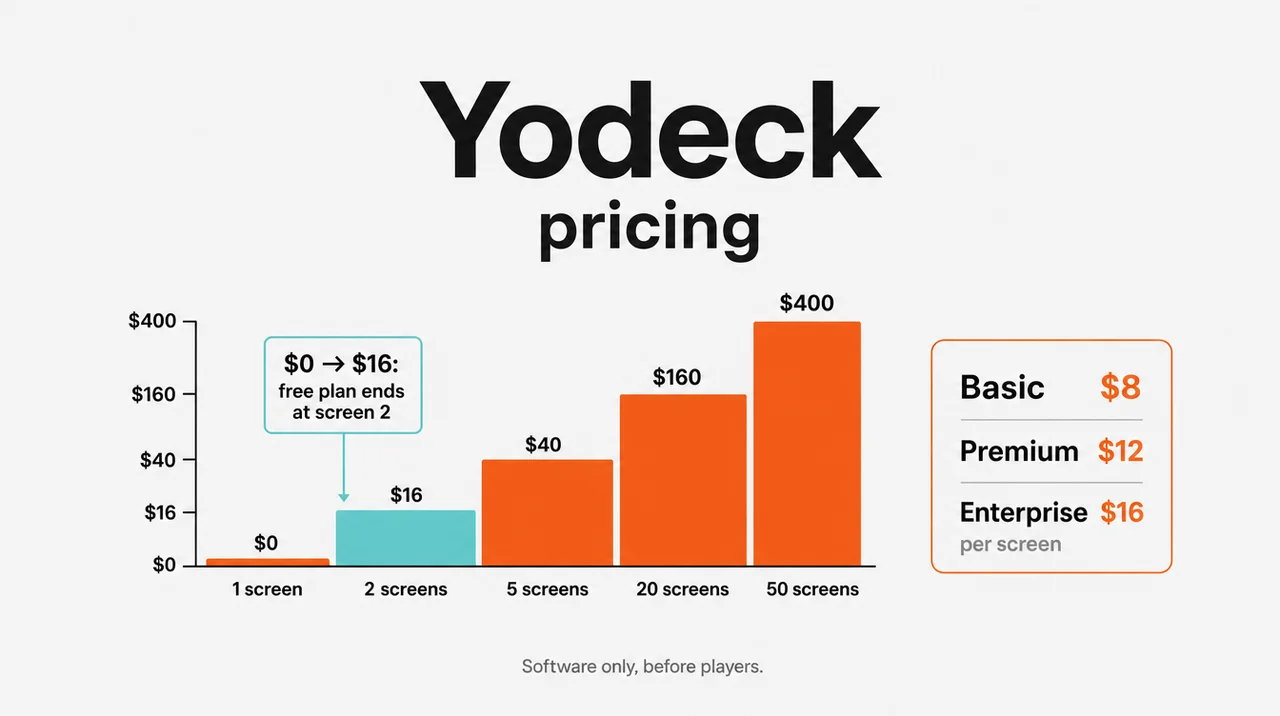
💸 “Yodeck is free” holds only for a single screen. A second registered screen ends the free plan, and both screens move to the paid rate, $16 a month on Basic. Compare the free-screen rule first in any Yodeck alternative.
A full count adds the screens, mounts and the network run, which the guide to what digital signage costs per screen totals line by line. Any Yodeck alternative worth the move has to beat these totals at your screen count, or beat them on the work it removes. Next, Decker’s plans sit against Yodeck’s line by line.
The Yodeck Alternative With POS Menus: Yodeck vs Decker
Yodeck and Decker share per-screen price steps, but Decker builds the menu from your POS and checks that screens show it. For a restaurant weighing Decker as a Yodeck alternative, price stops being the deciding factor. Decker’s Essential, Professional and Premium plans line up with Yodeck’s Basic, Premium and Enterprise, and the Decker pricing page lists each step. The difference shows in the work each platform does after a price changes at the register.
| Yodeck | Decker | |
|---|---|---|
| Free plan | One screen, only while the account has one screen | Starter: one screen free with no time limit |
| Paid plans | Basic, Premium, Enterprise | Essential, Professional, Premium, at the same price steps |
| Trial | 30 days, up to 5 screens, no card | 14 days, up to 5 screens, no card |
| Player | Raspberry Pi 4 Yodeck Player, or apps for Android, Fire OS, ChromeOS, Windows, LG webOS, Samsung Tizen, BrightSign and a web player | The TV’s built-in web browser or any other browser; Decker Player or the Android TV app where the internet drops often |
| Menu prices | No POS app; prices kept by hand in DSMenu | Toast, Square and Clover connect directly; Excel feeds any other register |
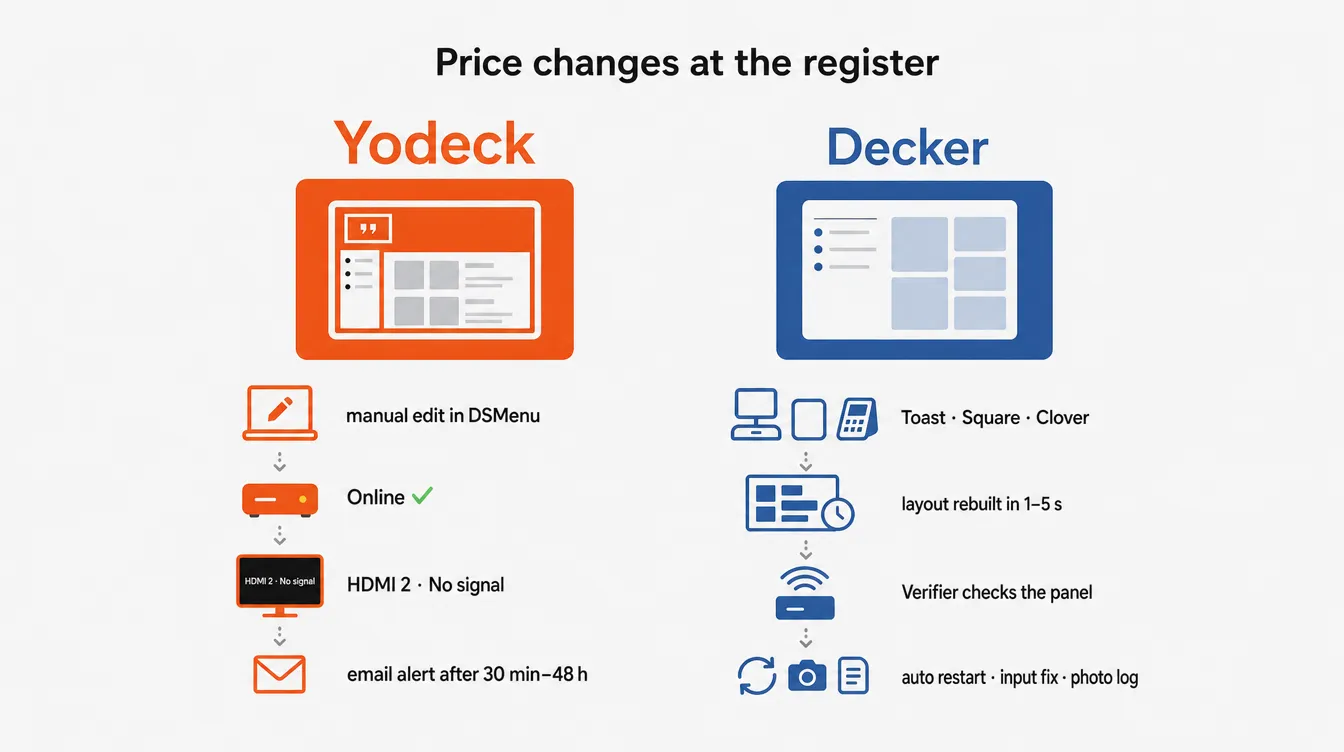
| A price changes | Someone edits the menu app or the template | The POS change rebuilds the layout, and only the changed elements redraw in 1–5 seconds |
| An item sells out | Someone removes it in the menu app | The item marked unavailable in the POS leaves the screen |
| Dayparts | Layered, priority-based schedules; tag-based playlists on Premium | Daypart automation, tag rules and promo rules on Professional |
| Playback reports | Premium | Professional |
| What gets watched | The player: online status, screenshots of what it plays, an email after a delay of 30 minutes to 48 hours | The panel: Decker Verifier sees a black screen, a wrong HDMI input, a frozen player and wrong prices |
| Fixing a dark screen | HDMI-CEC power and input commands from the Pi player | Verifier restarts the player and the TV, switches the input back and logs uptime with photo proof |
| Locations and franchises | Workspaces on Enterprise | Location management on Professional; franchise module and menu-to-sales attribution on Premium |
| SSO and audit logs | Enterprise | Premium |
| Support | Chat, email and phone on every plan; 24/5; under 72 hours on Basic and Premium, under 3 hours on Enterprise | Email support Monday to Friday, 9 a.m. to 6 p.m.; 1-hour SLA and phone on Enterprise |
Menus that read the register. Toast, Square and Clover connect to Decker directly, and an Excel sheet covers any other POS. When a manager changes a price at the register, Decker rewrites the menu image by itself, with fonts and layout intact, so no designer touches the file. Only the changed lines redraw, within 1–5 seconds, so the board never blinks in front of guests. An item 86’d in the POS disappears from the screen, which keeps guests from ordering what the kitchen cannot make.
In the Burger Shop case in Downtown Los Angeles, four counter screens were tied to the POS, and menu updates went from days or weeks to minutes. Among Yodeck alternatives, only Decker, Displai and NoviSign link the menu to a POS without custom scripts. The menu boards that sync with your POS page walks through the setup by register.
A Yodeck alternative with POS sync at the Premium price step. Among the options with POS sync, Decker turns it on with Professional, the plan at the same step as Yodeck Premium. On OptiSigns the same job needs Pro Plus at $15 per screen, and Toast adds about $25 per location a month for API access. Displai lists $49 per screen on G2. For a counter that only needs prices and sold-out items to follow the register, that gap between Yodeck alternatives repeats every month on every screen.
An online player does not prove the menu reached the screen. Yodeck watches the player: it reports Online, Offline or Off and shows screenshots of what the player renders. A TV that switched itself off or woke on the wrong HDMI input never shows up in those reports. Decker Verifier sits beside the screen or inside the player and works independently of what the player reports. Its image sensor reads the panel, so it catches a black screen or a stale price that the player reports as fine.
It restarts the player, the TV or both, switches the input back, schedules power around opening hours, and keeps a photo log per location and per shift. Decker Verifier adds that check as a separate option, and the browser keeps the last menu on screen from its cache through short outages, while a Decker Player covers sites where the internet fails every day. That check gives restaurants a second reason to choose Decker as a Yodeck alternative.
One editor for every location. Unlike most Yodeck alternatives, Decker keeps menu editing in the browser, on a laptop or a phone, with no separate menu account like DSMenu. On Professional, an AI design generator drafts the menu layout, dayparts switch on rules, and location management keeps per-store prices in one account. Premium adds a franchise module and menu-to-sales attribution, which shows how each menu change moved sales.
Where Yodeck stays ahead. Yodeck runs as an app on more platforms without an extra box, ships 800+ templates and a 30-day offline window, and gives phone support even to free accounts. A single static screen, or an office lobby with no POS, gets everything it needs from Yodeck, and a Yodeck alternative would add work without a gain.
🔌 A Yodeck alternative at the same price step, with the POS built in. Connect Toast, Square or Clover and watch a price change reach the menu in seconds. 14 days free on up to 5 screens, no card. Start free
Beyond Decker, eleven more platforms compete for the same budget, and the table below lines them up.
Yodeck Alternatives Compared: 12 Options Side by Side
Twelve Yodeck alternatives cover four jobs that matter: POS-driven restaurant menus, broad player support, free or low-cost screens, and self-hosting. Most Yodeck alternatives run on hardware a restaurant already owns. Only three connect menu prices to a POS out of the box, Decker, Displai and NoviSign, while OptiSigns reaches POS data through its API tool on higher plans.
| Platform | Best for | Price per screen a month | Free option | Players | POS menu sync |
|---|---|---|---|---|---|
| Yodeck (reference) | Simple signage on its own Pi player | $8–16 | 1 screen while the account has one | Pi 4, Android, Fire OS, ChromeOS, Windows, webOS, Tizen, BrightSign, web | None; DSMenu by hand |
| Decker | Restaurants that price in Toast, Square or Clover | Same steps as Yodeck | 1 screen, no time limit | TV web browser; Decker Player optional | Toast, Square, Clover direct; Excel |
| Displai (ex-Raydiant) | Restaurant chains, kiosks | $49 on G2, 1-year prepay | 14-day trial | Own hardware, $169 on G2 | Toast and Square native, with 86’d items |
| OptiSigns | Mixed screen fleets | $10–45 | 3 screens with the OptiSigns logo | Widest list, including Apple TV and Roku | Toast data through an API request and OptiSync on Pro Plus and above |
| ScreenCloud | Office communications | $20–30, billed annually | 14-day trial | Android, Fire OS, ChromeOS, Windows, macOS, Tizen, BrightSign | None |
| Rise Vision | Schools | $11 per display, K-12 | 14-day trial | ChromeOS, Windows, Android, Pi, Apple TV, BrightSign | None |
| NoviSign | Retail and mid-size chains | $14–25, billed annually | 30-day trial | Android, Windows, ChromeOS, Tizen, webOS, BrightSign | Toast, Clover, Lightspeed, Revel, Upserve |
| Juuno | Pi-free setups on a budget | $5–9 | 7-day trial | TV browser, Amazon Signage Stick, Chromecast, Pi | None |
| Play Digital Signage | BYO hardware, round-the-clock chat | $8–16 | 1 screen for 30 days | 100+ screen types, including macOS and Linux | None |
| DigitalSignage.com | Free and cheapest paid | $3 | 3 screens, no watermark | Windows, Mac, Linux, Android, ChromeOS, Pi, iPad, browser | None |
| PiSignage | Reusing Raspberry Pi players | $35 a player in year one, then $20 a year | 2 players | Pi 3/4/5/Zero 2 W, Android TV, Fire TV, Linux | None |
| Xibo | Self-hosted control | $0 self-hosted CMS | Open source | Windows, Android, webOS, Tizen, ChromeOS; no Raspberry Pi | None |
| Anthias | Free, offline-first | $0 | Open source | Raspberry Pi 2–5, x86 PCs | None |
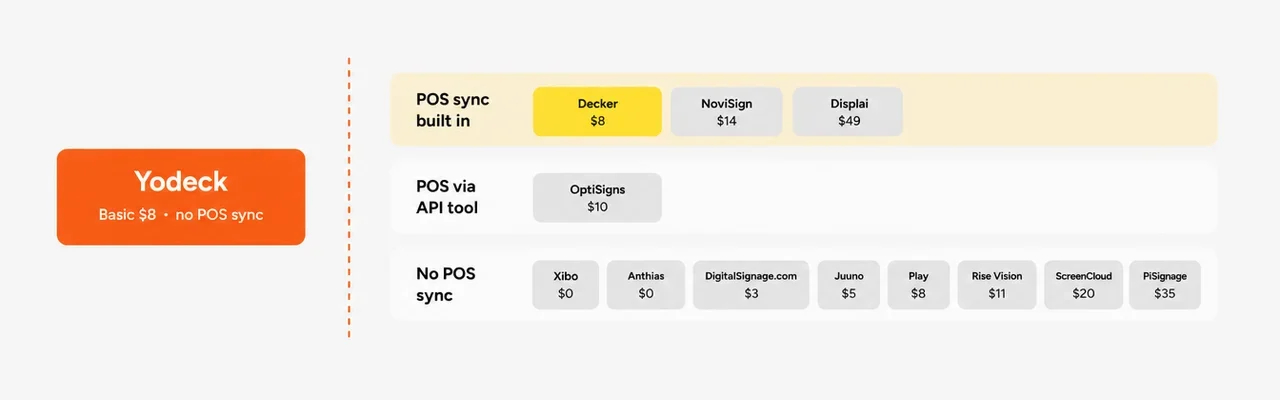
List prices and plan details from each vendor’s site; Displai’s price from its G2 listing. Each paid Yodeck alternative below gets a short profile: price, players, POS and who it fits.
OptiSigns
As a Yodeck alternative, OptiSigns gives three free screens to Yodeck’s one, with its logo on screen, then starts $2 higher at $10 per screen. It covers the widest player list in this group, including Apple TV and Roku. For a restaurant, the gap sits in the menu: Toast data reaches OptiSigns only through OptiSync on Pro Plus at $15 per screen, Toast adds about $25 per location a month for API access, and the owner builds the sold-out rule by hand. Among Yodeck alternatives, it suits a mixed screen fleet best. The breakdown of OptiSigns alternatives sets it against Decker on the POS question.
ScreenCloud
As a Yodeck alternative, ScreenCloud costs $20 per screen on Core and $30 on Pro, billed annually, which puts its entry plan at 2.5 times Yodeck Basic. It skips a free plan and starts with a 14-day trial.
ScreenCloud targets internal communications with content approvals, 80+ apps, SOC 2 Type 2 and 24/5 support. It has no player for Raspberry Pi, Apple TV or Roku, and staff edit its Digital Menu app by hand, with no POS connection. Offices with a compliance team get the most from it; a counter with changing prices gets the least. Teams already on it can weigh alternatives to ScreenCloud built for menus.
Displai (Formerly Raydiant)
Displai Systems bought Raydiant’s assets in 2025, and raydiant.com now opens displai.ai. Besides Decker, it remains the one Yodeck alternative here built for restaurants first. Toast’s partner directory lists it with real-time menu sync and automatic 86 updates, and Square’s app marketplace carries its Raydiant Digital Menus app with out-of-stock updates.
Displai sells to chains from 10 to 10,000 locations and pairs menus with kiosks. It publishes no prices; its G2 listing shows $49 per screen a month on a one-year prepay plus $169 for hardware, about four times Yodeck Premium. The comparison of Raydiant alternatives sets it against Decker line by line.
Rise Vision
Rise Vision serves schools as a Yodeck alternative. K-12 Basic costs $11 per display a month ($119 a year), Advanced $138 a year, and Enterprise $164 per display a year or $1,399 per school a year for unlimited displays. It runs on ChromeOS, Windows, Android, Raspberry Pi, BrightSign and Apple TV, answers support within one business hour from 9 a.m. to 6 p.m. Eastern, and backs every plan with a 30-day money-back guarantee.
It has no POS integration, so a cafeteria menu stays manual. Districts comparing Yodeck alternatives over Apple TV or ChromeOS gaps find the fit here, and Rise Vision alternatives cover what changes when a restaurant buys.
NoviSign
Among paid Yodeck alternatives with POS links, NoviSign bills annually at $14 per screen on Business, $17 on Business Plus and $25 on Premium, with no minimum screen count and a 30-day trial. Its players cover Android, Windows, ChromeOS, Samsung Tizen, LG webOS, BrightSign, the Amazon Signage Stick and, since June 2026, Raspberry Pi. On the menu side, NoviSign connects to Toast, Clover, Lightspeed, Revel and Upserve, and Clover prices sync automatically.
Playback reports start on Business, and every plan gets email tickets seven days a week plus a weekday phone line. NoviSign announced SOC 2 certification in 2023 and counts 70,000+ active screens. The page on NoviSign alternatives compares its POS setup with Decker’s.
Juuno
Juuno runs as the Pi-free Yodeck alternative at $5 per screen on Business and $9 on Growth, which adds playback reports. White Label costs $100 a month for 20 screens, then $5 per screen. It runs in a smart TV’s browser, on an Amazon Signage Stick, a Chromecast with Google TV or a Raspberry Pi, and starts with a 7-day trial, no card and no free plan. Juuno states on its own blog that it has no native POS integration, so staff hide sold-out items by hand. Among Yodeck alternatives, it suits owners who want off the Pi and pay least per screen.
Play Digital Signage
As a Yodeck alternative, Play Digital Signage follows Yodeck’s price steps: Essential $8 ($7.20 billed annually), Pro $12 and Ultimate $16. One screen runs free for 30 days. Play runs on 100+ screen types, including macOS, Linux, BrightSign and Raspberry Pi, and answers chat and email 24/7, with phone support on weekdays. Founded in Denmark in 2013 and a US corporation since 2018, Play lists 54 plugins and none for a POS. Of all Yodeck alternatives, it fits owners who want Yodeck’s price with weekend chat support.
Other Yodeck Competitors on Review Sites
G2, Capterra and Gartner list more Yodeck competitors. Few of these Yodeck alternatives target restaurants, but they show up in every comparison:
| Platform | Best for | Starting price |
|---|---|---|
| L Squared Hub | Small business to enterprise | $15 a month, annual |
| TelemetryTV | IT-run fleets and dashboards | $8–16 per device a month |
| Skykit | Workplace screens | $16.50 per display a month |
| Appspace | Intranet plus signage | Quote; 1 device free |
| CrownTV | Screens, installation and software in one contract | $20 per screen for software; from $2,950 per installed 32″ screen |
| Mvix | One-time purchase | From $450 for a player and perpetual license |
| truDigital | One plan with US phone support | $31–44 per screen, plus a $249–299 player |
| Look Digital Signage | Volume pricing | $6–15 per screen |
| Kitcast | Apple TV | $7 per screen billed annually, $9 monthly |
| screenTAP | UK venues, one flat rate | £5 per screen |
| ChannelOS | One smart TV | 1 screen free with a banner; $5 Solo, $8 Pro |
| PosterBooking | Ten screens on one bill | $52 a month for 10 screens |
Next comes the question owners ask first: is there a free app that does the same job?
Is There a Free App Like Yodeck?
Yes: DigitalSignage.com keeps 3 screens free, OptiSigns 3 with its logo, PiSignage two players, and self-hosted Xibo and Anthias cost nothing. Each free Yodeck alternative draws its line in a different place, so the catch matters more than the screen count.
| Option | Free | After that | The catch |
|---|---|---|---|
| DigitalSignage.com | 3 screens, no card, no watermark | $3 per screen; on-premise server $895 one-time | It bills every screen once you pass three; 1 GB storage on the free tier |
| OptiSigns | 3 screens | $10 per screen | OptiSigns logo on screen; free plan only on OptiSigns devices, Windows, Linux and Pi |
| PiSignage | 2 players | $35 per player in year one, then $20 a year | Player licenses apply even on its open-source server |
| PosterBooking | 10 screens | $52 a month for 10 screens | A watermark appears after the trial period |
| ChannelOS | 1 screen | $5 per screen | A ChannelOS banner runs along the bottom |
| Xibo | Self-hosted CMS and Windows player | Paid perpetual licenses for Android, webOS, Tizen and ChromeOS players | No Raspberry Pi player |
| Anthias | Any number of screens | $0 | One dashboard per device, no central control |
| Yodeck Free | 1 screen | $8 per screen, all screens billed | Ends at the second screen |
| Decker Starter | 1 screen | Essential plan | POS sync starts on Professional |
Anthias stands out among free Yodeck alternatives: it imports images, videos and web pages straight from a Yodeck account with an API token. Its makers put the trade-off plainly, noting that self-hosting moves the cost “off the invoice and into your own time”. The roundup of best free digital signage software covers the rest of the free field.
None of the free Yodeck alternatives in this table syncs prices from a POS. A Yodeck free alternative covers a static menu; once prices change weekly, the hours spent retyping them cost more than a paid plan. As a result, the next checks focus on the paid features a counter needs.
What to Check Before Leaving Yodeck: 8 Checks for a Restaurant
Before switching to a Yodeck alternative, check the price source, the sold-out flow and how you learn that a screen went dark. These eight checks separate a platform that runs a counter from one that runs a lobby.
- Price source. A direct POS connection (Toast, Square, Clover) means one system holds each price. A separate menu app or a spreadsheet means two places to edit and two chances to disagree.
- Sold-out items. The 86’d item should leave the screen on its own, without a manager at a laptop.
- Layout after a price change. The platform should redraw the menu by itself. A cycle of designer, file and upload takes one to two days per change.
- Dayparts and locations. Breakfast, lunch and happy hour should switch on rules, with different prices per location from one account. The page on digital menu board software lists what that editor needs.
- Dark-screen detection. Ask Yodeck alternatives whether they watch the player or the panel. Only a panel check catches a TV that woke on the wrong input.
- Hardware path. Reuse the Yodeck Pi, run an app on the TV, or plug a player into HDMI. An Amazon Signage Stick costs under $100.
- Support hours against your hours. 24/5 coverage leaves Saturday dinner to the weekend queue.
- Total at your screen count. Price 1, 5, 20 and 50 screens on the Yodeck alternatives you shortlist, with players, add-ons, the plan tier where POS sync starts and any per-location POS fee.
With those answers in hand, the next step is the switch itself.
How to Switch From Yodeck Without a Dark Menu Board
Move one screen first, run it beside Yodeck for 7 days, then roll out by location and cancel at renewal. A full weekend cutover leaves no room to catch a layout quirk before the lunch rush. The same order works for all Yodeck alternatives, not only Decker.
- Check the billing date. Annual Yodeck subscribers keep their rate until renewal, so time the move to the end of the term.
- Export your media. Images, videos and web pages move to any of the Yodeck alternatives above. Yodeck apps, widgets and schedules stay behind, and DSMenu menus need rebuilding on the new menu editor.
- Choose the hardware. The Yodeck Player runs on a Raspberry Pi 4 with Debian 10. A fresh SD card turns it into a PiSignage or DigitalSignage.com player; Xibo and ScreenCloud do not support it. For Decker, open the menu in the TV’s web browser and keep the Pi as a spare; a Decker Player goes in only where the internet drops often.
- Pilot one screen. Run the new board next to the old one for 4–7 days and read it from the back of the line.
- Rebuild dayparts and connect the POS. Map each menu item to its POS item once; after that, prices and stock follow the register.
- Roll out by location. Most counters with five to ten screens move to the Yodeck alternative over a weekend once the pilot runs clean.
In contrast, a few setups gain nothing from leaving, and the next section names them.
When Yodeck Is Still the Better Choice
Yodeck stays the better choice in five cases that each come with a clear number. A single screen with static content runs free on Yodeck, with phone support included. A menu that changes less than once a month, in a venue with no POS, gains nothing from price sync, and Yodeck Basic at $8 covers it. A team already running ten or more Yodeck Pi players without trouble saves the migration work by staying.
A site that needs native apps on Samsung Tizen, LG webOS, BrightSign or Fire OS, rather than a browser, fits Yodeck’s player list well. A buyer who weighs support above all will note that Gartner Peer Insights reviewers score Yodeck higher than ScreenCloud, Appspace and Navori on service and support. In those cases, switching to any of the Yodeck alternatives adds migration work without removing a real problem.
Questions and Answers
1 What is the best Yodeck alternative for a restaurant?
For a restaurant whose prices live in Toast, Square or Clover, the best Yodeck alternative is a platform that reads the POS directly, such as Decker. A sold-out item then leaves the screen and a new price redraws the menu without a designer. For a static menu, a free plan with three screens, such as DigitalSignage.com, covers the job.
2 What is Yodeck?
Yodeck is cloud-based signage software from Flipnode LLC, a US company, operating since 2015. It plays content on its own Raspberry Pi–based Yodeck Player or through apps for Android, Fire OS, ChromeOS, Windows, LG webOS, Samsung Tizen and BrightSign, plus a web player. Yodeck reports 65,000+ accounts and 350,000+ screens; restaurants usually compare it with Yodeck alternatives that connect menus to a POS.
3 Is Yodeck free?
Yodeck is free for one screen with Basic features, and only while the account has exactly one registered screen. Adding a second screen bills both. New accounts created since March 2, 2026, start with a 30-day trial on up to five screens before dropping to the free single screen. That day-30 switch is the natural point to test Yodeck alternatives.
4 How much does Yodeck cost per screen?
Yodeck costs $8 per screen a month on Basic, $12 on Premium and $16 on Enterprise. Annual billing costs the same but adds a free player, and accounts above 50 screens get a custom quote. On April 1, 2026, Premium and Enterprise each rose by $1.
5 Is Yodeck any good?
Yes, for simple signage: Yodeck holds 4.7 on G2 from 3,251 reviews and 4.8 on Capterra from 4,920 reviews. Reviewers praise fast setup and the free Pi player. Restaurants mark it down for menus that do not sync with the POS and look at Yodeck alternatives that do.
6 Does Yodeck integrate with Toast or other POS systems?
No. Yodeck’s app gallery lists 160+ integrations, and none connects to Toast, Square, Clover, Lightspeed or Shopify POS; its feedback board carries a customer request for Toast. Menus run through DSMenu, a separate account where staff type prices in. Decker, Displai and NoviSign are the Yodeck alternatives that connect to Toast directly.
7 What is the Yodeck web player?
The Yodeck web player runs Yodeck content in a browser instead of on a Yodeck Player. It works fully only in Chrome, Edge and Chromium, needs a browser extension or a PWA for screenshots, and does not support 4K, HDMI input or live YouTube.
8 Can I reuse my Yodeck Raspberry Pi player after switching?
Yes. The Yodeck Player runs on a standard Raspberry Pi 4, so a fresh SD card turns it into a PiSignage or DigitalSignage.com player, or into a general-purpose Pi. Among Yodeck alternatives, Xibo and ScreenCloud do not support Raspberry Pi, and Decker plays in the TV’s web browser, so the Pi can stay as a spare.
9 Can I move my content from Yodeck?
Images, videos and web pages move to any Yodeck alternative, and Anthias imports them automatically with a Yodeck API token. Yodeck apps, widgets, schedules and DSMenu menus stay behind and need rebuilding. Run a one-screen pilot on the new platform for 4–7 days before moving the rest.
10 What are some free alternatives to Yodeck?
Free Yodeck alternatives start with DigitalSignage.com, which keeps three free screens without a watermark, OptiSigns three with its logo, PiSignage two players, PosterBooking ten screens with a watermark after the trial, and ChannelOS one screen with a banner. Xibo and Anthias cost nothing to self-host. None of the free plans syncs menu prices from a POS.
11 Which Yodeck alternatives fit each type of business?
Yodeck alternatives each lean toward one job: ScreenCloud for office communications, Rise Vision for schools, DigitalSignage.com for the lowest price, and Decker for restaurant menus driven by a POS. The roundup of best digital signage software ranks the wider field. For a restaurant, the deciding question comes down to one check: does the menu read the POS? Overall, POS sync narrows a restaurant shortlist to three names: Decker, Displai and NoviSign.
Sources
- Yodeck
- Yodeck reviews on G2
- Raydiant pricing on G2
- Capterra
- Gartner Peer Insights
- Official websites of the brands reviewed in this article: plans, prices per screen, free plans, supported players and POS integrations