Top Digital Signage System Picks for 2026: The Best Digital Signage Software Ranked by Price, POS Sync and Uptime


The top digital signage system for a restaurant counter is Decker: its $12-per-screen plan reads Toast, Square or Clover and plays in the TV's own browser. Among the best digital signage software for other jobs, AbleSign costs $0 per screen, Rise Vision suits schools and Xibo suits IT teams. Next: the 10 picks.
What Is the Best Digital Signage Software?
The best digital signage software is the tool that matches your screen count, your register and your network, which narrows ten names to one in minutes. For a menu that has to follow the POS, the top digital signage system costs $12 a screen; for a free lobby screen, the best digital signage costs nothing.
- Best for menus that follow the register: Decker. Toast, Square and Clover sync on Professional at $12 per screen, and the board plays in a smart TV’s built-in browser.
- Best free digital signage software with no screen cap: AbleSign, free from 1 screen to 1,000.
- Best open source pick: Xibo, with a free self-hosted CMS under AGPLv3.
- Best for a low bill on many screens: Yodeck at $8, with a Raspberry Pi player shipped free on yearly plans.
- Best for the widest device list: OptiSigns, with apps for Apple TV and Roku.
- Best for schools: Rise Vision, with emergency alerts.
- Best for kiosks and touch screens: NoviSign.
The top digital signage systems below lean toward food and drink venues: counters, drive-thrus, bars, cafés and grocery aisles. Each top digital signage system gets scored on five things a restaurant owner can check in a day: a public price, a free plan or trial, a POS link, offline playback and review scores on G2 and Capterra. For counters where the menu changes with stock, restaurant menu screens that read the POS carry most of the weight in the ranking. Next, the ten platforms one by one.
Top 10 Digital Signage Software for 2026
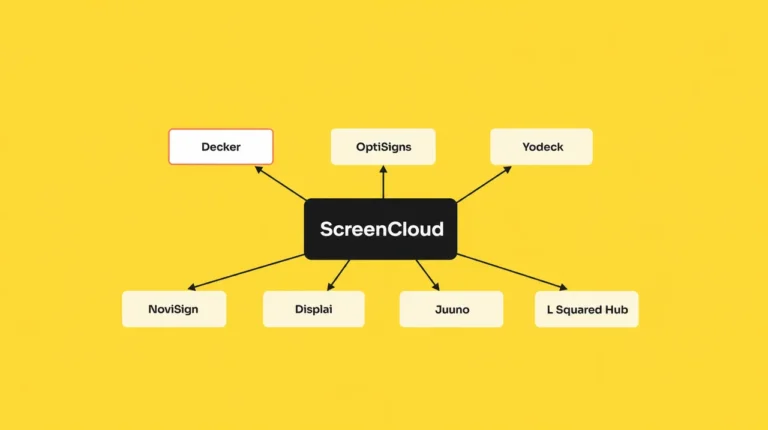
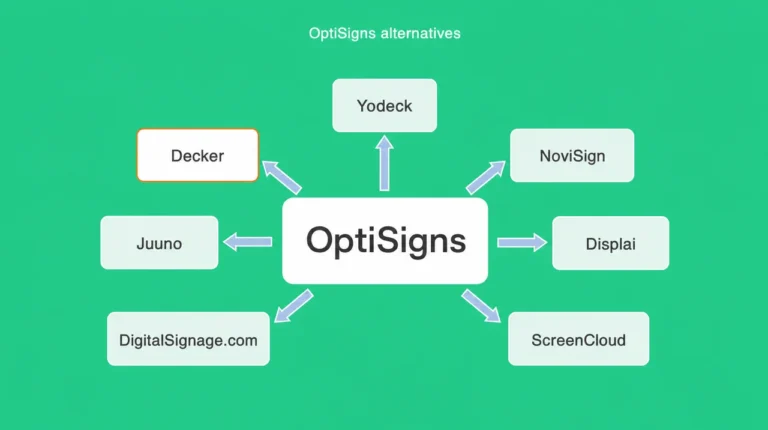
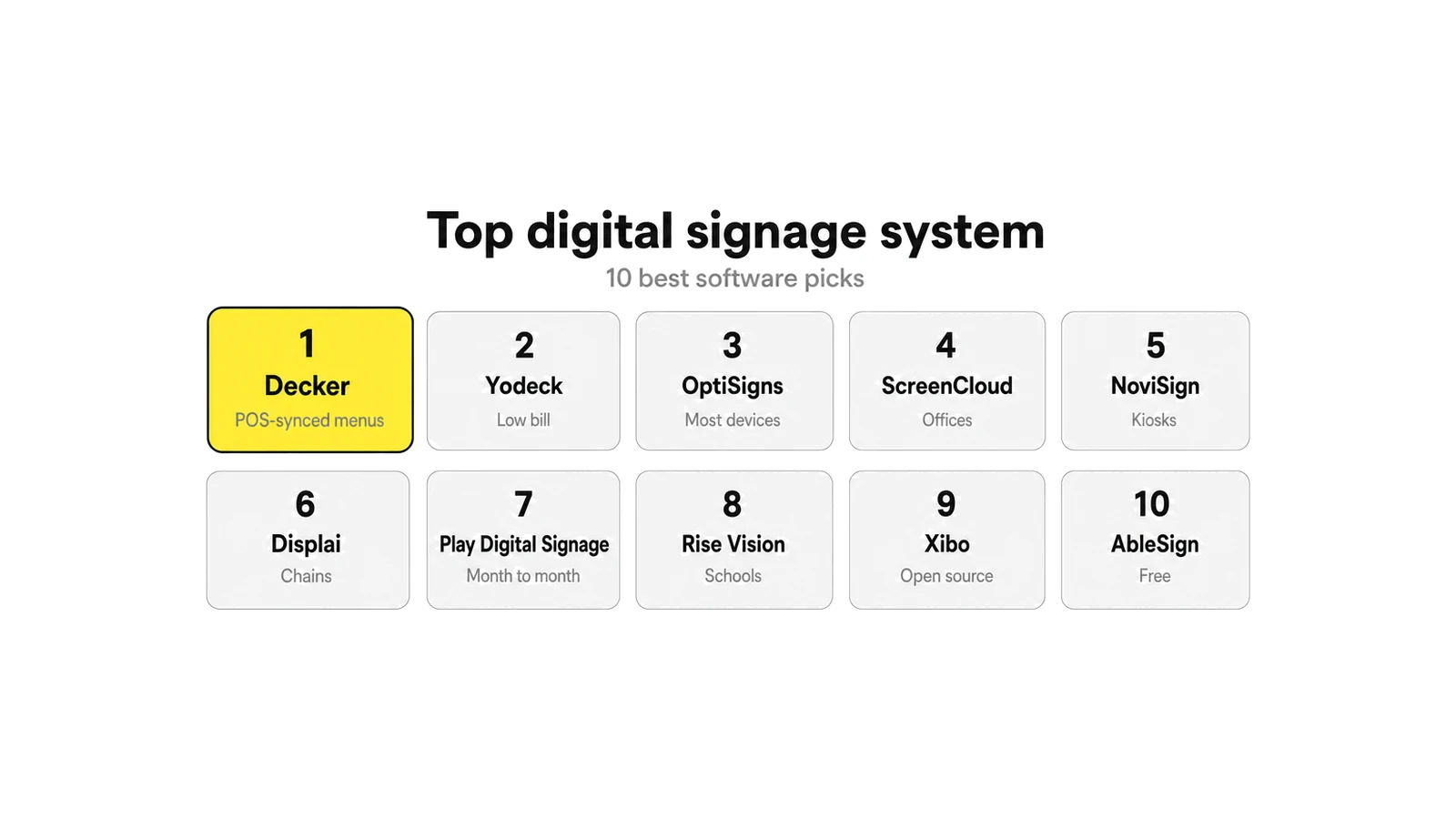
The top 10 digital signage software picks are Decker, Yodeck, OptiSigns, ScreenCloud, NoviSign, Displai, Play Digital Signage, Rise Vision, Xibo and AbleSign. Every top digital signage system here lists a price per screen per month in US dollars, from the vendor’s page or from G2.
1. Decker: Best for Menus That Follow the Register
Decker reads Toast, Square and Clover on Professional at $12 per screen a month, and the board plays in a smart TV’s built-in web browser with no device to buy. That makes Decker’s digital menu board software the top digital signage system in this list for a menu that changes with stock. Essential costs $8 and Premium $16, and a yearly plan takes 15% off each step. Starter keeps one screen free forever, and every paid plan starts with a 14-day trial on up to 5 screens with every feature and no card.
When an item sells out in the POS, it drops off the board and the layout closes the gap in 1–5 seconds. Proof-of-play reports come with Professional. Decker Verifier, a $7-per-screen add-on for any paid plan, places a compact device next to the screen and flags a black panel, a frozen image or a wrong price, with photo evidence in an audit trail. Decker builds no self-checkout kiosks, so a chain that needs ordering screens looks elsewhere.
2. Yodeck: Best for a Low Bill on Many Screens
Among the best digital signage software for big fleets, Yodeck charges $8 per screen on Basic, $12 on Premium and $16 on Enterprise, the same price monthly or yearly; Premium and Enterprise rose by $1 on April 1, 2026. A yearly plan ships a free Raspberry Pi player, and content keeps playing for at least 30 days offline. The trial runs 30 days on up to 5 screens, no card. G2 users rate it 4.7 from 3,279 reviews, Capterra users 4.8 from 4,934.
Yodeck reads no POS: menus run through DSMenu, a separate account where prices get typed by hand. For counters that need the register link, see the Yodeck alternatives that sync menu prices.
3. OptiSigns: Best for the Widest Device List
OptiSigns ranks as the best digital signage software for mixed hardware: Standard costs $10 a month or $9 on a yearly plan, Pro $12.50 and Pro Plus $15. Apps cover 15+ platforms, including Apple TV, Roku, Fire TV, Tizen, webOS and BrightSign, though Fire Stick on FireOS 8 drops out. Three screens stay free with an OptiSigns logo and 1 GB of storage, and the trial covers 2 screens for 14 days.
A Toast menu needs Pro Plus at $15 plus OptiSync, and Toast charges about $25 per location a month for API access. G2 shows 4.7 from 3,800+ reviews and Capterra 4.8 from 4,593. The OptiSigns alternatives without an API fee compare that bill line by line.
4. ScreenCloud: Best for Office and Multi-Team Screens
As a top digital signage system for offices, ScreenCloud holds a SOC 2 Type 2 report; Core costs $20 per screen and Pro $30 on yearly billing, or $24 and $36 month to month. No free plan exists, and the trial runs 14 days with no card. It plays on Android and Google TV, Fire TV, Tizen, webOS, Windows, macOS, ChromeOS and BrightSign, but not on Raspberry Pi, Apple TV or Roku.
Media from the library stays cached on the player, while YouTube and live streams skip during an outage. The Digital Menu Board app takes prices typed by hand, with no POS feed. Scores sit at 4.7 on G2 (455 reviews) and 4.8 on Capterra (289). The ScreenCloud alternatives for menu screens cover cheaper paths.
5. NoviSign: Best for Kiosks and Touch Screens
For touch kiosks, NoviSign stays the best digital signage software in this group: it lists Business at $14 per screen, Business Plus at $17 and Premium at $25, all on annual billing; monthly rates do not appear on its price page. No free plan exists, and a 30-day trial needs no card but caps storage at 80 MB. Players cover Android, ChromeOS, Windows, Tizen, webOS, BrightSign and the Amazon Signage Stick, with Raspberry Pi added in June 2026.
Toast data reaches the screens through Google Sheets on Business Plus, and offline playback comes with Business. NoviSign scores 5.0 on G2 from 47 reviews and 4.9 on Capterra from 121. The NoviSign alternatives with monthly billing cover the switch.
🔎 Roundups still quote NoviSign at $18, $26 and $44 a screen. Those rates no longer appear on NoviSign’s price page, which lists $14, $17 and $25 on annual billing; check the vendor page before comparing top digital signage systems on price.
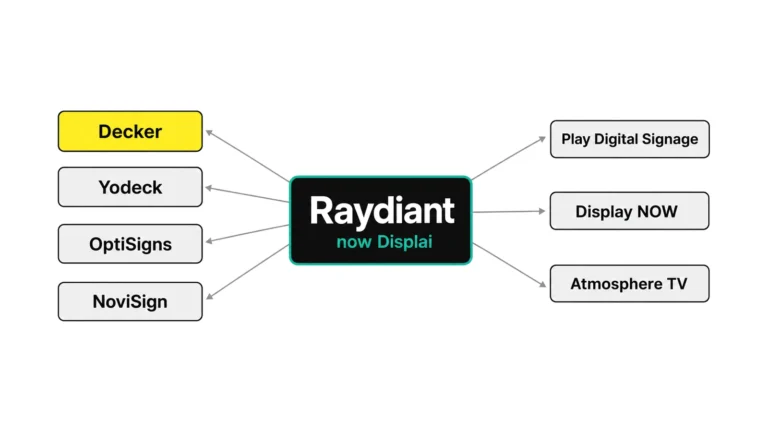
6. Displai (Formerly Raydiant): Best for Chains That Also Want Kiosks
Displai bought Raydiant’s products and customer contracts in May 2025 and sells by quote. G2 lists $49 per screen on a prepaid year plus a $169 device for every screen. In return, a chain gets self-checkout kiosks, Hoopla staff boards and InSight foot-traffic analytics.
Displai’s marketplace names Toast, Square, PAR and NCR Aloha, with Lightspeed among its partners. G2 users rate it 4.7 from 397 reviews, and Software Advice shows 4.7 from 318. For a counter without kiosks, the Raydiant alternatives with published prices skip the prepaid year.
7. Play Digital Signage: Best for Month-to-Month Small Fleets
For month-to-month billing, Play counts among the best digital signage software: it charges $8 per screen on Essential, $12 on Pro and $16 on Ultimate, with 10% off on a yearly plan. One screen with Pro features runs free for 30 days and stays free after a review on Capterra, G2 or another listed site. Play runs on 100+ screen types, from Raspberry Pi and Chromecast to Tizen and webOS, and keeps playing offline when Wi-Fi drops.
Screen alerts start on Pro, while proof of play and the dashboard come only with Ultimate at $16. No POS link exists. G2 shows 4.7 from 287 reviews and Capterra 4.8 from 954.
8. Rise Vision: Best for Schools and Emergency Alerts
As a top digital signage system for campuses, Rise Vision’s default price page lists Basic at $11 per display a month for education, while its business pricing starts at $12. A 14-day trial needs no card, and a 30-day money-back guarantee follows. Content stays stored locally, so a display keeps running through a network drop. Players include Rise Vision’s own media player, Android, Apple TV, BrightSign, ChromeOS, webOS, Raspberry Pi and Windows.
Emergency alerts and a school focus set it apart; a POS link does not exist. G2 users rate it 4.7 from 1,003 reviews, and Capterra shows 4.7 from 303.
📋 «Rise Vision is free for K-12» circulates in roundups. Rise Vision’s own price page shows no free plan, so a school should budget for the per-display rate and ask the vendor about education discounts.
9. Xibo: Best Open Source Digital Signage Software
For IT teams, Xibo counts as the best digital signage software to self-host: its CMS runs free under the AGPLv3 license on your own server, and the Windows player costs nothing. Android, webOS and Tizen players need paid perpetual licenses, priced only on request. Xibo Cloud starts with a 14-day trial on 2 players, no card, and Capterra lists cloud plans from £3.50 a month.
Content stays stored locally, so screens keep playing when the network drops, and proof of play comes with an audit log. Raspberry Pi has no Xibo player. G2 shows only 5 reviews at 3.5, while Capterra lists 4.6 from 239.
10. AbleSign: Best Free Digital Signage Software With No Screen Cap
AbleSign charges nothing per screen, from 1 screen to 1,000; only extra storage costs money, which makes it the best free digital signage software for a large loop-only fleet. It plays on Android 7.0+, the Amazon Signage Stick, Fire TV on FireOS 6.0+, BrightSign OS 9.1+, LG webOS Signage, ChromeOS and a web browser. Playback continues when the connection drops, and verified playback reports show what ran.
Tizen, Windows and Raspberry Pi do not appear on its device list, and one Capterra reviewer misses weather and tickers. Capterra shows 5.0 from only 2 reviews. Overall, these ten cover most needs, and the table below puts them side by side.
Best Digital Signage Software Compared: Price, Free Plan, POS and Players
Comparing the best digital signage software on one screen takes seven columns that matter: price, free plan, trial, POS link, offline playback, device and screen proof. Six of the ten top digital signage systems in it read no register at all.
| Platform | Price from, per screen a month | Free plan | Trial | POS menu | Offline | Device needed | Screen proof |
|---|---|---|---|---|---|---|---|
| Decker | $8; $12 with POS sync | 1 screen, free forever | 14 days, up to 5 screens, no card | Toast, Square, Clover direct | Browser cache; player for daily outages | None: TV browser | Proof of play on $12; Verifier, $7, with photo evidence |
| Yodeck | $8 | 1 screen, only while alone | 30 days, 5 screens | None | 30+ days | Pi free on yearly plan | Playback reports on $12 |
| OptiSigns | $10 ($9 yearly) | 3 screens with logo | 14 days, 2 screens | Toast via API + OptiSync, $15 | Yes | App on 15+ platforms | Proof of play on Pro |
| ScreenCloud | $20 yearly, $24 monthly | None | 14 days, no card | None | Library media | App or $95+ player | Proof-of-play logs |
| NoviSign | $14 yearly | None | 30 days, no card | Toast via Google Sheets, $17 | Yes | App | Proof of play on $17 |
| Displai | Quote; G2: $49 prepaid year | None | Demo request | Toast, Square, PAR, NCR Aloha | Not stated | $169 device | Proof of playback |
| Play Digital Signage | $8 ($7.20 yearly) | 1 screen after a review | 30 days free screen | None | Yes | App on 100+ screen types | Proof of play on $16 |
| Rise Vision | $11 education, $12 business | None | 14 days, no card | None | Yes | Own player or app | Screenshots on Advanced |
| Xibo | $0 self-hosted | CMS + Windows player | 14 days cloud | None | Yes | Paid licenses beyond Windows | Proof of play + audit log |
| AbleSign | $0 | Unlimited screens | Not needed | None | Yes | App on Android, Fire TV, LG | Verified playback reports |
Three patterns stand out across the best digital signage software in the table. The cheapest paid tier sits at $8 with Decker, Yodeck and Play, while ScreenCloud starts at $20.
Only four platforms read a register, and only Decker connects Toast, Square and Clover without an API fee or a spreadsheet in between. Displai alone hides its price behind a demo; on Gartner Peer Insights, the digital signage market lists 30 products with buyer reviews. The full rates for every plan above appear on Decker’s pricing page and on each vendor’s site. Therefore, the next section turns to what the best free digital signage software buys on a $0 budget.
Best Free Digital Signage Software
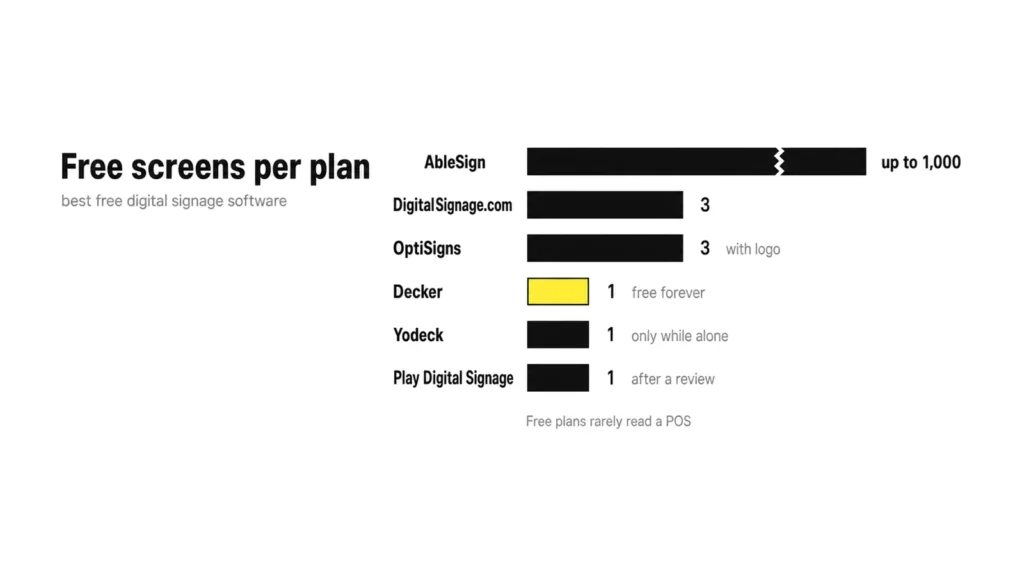
The best free digital signage software splits into three kinds: free plans that cap screens, open source that costs $0 plus your own server, and trials that end. Each kind charges in a different currency: logos, admin hours or a deadline.
Best Free Digital Signage App and Plan Options
| Free plan | Screens | Catch |
|---|---|---|
| AbleSign | 1 to 1,000 | Paid storage only; no Tizen, Windows or Pi |
| DigitalSignage.com | 3 | From 4 screens, every screen bills at $3 |
| OptiSigns | 3 | OptiSigns logo, 1 GB, OptiSigns devices, Windows, Linux or Pi only |
| Decker Starter | 1 | No POS sync until Professional |
| Yodeck | 1 | Free only while it stays the only screen |
| Play Digital Signage | 1 | Free after 30 days only for a review |
| Appspace | 1 device | 2 premium users; prices for paid plans not published |
| Atmosphere TV | Free channels | Ad-supported TV, no menu, no POS |
The best free digital signage app covers a lobby loop or a single specials board. Even the best free digital signage software rarely reads a POS, so a menu that changes with stock still needs a paid tier.
📋 «Free forever» on one screen does not hold at two. Yodeck’s free screen stays free only while it is the account’s only screen; the second screen bills both, so price the second screen before you plan the first.
Open Source Digital Signage Software
Open source digital signage swaps a monthly fee for your own hardware and hours. Xibo’s CMS runs free under AGPLv3, and Anthias, the open source edition behind Screenly, runs free on a Raspberry Pi or an x86 box. You still pay for a server, players and the person who patches them. The best free open source digital signage tools suit an IT team with Linux skills and a closed network, not a café owner.
Free Digital Display Software for Smart TVs and Downloads
The best free digital signage software for a smart TV comes two ways: download an app from the TV’s store, or open a web page in its browser. AbleSign ships apps for Android, Fire TV and LG webOS Signage. Decker skips the download: the board opens in the TV’s built-in browser, and Starter keeps that screen free. A Fire Stick, a cast dongle and other cheap paths sit in the guide on how to turn a TV into a menu screen.
Paid Plans With a Free Trial
| Platform | Trial | Card |
|---|---|---|
| Decker | 14 days, up to 5 screens, every feature | No |
| Yodeck | 30 days, up to 5 screens | No |
| NoviSign | 30 days, 80 MB | No |
| OptiSigns | 14 days, 2 screens | Not stated |
| ScreenCloud | 14 days | No |
| Rise Vision | 14 days + 30-day money-back | No |
| Xibo Cloud | 14 days, 2 players | No |
| Juuno | 7 days | No |
| Displai | Demo request only | — |
A free trial of the best digital signage software works best with a real menu on a real TV, not a demo template. In other words, test each top digital signage system on the screen the menu will live on.
How to Choose a Top Digital Signage System: Cloud, Smart TV or Media Player
A top digital signage system pairs cloud software with one of three playback paths: the TV’s own browser or app, a media player, or a local server. The software changes little between them, while the hardware bill and the outage plan change a lot.
| Setup | How it plays | Cost on top of the plan | Weak spot | Fits |
|---|---|---|---|---|
| Cloud software + smart TV | Browser or app on Tizen, webOS, Android TV or Fire TV | $0 | Consumer TVs sleep, update and switch inputs on their own | 1–10 screens, counters, cafés |
| Cloud software + media player | One box per screen: Raspberry Pi, BrightSign, a vendor player | From about $35 a screen | One more device to power and replace | Weak internet, video walls |
| Local server (self-hosted) | Your own CMS server, players on the LAN | Server and admin hours | Updates, backups and security fall on you | IT teams, closed networks |
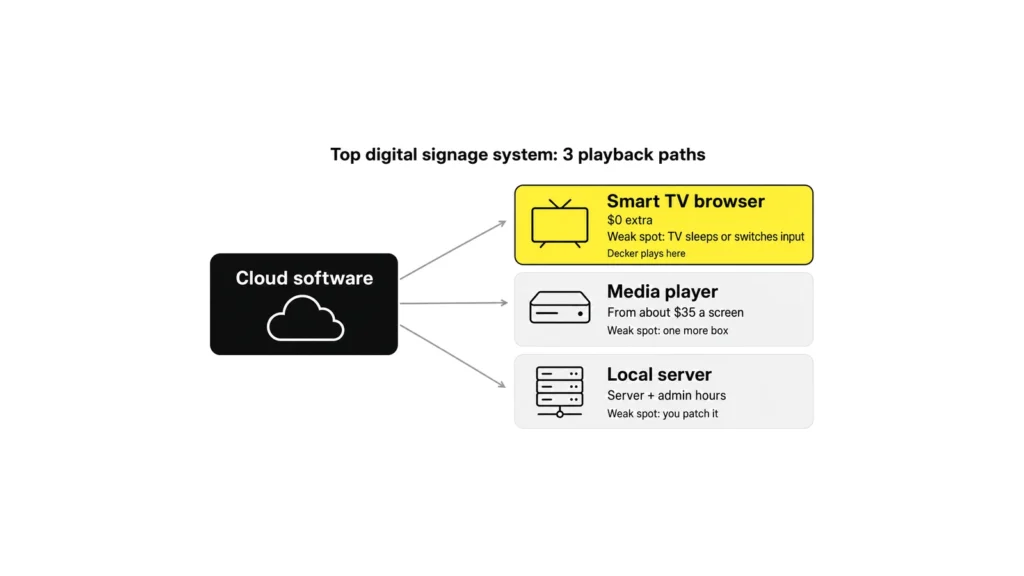
Decker runs in the built-in web browser of a smart TV, or any other browser, so the first screen needs no device at all. The browser keeps showing the last menu from its cache through short outages. A Decker Player or the Android TV app goes in only where the internet drops every day, and Decker ships the player by arrangement.
Cloud digital signage systems win for most restaurants because one login reaches every location. Smart digital signage systems add rules on top: daypart schedules, a sold-out item that hides itself, a promo that starts at 3 p.m. Top digital signage systems for enterprises add SSO and audit logs, which Decker puts on Premium.
The best digital signage system for one café and for 40 stores often shares the same software but not the same hardware. A self-hosted stack makes sense only with an IT team that already runs servers. Therefore, the next question after the playback path concerns the grocery aisle.
Best Digital Signage System for Supermarkets and Grocery Stores
A grocery store runs more screens per site than a café: deli, bakery, produce, checkout lanes and the entrance. The best digital signage system for supermarkets reads prices from the store system, schedules by department and shows which screens went dark. A shelf price and a screen price that disagree cost money at the register. Decker manages locations on Professional at $12 per screen and adds audit logs and a franchise module on Premium at $16. Meanwhile, the deli board and the checkout promo share one schedule.
Top Digital Display Software: What Keeps the Screen Running
Top digital display software keeps three things working without staff help: playback through outages, live data on the screen and proof that each panel shows content. A list of the best digital signage software that ignores those three ranks marketing pages, not uptime.
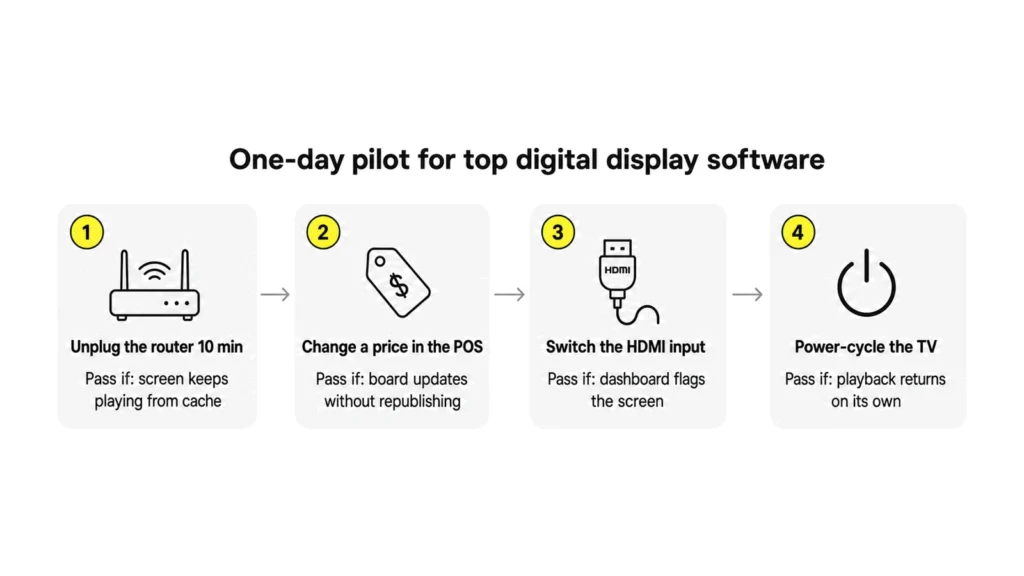
The best digital display software and the most reliable digital display software pass the same one-day pilot on a real TV:
- Map each screen to its location in the dashboard, then unplug the router for ten minutes. The screen should keep playing from cache.
- Change a price in the POS. The board should update without a republish.
- Switch the TV to another HDMI input. The dashboard should flag the screen.
- Power-cycle the TV. Playback should come back without a remote in hand.
Decker Verifier reads the panel itself: a compact device next to the screen, $7 per screen a month on any paid plan, catches a black screen, a frozen image or a stale price. Most cloud tools only report that the player app stays online, which says nothing about the TV.
The best dynamic digital display software also needs a data source: a POS, a Google Sheet or an API. Decker connects Toast, Square and Clover directly on Professional, and an 86’d item leaves the board while the layout closes the gap. The setup per register sits on the page about menus that follow Toast, Square and Clover.
⚠️ «Works offline» is not the same as «updates offline». Cached content keeps playing on Decker, Yodeck, Xibo and Rise Vision, but a new price reaches the screen only after the network returns, and ScreenCloud skips live streams until then.
In other words, the best digital signage display software earns its fee in the hours nobody watches the screen.
Best Digital Signage Companies and Providers
The best digital signage companies fall into three groups: software vendors, hardware makers and integrators that install both. For the best digital signage on a menu wall, a restaurant usually needs only the first group, because a smart TV already covers the hardware.
| Type | What they sell | Example names | Ask before signing |
|---|---|---|---|
| Software vendors (SaaS) | Cloud CMS per screen per month | Decker, Yodeck, OptiSigns, ScreenCloud, NoviSign | Monthly or annual only? Which POS? Can you export content after you cancel? |
| Hardware makers | Players and commercial displays, often with their own CMS | BrightSign, Samsung VXT, Amazon Signage | Which software runs on the device, and what does the warranty require? |
| Integrators | Design, mounting, cabling, support contracts | Mvix, CrownTV, local AV firms | Who owns the account and the content when the contract ends? |
The best digital signage company for a chain with 200 sites rarely matches the best one for a single taco shop. Top digital signage companies for enterprise rollouts sell SSO, audit logs and an SLA with response times; Decker’s Enterprise plan adds a one-hour SLA and phone support, and networks above 50 screens get volume pricing. A café needs the best digital signage for one counter: a price it can read without a sales call. As a result, the provider question often answers itself once screen count and POS are known.
Best Digital Signage for Small Business
The best digital signage for small business costs $8–$12 a screen, runs on a TV you already own and takes less than a day to set up. A sales call, a prepaid year or a $169 box per screen misses that bar.
For a café, bar or food truck, easy digital signage software looks like this: menu templates, a breakfast-to-lunch schedule and a phone that changes a price. Decker’s bill for one, three and five screens:
| Screens | Essential, $8 | Professional, $12, POS sync | Professional, yearly (−15%) |
|---|---|---|---|
| 1 | $8 a month | $12 a month | $122 a year |
| 3 | $24 a month | $36 a month | $367 a year |
| 5 | $40 a month | $60 a month | $612 a year |
For the best digital signage for small business on a single board, Decker Starter costs nothing. The best digital signage solution for a small team keeps the bill flat as items change, which rules out per-change design fees. Cheap digital signage software at $0–$3 a screen fits a lobby loop, not a menu that follows stock. For a full cost picture with TVs and mounts, see what digital signage costs in year one. Next, review scores show how owners rate these tools after months of use.
Best Digital Signage Software Reviews: How Users Rate the Top Platforms
Best digital signage software reviews on G2 and Capterra rate all ten platforms between 3.5 and 5.0, so the review count tells more than the score. A 5.0 from 2 reviews carries less weight than a 4.7 from 3,000.
| Platform | G2 | Capterra |
|---|---|---|
| Yodeck | 4.7 (3,279) | 4.8 (4,934) |
| OptiSigns | 4.7 (3,800+) | 4.8 (4,593) |
| Rise Vision | 4.7 (1,003) | 4.7 (303) |
| ScreenCloud | 4.7 (455) | 4.8 (289) |
| Displai | 4.7 (397) | 4.7 (318, Software Advice) |
| Play Digital Signage | 4.7 (287) | 4.8 (954) |
| NoviSign | 5.0 (47) | 4.9 (121) |
| Xibo | 3.5 (5) | 4.6 (239) |
| AbleSign | — | 5.0 (2) |
Among the best digital signage software in this list, Yodeck and OptiSigns hold the most reviews by far. Three complaints repeat across the best digital signage software reviews: screens that drop offline without an alert, support that slows down after the sale, and renewal terms that change. Before picking the best digital signage, read reviews from the last 12 months, filter by company size and look for your POS by name. Beyond scores, the list of names on the market runs far longer than ten.
Every Other Brand Beyond the Top 10
G2 lists 560+ digital signage products and Capterra 430+, so the ten best digital signage software picks above cover the names a restaurant meets first, not the whole market. The rest, grouped by type:
- Cloud software (SaaS): Juuno, Samsung VXT, Appspace, L Squared Hub, Pickcel, Spectrio, Nento Signage, TelemetryOS, OnSite, XOGO Decision Signage, SmartSign2go, Look Digital Signage, Carousel, Fugo, Kitcast, Wallboard, Signagelive, DotSignage, AiScreen, EasySignage, Cenareo, truDigital, Zeetaminds.
- Large networks and advertising: Navori, Broadsign, Poppulo (formerly Four Winds Interactive), Scala, Korbyt, Visix.
- Software sold with hardware: BrightSign (BSN.cloud), Amazon Signage, Mvix, CrownTV.
- Bar and restaurant TV: Atmosphere TV, UPshow (now EverPass), Rockbot, Display NOW, REACH Media Network.
- Free and open source: DigitalSignage.com, Screenly and its open source Anthias, piSignage, PosterMyWall for designs.
- Built into other products: Zoom Workplace and Zoom Rooms, Hexnode device management.
Juuno costs $5 a screen with a 7-day trial, and Display NOW $4.99 on a yearly plan. Similarly, BrightSign bundles its BSN.cloud Control at no charge with each player.
When a Free Plan Beats a Paid One
Even the best digital signage software earns its fee only when content changes or screens multiply. Skip it in these cases:
- One screen with a menu that changes less than once a month: a free plan or a USB stick covers it.
- No internet at the site and no plan to add it: cloud tools need a sync to receive changes, so a standalone player fits better.
- One promo video that loops all day with no schedule: the TV’s own USB playback costs $0.
- Fewer than three screens at one location with no POS link: a free tier from the list above lasts for months.
As a result, once a second location opens or the menu starts following the register, the math flips toward a paid plan.
Questions and Answers
1 What is the best digital signage software?
Decker fits a restaurant whose menu follows Toast, Square or Clover: $12 a screen on Professional, playing in the TV’s browser. AbleSign fits a free fleet of any size, Xibo a self-hosted network and Rise Vision a school. The best digital signage software depends on screen count, register and internet at the site, so compare those three first.
2 How many digital signage brands are there, and how do you choose the best digital signage software?
About 500: G2 lists 560+ digital signage products and Capterra 430+. The best digital signage software reads prices from your POS. It keeps playing from cache when the Wi-Fi drops. It proves that each screen shows content, through a dashboard alert or a proof-of-play report.
3 What is the best free digital signage software?
The best free digital signage software is AbleSign: it charges nothing per screen from 1 to 1,000 and plays on Android, Fire TV, BrightSign and LG webOS Signage. For one menu screen, Decker Starter stays free with no time limit, and Xibo’s CMS runs free on your own server. None of these reads a POS on the free tier.
4 What is the best digital signage app?
For smart TVs, the best digital signage app needs no download at all: Decker opens in the built-in browser of Tizen, webOS or Android TV. For the widest app list, OptiSigns covers 15+ platforms, including Apple TV and Roku. For free apps on Fire TV and Android, AbleSign leads.
5 Is there open source digital signage software?
Yes. Among the best digital signage software, Xibo’s CMS runs free under AGPLv3, with a free Windows player and paid licenses for Android, webOS and Tizen. Anthias, Screenly’s open source edition, runs free on Raspberry Pi. Both need your own server or device and someone to maintain them.
6 Where can I get a free digital signage software download?
Yes. AbleSign’s apps download free from the Android, Fire TV and LG stores, Xibo’s Windows player downloads free, and Play keeps one screen free after a review. Decker needs no download: the board opens in the TV’s browser on the free Starter plan.
7 What is the most reliable digital display software?
The best digital display software passes a power cut, a router reboot and a wrong HDMI input on your own TV. Decker, Yodeck, Xibo and Rise Vision keep cached content playing offline; Decker Verifier also catches a dark panel or a stale price that an online-status dot misses.
8 Which top digital signage system fits a restaurant?
A cloud system that reads the POS and plays on the TV already on the wall. Decker connects Toast, Square and Clover on Professional at $12 a screen; Displai reads Toast, Square, PAR and NCR Aloha but sells by quote with a $169 device per screen. Neither Yodeck nor ScreenCloud reads a register.
9 What are the top digital signage companies?
By reviews, Yodeck and OptiSigns lead with more than 3,000 on G2 each, followed by Rise Vision, ScreenCloud, Displai and Play. Among hardware makers, BrightSign and Samsung VXT sell software tied to their own players and displays. Therefore, a restaurant should shortlist the best digital signage companies by POS link first and by size second.
Sources
- G2 digital signage category
- Capterra digital signage category
- Software Advice: Displai
- Displai pricing on G2
- invidis: NoviSign connects Toast POS data with digital menu boards
- Official websites of the brands reviewed in this article: plans, prices per screen, free plans, trials, supported devices and POS integrations.